Cursor pro tip
Take a screenshot of any UI → describe it using Claude → convert to code using Cursor
From image to working component in under a minute ⚡
Build from visuals, not just prompts 🔥
@MrAhmadAwais Already subscribed yesterday to go plan , will share feedback shortly .
It will be good to have agent teams in command code to run parallel agents as i am building a complex app with lot of features
Introducing Kombai 2.0 - the first AI design engineer.
We keep hearing that AGI is almost here. Still, we’re stuck with coding agents that don’t have taste and design tools that don’t understand our codebase. Both are artifacts of a world where design and engineering were two different jobs, with a handoff in between.
That world is changing fast. Today, designers ship code, engineers want to escape handoffs, and everyone wants to build tasteful UX.
Kombai is built for this new world.
Design and engineering, finally on the same side.
if you're trying to build an MVP in a week and keep hitting walls, this is the guide i wish i had.
most people jump straight into code. that's the first mistake.
before writing a single line, you need these sorted:
> a design system for your app
> your tech stack locked in
> a prd with clear mvp features
> coding standards from day one (this makes going production-grade way easier later)
once that's done, dump your entire context into something like Lovable or v0. what do i mean by context? your prd, rough wireframes, list of key features, any inspiration screenshots. this gives you a working visual in hours, not days.
then do competitor research properly. i use OpenCode + Playwright MCP to actually navigate competitor products, use them like a real user, and save screenshots into a research-assets folder. this solves two things at once: UI/UX clarity now, and a reference for features you'll add later.
download the ui code from Lovable/v0, pass it into Claude Code, and ask it to break the app down into implementable tickets. after each ticket, use Playwright MCP to test the feature. any errors go straight back to the agent.
one thing most people skip: make your coding agent keep an architectural decisions.md file through the entire session. every time it picks approach A over B, it writes down why. sounds simple. saves hours of confusion later.
on tool choice. using one coding agent for everything is not the move if you want both speed and quality.
you don't need to become a Cursor pro or Claude Code pro. you just need the right mindset to pick and combine tools that get the job done.
here's what your toolkit needs to cover:
> research agent
> technical planning agent
> something to manage parallel agents
> design agent
> testing agent
> shared memory across all your agents
and if you want to use these tools at their actual potential, get familiar with these terms:
> MCP (model context protocol) — how agents connect to external tools and data
> context window — how much your agent can "see" at once, and why it matters for long sessions
> agent skills / custom instructions — reusable behavior you define so agents don't start from scratch every time
> subagents — agents that run under a parent agent, each handling one focused task
> slash commands — shortcuts to trigger specific agent behaviors mid-session
> tool calling — how your agent actually executes actions (browse, run code, read files)
> orchestration — coordinating multiple agents to run in parallel without stepping on each other
context is what drives all of this. the teams that move fast aren't the ones with the best developers. they're the ones who spent 2 days setting up the right context before writing code.
Ways to vibe code beautiful landing pages
> Design mode in kombai
> Using something like taste skill
> getting a DESIGN.md from https://t.co/LFhRGcDBYn + get some assets generated using https://t.co/MIYSOVNcm6 and give everything to claude code/codex
One reason AI sucks at design is because you're bad at telling it what you want
Experienced designers have a thousand shorthands for expressing design in words:
- "set the text tighter/looser", "bump the leading"
- "tighten it up", "let it breathe", "fix the hierarchy"
- "anchor", "rhythm", "negative space"
Feels like a skill waiting to be written here
true but do not limit yourself to claude. There are so many agents in market for specific things . Try out every niche tool and get the best out of each.
Ex . Claude can't design beautiful ui you either something like taste skill or some other skills or instead you can go can try design agents and bring that design to claude .
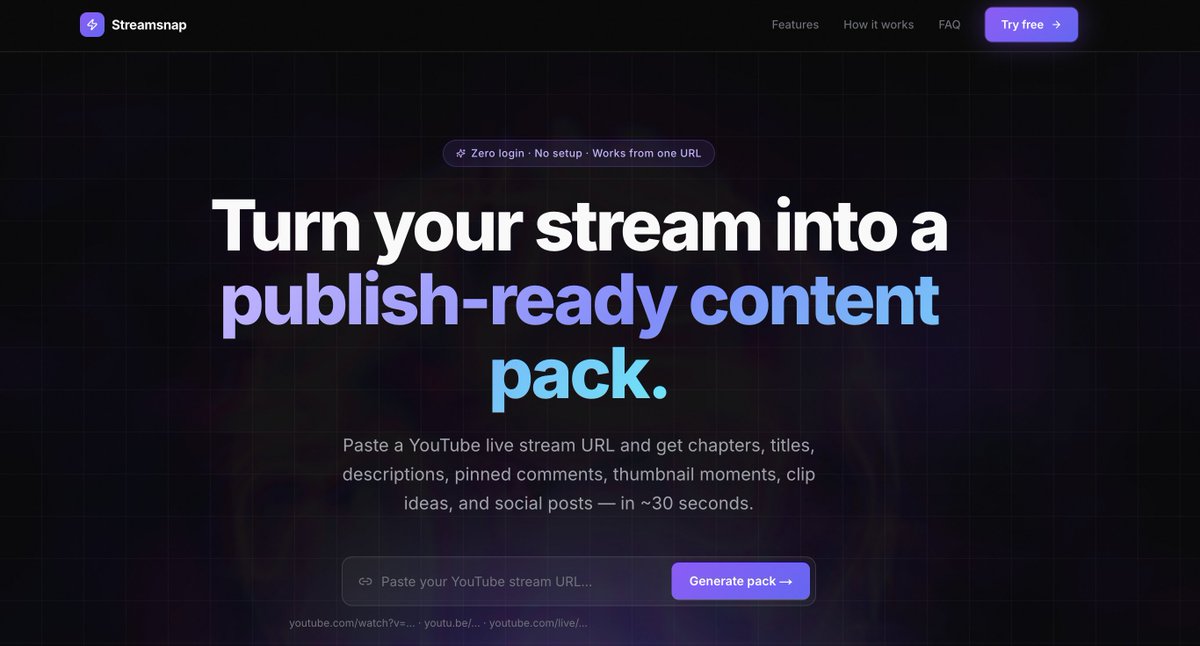
built a tool for youtube live streamers in 7 days
after every stream ends, streamers spend 45 mins manually writing chapters, description, title, pinned comment, social posts
paste one URL, get all of it in 30 seconds
no login. no setup.
built using Codex, Claude Code, Traycer AI, and Kombai
@outskillHQ @OpenAI
#Outskill #OpenAI #Codex #AIBuildersHackathon
got approached last week for a Frontend Engineer role at a Series A AI startup hiring remotely from India
what stood out: they weren't just asking for React and TypeScript
they specifically wanted someone who uses Claude Code and Cursor daily and can actually show it
not "familiar with AI tools"
daily workflow. proof. output.
this is where hiring is going:
companies don't want devs who tried Cursor once
they want engineers where AI is the default, not the exception
what my last 2 years looked like:
> built full product MVPs solo using Claude Code + Cursor
> shipped chrome extensions in a day to solve my own problems
> created content teaching AI coding workflows for AI companies
the gap between devs using these tools daily and devs not using them is widening fast
if you're still treating AI coding tools as optional, you're already behind
portfolio in replies.
also open to frontend and full stack roles at AI companies.