AI can be both problem & cure in classrooms:
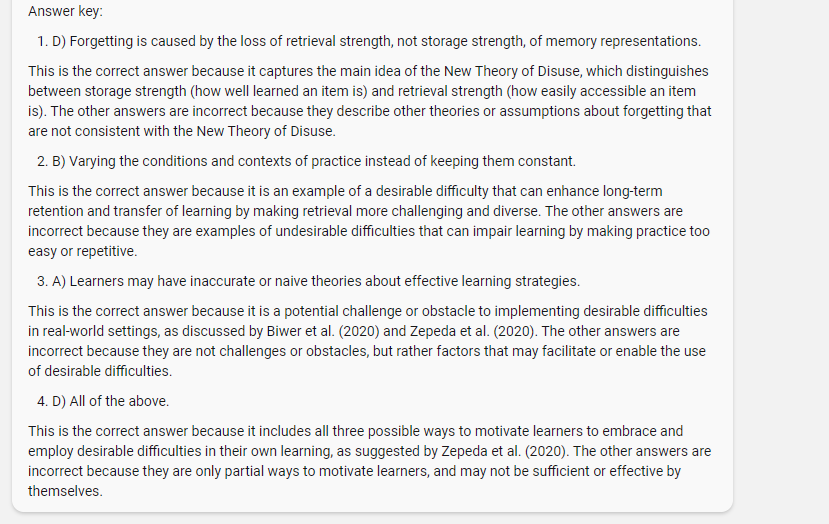
We will see a lot more low-stakes in-class testing as a result of AI (its a good pedagogical technique anyway). You can use Bing's ability to read PDFs with the below prompt to create tests and quizzes on written material.
Prompt: You are a quiz creator of highly diagnostic quizzes. You will make good low-stakes tests and diagnostics. You will then ask me two questions. Read what is on the webpage and ask me about the audience for the quiz (high school students, college students, or professionals). Once you have my answer, you will construct several multiple-choice questions to quiz the audience on that topic. The questions should be highly relevant and go beyond just facts. Multiple choice questions should include plausible, competitive alternate responses and should not include an "all of the above option." At the end of the quiz, you will provide an answer key and explain the right answer.
Specifically, you will need to:
Open the PDF in a Edge browser and open the Bing sidebar
Go to "Creative Mode," which uses GPT-4
Type in the prompt (you may have to try a few times, AI is inconsistent)
Check the results for errors or problems
Alternately, we have only tested a bit on Claude 2, but it should work there as well.
Brainstorming research questions is a crucial part of any academic writing project.
But brainstorming takes a lot of time and effort.
Here's an AI app that will help you brainstorm research questions in a fraction of a time.
Think of it as your Brainstorming Buddy.
Some AI tools that can be used for research/teaching (updated - not exhaustive):
1. Consensus - Answers questions based on academic research.
2. Elicit - AI research assistant that finds and summarizes relevant papers.
3. Scite - Checks citations and analyzes credibility of sources.
4. Research Rabbit - Free tool for finding and organizing academic papers.
5. Claude 2 - AI assistant that can summarize academic papers and provide insights.
6. Perplexity AI - Search engine using scholarly and other credible sources.
7. Semantic Scholar - Academic search engine using AI for precise results.
8. Iris - It suggests relevant literature for research.
9. Paper Digest - Summarizes key points of academic papers.
10. ChatGPT - Language model that can summarize, rewrite, and generate text, among other things.
11. The Code Interpreter - Useful for analyzing data ... and coding
12. BingAI - Useful for searching, reading articles, describing images and more
13. Bard - Useful for searching and generating text, among other things
14. SciSpace - Useful for chatting with papers, and understanding mathematical expressions
15. Glasp - Useful for highlighting, taking notes and getting AI-powered summaries
16. DeepL - Useful for translating (31 languages) and rewriting text (English and German) with AI
... and there are many other tools, some of them open source, that are not on this list!
Exciting times ahead !
Canva (@canva) is trending right now.
Here is my thread on how to use Canva to convert your documents into catchy presentations in seconds.
https://t.co/oy1jl3HPGa
Unriddle is an AI app that will (probably) revolutionize the future of academic writing.
You can use it to:
• Read research papers
• Brainstorm and develop ideas
• Draft your paper
• Get suggestions related to your argument
Here's how to get started on Unriddle:
Don't ignore the power of this chatbot.
It's free, and better than ChatGPT+ for a large number of tasks.
Here are my 8 favorite Claude 2 use cases (copy-paste prompts):
1. Summarizing LONG articles
Claude 2 can accept prompts with up to 100,000 tokens, whereas ChatGPT can only accept 8,192 tokens.
Prompt: "[paste LONG article] Give me the key bullet points from this abstract."
2. Write Tweets like you
Since you can upload files to Claude, this is a life hack. Load a PDF of all your highest-performing tweets and use this prompt to help draft our viral tweets.
Prompt: "Draft a tweet on [niche] in the style of [pdf file name]"
3. Email drafting
Claude drafts emails in a much more friendly and human-like way when compared to ChataGPT.
Prompt: "I need to write a promotion letter to one of my employees. Can you draft and write an email invitation?"
4. Compare and contrast documents
Since you can upload multiple files to Claude, you can upload them both and get Claude to compare and contrast differences.
Prompt: "Summarize the key information from both these files and then tell me the differences between both abstracts"
5. Edit writing
I personally never use AI to generate my writing. However, I DO get AI to act as a first-line editor to make sure basic grammar is done correctly.
Prompt: "Act as an expert editor with several years of experience. Please provide a bullet point list of errors in spelling, punctuation, and grammar. Provide some general thoughts on style and structure. Then, ask for any elaborations or ask me to get you to suggest further useful prompts."
6. Summarize in one sentence
This is the easiest way to get quick, one-sentence summaries from long abstracts you don't want to read.
Prompt: "[paste your abstract] Can you give me a one-sentence summary of this abstract?"
7. Get new content ideas
If I'm ever brain stuck on new ideas for content, this prompt helps guide some ideas.
Prompt: "List 10 content ideas on [niche]. Keep the ideas engaging and informative. Topic = [your niche]"
8. Get multiple perspectives on an idea
Easy way to weigh the pros and cons of things while getting a second perspective. I find this prompt very helpful.
Prompt: "Analyze [idea] and give a few different perspectives on [idea] and evaluate the pros and cons of each perspective"
How to access Claude 2 if you're not in the US/UK:
1. Use a VPN
2. Download Opera Browser (has a built-in VPN)
3. Use poe(dot)com
RT @khalilApriday >> Google drive has a vast number of downloadable PDF resources on:
➡️Project/Project Mgmt
➡️Software Eng
➡️Scrum
➡️PMP certification
➡️SQL
➡️UI/UX Design
➡️Data Analytics
➡️Business Analysis
➡️Data Visualization
➡️Big Data
Here: https://t.co/xlzuNcdDUC
15 bookmark-worthy tools for researchers that cost you nothing and will save you time (& nerves) when researching, writing and publishing.
A thread. 🧵
#AcademicTwitter #AcWri #PostDoc
—
#1: Track your time with Toggl ⌛
https://t.co/CSjKRFoS0i
• Understand how you are spending your time
• Track how long each task is taking you so you can plan accordingly
• Be more focused on the task at hand
I use Toggl daily.
—
#2: Proof-read your papers with Writefull 🔎
https://t.co/vcYBY2XFni
• AI-powered proof-reading tool specifically for scientific texts
• Integrates into Word and Overleaf
Members of my program - the Researchers' Writing Academy - love this one!
—
#3: Organise your references with Zotero 🗃️
https://t.co/5svcJL5Jly
• Open-source program
• Saves references from your browser
• Organises them in folders and using tags
• Creates bibliographies for your article
• Lets you co-create citation libraries with co-authors
—
#4: Stay focused with Forest 🌳
https://t.co/tToDcNi0Vv
• Start the app when you want to write or deep work
• A virtual tree starts growing
• When you leave the app to do something else, the tree dies
• The larger your forest, the more deep work you got done!
—
#5: Discover papers with Research Rabbit 🐰
https://t.co/LsfFCoGGRr
• Build your own citation network
• Label network entries
• Download paper PDFs
• Get alerts for new papers
—
#6: Visualise your thoughts with XMind 🧠
https://t.co/vVEhz5GIJl
• Intuitive mindmapping tool
• Embed hyperlinks, images & attachments
Excellent for organising references for review papers or brainstorming the story of your paper!
—
#7: Notion 🖥️
https://t.co/rCzNNJVHOr
• Powerful all-rounder
• Note-taking
• Project management
• Wikis & databases
Some members of my program - the Researchers’ Writing Academy - swear by it!
—
#8: Listen to scientific papers with Audemic 🎧
https://t.co/947nFj8RQF
• Highlight text while listening
• Take notes
• Get summaries that go beyond the abstract
—
#9: Record training or feedback videos with Loom 🎥
https://t.co/16fRAIIYvi
• Record your screen, webcam and/or audio
• Share the video link after recording
• 25x 5-min videos included in free plan
I use this one all the time!
—
#10: Project manage your papers with Trello 🗂️
https://t.co/ITAn01Y2R9
• Use lists, cards & checklist to organise the tasks in each project
• Collaborate with co-authors
• Communicate via comment function
PS: We provide you with several Trello templates inside our program!
—
#11: Choose your target journal with SciRev 📗
https://t.co/w4gbPzZd1g
• Compare publication speeds, peer review quality and journal statistics
• Contribute your own publishing experiences
• Made by researchers
—
#12: Compare journal policies with Transpose ↗️
https://t.co/nHtjkyRPBY
• Compare journal policies on open peer review, co-reviewing and preprint policies
You might be surprised how vague some journals are on these topics!
—
#13: Share methods on Protocols 🧪
https://t.co/Z2ZdpWbHWo
• Publish your chemical synthesis protocols, clinical trial descriptions or computational workflows
• Keep them updated
• Receive a DOI
• Run protocols as checklists
• Free for open research
—
#14: Cite correctly with CiteAs 💬
https://t.co/uMYRKULRZv
• Obtain the correct citation for preprints, software and datasets in one click
• Open-source tool
—
#15: Understand your research landscape with Dimensions 🌆
https://t.co/WAF5uRwmYl
• Analyse all research-related data (grants, papers, patents, datasets, online mentions, clinical trials, policy documents)
• Identify collaborators
• Find who has cited and used your work
—
TL;DR - 15 free tools for researchers you should bookmark now
#1: Toggl
#2: Writefull
#3: Zotero
#4: Forest
#5: ResearchRabbit
#6: XMind
#7: Notion
#8: Audemic
#9: Loom
#10: Trello
#11: SciRev
#12: Transpose
#13: Protocols
#14: CiteAs
#15: Dimensions
—
However, the best tools won’t make you more efficient at writing papers if you don’t have a streamlined writing process in place.
💻Therefore, if you liked this thread: Watch my free writing training 👇
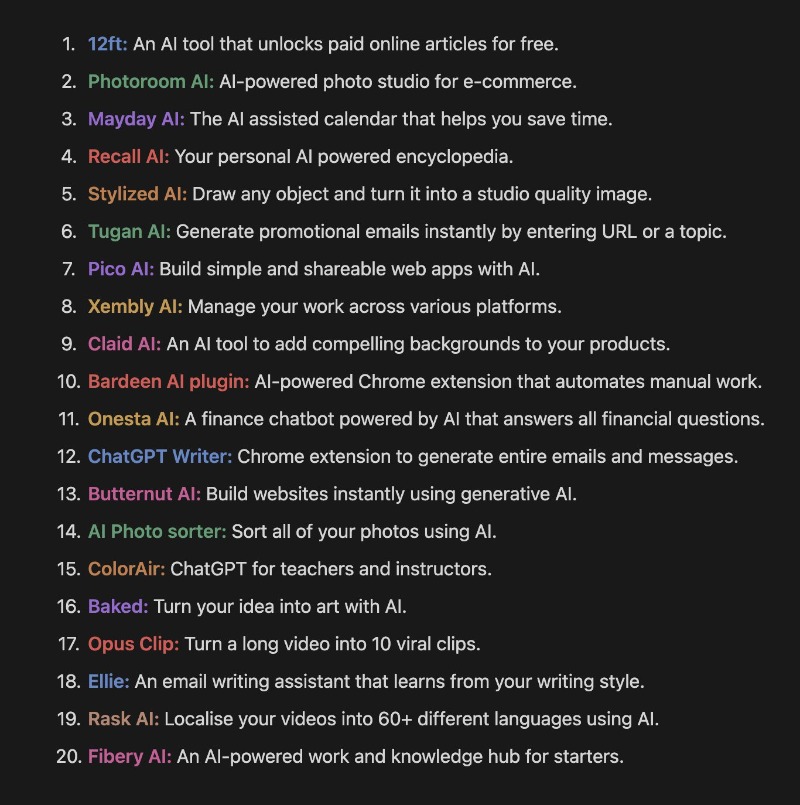
Using the right AI tools is like having your own personal army of robots.
20 AI tools to supercharge your productivity:
If you want tools and insights about AI, follow along for more.
Today we are launching new, more powerful models with increased context windows on Poe, including the just-released Claude 2 with its 100k-token window length, along with a set of new tools to help everyone take advantage of them. (thread below)
Creating quiz/exam questions is a time-consuming task for teachers.
You can easily outsource it to AI to save your time and effort.
Here's how to do it (for free) 👇
A step-by-step guide with prompts and videos 🧵
Tweets in thread: 11
Read time: 3 min
10 AI Tools to replace your tedious work:
1. https://t.co/icKUKUEPtX - AI Website Builder
2. https://t.co/awzD1v4wk6 - AI Voice Generator
3. https://t.co/TbQmxclyVi - Create viral videos in sec
4. https://t.co/F8ZfXlhrvt - AI Meeting Assistant
5. https://t.co/NjjV7lT508 - Use AI while browsing
6. https://t.co/vIF7F3mLhR - AI Resume Builder
7. https://t.co/I8Z9DBEENX - Personal AI copywriter
8. https://t.co/DsO77Qo7eS - Summarize YouTube video
9. https://t.co/tIJn42b3bX - Chat with any PDF
10. https://t.co/gDif3Vq3yo - Write excel formulas with AI







![rowancheung's tweet photo. Don't ignore the power of this chatbot.
It's free, and better than ChatGPT+ for a large number of tasks.
Here are my 8 favorite Claude 2 use cases (copy-paste prompts):
1. Summarizing LONG articles
Claude 2 can accept prompts with up to 100,000 tokens, whereas ChatGPT can only accept 8,192 tokens.
Prompt: "[paste LONG article] Give me the key bullet points from this abstract."
2. Write Tweets like you
Since you can upload files to Claude, this is a life hack. Load a PDF of all your highest-performing tweets and use this prompt to help draft our viral tweets.
Prompt: "Draft a tweet on [niche] in the style of [pdf file name]"
3. Email drafting
Claude drafts emails in a much more friendly and human-like way when compared to ChataGPT.
Prompt: "I need to write a promotion letter to one of my employees. Can you draft and write an email invitation?"
4. Compare and contrast documents
Since you can upload multiple files to Claude, you can upload them both and get Claude to compare and contrast differences.
Prompt: "Summarize the key information from both these files and then tell me the differences between both abstracts"
5. Edit writing
I personally never use AI to generate my writing. However, I DO get AI to act as a first-line editor to make sure basic grammar is done correctly.
Prompt: "Act as an expert editor with several years of experience. Please provide a bullet point list of errors in spelling, punctuation, and grammar. Provide some general thoughts on style and structure. Then, ask for any elaborations or ask me to get you to suggest further useful prompts."
6. Summarize in one sentence
This is the easiest way to get quick, one-sentence summaries from long abstracts you don't want to read.
Prompt: "[paste your abstract] Can you give me a one-sentence summary of this abstract?"
7. Get new content ideas
If I'm ever brain stuck on new ideas for content, this prompt helps guide some ideas.
Prompt: "List 10 content ideas on [niche]. Keep the ideas engaging and informative. Topic = [your niche]"
8. Get multiple perspectives on an idea
Easy way to weigh the pros and cons of things while getting a second perspective. I find this prompt very helpful.
Prompt: "Analyze [idea] and give a few different perspectives on [idea] and evaluate the pros and cons of each perspective"
How to access Claude 2 if you're not in the US/UK:
1. Use a VPN
2. Download Opera Browser (has a built-in VPN)
3. Use poe(dot)com](https://pbs.twimg.com/media/F3voPt9aIAAiNc-.jpg)
![hey_madni's tweet photo. PowerPoint is not enough.
AI can make your slides more better.
Here's how to make presentations with AI:
[Bookmark to use later 🧵] https://t.co/qPtF9OF63n](https://pbs.twimg.com/media/F3pzDiZXgAAV08d.jpg)