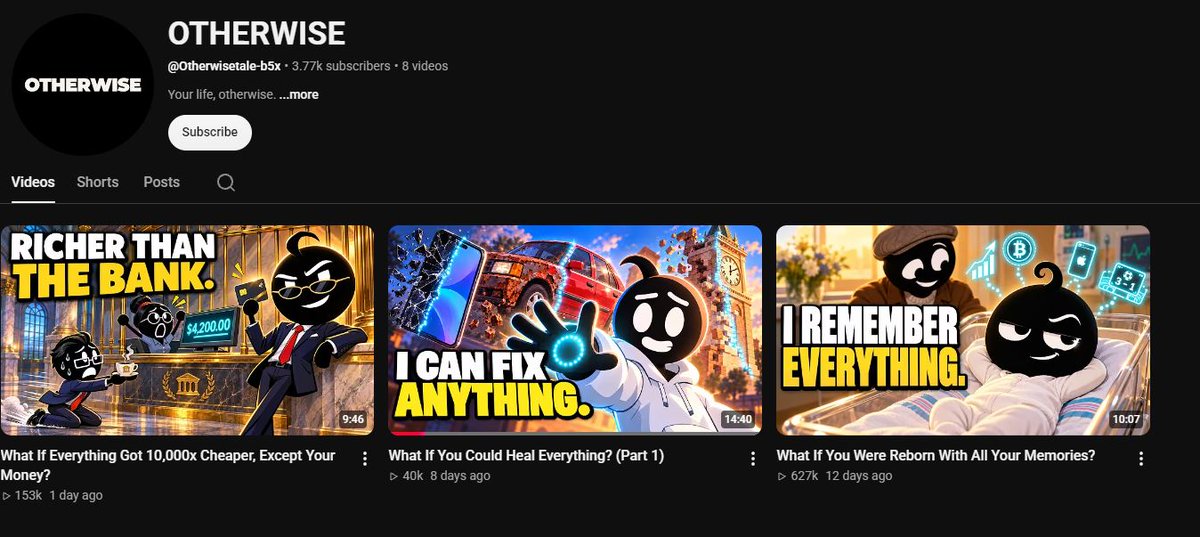
18.5K subscribers. Just 22 videos.
Tail Theory is a great example of how to build a faceless channel around a curiosity-driven niche.
Here’s what’s working:
Niche: Animal psychology, evolution and behavioural science.
Packaging: Simple illustrations with bold, curiosity-driven headlines.
Titles: Questions people didn’t know they wanted answered.
Content: Everyday animal behaviours explained through science and storytelling.
Look at the breakout video:
“Why Every Street Dog on Earth Looks the Same”
830K views.
That’s the real lesson.
You don’t need a completely new niche. You need a fresh angle on something people already find interesting.
Study the audience’s curiosity, package the question properly, and build a documentary around it.
The opportunity isn’t just animal facts. It’s animal science packaged as entertainment.
DM me FRAMEWORK if you want to learn how to find and build niches like this.
Youtubers underestimate how important a thumbnail is.
But both Youtubers and Thumbnail Designers underestimate how important Titles are.
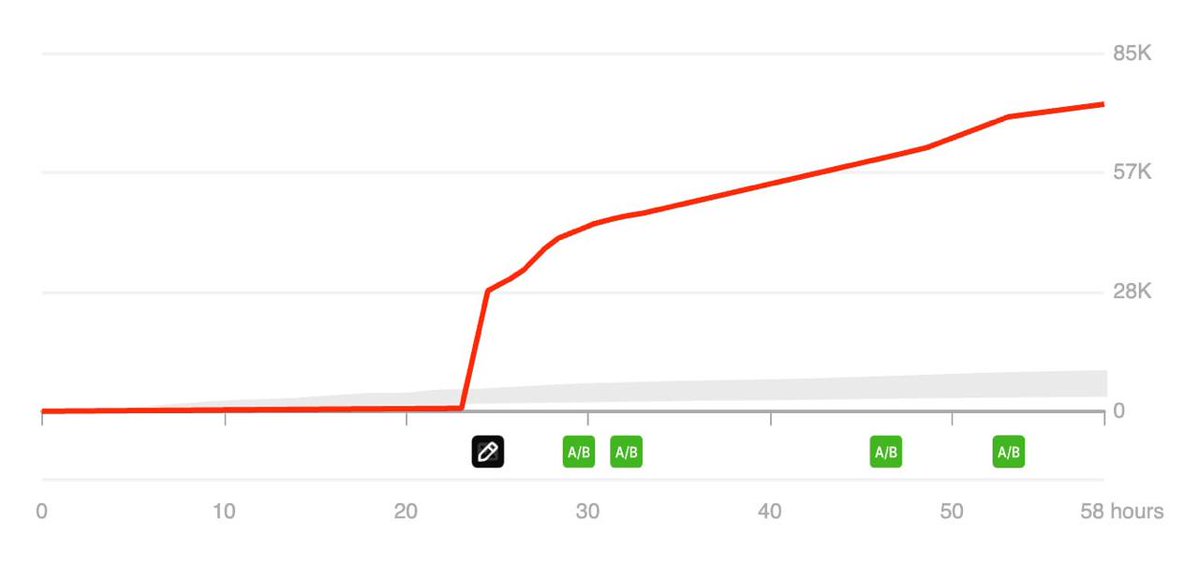
Below, we only changed the Title and the views skyrocketed.
Here are the best formats for every niche (save these):
I'm f**king BEGGING you:
> start an AI avatar channel this week
> pick a niche women search for every single day
> sell her one simple digital product
> post 3 videos a week until Christmas
> start 2027 with money landing from a product you own
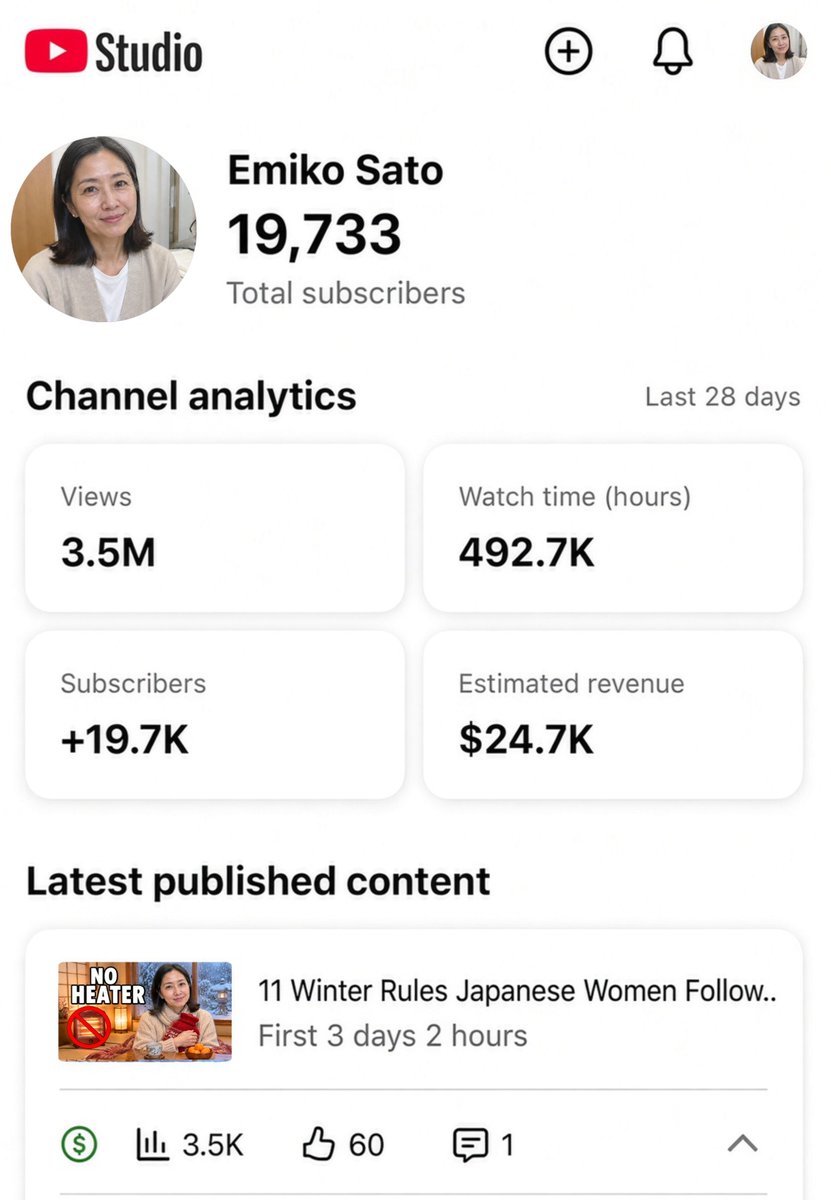
This is the exact pattern behind a channel that got 3.5M views in 28 days ↓
(screenshots below)
HOLY F*CKING GENIUS... some guy LITERALLY figured out you can make "what if" videos feel like long form videos
first video hit 600k views , got his channel monetized.
i reverse engineered it and had claude opus 5.5 recreate the style in pure code. and literally cost me $0 to create it
prompt's below, it's free. thank me later 👇
<inputs>
Ask me for my story idea. It's a "What if you could see ___ above everyone's head" premise plus a ladder of 3-4 people, from a stranger to someone who really matters. Or pitch 3 of them (e.g. times left you'll see someone, minutes left you'll talk to someone, how many more texts you'll send someone). Ask what my @handle is. Ask which voice tool I have: free first (Kokoro or Piper, run locally), or ElevenLabs (about $0.45 for a 2-minute Short). Ask if I have an image or video model, and tell me this method needs neither, because every frame is drawn in code. Then write the script and a shot list with seconds, and show me both before anything costs money.
</inputs>
<direction>
A 1080x1920, 30 fps, 2:00-2:15 vertical Short in the style of the "Times Left" animated story shorts: a quiet, cinematic 2D vector motion comic, drawn entirely on an HTML canvas in code. Not 3D, not AI images. The tone is emotional, not hyper: it should feel like a short film, with one gut-punch in the middle and a hopeful ending.
Characters: one blob-stick rig shared by the whole cast.
- At scale 1: a perfectly round solid-black head, 150 px across, with one curled tuft on top (a 40 px teardrop with a curl, like a sprout). The body is an oversized jacket shape, 130x220 px, with rounded shoulders and thick sleeve-arms (34 px wide) ending in round nub hands, no fingers. Legs are 10 px black lines, 200 px long, with 34x14 oval feet. No outlines on anything. Each jacket has one flat darker shade down one side and a lighter zipper or seam line.
- The face is drawn in WHITE on the black head: eye whites as ovals 26x30 with 10 px black pupils, brows as 6 px white strokes, mouth as a 6 px white stroke. No nose, no ears.
- Draw at scale 1.0 in wide shots, 1.6-2.2 in medium shots, and 3.5-4.5 in close-ups, where the head fills about 60% of the width and the shoulders are cropped by the bottom of the frame.
- One look each. The hero ("you"): an off-white puffer hoodie #e9e6df with a grey zip #b9b5ad and the hood bunched at the neck. The person who matters (best friend or sibling): a navy-blue jacket #2f6bb0 and a red cap #d8413a worn backwards. Side characters get one jacket colour each: a green apron #4c9a6e (barista), a mauve coat #9a5c8c (commuter), a burnt-orange coat #d8662e (the stranger at the end, holding a blue book #4a7fd0).
- Faces carry the feeling. Eyes: normal, wide (shocked), happy arcs, half-closed, narrow (thinking), one-tear (a blue drop #4fa3ff rolling down). Brows: up, worry, angry, flat, one raised. Mouths: smile, grin, o, flat, wavy, frown, open laugh. Blink for 0.1 s about every 2.5 s. Heads tilt 3-6 degrees when someone talks.
The floating number (the whole hook):
- Above EVERY head, about 50 px over the tuft: a glowing cyan dot-matrix LED number, 110 px tall at scale 1, built from round dots on a 5x7 grid. Core #bff6ff, glow #2fc6ff with a 30 px bloom, and a subtle flicker (opacity 0.92-1, about 8 Hz, random).
- When a number changes, it rolls like a slot machine: 0.35 s of vertical motion blur, overshoot, then settle with a small camera shake. Big jumps (3 -> 26 -> 515 -> 27,480 -> 60,000) roll faster each time.
- In close-ups the number can be cropped by the top of the frame, but at least half of it stays visible.
Sets: soft flat vector places with gentle gradients, no outlines, a muted cinematic palette, and depth of field (the background blurred 4-10 px, the foreground sharp). A light film grain (3% noise) and a soft vignette over everything.
- Train interior: pale green-grey #c9d3cf, grab handles, ad strips in red/pink/green, blue seats #33539a.
- Café: warm beige #e8d6b8, a shelf of colourful cups, a wooden counter, a pendant lamp.
- Bar: dark brown #3a2418, a back wall of glowing bottles (amber, green, blue, red), a red leather booth, string lights.
- Night: deep blue #1c2236 for phone moments.
- Airport: cool white-blue #dfe8f0, big windows, a plane outside, navy queue ropes.
- Bus stop: pale sky #b9d0e0, a glass shelter, a red poster ad, beige buildings behind.
Motion: slow and filmic, but never frozen.
- The camera pushes in 4-10% across every shot, with an ease-in-out. A small shake (decaying over 0.3 s) only when a number changes or something lands emotionally.
- Cuts every 2-5 s. Alternate wide shots (the number above everyone), medium two-shots and face close-ups.
- Characters always have life: breathing (scale y 1.0-1.015 over 3 s), blinks, small head turns. Walks are a simple 2-frame leg swing with a 6 px bob.
- Things come in with a soft slide plus a scale from 0.96, never a hard pop. Props (paper, phone) slide up from the bottom with a slight rotation (-3 to 3 degrees).
Overlay UI (screen space, always on top):
- Handle: "@YOURHANDLE", 30 px, white, all caps, letter-spaced, top-left at x 44, y 136.
- Header, 2 lines, centred at x 540: line 1 is the person's label ("EVERY STRANGER", "THE BARISTA", "YOUR BEST FRIEND", "BUS STOP GIRL"), white, at y 262. Line 2 is "TIMES LEFT: X" in yellow #ffc83d at y 366. Both are Montserrat Black at 78 px, all caps, with a 12 px black outline and a soft drop shadow. The header always matches the number of the person in focus, and it ticks at the same moment that number rolls.
- Date pills: small white rounded pills with a black outline, 26 px letter-spaced caps ("FRIDAY NIGHT", "WEEK 7 · SAT", "WEEK 8 · TUE"), centred at y 490. They slide in and fade out after 2 s.
- Props drawn as world objects: a torn-edge paper checklist with empty/ticked checkboxes and a highlighter swipe, a phone with chat bubbles, a phone showing a group photo where one person is a dotted empty outline, a flight-booking app with a yellow BUY button, a red handwritten "= 2 ?".
- End pill: "FULL FILM ON THE CHANNEL" at y 1530 for the last 3 s.
Captions:
- 1-3 words at a time in Montserrat Black, 92 px, centred at y 1255, max 940 px wide, all caps.
- White with a 14 px black outline and a soft shadow, and ONE key word per chunk in yellow #ffc83d (the noun or verb that matters).
- Each chunk pops from 85% to 100% in 0.12 s. Keep full stops, commas and question marks as in the original style ("THAT'S NEW.", "COFFEE?").
- Character dialogue gets the same captions; no speaker labels.
Banned: the @otherwise handle or any real creator's handle, real logos or airline/app brands, AI stills, a frame that holds completely still for more than 1.5 s, world text on the caption line (y 1190-1320), bright saturated "kid" colours, whispered narration.
</direction>
<structure>
Length: 2:00-2:15, 280-330 words. Times below come from a 133 s reference; scale them to the voice.
0-6 s: the HOOK. The narrator states the premise as line 1 ("Every person on this train has a number floating over their head") over the most striking picture: a wide shot where every head shows the same number. Push in slowly.
6-12 s: the rule clicks. A close-up of your face going wide-eyed, then one short reaction line ("Okay. That's new.").
12-19 s: the LIGHT BEAT. A side character with a big number (212). One small exchange, and the number ticks down by one (211). A tiny laugh.
19-30 s: the CORE PERSON enters with a small number (3). One line that shows how much they matter ("your best friend since you were eight").
30-40 s: the COUNTDOWN. They list upcoming plans; a checklist shows the plans, and the count of plans equals the number. You say "Wouldn't miss it."
40-50 s: you SKIP one. A phone text ("Next time, I promise"). The number drops. A line from them that stings ("You say that a lot").
50-62 s: the GUT-PUNCH. The checklist math doesn't add up ("= 2 ?"), then the group photo with you as an empty outline: "The party happened. You just weren't in it."
62-75 s: the GOODBYE. The last event on the list, a hug, one tear, number at 1. One quiet line from them ("Did I do something?") and yours ("No. I did.").
75-97 s: the TURN. "And then you have a very stupid thought": if skipping can take a number away, showing up can add one. You book something, and the number climbs 1 -> 2 -> 3 -> 41 with them cheering, arms up.
97-129 s: the CALLBACK. Back to a stranger you see every day, number 1. "You could keep her on pause forever. Or you could find out what comes after one." You talk. Their line reveals they were waiting too. The number rockets 3 -> 26 -> 515 -> 27,480 -> 60,000 over a short time skip.
129-133 s: the CLOSING LINE, the theme in one sentence, over the final wide shot plus the end pill. It can end mid-thought to drive replays.
</structure>
<build>
1. Tools (free): Python 3, Playwright with Edge or Chromium, FFmpeg, faster-whisper, numpy, Pillow. Install what's missing and tell me what you installed.
2. Script (free):
- Point of view: "you" and "your" for the hero. The narrator is calm and warm, like a friend telling you a story. Dialogue lines are short and real, how people actually talk.
- Every beat is about the number: it appears, it ticks, it drops, it climbs. If a beat doesn't move a number or make you feel something about one, cut it.
- One picture per line, 6-16 words per line.
- The light beat is a breather, the core person carries the story, the stranger is the payoff. The number must drop once (the cost) and climb twice (the fix, then the dream).
3. Voice: record one take per character, with all of that character's lines separated by blank lines.
- ElevenLabs eleven_v4 with stock library voices, never a cloned real creator. Narrator: a calm young man, warm and slightly amused (median pitch 110-150 Hz). Hero: a natural young guy. Best friend: a louder, joking guy. Stranger: a soft, playful young woman.
- Use audio tags sparingly: [softly], [laughing], [sad], [excited]. Cost: about 2,300 credits, about $0.45 for a 2:10 Short.
- Free route: Kokoro or Piper locally. Pick the warmest voices; it will sound flatter.
- Cut the takes into lines with faster-whisper word times (pad 0.06 s before and 0.2 s after). Keep natural pauses inside a line up to 0.35 s; this style breathes. Leave 0.3 s between lines, 0.6-0.9 s before the gut-punch and the turn.
- Match each take's level to the narrator, then lift any line more than 1.5 dB under the narrator's median. Use atempo only up to 1.05.
- Run whisper again on the finished track for word times. Every cut, number tick, caption and sound starts on a real word.
4. Film (free): one HTML page with one canvas, where every frame is a pure function of time: https://t.co/KjSvWkCgNW(t), window.READY, window.END.
- A SHOTS list of [start, end, function]. Each shot sets a camera (centre x, centre y, zoom, keyed over time), draws its world, and may return an overlay drawn in screen space.
- One rig function draws every character from a pose object: x, y, scale, breathe, rotation, arm and leg angles, head tilt, eyes, brows, mouth, look, tear, number value, number roll progress.
- Find hand positions with the same arm maths, so held props (a phone, a coffee cup, a beer, a book) sit in the hand.
- A STATE timeline per person ([time, value]) drives both the floating number and the header, so they can never disagree.
- Montserrat Black (free on Google Fonts) for every word.
5. Check before render: draw 3 contact sheets of 12-16 frames at key times. Fix captions over world text, numbers cut off, the header not matching the number, characters cut off and dead empty space.
6. Render (free): seek every frame in headless Edge or Chromium and encode inside the page with WebCodecs H.264 on the GPU: 30 fps, 40 Mbps, 2 motion-blur subframes over half a frame.
- About 4,000 frames; expect 4-6 minutes.
- Re-encode with libx264 CRF 20, preset slow, for the upload.
7. Sound (free):
- Music: one soft piano or lo-fi bed (Mixkit, free licence). Drop it to silence for the gut-punch line and on "No. I did.", bring it back swelling on the turn, and let it peak on 60,000.
- Effects: Mixkit, placed so each effect's loudest moment lands on its frame. Train rumble and café/bar room tone as low beds, a soft digital tick on every number change, a whoosh on cuts between places, a phone buzz, a paper slide, a pen scribble on "= 2 ?", a plane pass at the airport, a bus pass, a soft chime on the final number.
- Keep the narrator 15+ dB over everything else on every line. Render a voice-only mix and a no-voice mix with the same gains (before loudness normalising), compare RMS per line, and fix any line under 15 dB.
- Starting gains: music bed about 20 dB down, room tones 24 dB down, effects on speech 12 dB down, effects in gaps 5 dB down, every cue capped at -3 dBFS peak.
- Two-pass loudnorm to -14 LUFS, true peak -1.5.
8. Cover (free):
- Study the top 5-10 covers in this niche first.
- A hero close-up (scale 4) with wide shocked eyes, a huge glowing number above the head, a blurred set behind and a 2-line header in the same yellow/white style ("YOUR BEST FRIEND / TIMES LEFT: 3"). Draw it with the same rig.
- Check it at 240 px wide next to the competition. JPG under 2 MB.
9. Upload text:
- Title: "What if you could see how many times you'll see someone again?" (or your premise in the same "What if you could see..." shape), plus 0-1 emoji.
- Description: 2 short lines that tease the gut-punch without giving it away, ending on a question, then 4-5 hashtags (#animation #whatif #shorts #storytime #friendship).
</build>
<gotchas>
- Plain script tags share one global scope, so a top-level const declared in two files is a SyntaxError that blanks the whole page. Give each file's names their own prefix.
- ctx.filter blur and shadowBlur are slow. Pre-render each blurred background layer and each glowing digit (0-9 and the comma) to offscreen canvases once, then draw the cached images.
- Whisper writes "8" for "eight" and "20th" for "twentieth". Match lines by word count, not exact text.
- Whisper's word times drift up to 0.3 s where one character hands over to another. Time those lines from your own assembly list.
- On the first mix the narrator was only 6 dB over the music: the voice had hit the -3 dBFS peak cap and could not go louder. Pull everything else down instead, and measure before you normalise.
- White face features vanish at small scale. In wide shots (scale 1) draw eyes at least 8 px and strokes at least 4 px, or the faces read as blank black dots.
- The number and the header must tick on the same frame. Drive both from the STATE timeline; never hand-key them separately.
- Close-ups crop the floating number. Frame so at least half of it shows, or cut to a medium shot for every tick.
- World text on the caption line (a poster, a sign, the checklist's last row) collides with the captions. Keep it above y 1190 or below y 1320.
- Phones and paper props cover faces. Put props in their own insert shots, not over a two-shot.
- A dark set (bar, night phone) makes black heads disappear. Add a soft rim light (a 3 px lighter edge on one side of the head) and keep heads against lighter areas.
- Reading pixels back every frame (toDataURL) knocks the canvas off the GPU and renders about 50x slower. Encode inside the page instead.
- The 40 Mbps master is about 650 MB for 2:10. Render it to a big drive and upload the CRF 20 copy.
- Calm narration can get sleepy. Keep lines short and land a picture change on every line, even when the voice is slow.
</gotchas>
<start>
Ask me for my story idea, or pitch 3. Then show me the script (word count and seconds per line) and the shot list before any voice is generated.
</start>
I wanted to see how fast a brand new AI avatar channel could grow in a niche I'd never touched.
Niche: Japanese skincare.
Channel: Emiko Sato.
4 weeks later, here are the real numbers ↓
Bookmark this. I'll show you exactly how to replicate it 🧵
@grok How long does it take for a new YouTube channel to get impressions usually? Niche is YouTube monetization. New channel but linked to already existing channel/gmail
STOP being a mindless YTA peasant relying on AdSense to pull miserable $1k months...
All it takes is one email from YouTube saying you're demonetized, and the $1k is gone.
Real mfs are hitting $100k+ months selling these 10 products under their videos:
(Ranked from worst to best place to start. Bookmark this)
10. Decorative posters and prints
A history or space channel's wall art. Fans buy, but nothing gets solved, and printing + shipping eats your margin.
9. Branded merch
Channel logo shirts and mugs. Sells only when fans already love the channel. Views alone never prove people want to wear your logo.
8. Problem-solving physical gear
Resistance bands or grip trainers for a fitness audience. Fans actually use them, but buying stock, quality checks, shipping and returns stack up FAST.
7. Printed educational books
A cooking channel's cookbook, a fitness channel's training book. Useful long after the video ends, with print and fulfillment costs to factor in.
6. Swipe files and reference libraries
A design channel's original layout examples, a creator channel's title pattern library. Saves your viewer hours of research. Keep every asset original or properly licensed.
5. Prompt vaults and reusable AI workflows
An AI channel's tested production prompts. Sell one specific working outcome, NEVER a pile of 5,000 generic prompts.
4. Editable templates
Notion systems, design templates, project planners built around a task your viewer repeats every week. They buy a running start instead of rebuilding from zero.
3. Spreadsheets, calculators and trackers
A home renovation budget calculator, a training log. A repeat-use tool with one clear job, opened every week.
2. Simple niche apps
A focused tool solving one audience problem, like a personalized chess story tool for a chess channel. Build a tiny version first and see if people use it, instead of burning 6 months on software. Then budget for maintenance + support.
1. Practical PDF guides and manuals
A survival channel's blackout guide, a home safety channel's guide for seniors living alone, a farming channel's guide to growing your own food.
The best first thing to sell: the answers to every question your viewers keep asking, in one useful, affordable guide with zero inventory.
Usefulness and audience fit matter way more than the file format.
Whichever one you pick, it has to help with what your viewers ALREADY watch your videos for.
Check what bigger channels in your niche sell. Before you make yours, say it's "coming soon" in a video and count how many comments ask for it. Once it's made, talk about it in your script and put the link in your description.
AdSense is the part of your YouTube money that YouTube can switch off.
Your own product keeps selling.
Every product template I use for my channels is inside Elevate btw. Members also get my 1:1 help picking their product. DM me "PRODUCT" and I'll send you the details.