Andrew Ng just dropped a 3-hour course on how to become an AI Engineer in 2026:
• 00:00 - How to build agentic AI systems
• 04:25 - Future of AI engineering
• 23:38 - AI Prompting full course
• 2:52:17 - Creating an app with AI in 30 minutes
This 3-hour watch could replace 10 AI engineering courses on the internet.
Watch it today, then read how to run a self-improving system in the article below.
Jualan jasamu di Threads/FB. Tawarin ke UMKM, temen terdekat, kasih free dulu untuk beberapa fitur. Abis itu kasih diskon & tambahan lainnya sampe akhirnya dapet testimoni. Selanjutnya build portfolio, kumpulin jadi satu tempat.
Jangan pasif dan nunggu kesempatan. Tapi cari kesempatan sendiri. Apalagi pernah bikin website.
Di platform Threads banyak yg cari jasa bikin website/landing page.
This 25-minute Claude Code workshop by Anthropic's own applied AI team will teach
you more about Claude Code best practices and making your AI tools actually work together than everything you've scrolled past this year.
Bookmark this & watch, no matter what.
Then read the guide below.
Introducing Claude Design by Anthropic Labs: make prototypes, slides, and one-pagers by talking to Claude.
Powered by Claude Opus 4.7, our most capable vision model. Available in research preview on the Pro, Max, Team, and Enterprise plans, rolling out throughout the day.
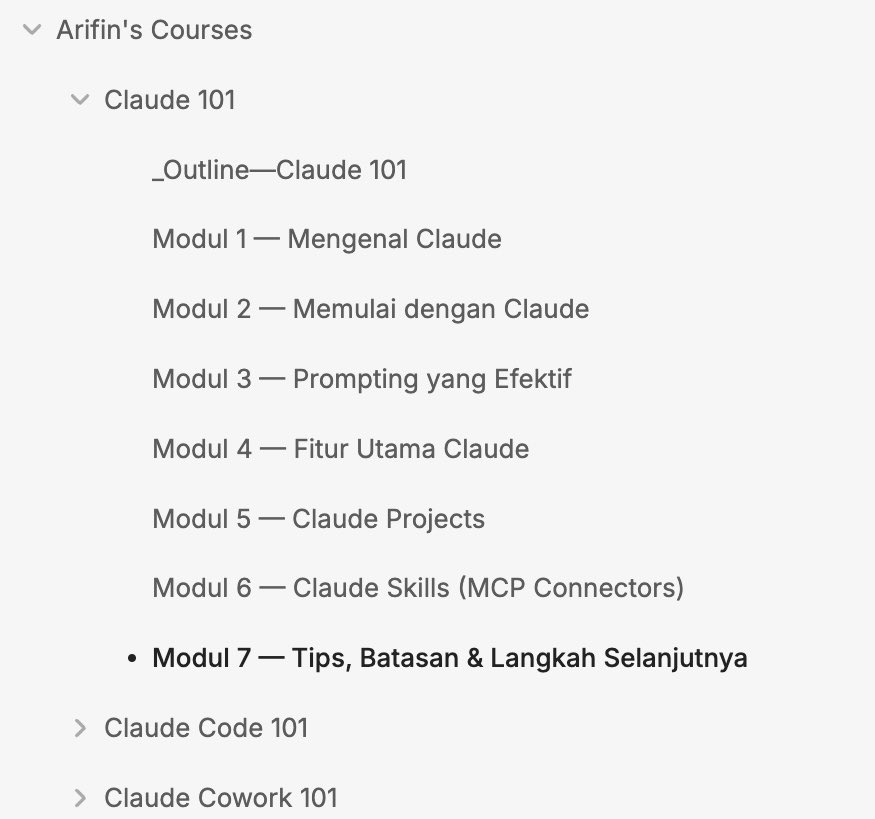
AKHIRNYAAA, ON PROGRESS BIKIN GUIDE UNTUK BELAJAR CLAUDE!!!!
Setelah eksplor dan make Claude hampirrr tiap hari, gw ngerasa jaraaang banget ada panduan cara make Claude yang Bahasa Indonesia.
Nahh karena ituu, gw pun memutuskan untuk membuat panduan detail basic Claude 101 bersama si Claude wkwkwk.
Tujuannya ini nanti buat bantu lebih banyaaak lagi org yang bingung mau nyobain claude mulai dari mana, biar bisa pelan2 jdi Power User yaa
Masih in progress yaa guidenya. Ntar gw kabarin lagi kalau udah launch hahaha
Bisa cek di bawah yaa daftar materi dan contoh isinyaa.
Tertarik gaa?? Coba komen “TERTARIK” dehh kalau pada tertarik.
Thank youu
Aku mau bikin kelas gratis tentang Claude
Kepikiran buat bahas:
• Kenapa Claude happening, bedanya sama LLM lain apa?
• Claude Chat vs Cowork vs Claude Code
• Effective Claude prompting techniques
• Claude Cowork use case & Automations for professionals
• Claude MCP and Integrations with 3rd Party (PPT, Sheet, etc)
• Bikin Web Apps dan Deploy secara gratis pake Claude Code
Siapa aja yang mau join? Coba Follow + Retweet + Reply di bawah ya 👇🏻
You watch one more episode of some Netflix nonsense series instead of spending an hour learning Obsidian + Claude?
Quit this, I’m begging you.
You’ll thank me later.
Claude sekarang udah di level yang beda banget.
dia udah bukan chatbot buat nulis email atau asisten coding doang.
Palantir resmi integrasiin Claude ke platform AI mereka buat keperluan militer dan pemerintah Amerika
Artinya dia jalan di environment yang butuh akurasi tinggi, reasoning kuat, dan nol toleransi buat halusinasi.
Modelnya sekarang Sonnet 4.6 dan Opus 4.6, dengan context window sampai 200.000 token.
Biar lu kebayang skala use case-nya, ini list lengkap kapabilitasnya sekarang:
1. Software Development & Code
‣ nulis, review, dan debug di 20+ bahasa
‣ baca seluruh codebase sekaligus dalam satu context window
2. Claude Code (Agentic Coding)
‣ jalan langsung di terminal CLI
‣ baca, edit, run, dan commit file mandiri
‣ lu describe task, Claude yang eksekusi end-to-end
3. AI Agent & API Integration
‣ jadi reasoning engine di sistem otomasi
‣ call API eksternal, baca database, eksekusi fungsi ‣
4. Riset & Analisis Dokumen
‣ baca dan analisis PDF atau kontrak ratusan halaman ‣ ekstrak insight dari dokumen panjang tanpa perlu summarize manual
5. Penulisan Profesional & Konten
‣ drafting laporan, email, dokumentasi teknis
‣ jaga tone konsisten di dokumen panjang
‣ adaptasi gaya tulisan dan support 30+ bahasa
6. Cowork (Desktop Automation)
‣ otomasi file management dan task harian buat non-developer
‣ nggak butuh skill coding sama sekali
7. Data Analysis & Interpretasi
‣ baca raw data macam CSV atau JSON buat narik insight
‣ nulis query SQL langsung dari pertanyaan biasa
‣ interpretasi statistik dan visualisasi data
8. Pendidikan & Pelatihan
‣ personalized tutoring teknis dan non-teknis
‣ bikin materi kursus, quiz, dan silabus
9. Cybersecurity & Threat Analysis
‣ analisis kode buat cari vulnerability
‣ penjelasan teknik serangan buat defensive security
‣ bantu nulis security docs dan incident report
10. Product & Business Strategy
‣ analisis kompetitor dari data
‣ drafting product roadmap dan PRD
‣ bantu prioritasin fitur pake framework kayak RICE/ICE
--
Yang bikin Claude beda itu trust. Anthropic build model ini dari awal pake framework Constitutional AI.
Hasilnya Claude jauh lebih predictable dan susah dimanipulasi buat ngasih output berbahaya.
Buat konteks agentic di mana lu ngasih akses ke tools dan data nyata, ini krusial banget.
Kalau lu masih pake Claude cuma buat tanya-jawab biasa, lu belum nyentuh 10% dari kapabilitas aslinya.
Worth di-explore lebih dalem.
AI itu pintar.
Tapi kenapa setiap kali kita buka, hasilnya terasa seperti ngobrol dengan orang yang baru kenal kita lima menit lalu?
Masalahnya bukan di prompt.
Masalahnya di konteks.
Setiap hari kita jelaskan ulang siapa diri kita, apa proyek kita, siapa audiens kita, gaya bahasa seperti apa yang kita mau.
Tutup tab.
Besok ulang lagi dari nol.
AI tidak salah.
Ia memang tidak hidup di sistem kita.
Solusinya?
Bukan memperbaiki prompt.
Tapi memasukkan AI ke dalam second brain kita.
Dengan kombinasi Obsidian + Claude Code, AI bisa membaca seluruh vault kita.. catatan, ide lama, struktur folder, aturan menulis, sampai proyek aktif.
Ia tidak lagi bekerja dari halaman kosong.
Ia bekerja dari seluruh sejarah pemikiran kita.
Bayangkan minta AI menulis newsletter, lalu ia otomatis:..
– Mencari catatan relevan.
– Mengambil insight lama.
– Mengikuti gaya bahasa kita.
– Menyusun outline.
– Menambahkan subject line.
– Menyimpan ke folder yang benar.
Semua dengan satu perintah.
Inilah yang disebut AI Second Brain.. konteks persisten, sistem yang berkembang, dan workflow yang bisa dijadikan command permanen.
Biayanya?
Sekitar €20/bulan.
Dampaknya?
Produktivitas naik drastis.
Pertanyaannya sekarang bukan “AI apa yang paling pintar?”
Tapi.. Apakah AI kamu benar-benar mengenal kamu?
90% of apps look vibe coded:
same purple gradients, same default fonts, same AI slop.
Here’s a workflow to make your app look like it came from a real agency, not a model:
1/ Ship a boring prototype first
> Use Google AI Studio or Cursor to spit out a 1‑shot functional app (e.g. voice journaling).
> Don’t touch the UI. Just list what actually exists now: screens, flows, edge cases.
Function first, vibe later.
2/ Decide how it should feel
> Ask Claude: who is this for, what state are they in, what feeling do we want?
> Turn that into 1–2 paragraphs of brand guidelines: name, vibe words, “analog vs sci‑fi,” what to avoid.
You’re not designing a screen, you’re designing a mood.
3/ Build a reference bank
> Collect images on Pinterest / https://t.co/Mpq6TUUB02 / your own Notion: objects, textures, lighting, typography.
> Think “cassette decks and paper notes” or “glass and neon,” not “UI shots.”
This becomes your visual prompt library.
4/ Generate on-theme assets
> Use Flux / Midjourney / Ideogram to create a small set of custom pieces: icon, logo, 1–2 hero illustrations, 1 special button.
> Use negative prompts to kill the generic look: “no glossy, no corporate, no 3D gradients.”
> Clean them up (remove background, tweak colors) so they’re Figma‑ready.
1–3 strong custom elements beat 20 random assets.
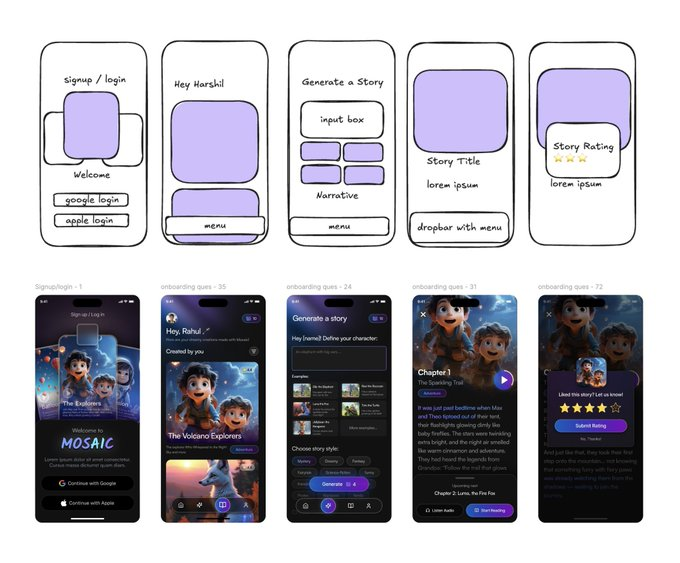
5/ Assemble in Figma like a real app
> Drop assets into real iOS / Android frames.
> Stick to an 8px grid, 2 fonts max, one accent color.
> Use blend modes and overlays so the AI art actually matches your background and type.
Now you have a legit, high‑fidelity design, not a screenshot from a model.
6/ Re‑vibe code the app
> Feed the final Figma screens + exported assets back into Google AI Studio or Claude Code.
> Tell it: “Rebuild the existing prototype using this layout, colors, and assets only.”
> Iterate until the code matches the design.