@fourdotmemezh@vvxiaoyu8888 At least memes on other platforms have their hype cycle—they launch, get pumped, then fade away. BSC memes on https://t.co/2FNp4ml4io just launch and disappear 🤣
Gue nemu website yang bikin gue mikir, "Ini harusnya gak gratis."
Namanya MeiGen.
Basically, ini adalah library prompt buat AI image dan video generation. Tapi bukan jenis prompt receh yang udah sering lo lihat sliweran di Twitter.
Semua di sini sifatnya curated, udah di-test, dan hasil output-nya udah masuk level produksi.
Lo bisa dapet prompt matang buat berbagai model top:
→ GPT Image 2
→ Seedance 2.0
→ Veo 3.1
→ Midjourney
→ Dan beberapa model besar lainnya
Yang bikin gue appreciate banget: prompt-nya bukan cuma sekelas "make a cool image." Banyak yang udah di-spec khusus buat kebutuhan cinematic lighting, product shot, fashion editorial, sampai anime style—hal-hal detail yang biasanya butuh trial & error berjam-jam buat dapetin formula pasnya.
Dan ini poin penting yang sering banget dilewatin orang:
Model AI-nya sendiri sekarang udah pada gila dan makin pinter. Yang sekarang jadi bottleneck itu bukan lagi tool-nya, tapi masalahnya lo gak tahu cara "ngomong" yang bener ke model tersebut.
Prompt engineering itu real skill. Dan website kayak MeiGen ini basically nge-shortcut learning curve lo buat dapet aset visual kualitas mumpuni.
Claude vs. Claude Code vs. Cowork.
Anthropic offers three distinct ways to interact with Claude, and each one targets a fundamentally different workflow. Think of it as: Chat for thinking, Code for building, and Cowork for doing.
Here's a quick breakdown:
1️⃣ Claude Chat
This is the conversational AI assistant most people already know. You type a prompt, Claude responds, and you iterate together.
- Turn rough ideas into structured plans through conversation
- Write emails, reports, essays, and long-form content
- Research and summarize complex topics in minutes
- Analyze documents, PDFs, and images
- Build interactive prototypes through Artifacts
The key here is that everything happens through conversation. You're thinking with Claude, not delegating work to it.
It's available on every device, has a free tier, and supports persistent memory across sessions.
The tradeoff is that it has no direct access to your local files (upload only), and it can't generate raster images natively.
2️⃣ Claude Code
This is a terminal-native coding agent. You describe what you want in plain English, and Claude reads your codebase, writes code, runs tests, fixes errors, and ships the result.
- Build and debug entire features across the full codebase
- Write, run, and fix tests automatically
- Manage git workflows and create pull requests
- Spawn multiple parallel agents working on different parts of a task simultaneously
It handles the full development cycle end to end, from planning to execution to testing. With the CLAUDE(.)md configuration file, you can teach it your project's conventions, patterns, and constraints so it writes code the way your team expects.
The tradeoff is a steeper learning curve compared to Chat, and token costs can add up during heavy sessions.
3️⃣ Claude Cowork
This is the newest addition. Anthropic describes it as Claude Code for the rest of your work.
It's an agentic desktop assistant that automates file management and repetitive tasks through a GUI. You describe an outcome, and Claude plans, executes, and delivers finished work: formatted documents, organized file systems, spreadsheets with working formulas, and synthesized research.
- Direct local file access and editing (no upload/download cycle)
- Schedule recurring tasks automatically
- Assign tasks remotely via Dispatch from your phone
- Computer Use lets Claude control your screen directly
It runs inside a sandboxed virtual machine on your computer, so Claude can only access folders you explicitly grant. You don't need to know how to code to use it.
The tradeoff is that your computer must stay awake for tasks to run, and it's still in research preview.
Here's how to think about choosing between them:
→ If you need to think through a problem or get writing/research help, use Chat
→ If you're building software and want an autonomous coding partner, use Code
→ If you have a clearly defined deliverable that involves local files and desktop workflows, use Cowork
All three are included in the same subscription starting at $20/month, which makes it one of the highest-leverage subscriptions in productivity software right now.
I've put together a visual below that maps the workflow of each product side by side.
Also, if you want to go deeper into Claude Code specifically, my co-founder wrote a detailed article covering the anatomy of the .claude/ folder, a complete guide to CLAUDE(.)md, custom commands, skills, agents, and permissions, and how to set them all up properly.
Read it below.
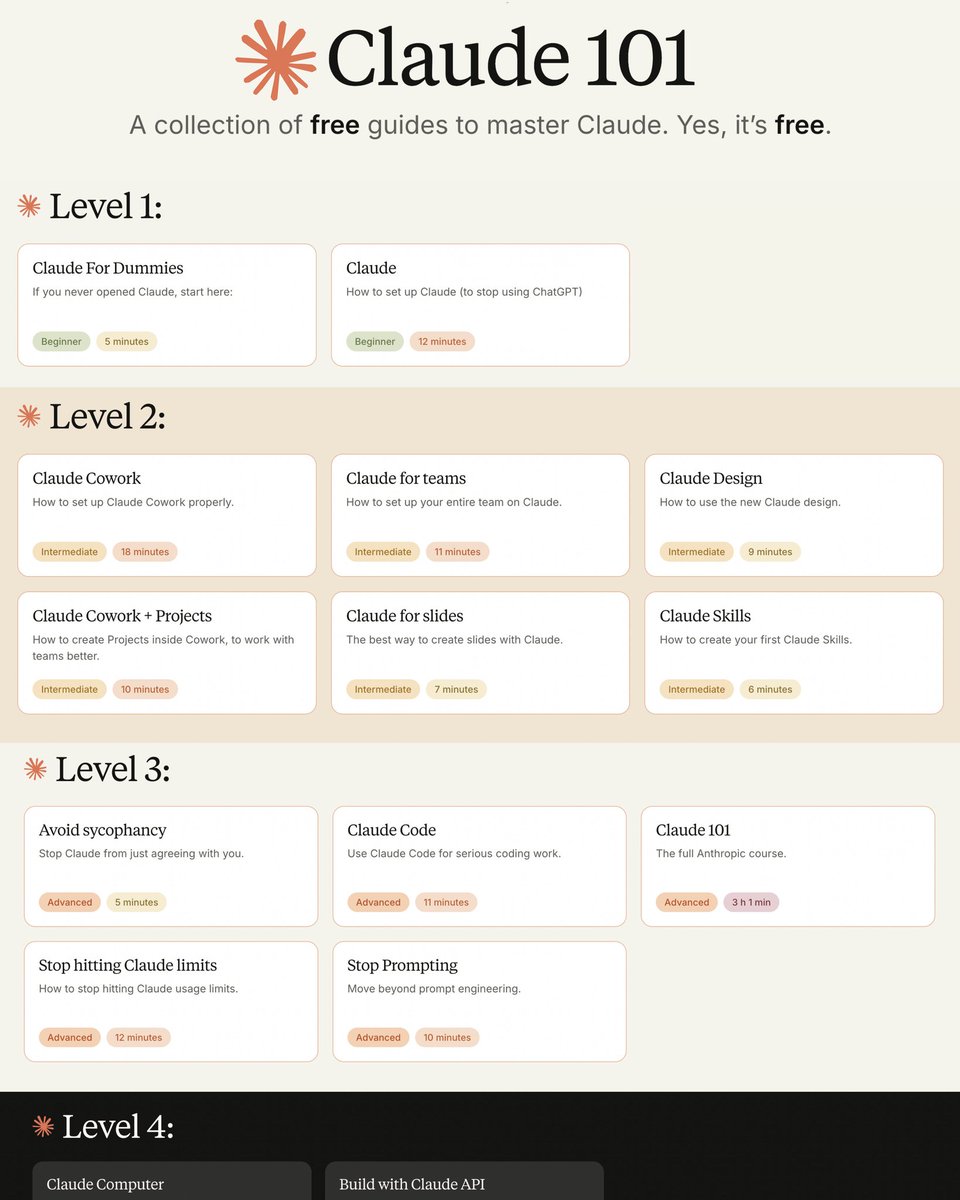
CURSO COMPLETO de CLAUDE AI en 5 HORAS
Guarda esta página antes de que se te pase.
Crea herramientas útiles.
Automatiza tareas repetitivas.
Aprende cómo la gente diseña bots y sistemas.
推荐Anthropic 13 门免费课程,还附带证书
我按 12 周排好顺序,简单到困难一步一步学
第 1–2 周|基础
1. Claude 101
上手 Claude 的日常使用,是后面所有课的前置。
https://t.co/8bdokywcqp
2. AI Fluency: Frameworks & Foundations
人机协作的四原则,建立怎么跟 AI 合作的心智模型。
https://t.co/1kmj6lhzgQ
第 3–4 周|接 API
3. Building with the Claude API
旗舰课 8 小时,从基础调用打到生产部署。
https://t.co/kD0wbhhvkb
第 5–6 周|MCP 协议
4. Introduction to Model Context Protocol
工具、资源、提示三要素入门,把外部工具接到 Claude。
https://t.co/tSTbHR7KOv
5. MCP: Advanced Topics
用 Python 深度构建 MCP server 和 client。
https://t.co/DV8iX8kSMz
第 7–8 周|Claude Code 与 Skills
6. Claude Code in Action
配 CLAUDE.md、Hooks、CI 集成,把它变成日常工具。
https://t.co/poSvymIGCR
7. Introduction to Agent Skills
写、配置、分发可复用的 Skills,agent 的积木。
https://t.co/htcluL5rTg
第 9–10 周|上云
8. Claude with Amazon Bedrock
在 AWS 上跑 Claude,IAM 与企业账号调用模式。
https://t.co/ai3OvOaleU
9. Claude with Google Vertex AI
在 GCP 上跑 Claude,与 Vertex 其他服务串联。
https://t.co/1jQdRfaxVR
第 11–12 周|角色专项
10. AI Fluency for Students
学生怎么把 Claude 当导师而不是作弊器。
https://t.co/ksFCTi8yOk
11. AI Fluency for Educators
教师怎么把 AI 融入课堂与作业设计。
https://t.co/8r22qINF2q
12. Teaching AI Fluency
怎么把四原则教给别人,培训师工具包。
https://t.co/PUoCqEHYyW
13. AI Fluency for Nonprofits
公益组织在预算和合规下怎么落地 AI。
https://t.co/hkkOrn4SRB
全免费,全官方。先 mark 再开学
你也可以看看下面我关于Agent记忆的爆文👇
Guía para añadir fácilmente Skills a Claude.
El artículo incluye 25 de las mejores skills para Claude, Gemini y ChatGPT.
Guárdate este post para no perderlo 🔖
CLAUDE CODE PUEDE AHORA EXTRAER DATOS EN VIVO DE MÁS DE 17.000 ACCIONES, PRECIOS DE CRIPTOMONEDAS Y ESTADOS FINANCIEROS EN SEGUNDOS.
Un comando. 60 segundos. Listo.
Aquí está la configuración exacta:
Paso 1: Abre Claude Code y pega esto:
claude mcp add --transport http financial-datasets https://t.co/51qgRjmah6
Paso 2: Autenticación
Escribe “/mcp”dentro de Claude Code y completa el flujo de OAuth en tu navegador.
Verifica la conexión en cualquier momento:
claude mcp list
Paso 3: Comienza a formular preguntas
- "¿Cuál es la relación P/E actual de Apple y su capitalización de mercado?"
- "Muéstrame el estado de resultados de Tesla para los últimos 4 trimestres."
- "¿Cómo ha cambiado el precio de Bitcoin en el último año?"
Eso es todo.
Claude Code ahora tiene acceso directo a datos financieros reales de más de 17.000 acciones, informes de ganancias, balances generales, estados de resultados, datos de flujo de caja y precios de criptomonedas.
Los analistas que pagan $24.000 al año por una Terminal Bloomberg no van a estar contentos de que esto exista.
Antes de esto necesitabas una Terminal Bloomberg o una API compleja de datos financieros o horas de investigación manual en múltiples fuentes.
Ahora necesitas un comando y 60 segundos.
Los cuantitativos, analistas y gestores de portafolios que descubran cómo combinar el razonamiento de Claude Code con el acceso a datos financieros en vivo tendrán una ventaja en investigación que se acumula cada día.
Guarda esto en favoritos antes de abrir tu próxima cuenta
Gemini puede editar vídeos completos en minutos y casi nadie lo está aprovechando.
Puede generar guiones, montar escenas y editar vídeos con un solo prompt.
Aquí tienes 7 prompts para usarlo como un profesional.
🔖 Guárdalo, lo agradecerás.
Buat kalian yang punya bisnis jualan entah warung, toko, atau bahkan cuma jualan lewat WA…
Sekarang udah ga perlu lagi ribet desain di Canva atau edit manual buat bikin poster yang keliatan “MAHAL”.
Hasilnya:
- Jualan keliatan lebih profesional
- Ada layout rapi (bahan + manfaat)
- Langsung ada harga
- Vibes kayak menu cafe / brand F&B
Kalian bisa pakai ChatGPT Images buat bikin poster produk kayak brand besar 👇
Jangan lupa di-save 🔖
He vuelto a la cafetería del post de ayer y he hablado con el encargado.
Ha flipado con el resultado y le he propuesto hacerle un nuevo menú con imágenes de calidad.
Tenemos una oportunidad brutal por delante, es momento de hacer lock in 🔒