🆕 in @JetBrainsRider: The reimagined Monitoring tool automatically detects performance hotspots, UI freezes & GC spikes while your app runs 🔥.
Click any issue to reveal the root cause right there in the bundled @dotTrace profiler without having to stop your application for an investigation!
Available for FREE in EAP builds 👉 https://t.co/R7TQZtuiFi
#dotnet
🔥Game-changer alert: @dotmemory is now integrated into Visual Studio! Get complete memory profiling capabilities within your familiar development environment. Every view, every feature – now right beside ReSharper. Learn more: https://t.co/T0foYTQgFb
ReSharper 2025.1 just started its Early Access Program!🚀
The EAP 1 build comes with a host of improvements to C++ support, and introduces the fully integrated version of @dotmemory for Visual Studio with ReSharper on board.
Learn more 👉 https://t.co/3E5KGzt3tw
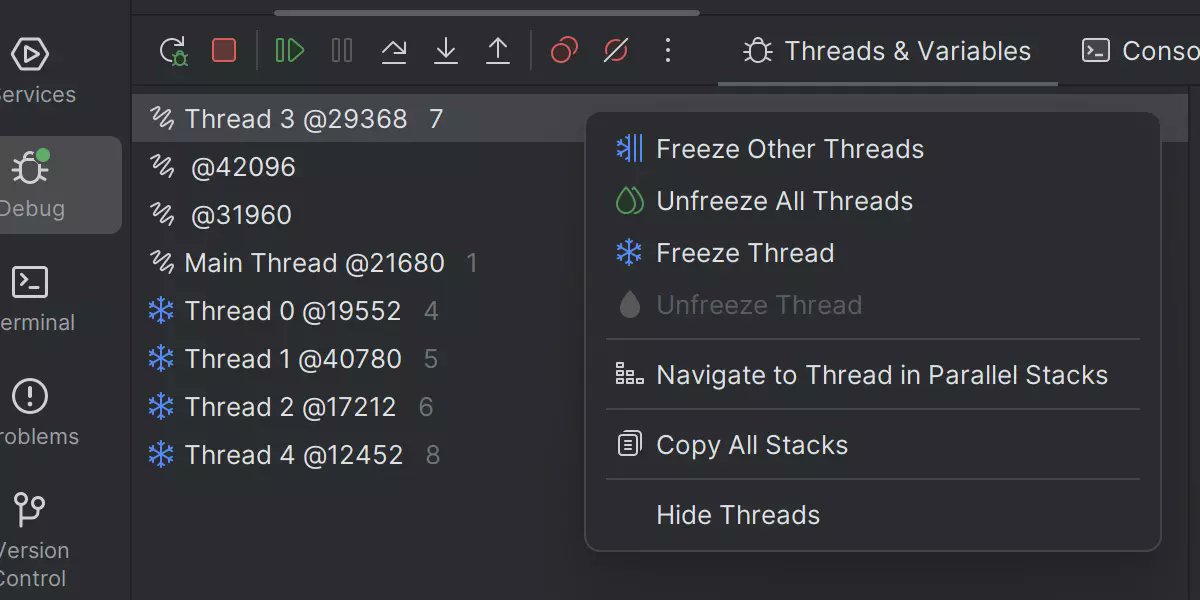
Debugging race conditions? 🏎️ Rider 2024.3 lets you freeze individual threads mid-session, so you can resolve those mysterious timing issues.
Learn about other updates in this release: https://t.co/yYoy2XNQuP
dotMemory 2024.3 is out!
🌐 Unified UI across all operating systems
🔍 Reintroduced Creation Stack Trace & Back Traces for memory issues
📊 New Icicle chart for dominator visualization
Learn more: https://t.co/kp8aSxzI2k
#dotnet#memoryprofiling
Rider 2024.3 has just landed!
🔥 Same-day compatibility with .NET 9, including full support for C# 13 features.
❄️ Ability to freeze and unfreeze individual threads during debugging.
🎮 Running and debugging native code on consoles.
✅ Support for multiline TODO comments
⭐ … And more exciting features!
Dive into the latest updates here: https://t.co/jGPgKQvW1I
#dotnet9 #csharp #gamedev
dotTrace 2024.3 has landed!
🔄 Undo/Redo actions for better profiling navigation
📜 Filter history support to streamline session analysis
Get all the details: https://t.co/P3VNrVzD9t
#dotnet#performanceprofiling
The Rider 2024.3 Release Candidate is now available!
This build contains all of the improvements expected in the major release:
🆕 Support for .NET 9, including the latest features of C# 13
💠 Windows Forms Designer for .NET projects
🎮 Running and debugging @UnrealEngine games on consoles
❄️ Ability to freeze and unfreeze individual threads during debugging
✨And so much more!
Learn more on our blog 👉https://t.co/CFMSdfLbFM
Contribute to open source, learn through self-education or courses, record educational podcasts, or grow your pet project easily with a FREE Rider subscription for non-commercial development.
Download and start today 👉
https://t.co/hKq3IldNUK
Spread the word! #dotnet#gamedev
dotMemory 2024.3 EAP 3 completely migrates from WPF to @avaloniaui for its Windows distribution and brings a set of improvements to the Dominators and Call Tree views.
Read more and download: https://t.co/scYAr9RUGq
dotMemory 2024.2.5 brings a new feature to improve your UX – Automatic View Selection. If you open an object set that results in a single element (e.g., a number of String objects), dotMemory automatically switches to a more relevant view. Download it now: https://t.co/m12vsX8xQl
dotTrace 2024.2 is out with:
🥳 Improved performance and faster processing of Timeline snapshots.
🔥 A new rendering engine in dotTrace Viewer on all platforms.
👉 An Options window added to the standalone version for macOS and Linux
More details: https://t.co/vY4bvxAON7 #dotnet
dotMemory 2024.2 brings improved instance search with new filtering options, as well as support for some features for Linux and macOS that were previously available only for Windows.
Learn more: https://t.co/U9IvkVvYGe #dotnet
🗑️ Catch wasteful resource utilization early!
Unnecessary allocations can consume large amounts of memory, leading to application stutter and crashes. Avoid them all together with ReSharper and dynamic program analysis: https://t.co/EBJMuSX9gx #ReSharperSuperpowers#dotnet
We can’t take our eyes off @Microsoft ’s new lineup of ARM-based PCs 🤩 Luckily, Rider is already ARM64-compatible on Windows machines and is ready for action 🚀
Download it right now: https://t.co/4eoZ9vEa4n
#MSBuild#dotNet
Use the new Monitoring tool window in Rider 2024.1 to monitor your application’s performance and gather key metrics in the background while running or debugging.
Learn more on our What’s New page: https://t.co/6hvbE5wGS4 #dotnet