New GitHub Copilot pricing is here. And it requires new usage behaviour.
Left (light):
- Ask mode with Auto model (10% discount)
- 0.8 AI credits
Right (dark):
- Agent mode with Sonnet 4.6
- 4.3 AI credits
Same prompt and same useful answer. 81% cheaper.
Stop building your own auth system.
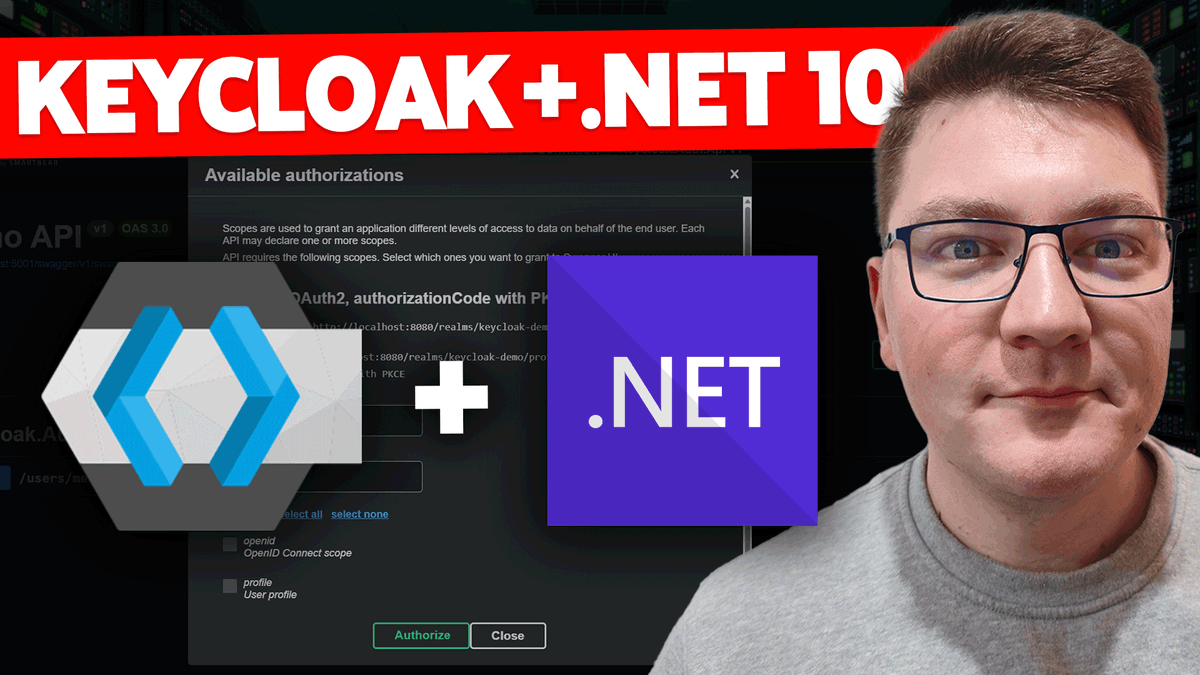
It’s 2026, and Keycloak is still one of the best ways to handle identity in .NET apps.
I just dropped a full guide on integrating Keycloak 26 with .NET 10 using Docker and OAuth 2.0.
Full setup here: https://t.co/gfaPkSxTGy
Two things you need to know about the EF Core bulk update APIs:
- They execute immediately on the database
- They aren't part of the native unit of work
- They don't affect the change tracker
This seriously affects your design, so be mindful of how these APIs work.
AI rant..🧵
Each Friday I set aside time to learn, use our products in development, tinker. My fridays are now consumed with understanding AI for productivity and accelerated development. Beware this is an AI rant. 1/15
Stop wasting the first 3 days of every project setting up boilerplate.
I built a free, production-ready Clean Architecture template to handle the plumbing for you.
It's already used by 40,000+ developers.
Here is what's inside the latest version:
- 𝗨𝗽𝗱𝗮𝘁𝗲𝗱 𝘁𝗼 .𝗡𝗘𝗧 𝟭𝟬
- 𝗡𝗲𝘄 .𝘀𝗹𝗻𝘅 𝗦𝗼𝗹𝘂𝘁𝗶𝗼𝗻 𝗙𝗼𝗿𝗺𝗮𝘁
- CQRS (No MediatR dependency)
- Structured Logging & Validation
- JWT Authentication & RBAC
- Docker Compose support
It saves you hours of setup time.
Download it for free here: https://t.co/RB9Rj29qV6
💡 Why the shift to .slnx? The new Solution format in .NET is a game-changer. It replaces the old bloated syntax with a clean XML syntax. It makes merge conflicts in your solution file a thing of the past.
They asked me this question, and I didn’t know the answer.
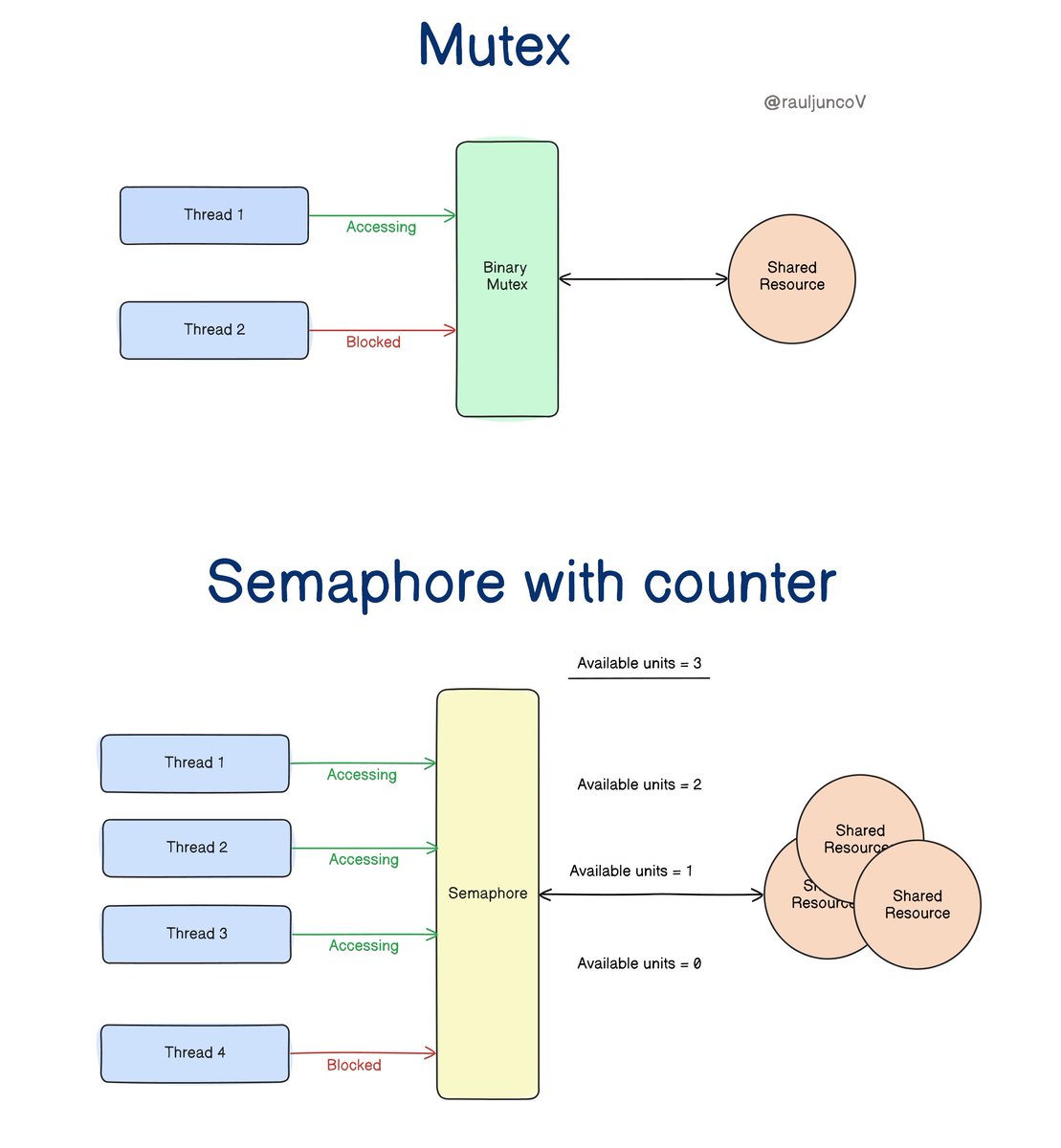
What's the difference between a Mutex and a Semaphore?
Mutexes and Semaphores are synchronization mechanisms used in concurrent programming.
They coordinate access to shared resources and protect them from simultaneous access.
Mutex
A mutex, short for mutual exclusion, is like a lock that ensures only one thread can access a resource at any given time.
Imagine it as a key to a single-person restroom. Only one person can use it at a time, and it stays locked until the person is done. Mutexes are binary—either locked or unlocked.
Semaphore
A semaphore is like a parking lot with multiple spots. It uses a counter to track available resources, allowing multiple threads to access them concurrently.
The counter starts at the number of available resources and goes down each time a thread takes a spot. When a thread leaves, the counter goes up.
Depending on the count, semaphores can allow multiple threads in.
Who owns What?
Mutexes maintain ownership, acquire, and release by the same thread or process.
In contrast, semaphores have no inherent concept of ownership. Any thread or process can increment or decrement the semaphore count.
When to use each?
• Mutex: When you need to ensure only one thread can access a resource at a time.
• Semaphore: When you need to allow a limited number of threads to access a resource concurrently.
Quick Analogies
• Mutex: A single key to a restroom. One person at a time.
• Semaphore: A parking lot with limited spaces. Multiple cars can park, but only up to the limit.
I hope this helps in your next interview.
Stay curious!
Something developers should be doing is always honing their skills. One way to do this is to traverse forum post like Stackoverflow. Find something unknown and experiment. In the following code I setup code to work with simple json that for some readers is new while others old hat but the point is to learn something new.
As done in the gist, experiment in a new class rather than say write code in main method of a console project and even better, write the code in a class project. Once the code is understood, document the code at method levels and create a readme file with details as time goes on without documentation a developer may forget details of code experimentation.
https://t.co/SrLtcQPm3q
Most C# coding standards recommend using camelCase for local variables and _camelCase for private or internal fields. Unfortunately, out of the box Visual Studio just uses camelCase for these fields.
https://t.co/dXB9GZed9Z
#VisualStudio#CleanCode
Your data has a temperature, and you are wasting money if you don't know it.
Hot, Warm, and Cold data.
Storing data is not just about saving it and forgetting about it. You need to understand how often you will access the data and how long you should keep it.
You can group data into three categories based on how often it's accessed:
Hot data
• What It Is: Data that you need often and fast.
• Where It's Stored: On fast storage like SSDs or even in memory.
• Examples: Things like product recommendations or cached search results.
• Cost: Storing hot data is expensive, but accessing it is cheap because it's always ready to go.
Warm Data
• What It Is: Data you access occasionally, like once a month.
• Where It's Stored: On slower but still accessible storage, e.g., Amazon S3 Infrequently Accessed Tier, Google Nearline.
• Examples: Older logs or data that are not as frequently needed. This could be data that you use for reporting or analytics.
• Cost: It is cheaper to store than hot data, but accessing it costs a bit more.
Cold Data
• What It Is: Data are rarely accessed and primarily kept for long-term storage.
• Where It's Stored: On the cheapest storage options, like HDDs or cloud archive services.
• Examples: Old backups or records that you keep for compliance reasons.
• Cost: It is very cheap to store but can be slow and expensive to access.
Retention is a different animal, explains "how long you should keep data" and is based on 4 pillars:
Value
Is this data critical for you, or can it be recreated if needed? You should keep Important data for longer.
Time
For data you store in fast-access places like memory, set a time limit (TTL) for how long it stays there before moving it to cheaper storage.
Compliance
Some laws require you to keep data for a certain amount of time or delete it after a specific period. Make sure your data storage practices follow these rules.
Cost
Storing data costs money. To save on storage costs, you can automate deleting or archiving data when it's no longer needed.
Don't just store data—manage it. Save this for your next Storage Decision.
Quick C# Tip 💡
This is the way how to enumerate C# enum:
In C# 12 with .NET 8, you can enumerate an enum using the 𝗘𝗻𝘂𝗺.𝗚𝗲𝘁𝗩𝗮𝗹𝘂𝗲𝘀 method.
This method returns an array of the values in the enum, which you can then iterate over.
Enum.GetValues(typeof(Colors)) gets an array of all the values in the Colors enum.
This ensures that the color variable is of the Colors type during enumeration.
Did you use it already?
__
Transform your API development process with Postman Flows! Experience a new way to visually create, debug, and automate complex API workflows with ease. Dive into the future of API management and enhance your productivity https://t.co/eqQDSsM5Gl.
#dotnet
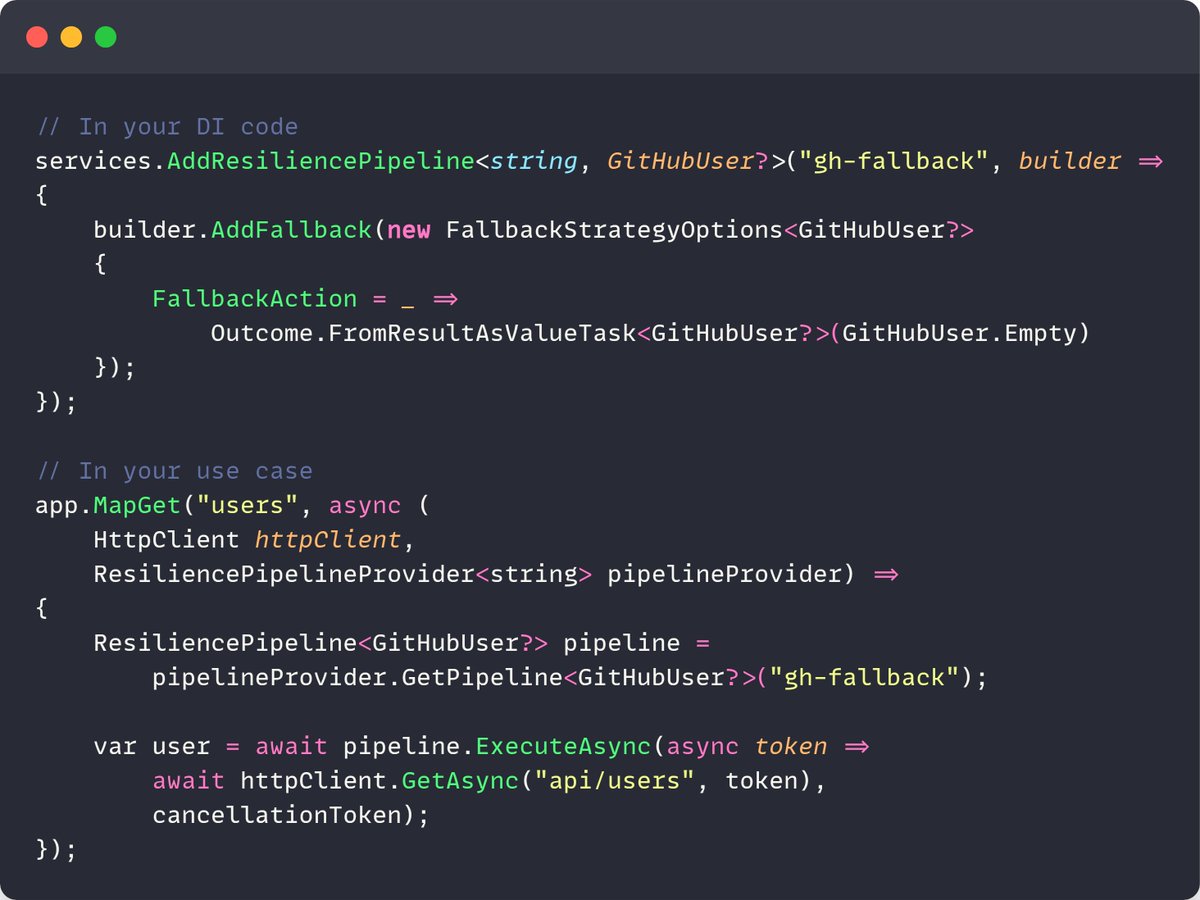
Resilience pipelines + DI in .NET? It's possible.
You can register your resilience pipeline with DI using a unique key and your pipeline setup.
You will use this key to resolve a pipeline instance from the ResiliencePipelineProvider.
5 seconds quick C# Tip 🚀
There is an easy way to initialize the Dictionary!
Initializing a dictionary in the previous versions of C# took a cumbersome approach.
However, with C# 12 there is a more concise initialization syntax.
Instead of using a new operator, you can use just brackets [].
I am used to the new practice. What about you?
__
Master .NET every Monday by joining https://t.co/65gw5pGHO0 Newsletter for free.
#Dotnet
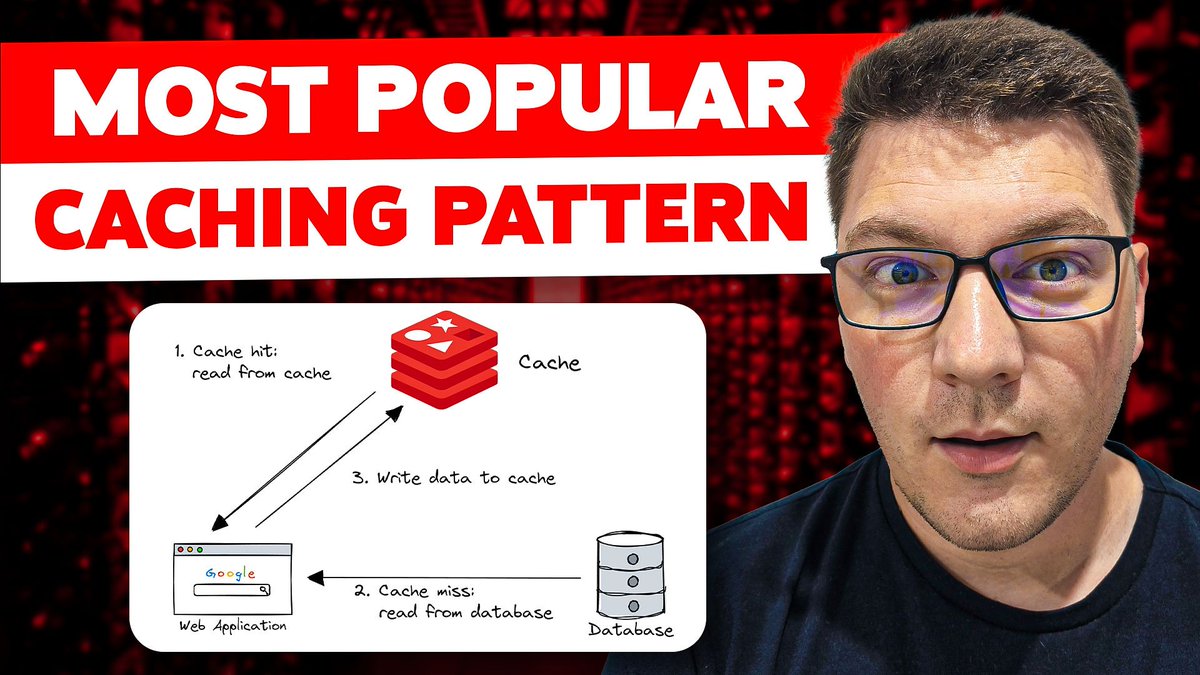
𝗧𝗵𝗲 𝗼𝗻𝗲 𝗰𝗮𝗰𝗵𝗶𝗻𝗴 𝗽𝗮𝘁𝘁𝗲𝗿𝗻 𝘆𝗼𝘂 𝗻𝗲𝗲𝗱 𝘁𝗼 𝗸𝗻𝗼𝘄.
It's called the Cache-aside pattern.
Fun fact: another name for this pattern is Lazy Loading.
In my latest video, we'll discuss:
- IMemoryCache, IDistributedCache
- Briefly talk about .NET 9 HybridCache
- How to solve the Cache stampede problem
Check it out here: https://t.co/AsNSRqDnAw
---
Subscribe to my weekly newsletter to accelerate your .NET skills: https://t.co/9bx4o5TL16
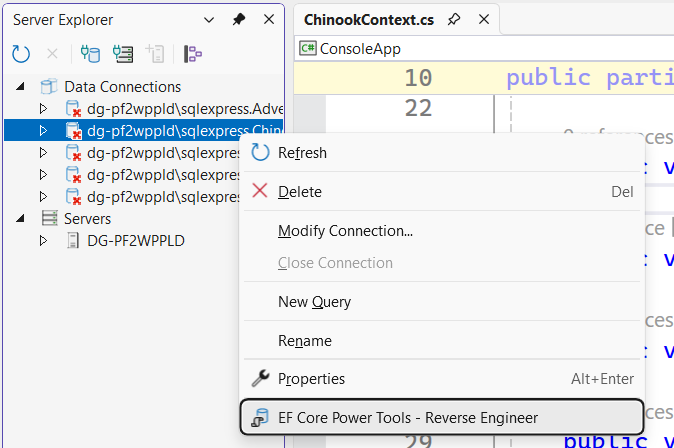
Launch Entity Framework Core Power Tools directly from Server Explorer in Visual Studio!
Try it out for yourself, get the latest daily build here:
https://t.co/2iibHkzGoN
#efcore#dotnet#visualstudio#azuresql#sqlserver
Example for merging elements using INumber<T>, collection expression and spread operator.
Sure there are several other methods to do this yet this example is targeted for the above.
Requires C#12
#csharp #Dotnet
If you need real-time functionality in .NET, there's one library you must know - SignalR.
SignalR allows you to push messages from your server to any connected clients.
I've just used it for a long-running task notifier.
Here's how to get started: https://t.co/I1KmSNSEbt






![TheCodeMan__'s tweet photo. 5 seconds quick C# Tip 🚀
There is an easy way to initialize the Dictionary!
Initializing a dictionary in the previous versions of C# took a cumbersome approach.
However, with C# 12 there is a more concise initialization syntax.
Instead of using a new operator, you can use just brackets [].
I am used to the new practice. What about you?
__
Master .NET every Monday by joining https://t.co/65gw5pGHO0 Newsletter for free.
#Dotnet](https://pbs.twimg.com/media/GRqZFTlXgAAaRLK.jpg)