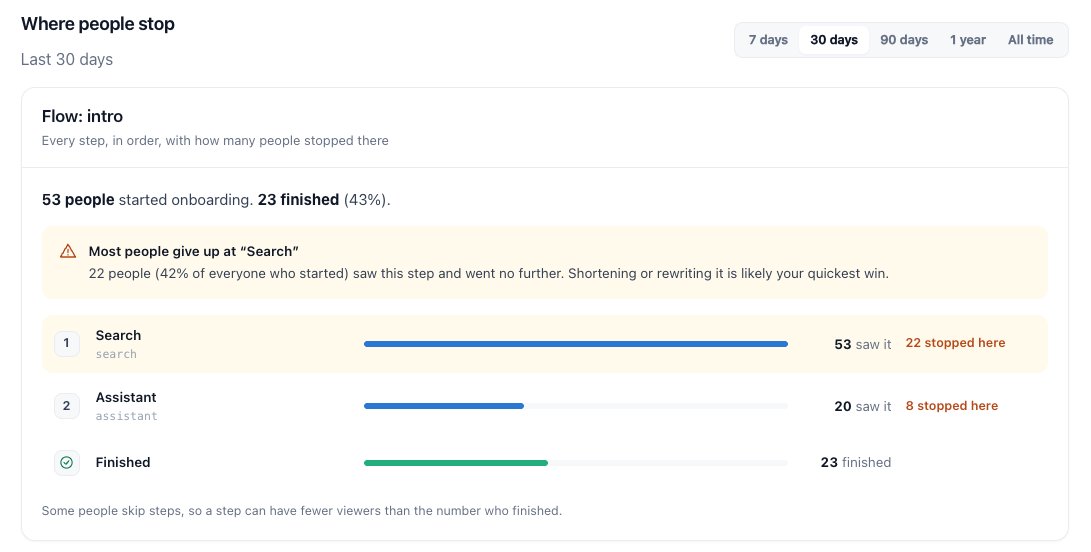
Damn, I should reconsider how to make my onboarding better.
Out of 53 people, only 23 created an account for one of my mobile apps. This is a clear sign that onboarding and intro screens really do matter.
Looks clean and simple. Gamification elements can work really well if users understand what's going on. I've seen a lot of people add too many gamification elements, and at some point, it becomes overwhelming, leaving users confused about what's going on.
Your design looks great, though. What's the app called?
@StateshiftHQ I'm not going to run any ads for this app for now. The main idea is to experiment with ASO and SEO to see what results I can achieve. Once I gain some users, and if they like the app, I might start doing some marketing on social media.
I'm in the final stages of building a new mobile app.
This time, I'm not planning to run any ads. I want to experiment with ASO, SEO, and GEO to see how far organic growth can take me.
I believe the best way to learn is by doing.
Any tips or lessons learned?
@LinoLeighton I wouldn't give up on Android just yet, especially if you already have users from Europe on iOS.
It really depends on the app, but some perform better on Android than others. I'd keep it running, experiment with a few things, and focus on improving conversions.
@b4dgerr It's part of the game. I feel like this is the onboarding process, haha. They ban you 3–4 times, or even more, until you understand how the system and algorithm work.
I think one of the biggest mistakes indie developers make is building too many features before understanding how people use their app.
Sometimes improving one existing feature can bring more revenue than adding five new ones.
How do you decide what to build next?
@hii_mohit Very impressive! Could you share some tips on writing articles on Medium? Is there anything specific you do to reach more readers and get more engagement?
@vitalikkravez1 The SDK doesn’t swizzle the view hierarchy. After a tap, it inspects a bounded React Fiber path, outside render. TextInput values and children are never read. Labels are sanitized on-device; sensitive custom regions can use <RiveoraIgnore>, and captureText can be disabled.
🚀 Introducing Riveora - mobile analytics with less manual tracking and more useful insights.
One thing that has always frustrated me about mobile analytics tools is how much you need to plan ahead.
Every time you release a new feature, you have to decide what to track and manually add custom events.
But here's the problem:
What if you forget to track a button click?
What if you don't know which metrics will actually matter until users start interacting with the feature?
By the time you realize you need that data, it's already too late. You can't go back and track interactions that were never recorded.
That's one of the main reasons I started building Riveora.
The idea is simple: instead of manually tracking every interaction, Riveora automatically captures different types of events for you.
And my long-term goal is to make most of the important interactions trackable automatically, so developers can focus on building their apps rather than constantly adding analytics code.
But automatic tracking is only part of it.
📱 Onboarding Analytics
Ever wondered how many users actually complete your onboarding?
With Riveora, you can see:
- How many users start and complete onboarding.
- Which onboarding screens users drop off on.
- How much time users spend on each screen.
💰 Paywall Analytics
Getting users to your paywall is one thing. Understanding how they interact with it is another.
Riveora helps you measure:
- How often users open your paywall.
- How long they spend looking at it.
- Whether they leave your app after seeing it.
- How different paywalls perform, so you can experiment and improve conversions.
And this is just the beginning.
I have a lot of ideas for new features that I believe will make Riveora much more powerful and automated.
My goal isn't to build another dashboard full of charts.
I want Riveora to eventually do more of the analysis for you - automatically identify problems, highlight opportunities, and help you understand what needs improving in your app.
There's still a lot to build, but I'm excited to share Riveora with everyone.
If you're building a mobile app, I'd genuinely love to hear your feedback and what features you'd find useful.
🌐 https://t.co/5QdtOQj3Hi
A lot of people don't spend enough time designing their paywalls or choosing the right wording, which costs them sales.
But if you're targeting the wrong audience, none of that matters.
I've tracked users spending just 3–5 seconds on paywalls. That's barely enough time to see anything.
One thing I've learned from building mobile apps:
Getting users to download your app is hard.
Getting them to stay is even harder.
You can spend weeks marketing your app, but if users leave after 30 seconds, what's the point?
Curious, what do you do to improve retention?
I'd suggest giving Riveora analytics a try. You'd be surprised how many users open an app for just a few seconds and then leave.
Riveora also lets you track how much time users spend on your paywall, which might help you understand what's happening.
P.S. If you decide to try it, feel free to reach out. I'd be happy to help with the setup.