So since we're all talking about SEO and trying to -ofc not BUILDING but CONNECTING through a community of people, it's also essential to look at the marketing processes.
Such as; turning visits to sales + visitors to genuine people who you sold to. 📈🧵
@via_marketing_@Wulf_SEO_UX_CRO@Hobo_Web that's right, we're not on the page of making fun at this point because of all the issues and losses we have, but that could help to relief 😅
Hello everyone,
I recently migrated my 11-year-old domain to a new domain name. Here’s a summary of what I’ve done so far: 301 Redirects: All URLs were properly redirected via 301 to the corresponding pages on the new domain. Google Search Console Updates: The domain change was registered, and all necessary migration actions were completed. Sitemaps Submitted: New sitemaps for the updated domain structure were submitted to Google. Backlink Profile: I started updating my backlinks to reflect the new domain. It’s been 42 days since the migration, but I’ve encountered significant issues with my traffic and indexing.
The Problem
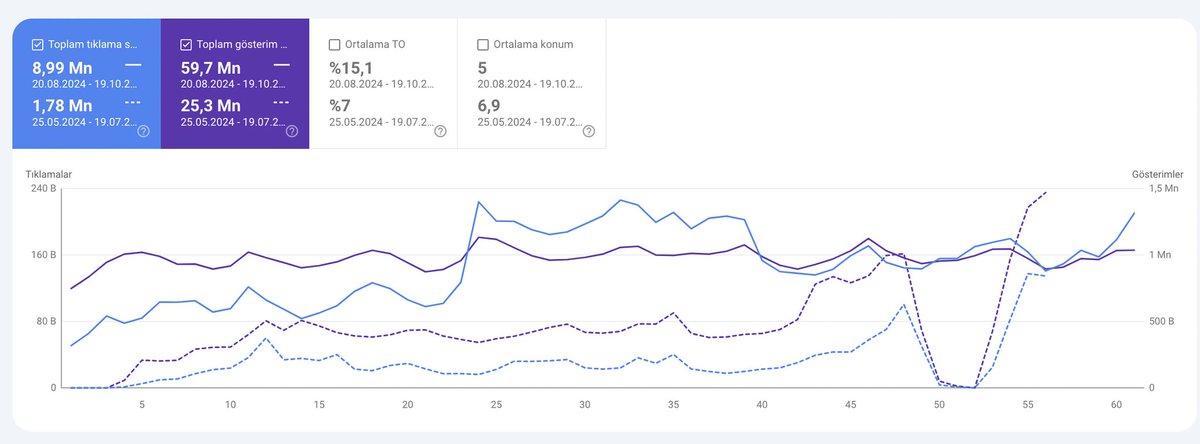
In the last 7 days, my old domain (which was fully redirected) has somehow started receiving 546K clicks, while the new domain has only received 31K clicks. Initially, the old domain was showing zero traffic (as expected after the migration), but now it has suddenly become visible again in Google search and is outperforming the new domain by over 500K clicks. This unexpected behavior has me very concerned and confused about what might be causing it.
My Questions:
Why is the old domain still receiving so much traffic despite the 301 redirects?
Is this normal?
Could this be due to an issue with how Google is processing the migration?
How can I fix this and ensure that traffic is correctly transferred to the new domain?
Are there additional steps I should take to prevent the old domain from ranking again?
Hello everyone,
I recently migrated my 11-year-old domain to a new domain name. Here’s a summary of what I’ve done so far:
301 Redirects: All URLs were properly redirected via 301 to the corresponding pages on the new domain.
Google Search Console Updates: The domain change was registered, and all necessary migration actions were completed.
Sitemaps Submitted: New sitemaps for the updated domain structure were submitted to Google.
Backlink Profile: I started updating my backlinks to reflect the new domain.
It’s been 42 days since the migration, but I’ve encountered significant issues with my traffic and indexing.
The Problem
In the last 7 days, my old domain (which was fully redirected) has somehow started receiving 546K clicks, while the new domain has only received 31K clicks. Initially, the old domain was showing zero traffic (as expected after the migration), but now it has suddenly become visible again in Google search and is outperforming the new domain by over 500K clicks.
This unexpected behavior has me very concerned and confused about what might be causing it.
My Questions:
Why is the old domain still receiving so much traffic despite the 301 redirects? Is this normal?
Could this be due to an issue with how Google is processing the migration?
How can I fix this and ensure that traffic is correctly transferred to the new domain?
Are there additional steps I should take to prevent the old domain from ranking again?
Hello everyone,
I recently migrated my 11-year-old domain to a new domain name. Here’s a summary of what I’ve done so far:
301 Redirects: All URLs were properly redirected via 301 to the corresponding pages on the new domain.
Google Search Console Updates: The domain change was registered, and all necessary migration actions were completed.
Sitemaps Submitted: New sitemaps for the updated domain structure were submitted to Google.
Backlink Profile: I started updating my backlinks to reflect the new domain.
It’s been 42 days since the migration, but I’ve encountered significant issues with my traffic and indexing.
The Problem
In the last 7 days, my old domain (which was fully redirected) has somehow started receiving 546K clicks, while the new domain has only received 31K clicks. Initially, the old domain was showing zero traffic (as expected after the migration), but now it has suddenly become visible again in Google search and is outperforming the new domain by over 500K clicks.
This unexpected behavior has me very concerned and confused about what might be causing it.
My Questions:
Why is the old domain still receiving so much traffic despite the 301 redirects? Is this normal?
Could this be due to an issue with how Google is processing the migration?
How can I fix this and ensure that traffic is correctly transferred to the new domain?
Are there additional steps I should take to prevent the old domain from ranking again?
Hi, About 30 days ago, I moved my site, changing all URLs to 301 and changing the address from the console. I moved my 10-year-old domain to a new, brand-new domain in order to rebrand.
In the first week of my redirection, traffic to the new domain increased while my old domain traffic started to decrease, but this changed later. Currently, traffic to my new domain has decreased and to the old domain it increased. What is the reason for this?
- The old domain name still appears in the search results for some queries.
- Neither the old nor the new domain name appears for other queries.
- My daily click count has changed significantly and a large portion of organic traffic is still directed to the old site.
301 redirects are working on all my pages.
I am contacting the old link network completely and updating it for my new domain name.
I updated my social media etc.
I changed every place on my site where my brand name is mentioned (except for faq, comments) to my current brand name.
I added my new sitemaps to the console and sent them etc. etc.
There is such a situation in index numbers, what could be the reason?Hi
New domain,
Old domain,
Google Merchant Center Adds Support for Existing Google Sheets Integration
Google Merchant Center has launched a new feature that makes product data management even easier. Now you can:
Integrate directly with Google Sheets,
Use your existing spreadsheets without needing to create new ones,
Speed up processes with flexible options for product uploads,
Ensure seamless connectivity with your main data sources.
How does it work?
Simply select an existing Google Sheets file,
Connect it directly to Merchant Center,
Use this spreadsheet as your primary product data source,
Keep product information updated effortlessly.
#google #merchantcenter
🔥 SEO Hack Alert!
Sometimes, what will give you success is the opposite of what you should be doing. That's exactly why there's no right or wrong in SEO & overall marketing.
There are only tests and results.
#SEO#ContentStrategy#DigitalMarketing
🚀 1.6M Organic Traffic in 3 Months!
With innovative SEO strategies, we helped a client in a competitive industry grow traffic from zero to 1.6M in just 3 months. A 140% click increase in the last month alone!
Follow me for more #seo!
PPC Experts, here's a crucial tip to optimize your campaigns and protect your budget:
Regularly review search terms that receive high clicks but result in zero conversions.
These irrelevant terms can quietly drain your ad spend.
Adding them as negative keywords will prevent wasted spend on traffic that doesn’t convert.
For example, if you're selling luxury watches and getting clicks for "cheap watches," adding "cheap" as a negative keyword ensures your ads stop showing for irrelevant searches.
This small tweak can significantly boost your ROI and keep your budget focused on high-intent traffic! 💡 #seo #ppc #ads
@jakezward It's absolutely true -especially if you're targeting an audience more related to going through LinkedIn, it may be the best place for you to show your brand.
🚀 Google Tag Manager now supports server-side tagging for Android & iOS apps! This gives teams more control & flexibility in mobile app analytics.
✅ Cross-platform compatibility – seamless on both Android & iOS
✅ Advanced data management – full control over data modification, deletion, and optimization
✅ Better integration with GA4, Facebook, TikTok, & more marketing platforms
✅ Expanded ecosystem – more possibilities in mobile app marketing
Server-side tagging helps streamline analytics, share data across platforms, and boost marketing performance! #seo #marketing #googletagmanager
🚀📈 Exciting news! Over the past two months, we gained 7M organic clicks!
Thanks to our strategic SEO efforts and server optimizations, we’ve achieved remarkable growth compared to the previous period:
+405% Click Increase 📈
+135% Impressions 📈
Despite facing challenges with brand attacks, our focus on building authority is paying off with significant user engagement. Additionally, our well-planned site redirect strategies have significantly boosted our organic performance.
#SEO #casestudy
Chrome DevTools AI Assistance is here!
🔹Contextual Help: Get accurate answers based on the technical details of the page you're inspecting.
🔹 Style and Error Solutions: Explore interactions between DOM elements and troubleshoot issues quickly.
🔹 Easy Start: Ask your questions or begin with suggested prompts.
🔹 With AI assistance, resolving style and error issues is faster than ever. This feature is still experimental, but your feedback can improve it. 🙌
The new AI Assistance panel in Chrome DevTools is now available to support your development process. You can ask questions about your code and quickly resolve errors or styling issues. The best part? You can chat directly with Gemini to get context-aware answers. 🤖✨
Give it a try, share your feedback, and elevate your web development experience! #seo #marketing #google #ai