Username reservations are here, as more and more people claim theirs, here’s answers to the top questions you’re asking ⬇️
Q: Are usernames mandatory?
A: Nope, they are optional.
Q: What if the username I want isn’t available?
A: There’s a few reasons you might not be able to reserve the username you want:
1) It’s an existing Instagram or Facebook username; these are reserved for their owners.
2) We’ve held well-known names and some variations of them - like public figures, celebrities, government entities and Meta-verified accounts - so they can only be claimed by their legitimate owners. If you try to reserve those, the system will say it’s not available.
3) Someone already claimed a common name, in that case use the username generator.
Q: What if someone creates a username similar to mine to impersonate me or run a scam, how do you stop someone from pretending to be me?
A: Usernames are not available for messaging yet. When they are, and you get a message from someone new, we’ll let you know the country origin, and a warning for first time outreach. Well-known public-figure names and their variations are held for verified owners. We’re also keeping a close eye on blocks and reports to take action against scammers.
Q: Can random people message me if they know or guess my username?
A: Just like you can’t search for a phone number in WhatsApp, you can’t search for a username. The best way to prevent someone from contacting you is to add a username key and to choose a username that is unique to WhatsApp.
All the current measures remain in place to prevent unwanted contact, including warnings with details about unknown senders (whether they're a new account, if you share groups, what country they're in) and the ability to block and report.
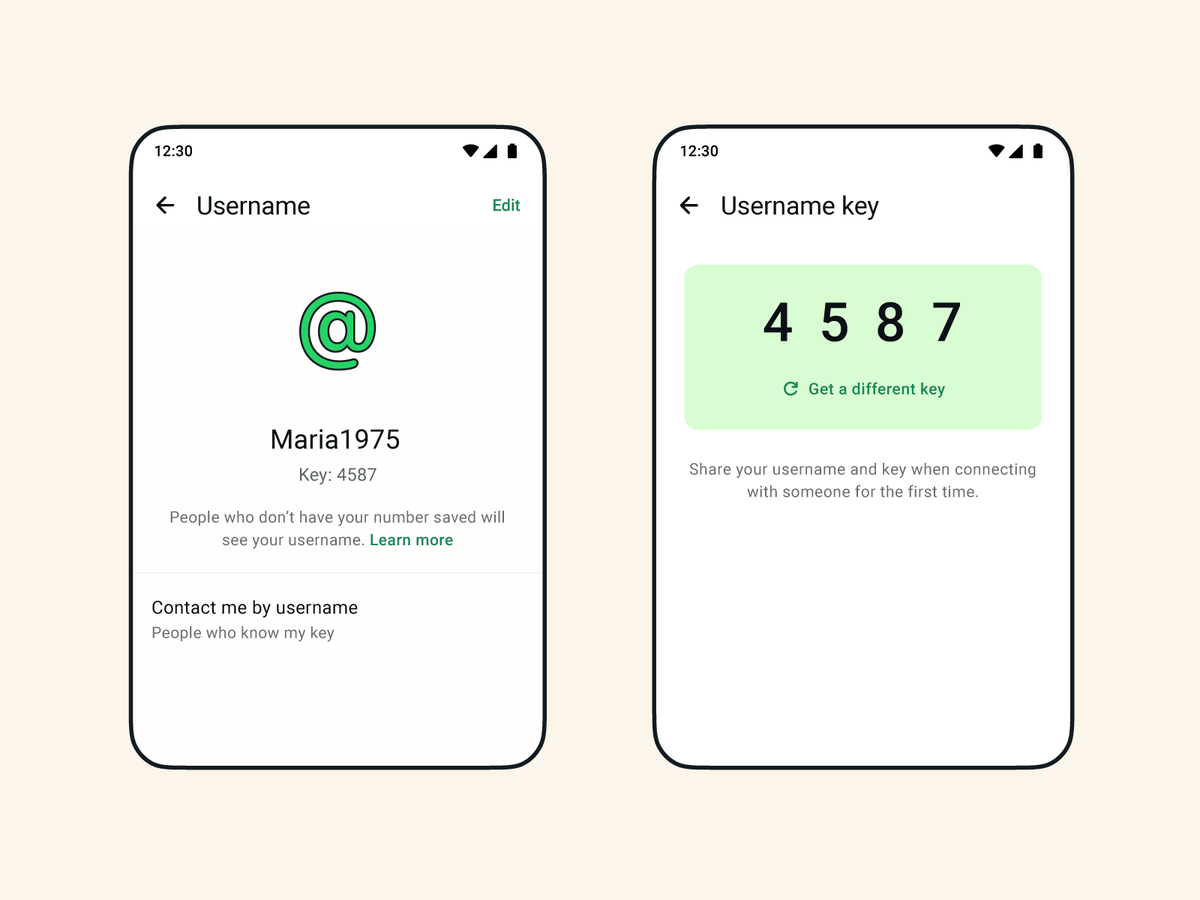
Q: What is a username key?
A: An extra layer of protection you can enable with your username, so that another user will have to know both your username and your username key to contact you. You can reset your key at any time to stop new inbound contact through your username.
Q: Do I have to link my other Meta accounts?
A: If you want the same username as your Instagram or Facebook account, you’ll have to link them. This one of the ways to reduce impersonation and to make sure you’re the legitimate owner of the account. But after that, you can unlink the account if you want, or you can choose a username unique to WhatsApp.
Q: Can I change my username later?
A: Yes, as long as the new one you want is available.
A few more things to keep in mind...
People are making false claims about reserving popular or well-known usernames - this isn't true, only the legitimate account owners are able to reserve well-known public-figure names.
We enabled reservations before usernames launch later this year because we think people will feel strongly about what username they want on WhatsApp. We’re taking our time and listening to feedback so that when it rolls out later this year we get it right.
We're partnering with @AnthropicAI to bring @claudeai -powered AI Pods to our clients.
@Globant is now the largest company founded in Latin America to join the global Claude Partner Network.
If you're setting a WhatsApp username, enable Username Key right now.
Meta has it OFF by default for most users, meaning anyone who knows your username can message you for the first time.
Username Key adds an extra layer of privacy by requiring both your username and a unique 4-digit key before someone can message you for the first time.
⭕️ Oficial: hoy WhatsApp anuncia que comienza a habilitar la reserva de los nombres de usuario
✅ La nueva función permitirá a las personas iniciar conversaciones sin necesidad de compartir su número de teléfono.
✅ Ahora quienes contacten a un usuario por primera vez podrán hacerlo utilizando su nombre de usuario, sin ver su número de teléfono
📱 Para reservar un nombre de usuario, podés hacerlo desdeAjustes > Cuenta > Nombre de usuario en la versión más reciente de WhatsApp
- Seguime para más información tech
your phone number is personal and sometimes you want to connect without handing it over. that's why we're introducing usernames for WhatsApp.
starting this week, you can reserve a username to use later this year when we launch the feature. It takes just a few seconds, make sure you have the latest version of WhatsApp and then go to Settings > Account > Username.