What if you only ever needed one browser tab open and you could bring all the relevant websites to you, instead of you going to them?
DOM synchronization allows an invisible web view as data source of truth, while rendering it however you want to display it as a block on the canvas.
Gist of it is:
- take a source website
- annotate with data attributes relevant elements
- pass to AI an array of those annotated elements
- allow it to rearrange, restyle, etc however it wants
- display those elements on a new canvas
- when an event happens on an attributed element, replay it back in the source website
- reconcile data changes back to canvas
This way the canvas representation doesn't have to reproduce any custom javascript. It can fully piggy-back off the original website.
Anyways... I'm just sharing some thoughts and explorations as I have them. I've been able to use my canvas to have my Google Chat, Gmail, X feed, Grafana charts and Cloudflare Workers dashboard all in front of me at the same time and I'm enjoying it. Exploring semantic expression of websites instead of strict DOM, also looking at using network calls (CDP) as context instead of relying fully on UI to know what data is available... a lot of interesting things possible.
Mix this with generative UI and the whole internet is at your disposal to make it appear how you want backed by all the services/websites you already use.
Doing a little mini-series on distributed Elixir with some examples, starting with setting up your cluster and monitoring it #Elixir
https://t.co/HJVopvtHTk
Introducing HappyHorse 1.1 — now officially live on Alibaba Cloud Model Studio!
Available via API, providing a complete integration solution. This release delivers production-ready video synthesis systematically optimized across core content generation scenarios.
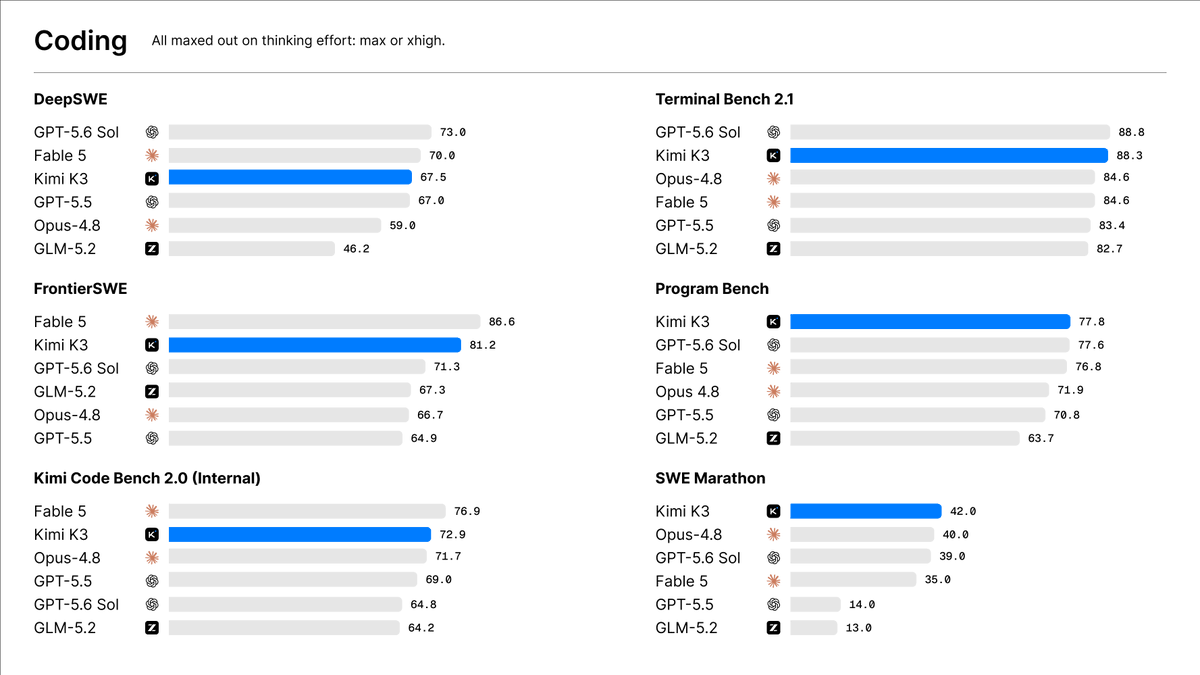
Introducing Kimi K3: Open Frontier Intelligence
🔹 2.8 Trillion Parameters, 1 Million Context, Native Multimodal
🔹 Kimi Delta Attention enables up to 6.3x faster decoding in million-token contexts
🔹 Attention Residuals deliver ~25% higher training efficiency at <2% additional cost
🔹 Built for long-horizon agentic coding and self-evolving workflows
Kimi K3 is now live on on https://t.co/zrk6zZxZUo, Kimi Work, Kimi Code, and the Kimi API.
Open Weights by July 27, 2026.
🔗 API: https://t.co/XCrgjXAqMw
🔗 Tech blog: https://t.co/YTfiMSNM1f
Why do we still buy stadium tickets without ever seeing what the view from the seat actually looks like? ☠️
So I prototyped an idea.
A 3D seat view experience for a football stadium built with Fable 5 + @threejs, where you can preview exactly what you'll see from your seat before buying.
The entire 3D experience was working after the first prompt, and the whole prototype came together in just five prompts.
This is the kind of 3D experience I'd love to see more of, tbh. Feels so good.
Right now, buying a ticket gives you almost no sense of what the experience will actually feel like. We're still relying on static seat maps, charts, and boring UI layouts, when interactive 3D experiences could make that decision so much easier.
If you think, 3D development has the potential to create genuinely useful experiences. This feels like the direction we should be heading. 3D is the future.
I can already imagine this for cinemas, cricket stadiums, Wimbledon, concerts, and so many other venues.
I'm planning to take this further. What should I build next? More stadium features, or should I try another venue? Let me know :D
Code: https://t.co/6siJHap4fb
Live: https://t.co/n5eZfpf7Jw
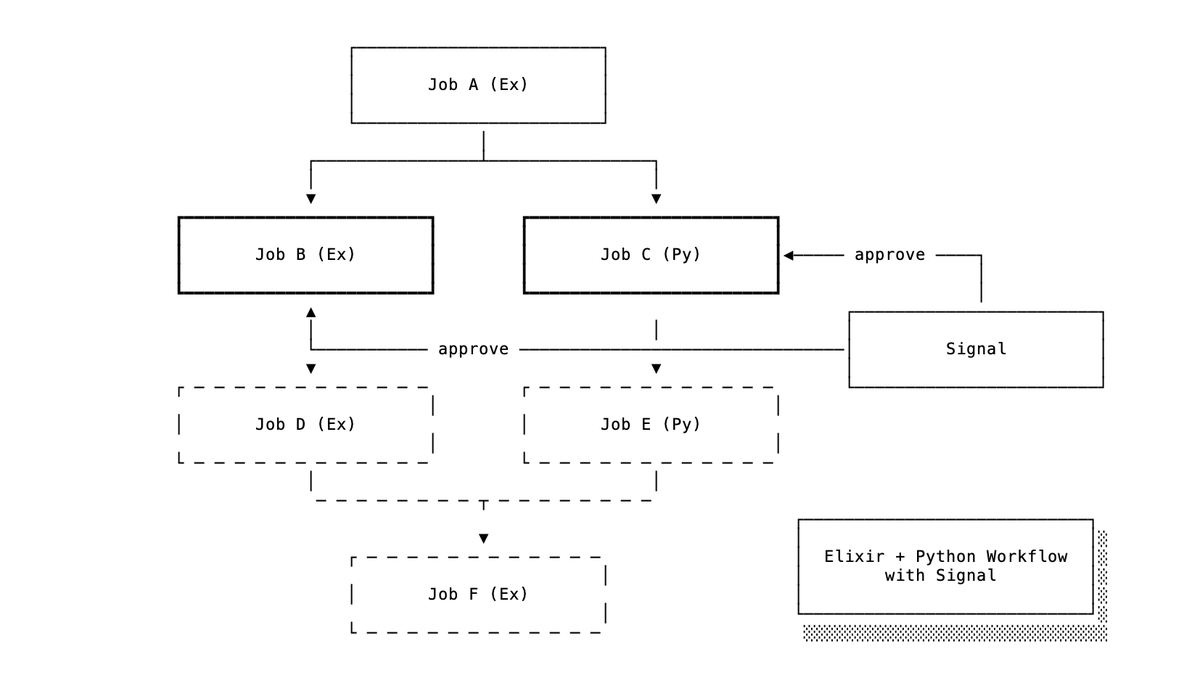
Oban Py Pro v0.6 is out with workflow improvements including:
📡 Signals and Awaiting
🗂️ Workflow Tracking
🦄 Unique Workflows
It's now possible to have hybrid Elixir + Python workflows with shared signal handling!
Business today is not about who has the biggest office. It is about who has the fastest idea, the cleanest execution and the strongest digital presence.
AshLua has been released! Easily and safely provide #AshFramework actions to a lua script to be called in your application 😎. Works via the very excellent lua library by @davydog187! See the guides for a very special element: integration with AshAI. Easily provide MCP tools for reading the docs of your new custom lua SDK as well as evaluating a script 🤯
A core tenet of #AshFramework is to "Model your domain, derive the rest". And the "rest" is often some kind of code generation or compilation step, which makes your actions accessible over some interface. AshGraphql builds an Absinthe schema for GraphQL support. AshJsonApi makes your actions available over Phoenix controllers or plugs. AshTypescript emits a typescript client.
Ash has had introspection tools since the beginning. You can say things like `Info.attributes(Post)` to get a list of attributes. However, we ended up repeating the same complex patterns in every extension of Ash to take some set of actions that should be exposed, and answer questions like "what are all the types we need to expose?" or "what filters/sorts does this resource support?"
Thanks to Torkild (Ash core team member), we now have a tool that makes this *extremely easy*. It's called `%Manifest{}`. This manifest can take a given set of actions, i.e "entry points" (or just "everything in an app") and gives you all of this information right at your fingertips. Each item in this data structure has a place for you to put extension-specific information "right where you need it" for later usage.
Over time we will back-port this new data structure into our existing extensions, but moving forward this is by far the best way to do code generation with Ash!
Before you had AI to spit out large swaths of code, you had to write it all yourself which gave you a natural in-depth understanding.
With AI, the path of least resistance now gives you an easy way out of understanding the code you are shipping. But the fact that you shouldn't ship code you don't understand *hasn't changed*. You just have to resist the temptation 🙅
On the flip side of this, AI provides all kinds of opportunities for understanding that were never reasonable before. Whenever I'm having trouble grokking a large code change, I use this simple prompt and so far it has yet to fail me:
> Take each non-test hunk from the git diff, and create an HTML page slide show for each one, explaining why it had to change and where it fits in the big picture. Put it in an order that will help me understand this change.
In less than a minute I have an understanding aid that would have been entirely infeasible in the past.
The only flaw here is that you have to be really honest with yourself when reviewing AI generated code. Do I understand this well enough to speak to it later? Am I confident in the second order effects of this code? Have I thought through the edge cases?
If not, don't just "ship it anyway". Use your fancy new tools to help you understand it 😎
How to ACTUALLY get your first 100 users
This guy grew his saas to $3M/year with a playbook anyone can copy:
1) Ranked against every competitor and stole their traffic
2) Built free tools. Embedded his product inside
3) Built demos for strangers on Reddit for free
4) Showed up everywhere his users were
Now? 150,000 users. And counting.