Need a brand logo?
This probably has it.
→ https://t.co/Z8Z5TIpEuH
One of the biggest libraries of brand logos.
Browse across categories like:
• AI
• accessibility
• auth
• automotive
• architecture
Export in:
• React / HTML / CSS / Next.js
• SVG / WebP / raster
Probably every logo you’ll ever need.
Astro and WordPress do not have to be an either/or decision.
For some client sites, WordPress can stay the familiar content layer while Astro handles the front end.
Wrote up a practical walkthrough here:
https://t.co/ir3fxgrbgB
Gutenberg 23.1 has introduced a native UI for creating custom post types, a feature long left to plugins, and not everyone's convinced it belongs in core.
https://t.co/7pLpMc5mzv
shadcn keeps making me look like a better designer than I am. @shadcn always says it's just a base you build on top of, and honestly that's why it works so well.
Themelets: static sites in a tiny WordPress hat. A themelet is a static HTML/CSS site that learned the WordPress handshake: installable as a theme, friendly to plugins, and small on purpose. GitHub Pages simplicity, WordPress-shaped:
https://t.co/xZphiS4oo9
NEW POST
Thoughtworks internal IT use a workflow for agentic programming called Structured-Prompt-Driven Development (SPDD). @WeiZhang595190 and Jessie Jie Xia describe how this works with a simple example plus details in a github project.
https://t.co/6cHnSPWr6L
I built a Figma plugin that extracts local styles (tokens and variables) and generates DESIGN md and SKILL md files that you can integrate with any AI tool
💻 open-source under MIT license
🤖 works with all major AI tools
🚀 local algorithm without API calls
I made a tool that generates a DESIGN.md from any URL and recreate the site pretty accurately.
You can reuse these prompts as a starting point to learn design systems, stay consistent and avoid purple gradients.
the hottest new design tool is english
google just introduced design .md, and i'm shocked more people aren't talking about it
it's a single plain text file where you describe how your app should look:
> colors
> fonts
> spacing
> button styles
> card layouts
all of it, all written in plain english
your ai coding agent reads this file before generating any ui.
so every screen, component, and page comes out visually consistent. automatically
the reason this matters is because most vibe-coded apps look like absolute slop
like it was designed by someone who's never opened a design tool
every screen looks slightly different. the colors don't match. the spacing is random. buttons change shape between pages
design .md solves this at the root
instead of trying to describe how things should look in every single prompt, you write it once in one file:
"primary color: # 6366f1 (indigo). use for buttons, links, and focus states"
"body text: inter, 16px, regular weight, 1.5 line height"
"cards: white background, 1px border, 12px rounded corners, 16px padding"
"buttons: 8px rounded corners, 10px vertical padding, bold text" etc
your ai reads this before touching any ui.
so every screen matches.
every component follows the same rules
and it works across tools. claude code, codex, cursor, gemini, whatever you're using.
the file lives in your project folder (same spot as skills and other context files)
and any ai tool that reads your project files picks it up automatically
google stitch (google's ai design tool) can also extract a design .md from any live website
point it at stripe .com. it pulls out stripe's entire visual language as a text file.
the exact colors, typography, spacing, and component patterns that make stripe look like stripe
drop that file into your project and your ai builds ui that matches stripe's design quality
someone already built a collection of 55 pre-made design .md files from companies like stripe, apple, airbnb, linear, notion, figma, spotify, uber
it's all on github for free (called awesome-design-md)
the workflow:
1. pick a design system you like from the repo (or extract one from any website using stitch)
2. drop the design .md file into your project folder
3. tell your ai coding agent to build your app/website
4. it reads the file and every screen comes out matching that visual style
one file that creates consistent design across your entire app.
no figma / design skills / css knowledge required
a year ago you needed a designer to make something look professional
now you need one text file written in english
Coding agents shouldn't run on a laptop.
That's why I've been building Cave.
It's a self-hosted platform for running @opencode agents in isolated sandboxes on your own server.
You give it a GitHub repo, it creates an isolated sandbox, clones the code, sets everything up, and gives you a coding agent.
Check in from your phone, run multiple agents side by side.
It's not open source yet (it will be), but I'm opening a private beta so you can install it on your own server already.
I've been dogfooding it since day one. If you're running a software factory: multiple agents working in parallel across repos, Cave gives you one place to monitor and manage all of it.
Now, I'm looking for people who want to give it a spin. DM me, happy to set you up 😊 🚀
I hooked Claude Code up to my WordPress site with the official MCP adapter. Now I draft posts locally and publish them without opening the WordPress admin.
Claude even formats the Gutenberg blocks automatically!
Full walkthrough: https://t.co/MKHgxTxdkC
Designers, this is your highest leverage in 2026. It's mind-blowing.
Figma MCP update makes it one of the strongest integrations with Claude Code I’ve seen. You can now use Claude Code to design in Figma.
Don't fall behind.
🤯Holy shit....Someone just built the missing layer for AI coding.
Most AI agents don’t actually understand your codebase.
They grep files, open random folders, and guess architecture.
This repo fixes that.
It indexes your entire codebase and gives AI real semantic understanding.
Not just files — everything: • dependencies
• architecture
• APIs
• infra configs
• database schemas
• cross-file relationships
Then I saw the benchmark…
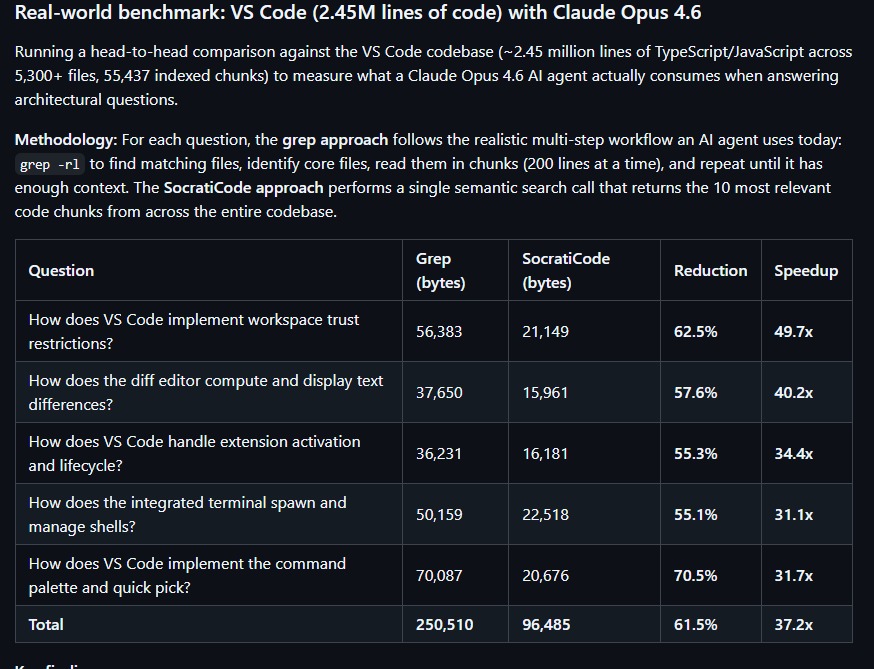
Tested on the VS Code codebase (2.45M lines):
→ 61.5% less context used
→ 84% fewer tool calls
→ 37x faster than grep-based agents
That’s not incremental.
That’s a completely different workflow.
Instead of AI searching blindly,
it actually knows your codebase.
Zero config.
Fully local.
Works with Claude Code, Cursor, MCP, Codex.
This might become standard for AI dev tooling.
Repo in comments ↓
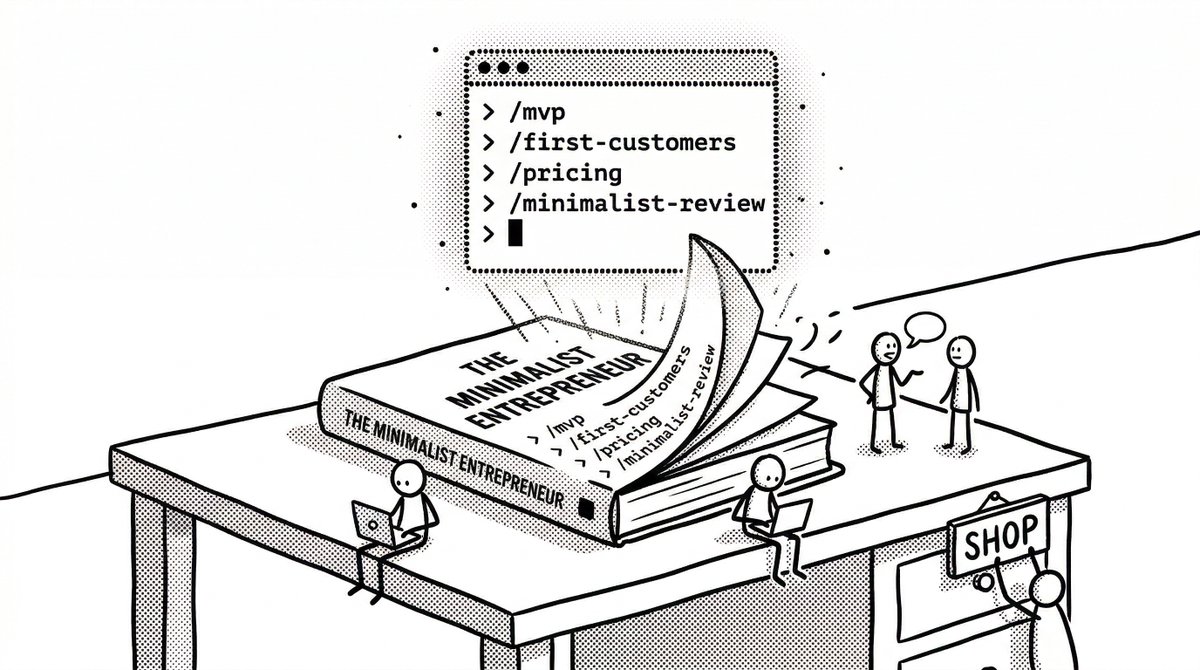
I turned The Minimalist Entrepreneur into 9 Claude Code skills.
/find-community — find your people
/validate-idea — test before you build
/mvp — ship in a weekend
/first-customers — sell to 100 people
/pricing — charge something
/marketing-plan — make fans, not headlines
/grow-sustainably — spend less than you make
/company-values — define your culture
/minimalist-review — gut-check any decision
https://t.co/TqtCR7HWe4
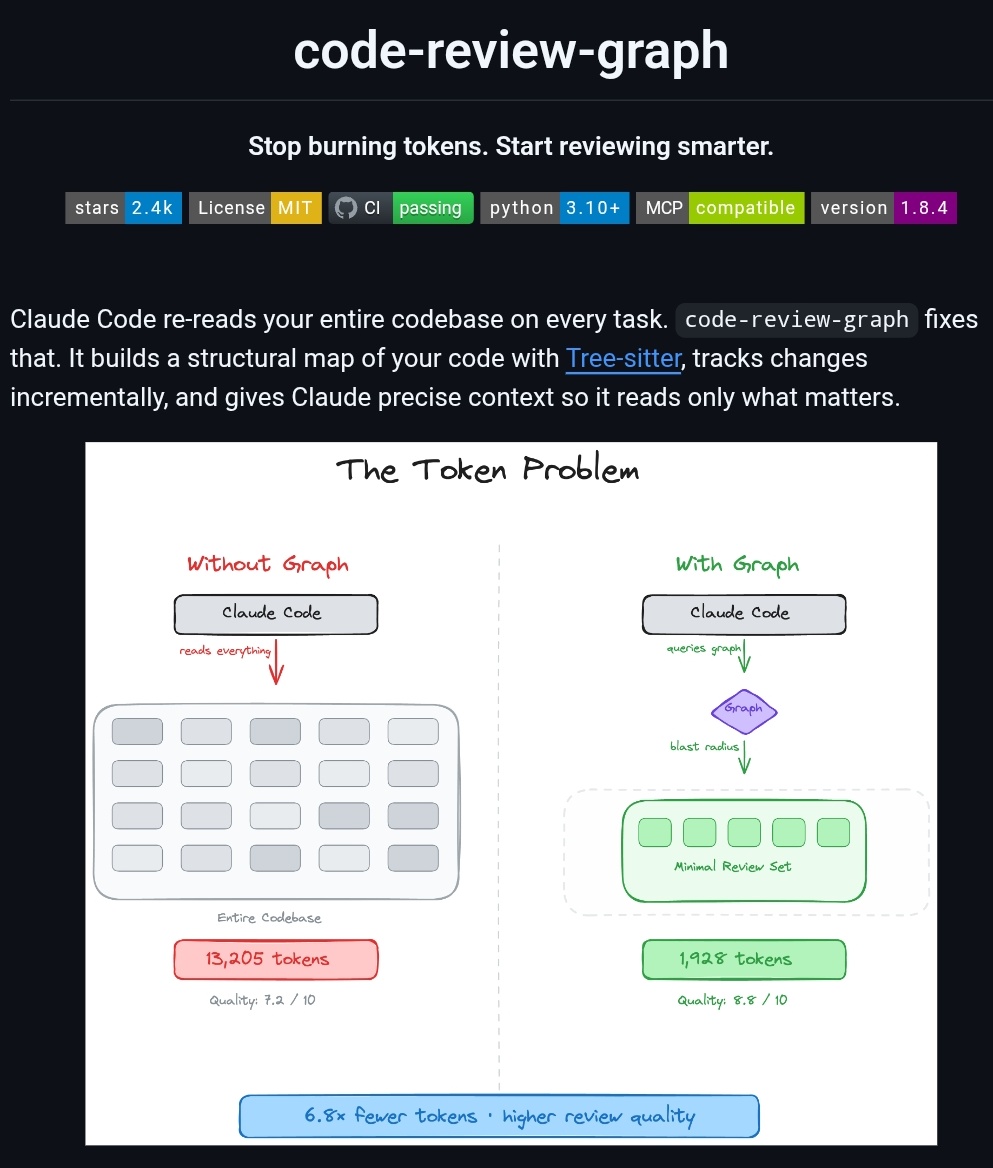
Claude Code re-reads your entire codebase on every task
code-review-graph fixes that
builds a persistent knowledge graph, tracks what changed, loads only what matters
local SQLite. no cloud. no drama
https://t.co/kWI39Qx0rU
1. Create local site in LocalWP
2. Open the folder in Cursor
3. Teach Cursor how to log into the site as user to run WP-CLI
4. Save step 3 as a reusable (personal, not project) skill.
5. Teach Cursor how to log into my live server. (SSH keys never have to be exposed to Cursor)
6. Build script to pull all files and database from live to local.
7. Make script reusable enough to implement on other live sites.
8. Save steps 6 and 7 to a personal skill.
9. Pull live site directly into LocalWP in a single command.
10. Make a bunch of changes to the local site. (add a page, change the theme, add some plugins, delete something old, delete something new, add it back)
11. Export the DB of the local site
12. Use the local DB dump and the live DB dump to train cursor on making a script to make safe DB changes.
13. Create a new script to push file and db changes back to live.
14. Test thoroughly (your created scripts should have dry-run functionality, and do your first real tests on a site you can restore a backup to)
15. Cry a little bit that this is so easy now.
Yes, I just did this, and the entire process took me about an hour.
Does this mean that tools out there that do this for users are dead? Absolutely not. You still have to have my level of understanding for how-this-all-works.gif for this entire process to only take an hour (that will be 30 seconds on the next site).
But man, agentic AI is pretty darn powerful.