Patch 26.17 Preview!
This patch is mostly a stabilization patch after observing the adjustments made on 26.16.
Mages bot overall have lost some amount of winrate across the board, but not a huge amount, which is roughly about the impact we're looking for.
So far, we're seeing good skews on Poppy and Camille support with support nerfed and Top skews playing out well (in particular).
We're still monitoring the impact of Hail of Blades on champions more broadly, eg. Yi, Trynd, Shaco, etc.
Sundered Sky
- Directionally, Sundered Sky and AP Jungle changes have been good, but magnitude is still off
- We're putting another small-moderate nerf in for this patch and hoping to see more movement on AP jungles and Sundered Sky dominance in higher levels of play
Stormrazor
- Outside of Stormrazor Jhin, it doesn't have a large user base and we think it could have more power overall to broaden the user pool
Champion wise, a pretty standard set of nerfs here, mainly for power impacting outliers.
For organizations that say they do Zero Trust, do they really? A core pillar of Zero Trust, especially in the AI world is managed device requirements to access cloud resources. Most successful businesses are highly collaborative and organizations don't really know where to start. If your employees can access cloud resources from an unmanaged Windows, Mac, or Linux, this is NOT Zero Trust.
IMPORTANT:
What is a managed device? A company issued asset with security point solutions installed, configurable by the organization, monitored (90%+ visibility on all activities via EDR; centralized logging), and remotely accessible by the organization in the event of incidents.
Collaboration is really challenging to "secure". If you do not enable the business to collaborate, you will hurt the business.
Where do you start then? Internal employees who have managed devices. This could be laptops, on-site workstations, kiosks, AVDs, W365 VMs, VDIs, etc. If they have managed devices, dont allow them to access company resources from unmanaged Windows, Mac, Linux, etc. Use MAM-WE to enable access from unmanaged phones where necessary. Intune application protection policies are very granular to control access and movement of data in the data security sections of the policies. You can block transfer between apps, downloads, cloud sync, backup, etc. Moreover, when employees depart, when you wipe, it only wipes company data. Should you allow access to all apps through MAM-WE? No. Most orgs need email and Teams. That's it. If they need more robust activity, they should login from their managed device.
There is a caveat to email: Enterprise M365 Copilot will ground company data and make it accessible on these devices. There is no good way to block it. This is why your MAM-WE data security policies within App Protection Policies need to be tight.
What about vendors? This is one a lot of orgs really struggle with. The best route is always B2B collaboration (not talking about DIB here because that vertical is much more nuanced due to CUI). If not done with a lot of consideration of impacts, you have the potential to really cripple the organization. Rely on DLP until you sort out streamlined automations to enable rapid onboarding of B2B collaboration. The turn around time for this needs to be fast (less than a day) to enable the business.
Take home message: you are not doing Zero Trust in the AI world if you allow employee access from unmanaged devices. B2B Collaboration needs rapid onboarding that is simple for users to request.
One of the most frequent questions I'm asked is "how do you stay up to date on malware stuff?"
Okay, here is a pro tip:
1. Google OTX AlienVault
2. Make account
3. Look at latest
4. Scroll until you find posts from a guy named Petr something-something (has numbers in his name).
4. Follow his account
He monitors all the big malware places and shares the URL, hashes, etc. from malware vendors. I've been following this random ass dude for years and getting updates on everything.
I have no idea who he is. I don't know where he's from. All I know is his setup is absolute fire and he keeps you up to date on literally everything malware related 24/7 365. He also has stuff from vendors in China, Russia, Japan, etc.
Every morning I log into OTX and check up on my boy Petr to see what fire he's bringing me. I love him.
So, Copilot Agents in EDU. Let's figure this out. My first recommendation, until you're sure you are ready, is to go to M365 Admin Center > Agents > Settings > User Access > Specific users or groups > Add a control group with your test users to deny general access.
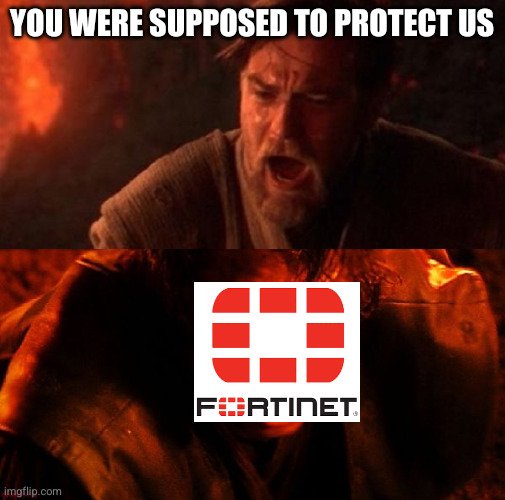
I work at Fortinet.
Every day, I spend 30min adding purposely vulnerable code. If I miss a day, I add 30min to the next day.
Tomorrow, I will spend 30min adding purposely vulnerable code to Fortinet.
Let me blow your mind real quick:
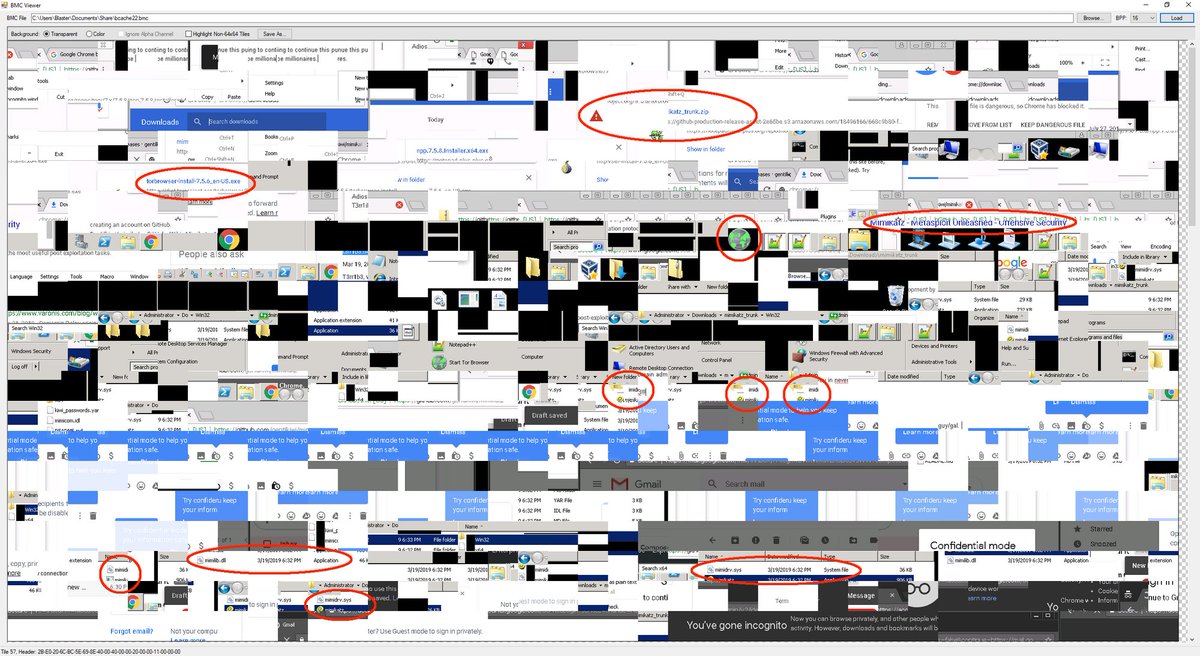
When you use Remote Desktop (RDP), Windows secretly takes screenshots of what you are doing.
It’s called the RDP Bitmap Cache.
To make the connection faster, Windows saves small tiles (images) of the remote screen to your hard drive in a bin file.
Even if the session is over and the remote server is destroyed... your laptop still holds the cache files.
Forensics teams use tools like BMCViewer to stitch those tiles back together.
They won't just see logs but the literal email, document, or picture you were looking at.
💀
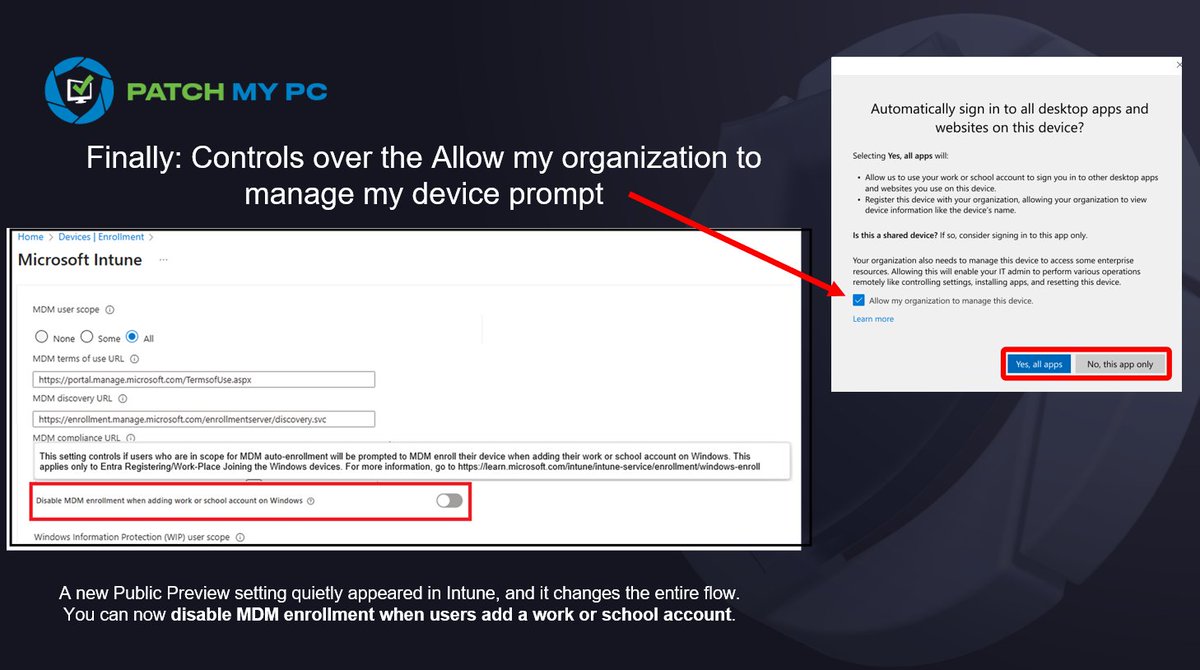
Microsoft finally added a new control in Intune that many of us have been waiting for.
That familiar prompt asking "Allow my organization to manage my device"??? It finally becomes something we can control service side!.
This prompt has been the source of a lot of unexpected enrollments and frustration. There is now an option (public preview?) to disable MDM enrollment when a user adds a work or school account. It looks small, but it solves a long-standing problem.
I wrote down what changes and why it matters.
https://t.co/SXGfmyzf5P
#Intune #MSIntune #Windows #Windows11 #Microsoft
I finally came around and documented all the Conditional Access bypasses in a single blog post. It contains not only the documented bypasses, but also the results of new research.
#Entra#ConditionalAccess#Security#Cheese
https://t.co/YWBfY0NhHl
Here's my top 20 weaknesses in M365 based on experience consulting. I've seen most of these everywhere in varying mixtures. Public groups has been a problem in all but one org I've worked with.
1. Public Groups expose sensitive data
2. Upload from unmanaged devices
3. Download from unmanaged devices
4. Lack of CAPs to block device code phishing
5. Lack of CAPs and configurations to mitigate AITM
6. OneDrive sync allowed from unmanaged devices
7. Ability to sync cloud storage to other 3rd party drives and vice versa
8. Anyone links in OneDrive and SharePoint
9. Legacy SharePoint IRM on sites and document libraries and Teams (classic) sites
10. Non-existant App Governance
11. Lack of governance or data security on Power Platform Connectors
12. Lack of license by request for Power Platform Apps
13. Teams apps sprawl
14. Anon users allowed to chat in Teams
15. Excessive API permissions in vendor apps
16. Ungoverned 3rd party AI
17. Lack of DLP on Microsoft Cloud Services
18. Lack of Safelinks in office365 apps aside from email
19. Lack of safe attachments in m365 apps outside email
20. Lack of phishing resistant authn
As an IT admin something I learned the hard way was to never trust yourself to not misconfigure anything. Double check your work, even get a second set of eyes on it. Your future self will thank you.
Happy Thursday!
Just published the first version of my Entra ID Break Glass Account Management solution for paid members.
What it does:
+ Automated security assessment for Emergency Access (Break Glass) accounts
+ 12 security checks covering configuration, authentication, roles, and Conditional Access compliance
+ PowerShell-based framework that validates your Break Glass accounts actually work
+ Generates compliance reports (HTML dashboard, JSON, CSV)
This solution validates your Break Glass accounts are properly configured and will work when you need them.
Fully extensible - add your own checks, customize thresholds, integrate with your monitoring.
More checks coming soon.
Available now - https://t.co/lImMFh83p1