Do you want to build a modern looking left navigation menu for your #PowerApps that you can reuse across your apps easily? Check out this video where I show you how to do that in under 5 minutes!
https://t.co/HeTfQgTKgt
#PowerPlatform#UI#UX
It's so cool to see screens that I built show up in product! 🤩
We've got some new prebuilt screens in Power Apps that will help you easily create modern, responsive apps by simply selecting a screen.
Check them out👀
https://t.co/mPfxyx0PEh
#PowerApps#UI#PowerPlatform
“Inspiring Inclusion,” is a celebration of the accomplishments of women during Women’s History Month.
Today, we highlight our inspirational Community Projects and Programming Manager, Ebony Woods.❤️
#WomensHistory #WomensHistoryMonth#Celebrate #CocaColaConsolidated#BeInspired
Are you looking for inspiration for how to use Copilot in your Power Platform solutions? The Copilot Cookbook is here to help! Check out this curated gallery to get inspired!
#Copilot#PowerPlatform
Something cool just dropped 👀
1. Go to https://t.co/3IqVgJ5ybP
2. Make sure you're in Web mode & click "Notebook" at top left
3. You can write your prompt AND ALSO modify it inline to get better results.
Give it a try and holla what you think! 👇🏽
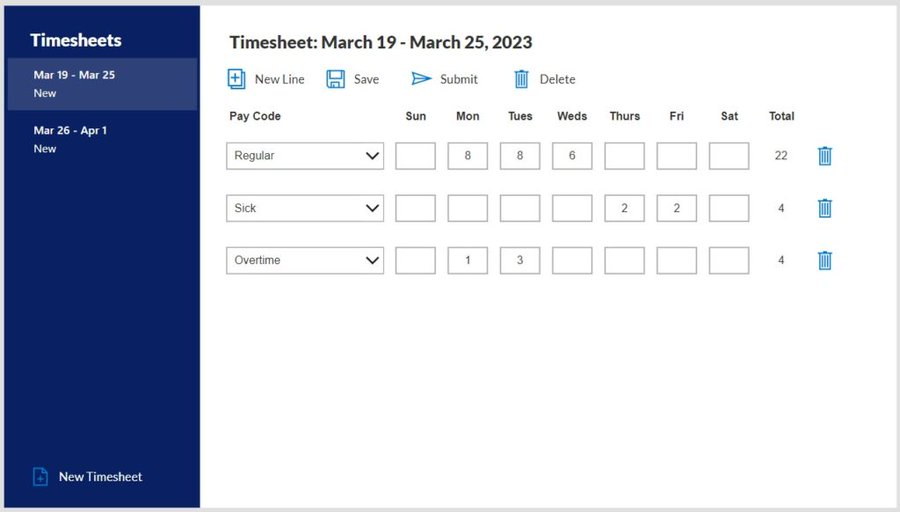
Are you looking for a simple and effective way to track your time? Check out my latest YouTube video, where I show you how to use the Weekly Modern Timesheet Template that I created with #PowerApps! ⏲
https://t.co/i9PAhVW85B
#Templates#Timesheet#PowerPlatform
In ‘My Content’ in the Microsoft 365 app, you can use the tagging feature to categorize content you or others create, and never worry about where content is stored again.
All tags are private to you!
🏷️🔖🏷️🔖📁🗂️
https://t.co/lJvO1u31CI
#Microsoft365
#PowerApps Responsive Forms
To actually learn responsive design you can’t rely on out of the box features 📦
I’ve come up with a simple forms pattern you can use again and again ♻️
Learn to build it here:
🔗 https://t.co/rdRGYK5TEn
Giving away this JORDAN brand Michigan performance T-shirt in your size! Instructions to enter:
1) LIKE this tweet.
2) RETWEET this tweet.
3) FOLLOW this account.
Winner announced Sunday! Good luck!
#PowerApps Timesheets Tutorial Pt. 2 👨💼⏰
Learn how to build this app for yourself using my written instructions ✏
Then customize the Timesheets app to meet your needs 🎨
Check it out here 👇
🔗 https://t.co/qYVASTpDL6
Giving away this NIKE Michigan retro logo performance T-shirt in your size! Instructions to enter:
1) LIKE this tweet.
2) RETWEET this tweet.
3) FOLLOW this account.
Winner announced Sunday! Good luck!