Wafer is now integrated with @getbifrost
Build using Wafer's endpoints with less infrastructure to maintain.
With the Bifrost AI Gateway, your team can manage credentials and spending across applications, freeing up engineering time for the product.
Docs in the comments.
One platform for all your AI traffic:
Bifrost Edge 🤝Bifrost Gateway
We're inviting leading infrastructure and AI teams to try it. Request access here https://t.co/5qEqiA0JNe
Introducing Bifrost Edge
AI gateways today govern the traffic your team routes through it. But a rising share of AI tools that teams run never reaches the gateway - right from your Claude Cowork to ChatGPT and Notion AI - so your budgets, logs, and guardrails never apply to them.
Bifrost Edge changes that..
Nothing changes for the people using AI. Zero config: one sign-in, and it just works in the background.
Your infrastructure and security teams get full visibility and control across all of it.
For the first episode of Runtime by Maxim AI, we managed to pry Dan from our engineering team away from his terminal long enough to walk us through how we built Bifrost, our enterprise AI gateway.
In this episode, we cover:
✅Why we chose Go over Python for building a a high-throughput, ultra-low latency gateway
✅How we built Adaptive Load Balancing to ensure your AI systems never fail
✅Other infrastructure decisions that matter when you’re processing millions of LLM calls at scale
This is the first in a series of technical deep dives into the architecture, trade-offs, and reliability patterns behind Maxim AI. More conversations (and attempts to get our team away from their code) coming soon!
Watch Episode 1 now 👇
https://t.co/4tpBuCi2YB
When AI is mission-critical, the infrastructure behind it can’t be average.
✔️ Infrastructure matters.
✔️ Performance matters.
✔️ Enterprise resilience matters.
That’s why we built Bifrost, the most performant AI gateway, engineered for enterprises from day one and trusted by Fortune 100s to startups worldwide.
Take a look 👀
Recently a Global 500 with over 200K employees organically adopted @getmaximai and onboarded multiple teams building a large internal swarm of agents in a matter of days🧵👇
1/8
✅ Multiple models behind the same CLI
✅ Usage tracking across models and teams
✅ Anthropic-compatible API types
✅ MCP tools support
✅ Built-in observability, load balancing, and failover
2/3
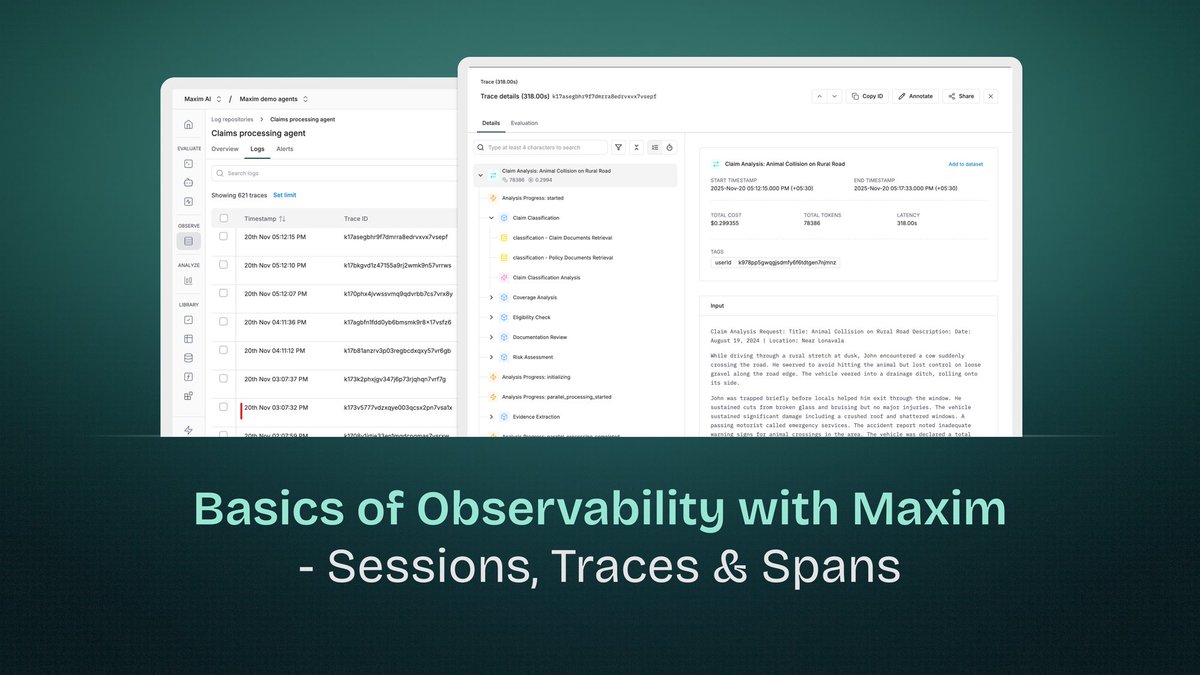
Observability in AI applications differs fundamentally from traditional application monitoring. While conventional systems deal with deterministic request-response cycles, AI applications involve multi-turn conversations, complex reasoning chains, multiple model invocations, and retrieval operations - all of which need visibility for debugging, optimization, and understanding system behavior.
Maxim AI's observability platform extends distributed tracing principles to address AI-specific challenges. At its core are three hierarchical constructs: Sessions, Traces, and Spans. Understanding these components and their relationships is essential for effectively monitoring and troubleshooting AI applications.
Want to read more? Link - https://t.co/ydBpI1pN9h
Modern speech AI systems are impressive. They can understand context, generate human-like responses, and even capture emotion in their voice. But there's a hidden technical challenge that plagues nearly all of them: first token latency.
When these systems generate speech, they produce it as a series of small audio chunks called "tokens." Traditional models generate these tokens one at a time, sequentially.
The researchers behind VITA-Audio decided to break that paradigm. Instead of generating one audio token at a time, they sought to generate multiple in a single forward pass through the model. This is where their key innovation comes in: Multiple Cross-Modal Token Prediction.
Sounds Interesting right? Read the complete blog written by Vrinda Kohli here - https://t.co/utSVavfVVW
Zed AI by @zeddotdev is a high-performance, collaborative code editor built for the modern development workflow. With native AI assistant integration, Zed can leverage language models directly within the editor for code generation, refactoring, and explanation. Integrating Zed with Bifrost Gateway unlocks multi-provider model access, MCP tools, and observability - transforming Zed's AI assistant into a flexible, enterprise-ready coding companion.
Check out this short blog on how to integrate Bifrost with Zed - https://t.co/V3XbKc7B7L
@Kimi_Moonshot recently open-sourced Kimi K2 and its reasoning-optimized variant, K2 Thinking. As someone who works with large language models, I wanted to break down what makes this release interesting and where it pushes forward the state of open-source AI.
This blog walks through the key technical innovations: how they trained such a large model without crashes, how they generated training data for complex agentic behavior, and what makes the reasoning mode special - https://t.co/gEZ1UrMdcZ
Codex CLI is @OpenAI 's command-line tool for code generation and completion, bringing AI-assisted coding directly to the terminal. By routing Codex CLI through Bifrost Gateway, you gain access to multiple model providers, enhanced observability, and MCP tool integration - transforming a single-provider CLI into a flexible, multi-model development assistant.
Check out this blog and get started with using Bifrost with Codex CLI - https://t.co/pqvnTzK9fU
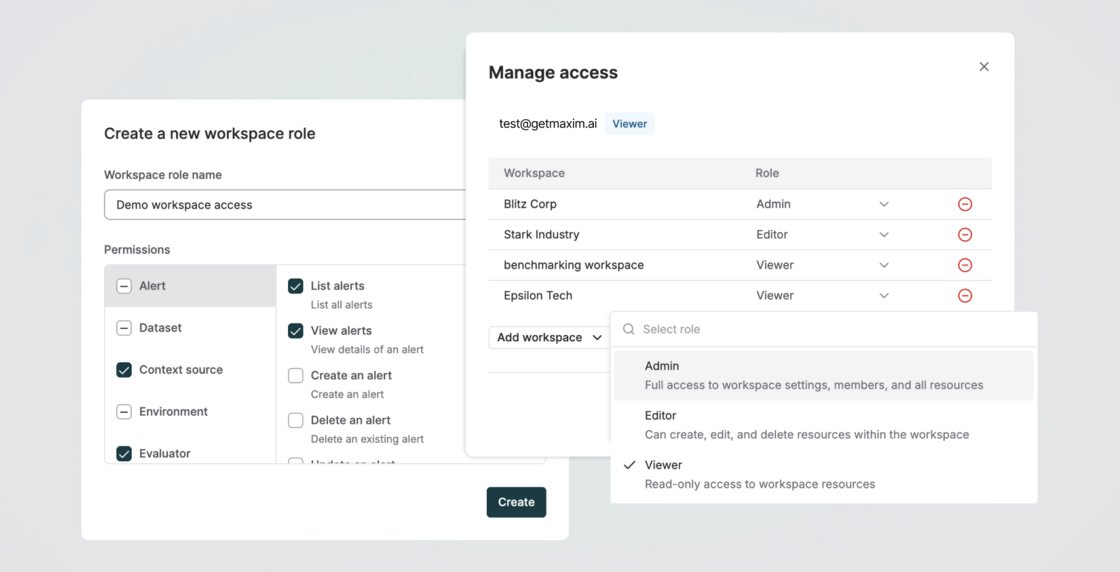
We’ve enhanced Role-Based Access Control (RBAC) in Maxim to give you finer control over access management.
Previously, roles were assigned only at the organization level, giving users the same scope of access across all workspaces they were part of. Now, you can assign different roles to users per workspace and also create custom roles with precise permissions for the resources and actions a member can access, specific to a workspace.
This gives teams granular, functional control over what users can view or do - e.g., allowing someone to create, deploy, or delete a prompt in one workspace while granting read-only access in another - making collaboration more secure, flexible, and scalable.
Get Started now - https://t.co/ujL3ngeEYr
You can now generate synthetic datasets in @getmaximai to simplify and accelerate the testing and simulation of your Prompts and Agents. Use this to create inputs, expected outputs, simulation scenarios, personas, or any other variable needed to evaluate single and multi-turn workflows across Prompts, HTTP endpoints, Voice, and No-code agents on Maxim.
You can generate datasets from scratch by defining the required columns and their descriptions, or use an existing dataset as a reference context to generate data that follows similar patterns and quality.
You can include the description of your agent (or its system prompts) or add a file as a context source to guide generation quality and ensure the synthetic data remains relevant and grounded.