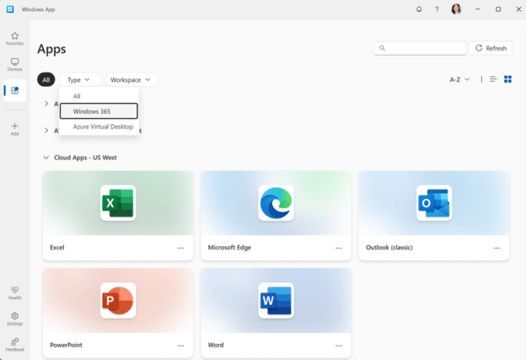
Windows 365 Cloud Apps now in public preview! Stream specific apps from the cloud on Frontline Cloud PC, no full desktop needed. Ideal for frontline workers.
Details: https://t.co/q3EE7mKxfg
#Windows365#CloudPC#MSIntune#Windows#CloudApps
@IntuneSuppTeam Thanks for the help, Im testing with Windows 11 23H2, and the personal Enrollement is blocked thats why im uploading the corporate identifier
@IntuneSuppTeam@Mister_MDM
Hej , im testing Autopilot V2 and i uploaded a corporate device identifier with the below format :
HP,HP EliteBook 850 G8 Notebook PC,5CGXXXXX and still get error 80180014 when i try to enroll it . what can be the issue 🤔any hint ?
@ariaupdated@IntuneSuppTeam Thanks for the tip , i will try that.
It is just because we have " VIP " people that make random meetings during the month so we need to make sure they don't get disturbed by updates .
@IntuneSuppTeam when can i start testing " Autopilot device preparation " on corporate devices ? i cant add identifiers for windows devices yet . Is it pulled back for corporate devices ?
@JasonSandys we have another issue with WHFB. users who log in with a PIN code and use Citrix need to re-authenticate with their username and password every time they open or log in to Citrix. is it possible to change the default login method to password without the need to disable WHFB ?
@PerLarsen1975@IntuneSuppTeam Thanks for the reply , How are we supposed to install the sccm agent on an AAD machine if it requires an approval from the sccm console if we deploy it as an app 🤔
Hi @IntuneSuppTeam when i enable the Co-management authority setting to install the SCCM agent on Autopilot AAD machines , i get an error on " Preparing device for mobile management stage. Error Code 0x800705b4 " what can be causing this ?
@KevinOdomNC@IntuneSuppTeam Indeed , but when you consider moving the client into a package for AAD scenario, you should approve the device in sccm console or set it to automatically approve clients which we dnt want to