For the second year in a row, Oklahoma City is one of the top two big cities in which to live!
This ranking would have been inconceivable in the 1980s and 1990s, but it reflects an intentional strategy we’ve deployed ever since those challenging years. Across three decades, our residents have passed 15 votes totaling $10 billion of investment in our quality of life. Now, we’re enjoying what happens when you invest in your city.
Enjoy this moment, OKC, and know that it’s not coming to an end anytime soon, because we have nearly $5 billion of that investment still rolling out over the next few years.
#1OKC
O vídeo publicado pela Federação Bósnia com a lista de convocados para a Copa, além de mostrar lindas imagens do país - principalmente de Mostar -, é também uma aula de pronúncias dos nomes dos jogadores . ⚽️🇧🇦
Arguably the best 9 holes of my life…. Driver only & I feel like I didn’t miss a shot. So fun getting creative out there and just manufacturing shots. Helps quiet my brain down and just focus on the vision of the shot I’m trying to hit #golf
@CollinRugg Put me in a room with this monster, and let me maul him to death with my bare hands.
The death penalty is not sufficient for a monster like this.
Welcome back to OKC, Enes Freedom! Still showing love for this community and the people in it. Enes spent time with us at City Rescue Mission this week, learning more about the work happening every day to help our neighbors end their homelessness. Thanks for still loving OKC!
🚨Breaking: The guy who created Claude Code (@bcherny) just revealed how his team actually trains their AI.
One file: CLAUDE.md
You place it at the root of your project.
Inside it:
past mistakes
conventions
rules
Claude reads it every session.
The result?
The agent improves over time without you touching the code.
Every bug that gets fixed becomes a permanent rule.
Boris Cherny uses this internally at Anthropic every day.
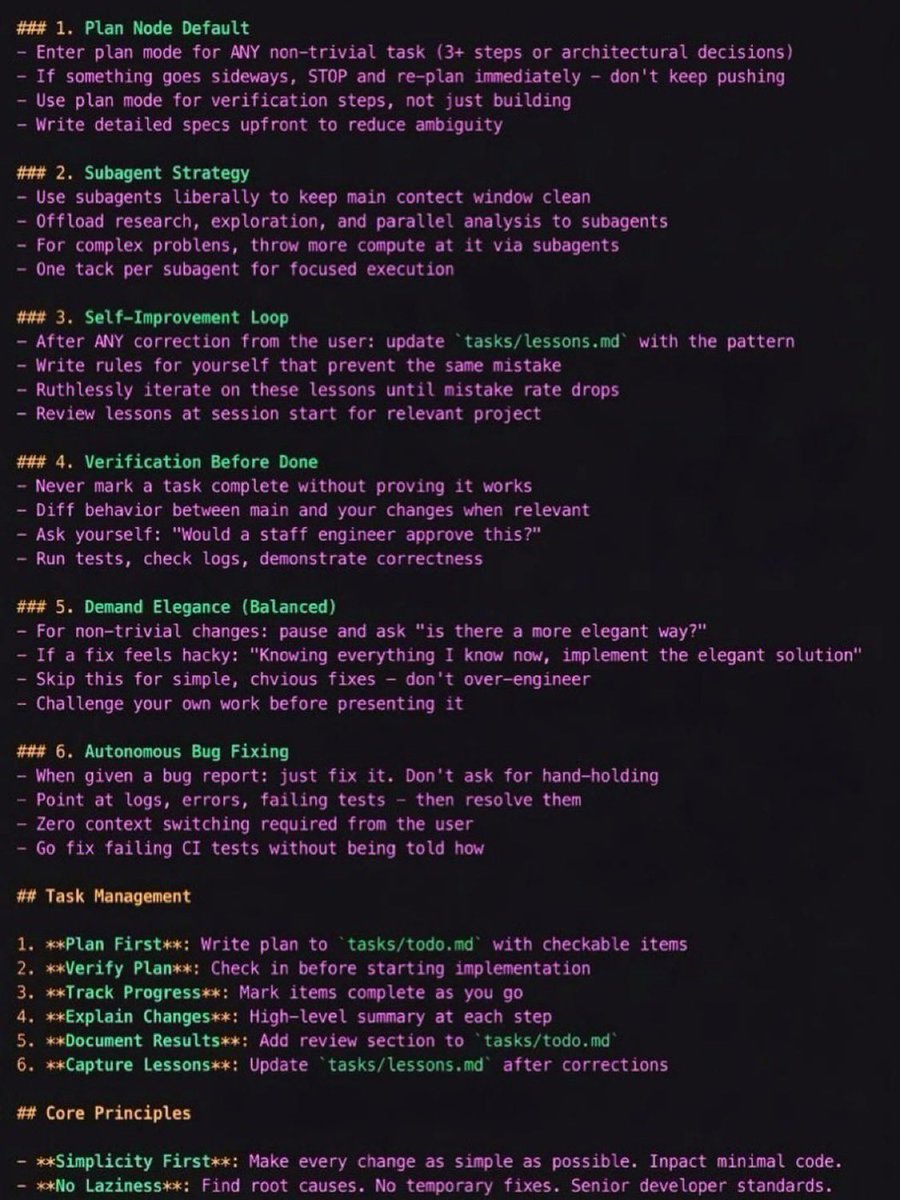
Here’s the template he shared — ready to copy, paste, and adapt.
CLAUDE.md Template
1. Plan Mode Default
Enter plan mode for any non-trivial task (3+ steps or architectural decisions)
If something goes wrong, STOP and re-plan immediately — don’t keep pushing
Use plan mode for verification steps, not just building
Write detailed specs upfront to reduce ambiguity
2. Subagent Strategy
Use subagents frequently to keep the main context window clean
Offload research, exploration, and parallel analysis to subagents
For complex problems, throw more compute via subagents
Assign one task per subagent for focused execution
3. Self-Improvement Loop
After any correction from the user, update tasks/lessons.md with the pattern
Write rules for yourself to prevent repeating the same mistake
Ruthlessly iterate on these lessons until the mistake rate drops
Review lessons at the start of each session
4. Verification Before Done
Never mark a task complete without proving it works
Diff behavior between main and your changes when relevant
Ask yourself: “Would a staff engineer approve this?”
Run tests, check logs, and demonstrate correctness
5. Demand Elegance (Balanced)
For non-trivial changes, ask: “Is there a more elegant solution?”
If a fix feels hacky, ask:
“Knowing everything I know now, implement the elegant solution.”
Skip this for simple fixes — don’t over-engineer
Challenge your own work before presenting it
6. Autonomous Bug Fixing
When given a bug report: just fix it
Use logs, errors, and failing tests to diagnose
Require zero context switching from the user
Fix failing CI tests automatically
Task Management
1. Plan First – Write the plan in tasks/todo.md with checkable items
2. Verify Plan – Confirm the plan before implementation
3. Track Progress – Mark items complete as you go
4. Explain Changes – Provide a high-level summary at each step
5. Document Results – Add a review section to tasks/todo.md
6. Capture Lessons – Update tasks/lessons.md after corrections
Core Principles
Simplicity First
Make every change as simple as possible and minimize code impact.
No Laziness
Find root causes. Avoid temporary fixes. Maintain senior-level engineering standards.
Claude Cowork complete crash course from zero to expert in 12 minutes.
Installation, automations, connectors, plugins..all of it:
00:00 Intro
01:00 Installation & setup
02:08 Your first task
03:01 Global instructions (most skip this)
04:00 What Cowork can actually access
05:15 Skills feature
06:08 Connectors explained
07:04 Real workflow (Drive + Gmail)
07:46 Claude in Chrome
08:43 Scheduled tasks
09:52 Plugins (why $285B was wiped out)
11:41 Big picture
You can now enable Claude to use your computer to complete tasks.
It opens your apps, navigates your browser, fills in spreadsheets—anything you'd do sitting at your desk.
Research preview in Claude Cowork and Claude Code, macOS only.