A lot of people don't realize that Windows has a built-in feature called Windows "Sandbox" that boots up a brand new virtual Windows machine in seconds. So I made an MCP server so you can test your apps inside a throwaway machine in seconds. https://t.co/huB9hAoxSv
For anyone who wants to check out @r3nzsec 's amazing IRFlow Timeline (to replace Timeline Explorer) but have to use Windows or Linux, I compiled binaries for those platforms. Feel free to submit issues if you find any bugs.
DFIRなどでTimeline Explorerより遥かに優れている「IRFlow Timeline」を使いたいけど、Macを持っていない!という方のために、Windows版とLinux版のリリースパッケージを作りました。
Windows Binary: https://t.co/MPyDiipe4t
Linux Binary: https://t.co/YumjI1cwed
Website: https://t.co/iczzGaD7NV
🚨 MAJOR MOBILE FEATURE 🚨
You can now record up to 1 hour of live audio directly in the mobile app. Capture lectures, team meetings, or your latest mad scientist rants and instantly use them as sources.
Pro tip: Combine your live audio recordings with photos of your handwritten notes to create the ultimate personalized workspace
Install Oh-My-Hermes.
https://t.co/ehmuptlzxA
It's a dedicated harness that expands the coding intelligence of Hermes Agent.
It packs 150+ battle-tested workflow skills, an in-house long-term memory system pushed to tier-1 benchmark performance, subagent routing recipes, graph engineering workflows, and a gorgeously crafted Native TUI.
I’ve been burning hundreds of billions of tokens continuously stress-testing, validating, fixing benchmark drop-offs, and enforcing strict software design principles through prompts. The result is an insane piece of tech that never degrades into slop.
Growth is exploding, and the community feedback has been overwhelmingly positive.
Check out the newly revamped Oh-My-Hermes website!
#hermes
Posting logs with exploit details is awesome 🚀 and helps us test detections. Here's my yara based Velociraptor artifact 🦖, tested against Adel's released PHP2Shell case logs.
https://t.co/4PaxV5njVm
#DFIR#ThreatHunting
https://t.co/d15u43t04X OSINT MCP tools
I use OSINT MCP servers a lot these days, and I think anyone who automates investigations should have them at hand 🕵️
The good ones I collect in a list: 70+ tools in 11 categories, with free and self-hosted ones marked.
Now it’s on StartMe:
https://t.co/uG5p5Oxyvt
SO-CRATES 5.0 is out 🧅
SO-CRATES is a free, open source web app for analyzing PCAPs, logs, emails and binaries, all in one container that works offline.
New in 5.0: tshark runs alongside @Suricata_IDS and provides additional protocol support, including S7comm, IEC 104, BACnet, OPC UA, Telnet, RADIUS, IPMI, DHCPv6 and tunnels. A new Findings tab ranks what those records show.
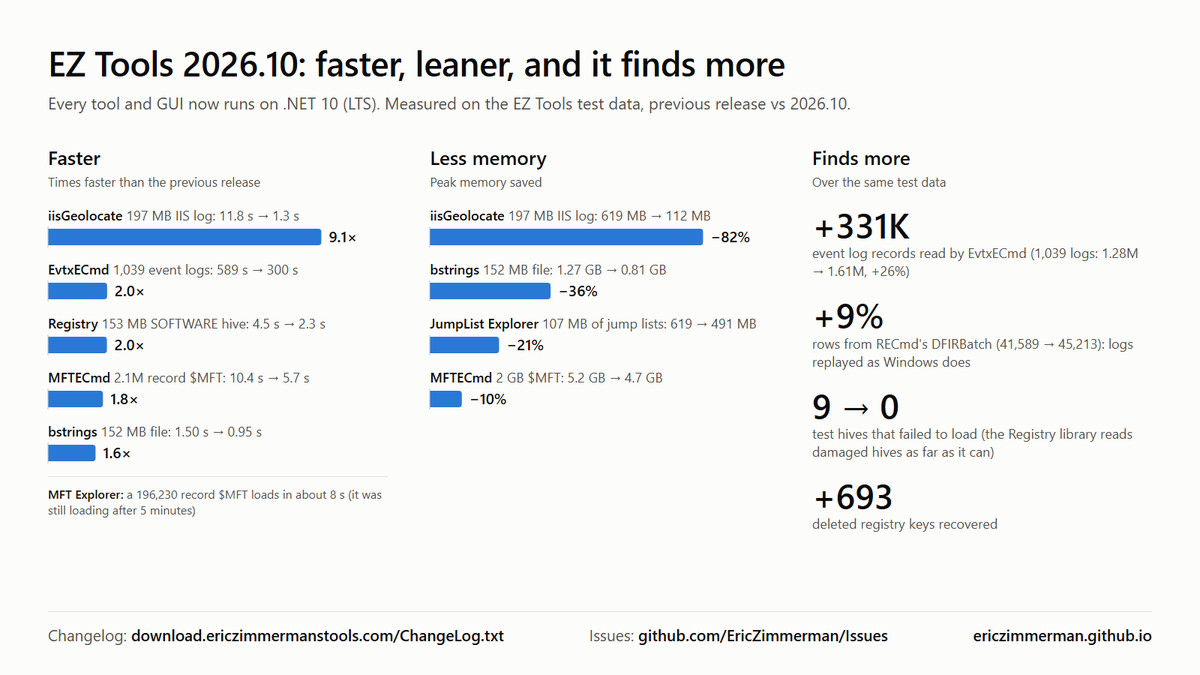
1/ EZ Tools 2026.10 is out, all on .NET 10 (LTS)
✅ More accurate: 331K more event log records, hive logs replayed as Windows does, every test hive loads
⚡ Faster: up to 9x; EvtxECmd and Registry 2x
📉 Less memory: up to 82% less
Update with Get-ZimmermanTools 🧵 #DFIR
I highly recommend cloudflare's security audit skill: https://t.co/Mu6Dm0fzk8
Run it on all your software. Run it with the free models. Use it even if you used a model to audit something - it will find much more things. Works in all agent harnesses and is model independent.
Two very useful posts on monitoring and hardening PHP services, plus an Nmap command to help find them in your environment:
1. Discovery with Nmap
Common and alternative web ports; HTTP headers that may expose PHP versions:
nmap -sT -sV --version-light -T4 --max-retries 1 --open -p 80,81,443,8000-8010,8080-8090,8181,8443,8880,8888,9000,9001,9080,9090,9443 --script http-headers --script-timeout 10s --script-args 'http-headers.path=/index.php,http-headers.useget=true' <target>
Look for X-Powered-By: PHP/.... Fast inventory check; hidden PHP deployments can be missed, and version banners don’t confirm vulnerability.
2. Huntress: Monitoring and detection
• Confirmed facts and remaining questions
• Suspicious PHP child processes, shells and downloaders
• Webshells and other post-exploitation activity
• My process-watcher for Linux process visibility
https://t.co/XLx8za50cZ
3. Vincent Schmalbach: Hardening and patching
• Temporary nginx/Apache filters and upload-progress settings
• WAF/origin bypass checks
• Package and backport verification
• PHP-FPM/worker restarts, container rebuilds
• Side effects and checks for compromise
https://t.co/30YfHmqIcR
Temporary measures are stopgaps. Prepare to apply the official fixes as soon as available.
Google just open-sourced Harness².
(turn any harness into a self-improving system)
a harness is everything wrapped around the model, like the system prompt, tools, memory, skills, and subagents. today a person designs it once, and the agent runs every new task with that same fixed setup.
Harness² lets the agent refine that setup for each new task on its own, with the model weights left untouched.
on every task, the agent proposes edits to its harness, runs a few candidate versions, and composes a better harness by comparing how those runs behaved.
because it learns from the differences between runs, it needs no correct answer or grader for the task.
that covers a single task. Harness² also carries what it learns from one task into the next.
after each task, it saves the harness it settled on along with the lessons that held up across the runs. the next time it refines a harness, it starts from those notes instead of from scratch.
this means every finished task makes the next round of edits more informed.
Google tested this with Gemini 3.5 Flash and GLM-5 on legal, office, and professional work benchmarks. one round of edits was enough to beat their original harnesses, and giving the agent more rounds pushed scores higher.
those extra rounds can go wide or deep. the agent either tries several candidate harnesses at once or keeps refining a single one step by step, using OpenCode or Codex to carry out the work.
you can find the Harness² repo here: https://t.co/i00WLeeFpw
I wrote about a similar idea for agents already running in production, where the harness should repair itself after a failure instead of waiting for someone to debug the trace by hand.
that piece walks through how @Cometml's Opik (open-source) closes this loop, going from a failing trace to a proposed fix to a regression test that stops the same failure from coming back. it's quoted below.
Having responded to probably hundreds of incidents at this point, from ransomware to APT's, in my experience, the lack of knowledge on how to adequately secure Entra applications and service principals continues to be the biggest knowledge gap most defending teams have.
You should be able to securely configure apps, detect compromise of apps and understand how to investigate compromise of apps. It seems overwhelming at first, but it isn't.
Get started like this
Secure them:
•Use managed identities where possible - negates the need for credential handling
•Limit privilege - reduce both the permissions granted and add additional API specific restrictions (i.e don't grant read/write all to all SharePoint sites, just the ones an application needs to access). This includes pushing back on vendors or internal teams that request privilege not required
•High privileged applications should have no direct owners - lower privileged users can be granted direct ownership of an app, don't do this, govern the ability to manage applications via Entra ID roles
•Configure credential restrictions such as requiring shorter lived secrets or enforcing use of certificates
•Remove unused apps and service principals, this can prevent existing high privileged apps being leveraged and reduces your supply chain compromise footprint for multitenant apps
•Monitor risk events for service principals like you would users
Detect compromise of them:
•Alert on application creation or application credential creation - may be noisy in large environments, but a good starting point
•Alert on credentials being added to service principals - credentials generally live on the application object, service principal credential creation should be rare
•Alert on permission consent - this can detect not only malicious activity but permission creep
•Alert on anomalous resource access - does your app usually access only Azure Storage, and suddenly it accesses Microsoft Graph? - this may indicate a compromised credential
•Alert on anomalous ASN or location access - does your app usually access only from a specific ASN or country, and suddenly that changes? - this may indicate a compromised credential
Many of these are covered by Defender for Cloud Apps and other tools out of the box, but it is worth ensuring you are covered down and what they actually mean.
Investigate compromise of them:
Know how to query the following logs and understand the events surfaced
•Entra ID sign in data - filter on service principal sign in events via the Entra portal or Kusto in the Defender XDR portal
•Entra ID audit logs - filter on events related to the service principal via the Entra portal or Kusto in the Defender XDR portal. Service principals can be used to further establish persistence, such as creation of users or additional service principals, rinse and repeat for any malicious additions to your environment
•Microsoft Graph - was the compromised app used to access data via Microsoft Graph? You can query via the Defender XDR portal using Kusto to find these events
•Defender for Cloud Apps - did the compromised app access other M365 services? You can query via the Defender XDR portal using Kusto to find these events
•Unified Audit Log - you can retrieve the events related to the compromised app via the audit functionality inside the Defender XDR portal
From research to FREE tools! 🔍
At #DFIRSummit, Ray DePalma shared his open-source AI DFIR Toolkit: 51 tools, 622 artifacts, 70 detection rules & 22 case studies.
🔗 Toolkit: https://t.co/oaJ284ObFX
Discover more free tools! Join us free Live Online: https://t.co/6TMWyImast
The number 1 complaint I hear from people is they just don't know wtf to do with AI agents
They set up Grok Bot, Muse, Hark, Dots, Hermes and then do nothing with it
So I'm launching a free project: Agent Use Cases
It's a website that scans the entire internet every day and finds every use case people do with AI agents
Searches across basically every site on the internet to see what people are doing with AI agents that is making them money/providing them value
Use cases are organized by category and which agent they're used in
Gives you the use case, end result, and prompt to steal the use case
Some cool use cases I've already discovered:
1. Finding unclaimed money online
2. Negotiate phone bill down autonomously
3. Teach an agent to day trade
It's completely free. Nothing pay walled. You can just go on and discover cool new use cases
I'd recommend browsing then giving the link of this post to your agent and having it find use cases relevant to you
Sign up for the newsletter if you want 5 new use cases in your inbox every morning too
Check it out: https://t.co/ovTDKYMYH1
you now get Claude API credits with your MAX plans ($100, or 200 matching your plan) every month, use this to build more personal AI for yourself!
I made an AI homepage that's generated everyday based on sites I read and replaces my 'new tab' page in Chrome
SO-CRATES 4.4 is out.
Drop in a phishing email in .eml format.
It pulls the sender, SPF/DKIM/DMARC, the Received chain, lying links, and macro/executable attachments.
Then YARA-scans the decoded files.
#DFIR#InfoSec
Your Google Drive folders now live inside Gmail.
Select the emails, drag them onto a Drive folder, and they're filed. No downloading, no forwarding, no re-uploading.
New drag and drop in Save Emails to Google Drive 👇