

Top Tweets for #Aftertone

🍹Aftertone📢販売開始
Haru_Haro ソロ参加トーク
📅11/21(土)22:00〜22:30
🎟️980 VRChat Credits
販売締切:同日21:30(日本時間)
Verified 18+ 必須
本人確認・運営承認後、ワールド内で購入
https://t.co/tTpQqcIVKg
#Aftertone #VRChat

🍹Aftertone📢販売開始
ぱきち ソロ参加トーク
📅11/21(土)22:00〜22:30
🎟️1,200 VRChat Credits
販売締切:同日21:30(日本時間)
Verified 18+ 必須
本人確認・運営承認後、ワールド内で購入
https://t.co/tTpQqcIVKg
#Aftertone #VRChat


@aftertoneapp the 'rest bolted on after burnout' framing is exactly the problem. when rest is a recovery mechanism instead of a structural part of how you work, you're always in deficit recovery mode. building it in changes what's actually possible.
配信のあとに、まだ残る話を。
📅9/12(土) 22:00
🍸️Aftertone プレオープン
配信者と言葉を交わす、VRChatの少人数トークラウンジ。
普段の配信では聞けない想いに触れる夜を。
公式:https://t.co/ed4pT6D1np
グループ:https://t.co/sfOodiwFfA
#Aftertone #VRChat


@aftertoneXH 여음님 여기오세요!
https://t.co/EbIFmOcyW0

@aftertoneapp Batching kills context switch tax. Game changer.

focus mode UI for Aftertone: the best way to zone in and focus on the task at hand
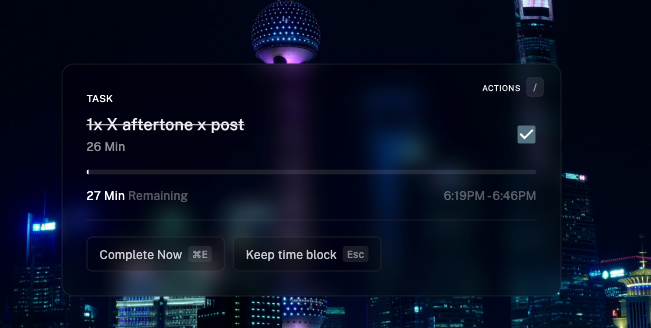


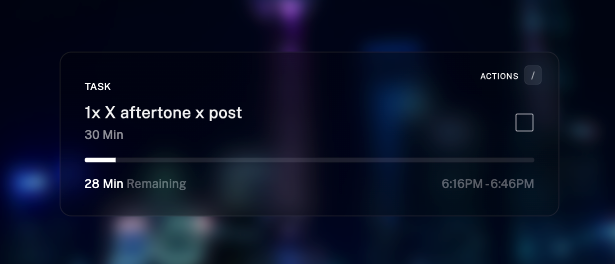

@aftertoneapp I try to use AI the same way I'd use a notebook: to organize my thoughts, not outsource them. The goal is to think better, not think less.
@aftertoneapp This applies beyond AI too. Every context switch has a cost, so batching similar tasks is one of the simplest ways to protect your focus.

@aftertoneapp I actually built a tool, https://t.co/xijA8QF5Km, to help developers improve their typing speed, but I can see how improving workflow concentration can also boost productivity. Yeah, batching prompts and reviewing all outputs at once can really help minimize distractions.

@aftertoneapp Batching prompts is a smart way to protect deep work. It turns AI from an interruption into a focused workflow.

@aftertoneapp Batch your prompts Not your distractions

@aftertoneapp Delegating the decision making and thinking to AI means we a cooked 😫

@aftertoneapp Setting boundaries around news consumption can make a bigger difference than trying to consume less overall.

@aftertoneapp Simple rules and clean processes usually beat complicated Ai workflows
@aftertoneapp The biggest mistake isn't using AI.
It's trusting it without thinking critically about the output.
@aftertoneapp There's a difference between using AI to sharpen your thinking and using it to avoid thinking.
That difference matters.

@aftertoneapp That one week log is a smart way to cut through the hype and see where AI really saves time. The hidden correction cost is what most people miss. Btw, let's connect and support each other!!

@aftertoneapp i feel like ai has helped me organize my thoughts way better than i could every day

@aftertoneapp I feel that what's truly helpful is being able to solve problems. In contrast, things that only appear helpful just make the PowerPoint look better or the copy look more polished.
Since the rise of AI, everyone's presentations seem to be getting more and more beautiful
@aftertoneapp I actually built a tool to help with this very problem. You know https://t.co/xijA8QF5Km, it's a free site where you can practice typing and coding skills while getting real-time feedback and explanations. Sounds like you could use a tool like that to stay focused.

@aftertoneapp Flow State is Hard to regain,so this solves a real problem

A timer going off mid-thought is one of the worst things in a workday.
With Auto-Extend, Aftertone won't pull you out of flow. Your session adapts to you, When you're done, your schedule updates on its own.
Just one of the ways we keep things simple without you having to think about it.

@aftertoneapp Hey, I actually built a tool exactly for this kind of thing - https://t.co/Ig5FMdfQZj. We help people improve their coding typing speed with AI explanations. The key is balance - use AI to augment your work, not replace it.

@aftertoneapp that's actually what https://t.co/HHN9kA7c91 is all about teaching you to think sharper with technology not replacing your mind. the website offers free typing speed tests and insightful AI explanations to help you master coding techniques and improve your critical thinking

@aftertoneapp these are simple things but actually very real.
always starting to appreciate being wellrested when i slept less than 6h at night lol
how to consistently outperform most people at work
> go to bed at the same time every night and protect 7-8 hours of sleep
> pick your single most important task the night before. use aftertone to do this easily
> do that task first thing in the morning before checking email or slack
> work in 60-90 minute focused blocks with no notifications
> take a 10 minute walk between blocks instead of scrolling your phone
> batch all meetings into one part of the day so they don't fragment your focus
> end each day by writing down what you finished and what's next
> say no to things that don't move the needle
@aftertoneapp I agree, been working on https://t.co/Ig5FMdfQZj to help people type more efficiently, but research shows even coding productivity drops off after 8 hours, and hitting a wall after 55 hours a week - no need to sacrifice speed and sanity.
One thing I love about @aftertoneapp is the wallpapers on the focus screen everyday. They show up when you've planned everything/completed everything for the day.
We selected them deliberately for their relaxing + inspiring nature.

the flow bar beside completed tasks on @aftertoneapp is one of my favourite features - i can see exactly whether i was in flow state or not, and where i got more interrupted throughout the day.
always interesting looking back
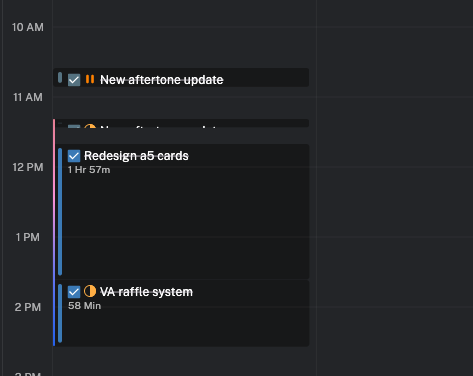
No task ever takes exactly the time you planned for it.
Auto-Extend means you don't have to care. Work until you're done, tell Aftertone, and your calendar updates itself. The next task slides into place automatically.
Just one of the ways we remove friction before you've even noticed it.

@aftertoneapp auto-reshaping on finish is a genuinely useful idea. 'quickest productivity tool ever made' is a big claim though, what's the actual benchmark?
Most people manually adjust their calendar every time something runs over.
Aftertone's Auto-Extend does it for you. Toggle it on and your schedule reshapes itself the moment you finish - no dragging blocks around, no fixing overlaps.
Just one of the ways that we're the quickest productivity tool ever made.
Trends for you
Most Popular Users

Elon Musk 
@elonmusk
239.7M followers

Barack Obama
@barackobama
118.6M followers

Cristiano Ronaldo
@cristiano
114.3M followers

Donald J. Trump
@realdonaldtrump
111.7M followers

Narendra Modi
@narendramodi
106.9M followers

Rihanna
@rihanna
98.6M followers

NASA
@nasa
92.1M followers

Justin Bieber
@justinbieber
91.7M followers

KATY PERRY
@katyperry
89.9M followers

Taylor Swift
@taylorswift13
83.9M followers

Lady Gaga
@ladygaga
75.4M followers

Virat Kohli
@imvkohli
73.3M followers

Kim Kardashian
@kimkardashian
70.8M followers

YouTube
@youtube
68.6M followers

Neymar Jr
@neymarjr
66.3M followers

Bill Gates
@billgates
65.1M followers

Selena Gomez
@selenagomez
63M followers

The Ellen Show
@theellenshow
62.1M followers

CNN
@cnn
61.7M followers

X
@x
60.6M followers