

Top Tweets for #AndroidTip

Did you know You can change the project name in Android Studio by adding a https://t.co/6xliXmjSTd attribute in your settings.gradle?
#TipOfTheDay #TIL #androidtip #android #androiddev


📸💥 Lost your favorite Snapchat photos? Don't worry, Android users! 🤳🤖 Here's a quick guide on how to recover Snapchat photos on your Android phone! 📱🔍 Discover the hidden treasure of your memories and never lose a snap again! 🎉🌟
#SnapchatRecovery #AndroidTip #SnapMemorie


Check out this article to learn about some best practices for writing efficient, maintainable, and readable code in Jetpack Compose📱
#android #androiddevelopment #androiddev #jetpackcompose #bestpractices #androidtip
https://t.co/X7kGH3oGP1

WhatsApp Rolls Out Many Exciting Features For Android Users
.
.
#Apps #Tech #TechNews #Whatsapp #Whatsappupdate #Android #androidtip #SocialMedia #tuesdayvibe #earthquake #HaryanaWithFarmers #stockstowatch
https://t.co/OZfOmHNUmI

Android वर Guerilla Malware च्या माध्यमातून सायबर हल्ला! 89 लाख डिव्हाइस Infected
https://t.co/KWxxssYdmn < येथे वाचा सविस्तर वृत्त
#android #androidtip #technology #guerillamalware #malware #CyberAttack

Android Tip:
Use ViewStub for views that you want to lazily inflate at runtime.
This reduces memory usage and speeds up rendering of the layout.
#AndroidDev #Android #AndroidTip

Android Tip:
If you write Compose related blogs, make sure to mention XML alternative since most people are still not familiar with new Compose jargon i.e. RecyclerView vs LazyColumn.
Here's the proof 👇
#AndroidDev #JetpackCompose #AndroidTip

Jetpack Compose vs XML:
Instead of setting margins for each element to have equal spacing in XML, you can now set it once in a parent layout with verticalArrangement or horizontalArrangement in Compose.
#AndroidDev #Android #AndroidTip #100DaysOfCode

Android Tip:
Move single or multiple lines in Android Studio by placing the cursor on the line or selecting multiple lines and pressing Shift + Cmd + Up/Down.
#AndroidDev #Android #AndroidTip #100DaysOfCode
Android Tip:
Make use of @ Nullable annotation in Java for methods that might return null to avoid NullPointerException.
This:
1. Generates an IDE warning when calling from Java.
2. Creates a Nullable return type when calling from Kotlin.
#AndroidDev #AndroidTip #100DaysOfCode

Android Tip:
When you use a small icon i.e. < 48dp — make sure to add a padding of at least 48dp (ideally 54dp) to increase the icon’s touch target.
#AndroidDev #AndroidTip #DesignTip #100DaysOfCode

Android Tip:
Avoid hardcoded values when setting color of a UI element.
Instead, set them using attributes, e.g. "?attr/colorAttr".
This helps in supporting dark mode and makes it super easy to rebrand your app in the future. ✨
#AndroidDev #Android #AndroidTip #100DaysOfCode

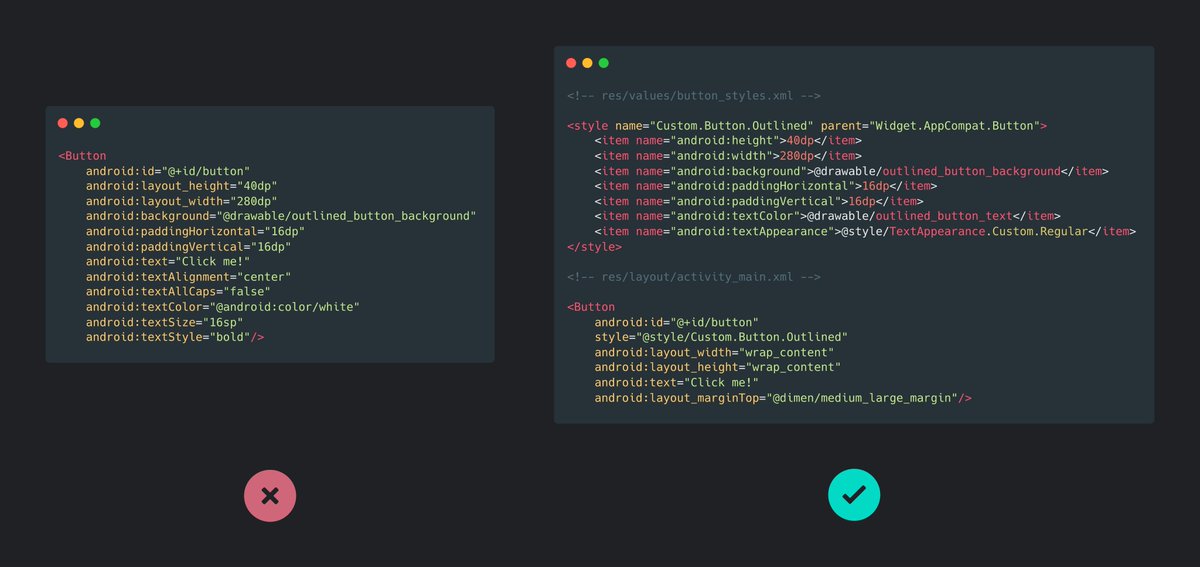
Android Tip:
Instead of setting attributes every time you create a UI element, create a custom style once and apply that with the style attribute.
This keeps the design consistent across the app as well as avoid code repetition.
#AndroidDev #Android #AndroidTip #100DaysOfCode
#AndroidTip:
Add a ripple effect to a UI element:
1. Create a new background drawable using the <ripple> tag.
2. Use that background as the focused state of the element.
3. Remove its default colorControlHighlight value.
Code snippet in the 🧵
#AndroidDev #100DaysOfCode
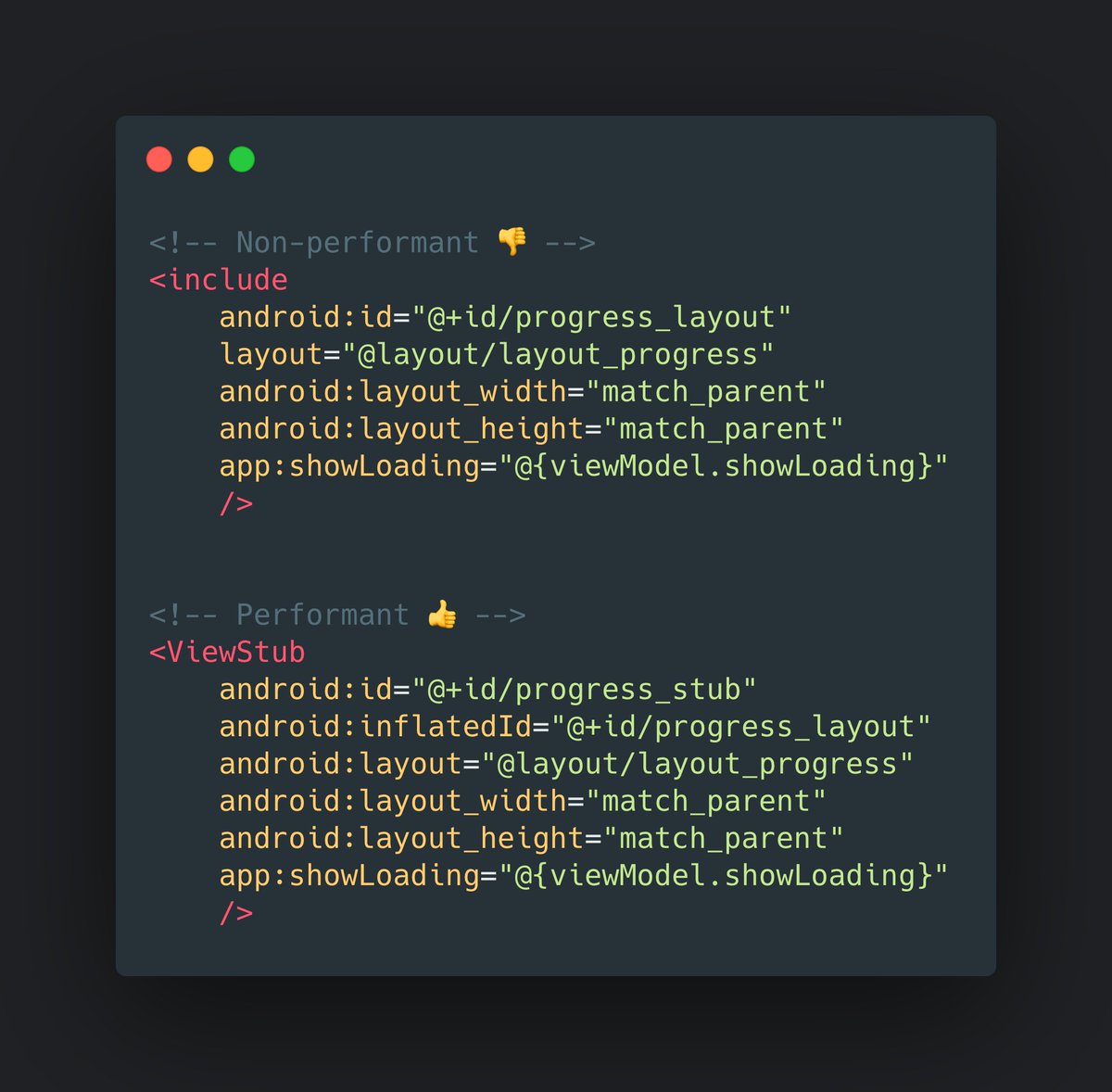
Android Tip:
Use ViewStub for views that you want to lazily inflate at runtime.
This reduces memory usage and speeds up the rendering of the layout. 🙌
#AndroidDev #Android #AndroidTip #100DaysOfCode
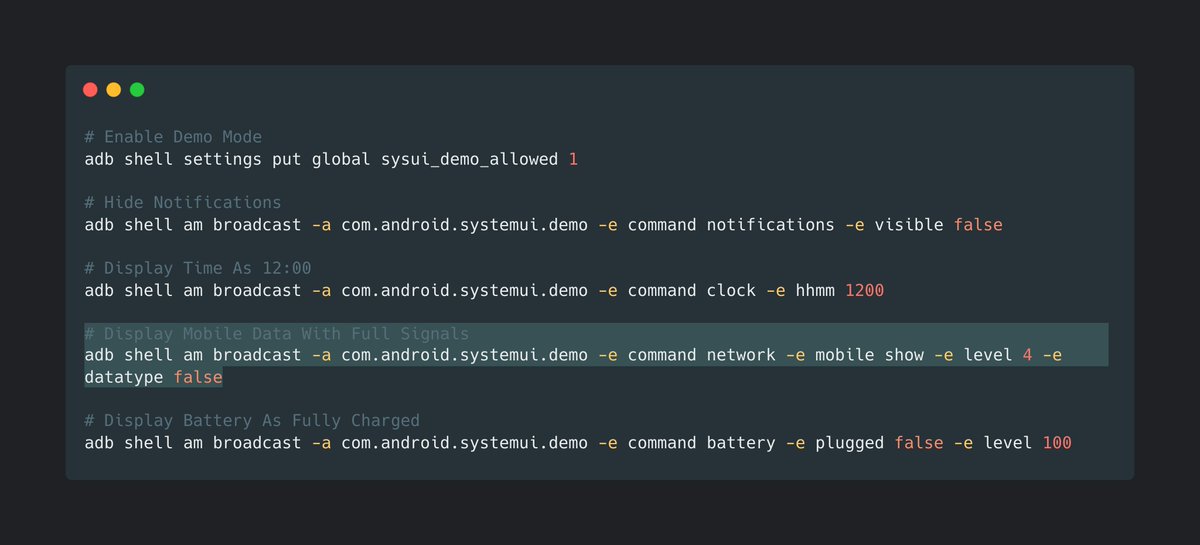
Android Tip:
In order to take clean & consistent screenshots of your app, you can cleanup your status bar on your phone or emulator by using ADB shell commands in the Terminal.
#AndroidDev #Android #AndroidTip #100DaysOfCode


Runtime permission requesting in Jetpack Compose
with `rememberLauncherForActivityResult` in the `activity-compose` Jetpack artifact, we can request for runtime permission inside the composables
#AndroidDev #AndroidTip 📝📝

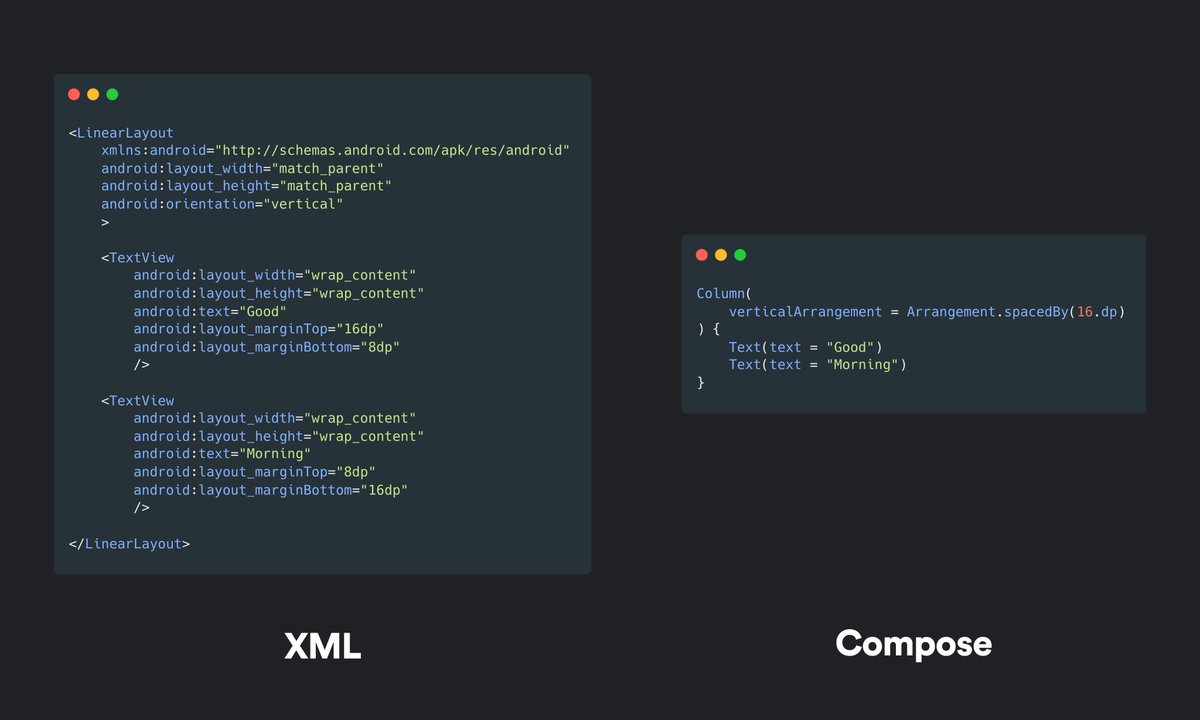
Jetpack Compose vs XML:
Instead of setting margins for each element to have equal spacing in XML, you can now set it once in a parent layout with verticalArrangement or horizontalArrangement in Compose.
#AndroidDev #Android #AndroidTip #100DaysOfCode
Android Tip:
When you hide the status bar in your apps and your toolbar hides behind the screen notch, you can adjust the toolbar margin with this code snippet below.
👉 Learn more: https://t.co/JARhe5tC7I
#AndroidDev #Android #AndroidTip #100DaysOfCode


Last Seen Hashtags on Sotwe
Most Popular Users

Elon Musk 
@elonmusk
240.1M followers

Barack Obama
@barackobama
119.3M followers

Donald J. Trump
@realdonaldtrump
111.6M followers

Cristiano Ronaldo
@cristiano
108.9M followers

Narendra Modi
@narendramodi
107M followers

Rihanna
@rihanna
97.3M followers

NASA
@nasa
92.1M followers

Justin Bieber
@justinbieber
90.6M followers

KATY PERRY
@katyperry
86.8M followers

Taylor Swift
@taylorswift13
80.6M followers

Lady Gaga
@ladygaga
72.1M followers

Kim Kardashian
@kimkardashian
69.4M followers

YouTube
@youtube
68.6M followers

Virat Kohli
@imvkohli
68.5M followers

Bill Gates
@billgates
63.4M followers

The Ellen Show
@theellenshow
62.5M followers

CNN
@cnn
61.9M followers

Neymar Jr
@neymarjr
61.1M followers

X
@x
60.9M followers

Selena Gomez
@selenagomez
59.9M followers