

Top Tweets for #androidtip

Did you know You can change the project name in Android Studio by adding a https://t.co/6xliXmjSTd attribute in your settings.gradle?
#TipOfTheDay #TIL #androidtip #android #androiddev


📸💥 Lost your favorite Snapchat photos? Don't worry, Android users! 🤳🤖 Here's a quick guide on how to recover Snapchat photos on your Android phone! 📱🔍 Discover the hidden treasure of your memories and never lose a snap again! 🎉🌟
#SnapchatRecovery #AndroidTip #SnapMemorie


Check out this article to learn about some best practices for writing efficient, maintainable, and readable code in Jetpack Compose📱
#android #androiddevelopment #androiddev #jetpackcompose #bestpractices #androidtip
https://t.co/X7kGH3oGP1

WhatsApp Rolls Out Many Exciting Features For Android Users
.
.
#Apps #Tech #TechNews #Whatsapp #Whatsappupdate #Android #androidtip #SocialMedia #tuesdayvibe #earthquake #HaryanaWithFarmers #stockstowatch
https://t.co/OZfOmHNUmI

Android वर Guerilla Malware च्या माध्यमातून सायबर हल्ला! 89 लाख डिव्हाइस Infected
https://t.co/KWxxssYdmn < येथे वाचा सविस्तर वृत्त
#android #androidtip #technology #guerillamalware #malware #CyberAttack

Android Tip:
Use ViewStub for views that you want to lazily inflate at runtime.
This reduces memory usage and speeds up rendering of the layout.
#AndroidDev #Android #AndroidTip

Android Tip:
If you write Compose related blogs, make sure to mention XML alternative since most people are still not familiar with new Compose jargon i.e. RecyclerView vs LazyColumn.
Here's the proof 👇
#AndroidDev #JetpackCompose #AndroidTip

Jetpack Compose vs XML:
Instead of setting margins for each element to have equal spacing in XML, you can now set it once in a parent layout with verticalArrangement or horizontalArrangement in Compose.
#AndroidDev #Android #AndroidTip #100DaysOfCode

Android Tip:
Move single or multiple lines in Android Studio by placing the cursor on the line or selecting multiple lines and pressing Shift + Cmd + Up/Down.
#AndroidDev #Android #AndroidTip #100DaysOfCode
Android Tip:
Make use of @ Nullable annotation in Java for methods that might return null to avoid NullPointerException.
This:
1. Generates an IDE warning when calling from Java.
2. Creates a Nullable return type when calling from Kotlin.
#AndroidDev #AndroidTip #100DaysOfCode

Android Tip:
When you use a small icon i.e. < 48dp — make sure to add a padding of at least 48dp (ideally 54dp) to increase the icon’s touch target.
#AndroidDev #AndroidTip #DesignTip #100DaysOfCode

Android Tip:
Avoid hardcoded values when setting color of a UI element.
Instead, set them using attributes, e.g. "?attr/colorAttr".
This helps in supporting dark mode and makes it super easy to rebrand your app in the future. ✨
#AndroidDev #Android #AndroidTip #100DaysOfCode

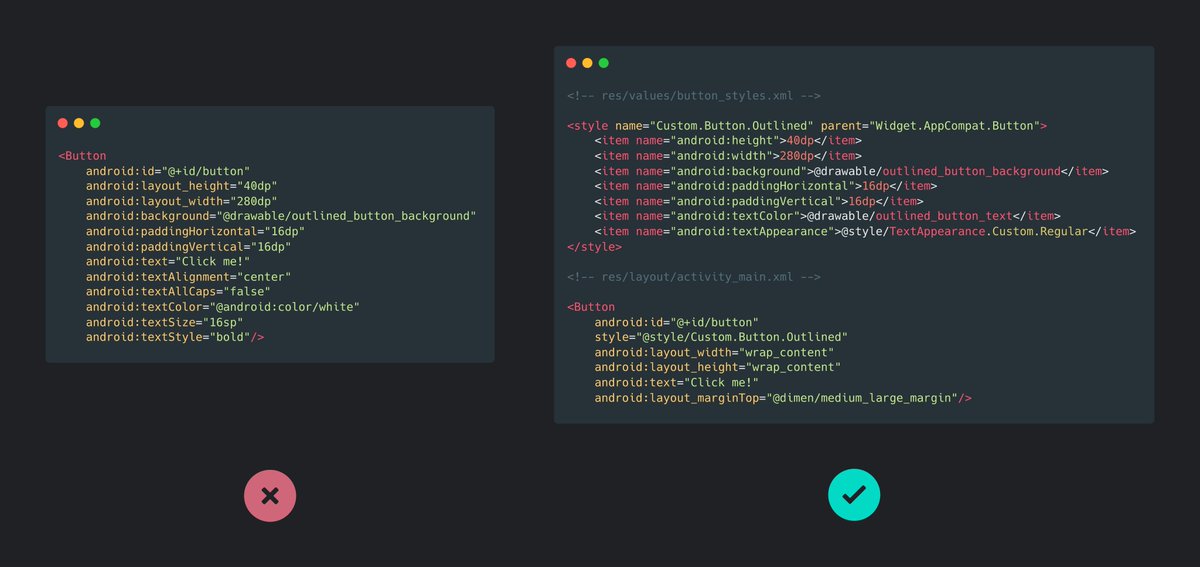
Android Tip:
Instead of setting attributes every time you create a UI element, create a custom style once and apply that with the style attribute.
This keeps the design consistent across the app as well as avoid code repetition.
#AndroidDev #Android #AndroidTip #100DaysOfCode
#AndroidTip:
Add a ripple effect to a UI element:
1. Create a new background drawable using the <ripple> tag.
2. Use that background as the focused state of the element.
3. Remove its default colorControlHighlight value.
Code snippet in the 🧵
#AndroidDev #100DaysOfCode
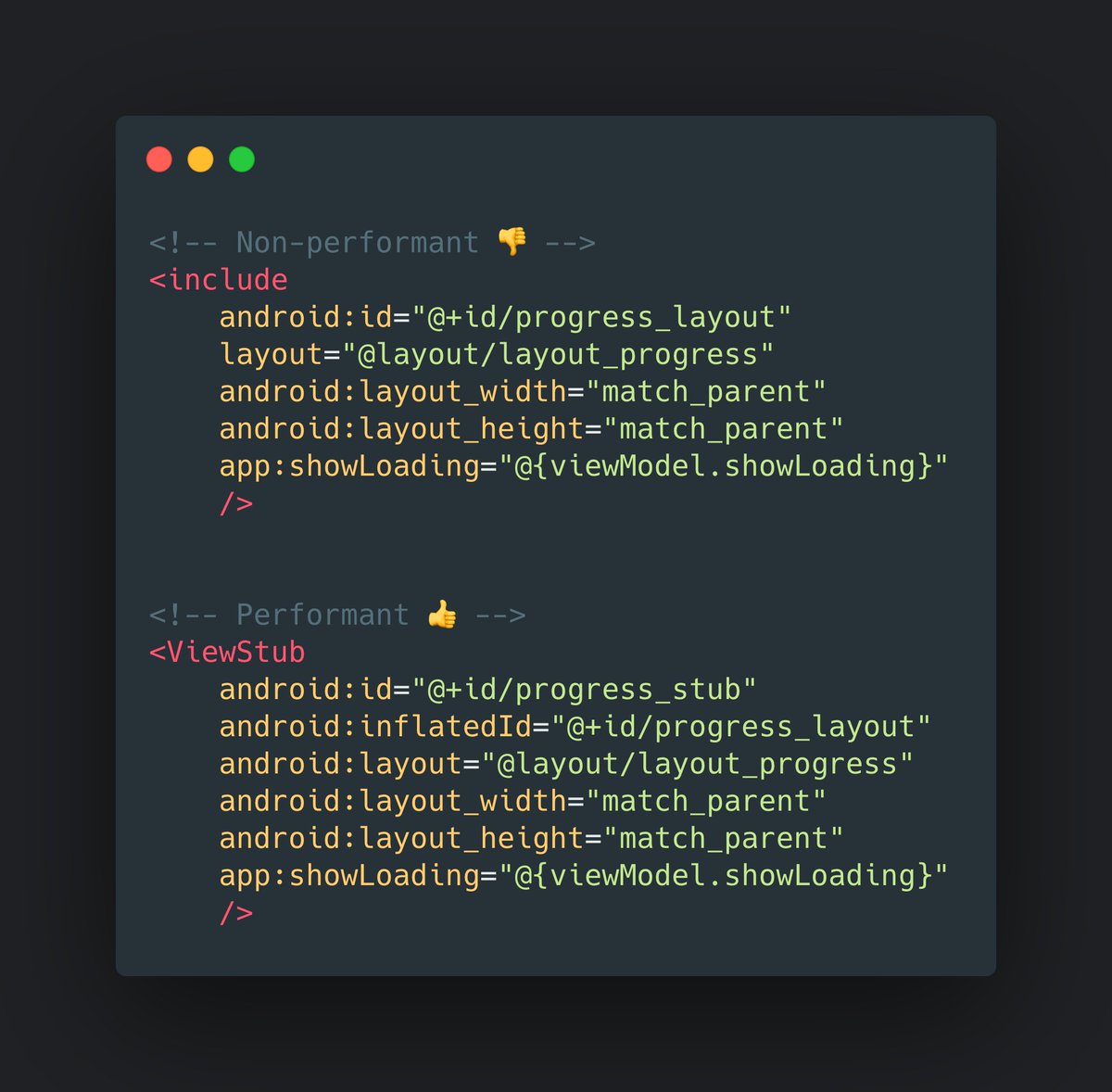
Android Tip:
Use ViewStub for views that you want to lazily inflate at runtime.
This reduces memory usage and speeds up the rendering of the layout. 🙌
#AndroidDev #Android #AndroidTip #100DaysOfCode
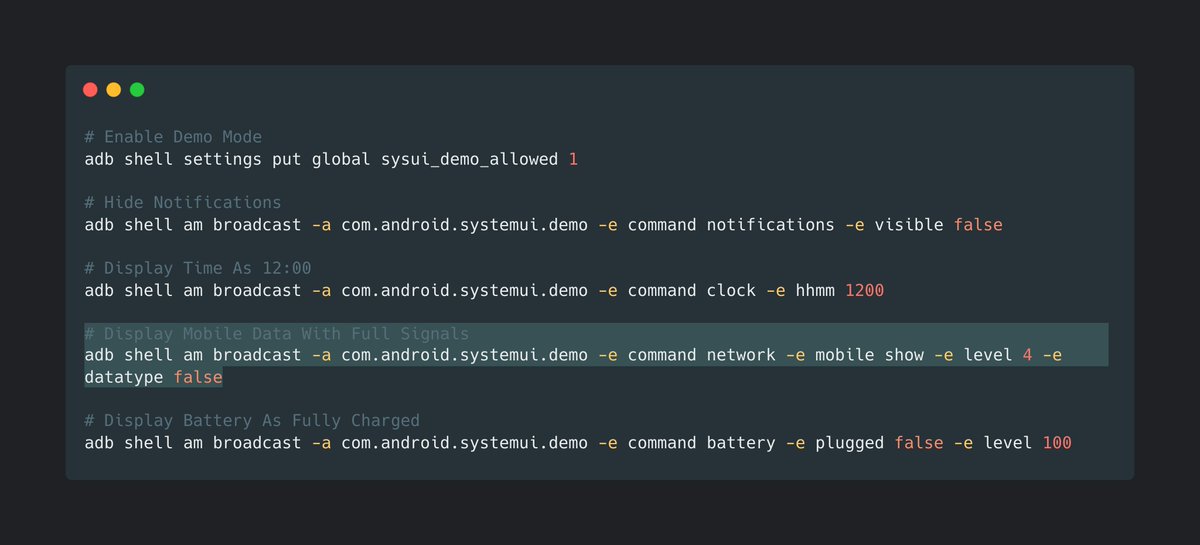
Android Tip:
In order to take clean & consistent screenshots of your app, you can cleanup your status bar on your phone or emulator by using ADB shell commands in the Terminal.
#AndroidDev #Android #AndroidTip #100DaysOfCode


Runtime permission requesting in Jetpack Compose
with `rememberLauncherForActivityResult` in the `activity-compose` Jetpack artifact, we can request for runtime permission inside the composables
#AndroidDev #AndroidTip 📝📝

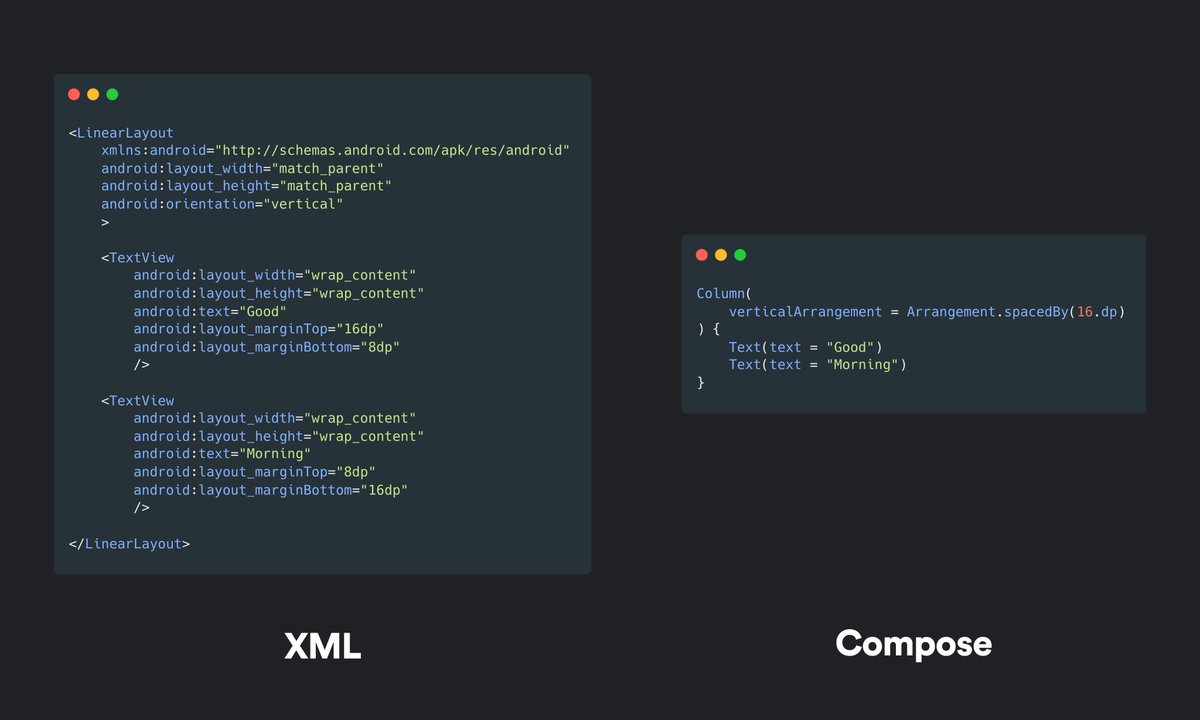
Jetpack Compose vs XML:
Instead of setting margins for each element to have equal spacing in XML, you can now set it once in a parent layout with verticalArrangement or horizontalArrangement in Compose.
#AndroidDev #Android #AndroidTip #100DaysOfCode
Android Tip:
When you hide the status bar in your apps and your toolbar hides behind the screen notch, you can adjust the toolbar margin with this code snippet below.
👉 Learn more: https://t.co/JARhe5tC7I
#AndroidDev #Android #AndroidTip #100DaysOfCode


Last Seen Hashtags on Sotwe
TheChangeWeVotedFor
Seen from France
buffelprimo
Seen from Poland
アンガスサーロインカットステーキ
Seen from Japan
ipadmix
Seen from Brazil
immashine
Seen from Turkey
feetfetısh
Seen from Brazil
محارم_اخوات_حقيقى
Seen from Saudi Arabia
Omegle
Seen from United States
กางเกงในชายแท้บ้านๆ
Seen from Thailand
photomachine
Seen from United Kingdom
Most Popular Users

Elon Musk 
@elonmusk
240.1M followers

Barack Obama
@barackobama
119.3M followers

Donald J. Trump
@realdonaldtrump
111.6M followers

Cristiano Ronaldo
@cristiano
108.9M followers

Narendra Modi
@narendramodi
107M followers

Rihanna
@rihanna
97.3M followers

NASA
@nasa
92.1M followers

Justin Bieber
@justinbieber
90.6M followers

KATY PERRY
@katyperry
86.8M followers

Taylor Swift
@taylorswift13
80.6M followers

Lady Gaga
@ladygaga
72.2M followers

Kim Kardashian
@kimkardashian
69.4M followers

YouTube
@youtube
68.6M followers

Virat Kohli
@imvkohli
68.5M followers

Bill Gates
@billgates
63.4M followers

The Ellen Show
@theellenshow
62.5M followers

CNN
@cnn
61.9M followers

Neymar Jr
@neymarjr
61.1M followers

X
@x
60.9M followers

Selena Gomez
@selenagomez
59.9M followers