

Top Tweets for #BinReversingTips

New video is out! If you don't know anything about assembly, memory, and debugging, or if you want to cheat dirty in a minesweeper with @x64dbg, welcome ;) https://t.co/C5IANNG2so
#reverseengineering #cybersecuritytips #Hacking #CyberSecurity #BinReversingTips

#MalwareLabDaily 0x65
There are already 100 tweets in this series. I hope you like them
And now, this special 101st tweet is about another #ReverseEngineering series called #BinReversingTips by @whtaguy
Check also his older series of 30 tips from last year, please

*Reversing Engineering Tip 4/30*
End your frustration waiting for lazy-loaded pdbs to download while debugging/REing - Download them all in advance with:
symchk.exe /s srv*c:\symbols*https://t.co/tYRJSBhoj0 c:\windows\system32\*.dll
saves time in CTFs! #BinReversingTips
*Reversing Engineering Tip 3/30*
Want to highlight a large address range to define it as code/data/str? Use ALT-L to “lock” cursor, then freely navigate to the chunk’s end while everything you pass is highlighted
#BinReversingTips
*Reversing Engineering Tip 2/30*
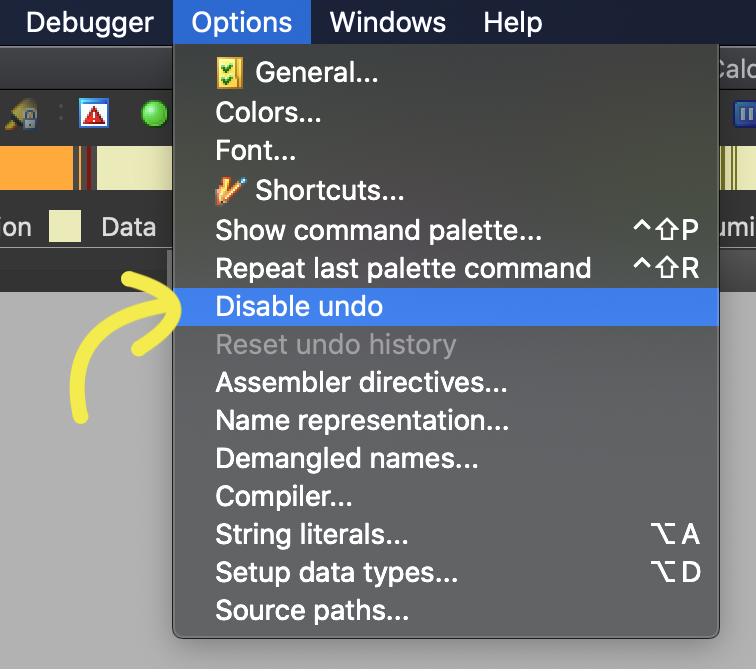
April 1st pro tip to return IDA to its “good ‘ol days”
Did you know you can disable undo in the options menu?#NoUndoNoSurrender !
#BinReversingTips

*Reversing Engineering Tip 1/30*
IDA’s “Jump to Address” (G key) can also jump relative to the cursor! Useful for jumping to elements in arrays
#BinReversingTips
-Reversing Tip 30/30-
better than anything technical I can share: RE isn’t a 1337 h4ck3r only reserved field! Like anything else: It’s open to everyone! And like any skill, “just” enjoy it, work hard, and you’ll get it. thread 🧵 #BinReversingTips [1/2]>>>
-Reversing Tip 29/30-
buckle up buckaroos! Here's the most useful RE strategy no one talks about:
*analyze the block layout before diving into ASM code*. Layout view is available on many disassemblers, here’s how to use it #BinReversingTips Explanatory thread🧵[1/6] >>>
![MavLevin's tweet photo. -Reversing Tip 29/30-
buckle up buckaroos! Here's the most useful RE strategy no one talks about:
*analyze the block layout before diving into ASM code*. Layout view is available on many disassemblers, here’s how to use it #BinReversingTips Explanatory thread🧵[1/6] >>> https://t.co/fakqvBYKjV](https://pbs.twimg.com/media/EW0MHs9XkAcfiGN.png)
-Reversing Tip 28/30-
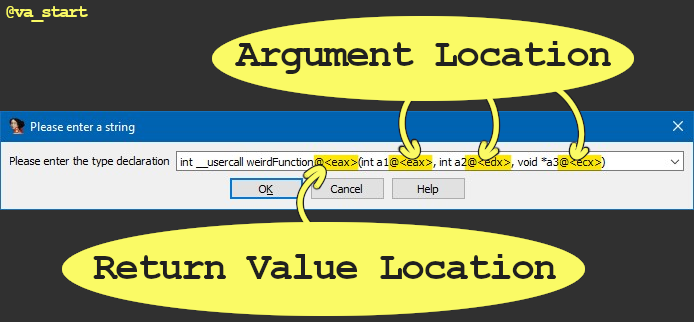
IDA auto-analysis missed a function arg because it was passed in an “unexpected” register?
Use the “__usercall” call convention with “@<register_name>” to declare args & their location:
#BinReversingTips #idaTips
-Reversing Tip 27/30-
Sometimes you can reverse a function solely by looking at its call graph. The function calls to/from a target reveal a lot about its logic. Let’s analyze some examples: a thread🧵 [1/6] #BinReversingTips
![MavLevin's tweet photo. -Reversing Tip 27/30-
Sometimes you can reverse a function solely by looking at its call graph. The function calls to/from a target reveal a lot about its logic. Let’s analyze some examples: a thread🧵 [1/6] #BinReversingTips https://t.co/yuRCRNOmVG](https://pbs.twimg.com/media/EWnr9AqWAAIm3V2.png)
-Reversing Tip 26/30-
Ensure malware you’re researching won’t accidentally run by appending “.dontrunme” to the extension, which will prevent windows from executing the file when it’s double clicked. On linux just `chmod -x`
#BinReversingTips #infosec

-Reversing Tip 25/30-
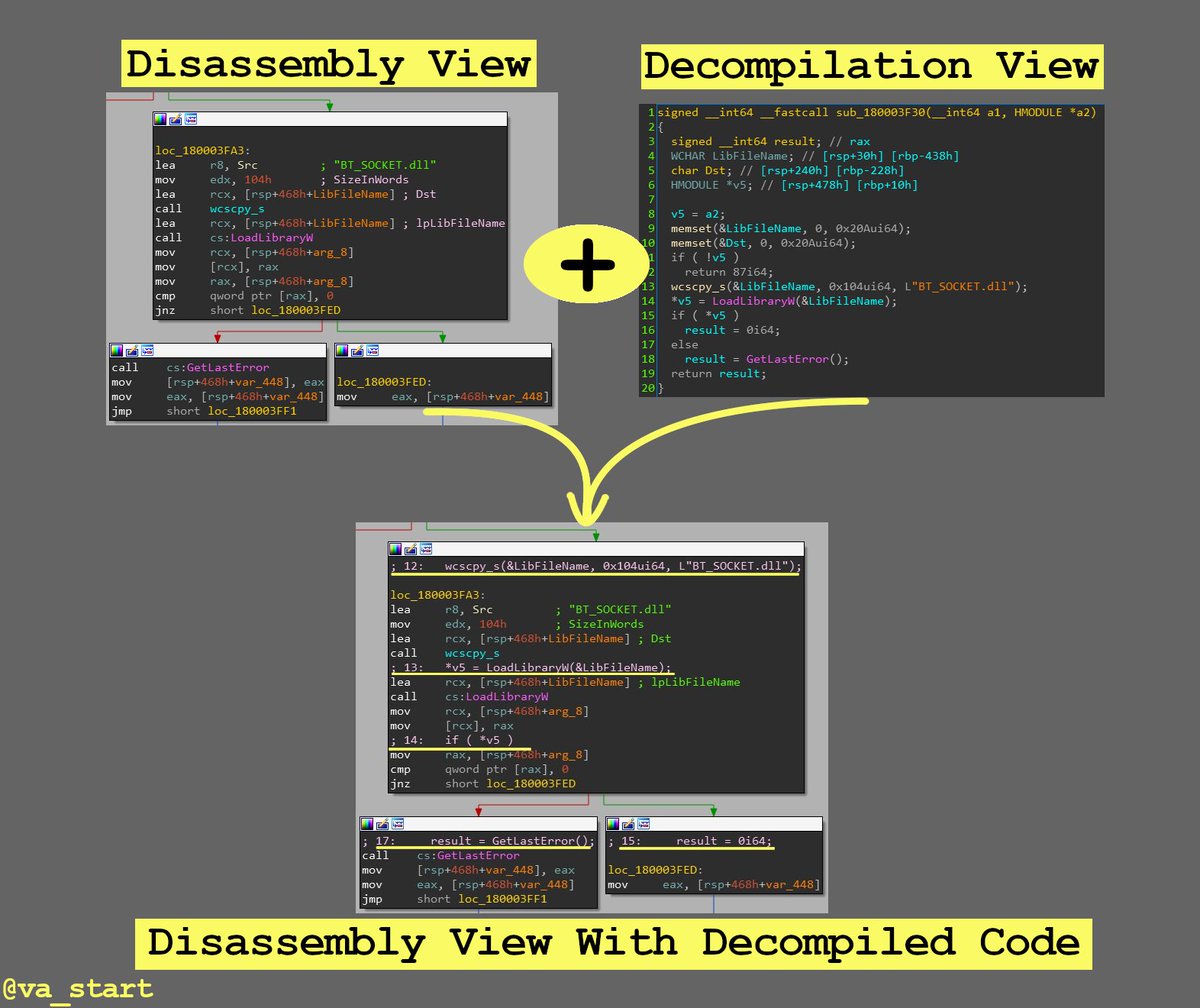
Get the best from both IDA’s decompiler & disassembler by overlaying the C code on the ASM in graph view (by clicking the “/” key)
#BinReversingTips
-Reversing Tip 24/30-
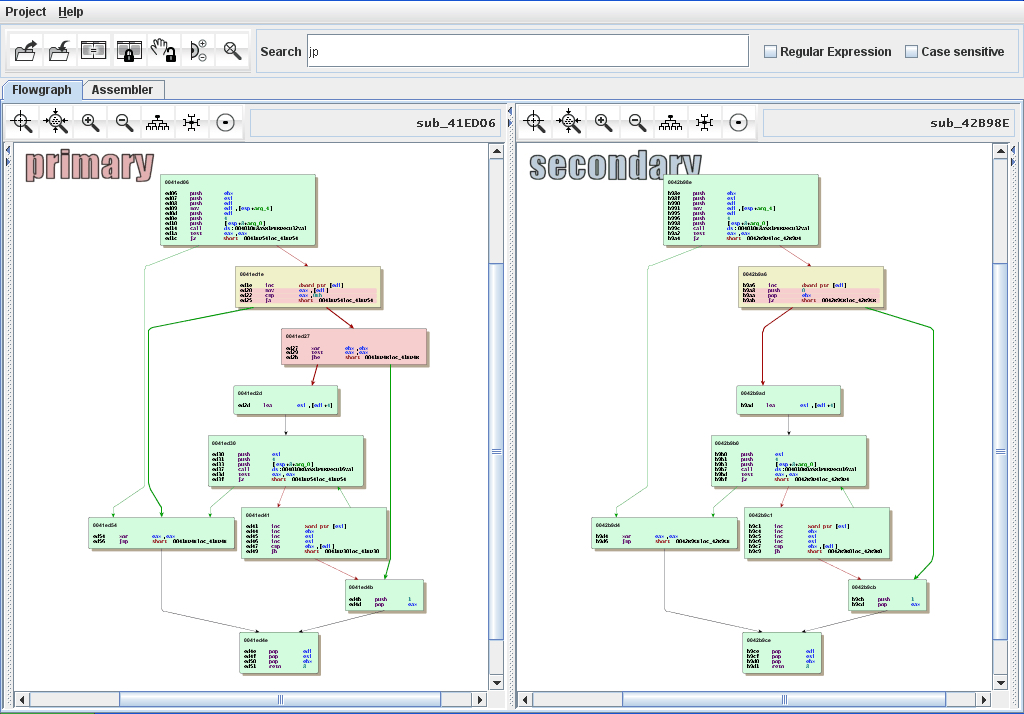
Looking to find code handling certain logic?
Search previous versions’ release notes to find when that logic was last updated. Next, bindiff the version before & of that release, the diff will have your target func https://t.co/2YvMYirXJb / #BinReversingTips
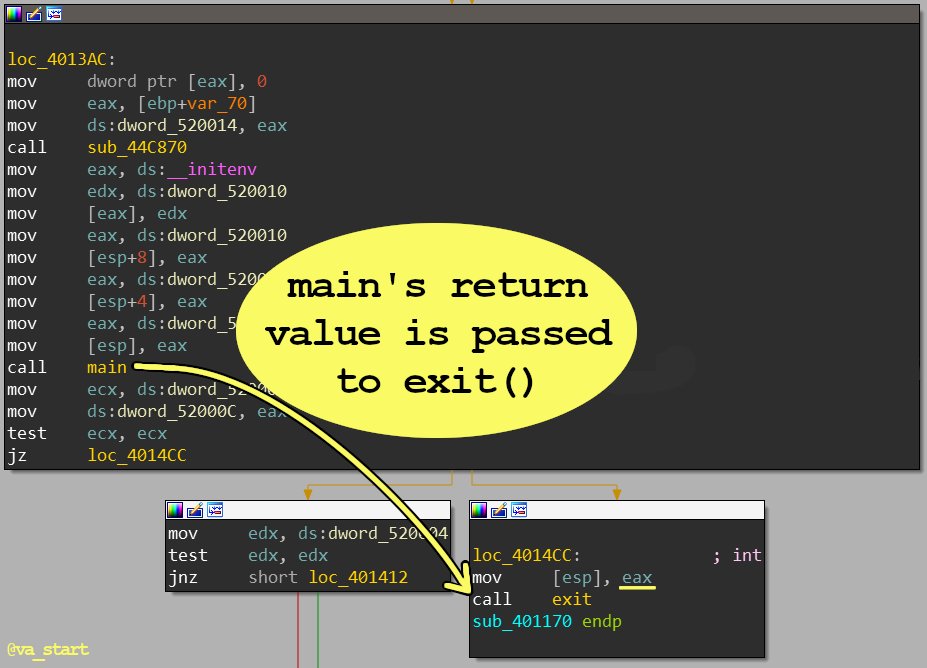
-Reversing Tip 23/30-
The easiest way to find the “main()” function is by working in reverse: find which function’s return value (saved in eax) is passed to exit() - that’s main()
#BinReversingTips
4) Last resort: Time Travel Debugging. 1) Start debugging the program with TTD 2) when the string appears, scan the program’s memory for its addr. 3) go back in time to find when/where the string was put there [5/5] https://t.co/j3MeOkdDX0 // #BinReversingTips
3) Google the str to see if it’s system generated: error strings for example, can be right from lib functions such as perror()/FormatMessageA(), in which case the str won’t be in the exe [4/5] #BinReversingTips
![MavLevin's tweet photo. 3) Google the str to see if it’s system generated: error strings for example, can be right from lib functions such as perror()/FormatMessageA(), in which case the str won’t be in the exe [4/5] #BinReversingTips https://t.co/Qlnx19xRVE](https://pbs.twimg.com/media/EWMczT4UYAIIYUv.jpg)
2) sometimes the string isn’t embedded in the binary, but is imported from an external resource file. find the str by grepping the program's installation folder [3/5] #BinReversingTips
![MavLevin's tweet photo. 2) sometimes the string isn’t embedded in the binary, but is imported from an external resource file. find the str by grepping the program's installation folder [3/5] #BinReversingTips https://t.co/xrYbXnYJqr](https://pbs.twimg.com/media/EWMcqVJVAAApwcS.jpg)
1) the strings window only has auto-identified strings, which misses some.
Use ALT-B to search the whole binary, even places not identified as data regions. [2/5] #BinReversingTips
![MavLevin's tweet photo. 1) the strings window only has auto-identified strings, which misses some.
Use ALT-B to search the whole binary, even places not identified as data regions. [2/5] #BinReversingTips https://t.co/AFPiU552oh](https://pbs.twimg.com/media/EWMb3rGUcAMka2N.png)
-Reversing Tip 22/30-
STRING HUNTING EDITION
strs help identify code functionality; how can we find a str seen in the GUI that isn’t in IDA’s strings window? a thread🧵
#binReversingTips / [1/5] >>>
![MavLevin's tweet photo. -Reversing Tip 22/30-
STRING HUNTING EDITION
strs help identify code functionality; how can we find a str seen in the GUI that isn’t in IDA’s strings window? a thread🧵
#binReversingTips / [1/5] >>> https://t.co/Tb7NFb31ch](https://pbs.twimg.com/media/EWMbsBsVcAU0WFX.png)
Last Seen Hashtags on Sotwe
rosiesporch
Seen from United Kingdom
perv
Seen from Kuwait
momson()*************************
Seen from France
Toronto
Seen from United States
Monkeyapp
Seen from United States
少萝砂糖
MasakaRepublic
Seen from United States
HistoriaConGarra
Genemarquinez
Seen from India
กางเกงนักเรียนมือหนึ่งแก้ทรง
Seen from Thailand
Trends for you
Most Popular Users

Elon Musk 
@elonmusk
241M followers

Barack Obama
@barackobama
119.2M followers

Cristiano Ronaldo
@cristiano
112.2M followers

Donald J. Trump
@realdonaldtrump
111.8M followers

Narendra Modi
@narendramodi
107.1M followers

Rihanna
@rihanna
98.1M followers

NASA
@nasa
92.2M followers

Justin Bieber
@justinbieber
91.3M followers

KATY PERRY
@katyperry
88.5M followers

Taylor Swift
@taylorswift13
82.4M followers

Lady Gaga
@ladygaga
73.9M followers

Virat Kohli
@imvkohli
71.3M followers

Kim Kardashian
@kimkardashian
70.2M followers

YouTube
@youtube
68.7M followers

Bill Gates
@billgates
64.4M followers

Neymar Jr
@neymarjr
64.1M followers

The Ellen Show
@theellenshow
62.4M followers

CNN
@cnn
61.8M followers

Selena Gomez
@selenagomez
61.6M followers

X
@x
60.8M followers