

Top Tweets for #binReversingTips

New video is out! If you don't know anything about assembly, memory, and debugging, or if you want to cheat dirty in a minesweeper with @x64dbg, welcome ;) https://t.co/C5IANNG2so
#reverseengineering #cybersecuritytips #Hacking #CyberSecurity #BinReversingTips

#MalwareLabDaily 0x65
There are already 100 tweets in this series. I hope you like them
And now, this special 101st tweet is about another #ReverseEngineering series called #BinReversingTips by @whtaguy
Check also his older series of 30 tips from last year, please

*Reversing Engineering Tip 4/30*
End your frustration waiting for lazy-loaded pdbs to download while debugging/REing - Download them all in advance with:
symchk.exe /s srv*c:\symbols*https://t.co/tYRJSBhoj0 c:\windows\system32\*.dll
saves time in CTFs! #BinReversingTips
*Reversing Engineering Tip 3/30*
Want to highlight a large address range to define it as code/data/str? Use ALT-L to “lock” cursor, then freely navigate to the chunk’s end while everything you pass is highlighted
#BinReversingTips
*Reversing Engineering Tip 2/30*
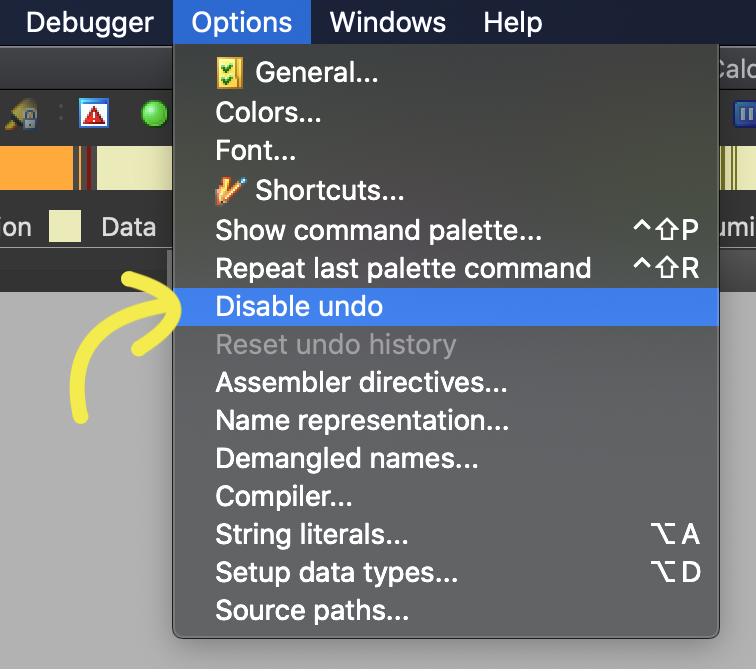
April 1st pro tip to return IDA to its “good ‘ol days”
Did you know you can disable undo in the options menu?#NoUndoNoSurrender !
#BinReversingTips

*Reversing Engineering Tip 1/30*
IDA’s “Jump to Address” (G key) can also jump relative to the cursor! Useful for jumping to elements in arrays
#BinReversingTips
-Reversing Tip 30/30-
better than anything technical I can share: RE isn’t a 1337 h4ck3r only reserved field! Like anything else: It’s open to everyone! And like any skill, “just” enjoy it, work hard, and you’ll get it. thread 🧵 #BinReversingTips [1/2]>>>
-Reversing Tip 29/30-
buckle up buckaroos! Here's the most useful RE strategy no one talks about:
*analyze the block layout before diving into ASM code*. Layout view is available on many disassemblers, here’s how to use it #BinReversingTips Explanatory thread🧵[1/6] >>>
![MavLevin's tweet photo. -Reversing Tip 29/30-
buckle up buckaroos! Here's the most useful RE strategy no one talks about:
*analyze the block layout before diving into ASM code*. Layout view is available on many disassemblers, here’s how to use it #BinReversingTips Explanatory thread🧵[1/6] >>> https://t.co/fakqvBYKjV](https://pbs.twimg.com/media/EW0MHs9XkAcfiGN.png)
-Reversing Tip 28/30-
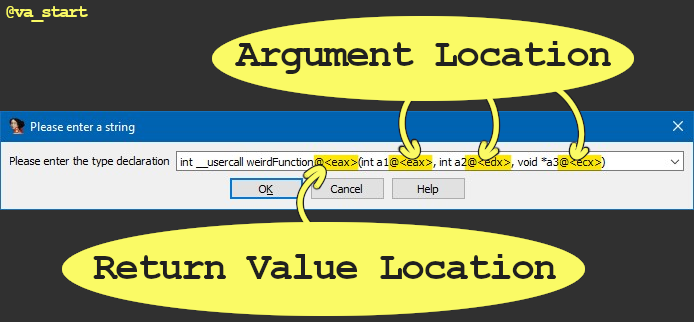
IDA auto-analysis missed a function arg because it was passed in an “unexpected” register?
Use the “__usercall” call convention with “@<register_name>” to declare args & their location:
#BinReversingTips #idaTips
-Reversing Tip 27/30-
Sometimes you can reverse a function solely by looking at its call graph. The function calls to/from a target reveal a lot about its logic. Let’s analyze some examples: a thread🧵 [1/6] #BinReversingTips
![MavLevin's tweet photo. -Reversing Tip 27/30-
Sometimes you can reverse a function solely by looking at its call graph. The function calls to/from a target reveal a lot about its logic. Let’s analyze some examples: a thread🧵 [1/6] #BinReversingTips https://t.co/yuRCRNOmVG](https://pbs.twimg.com/media/EWnr9AqWAAIm3V2.png)
-Reversing Tip 26/30-
Ensure malware you’re researching won’t accidentally run by appending “.dontrunme” to the extension, which will prevent windows from executing the file when it’s double clicked. On linux just `chmod -x`
#BinReversingTips #infosec

-Reversing Tip 25/30-
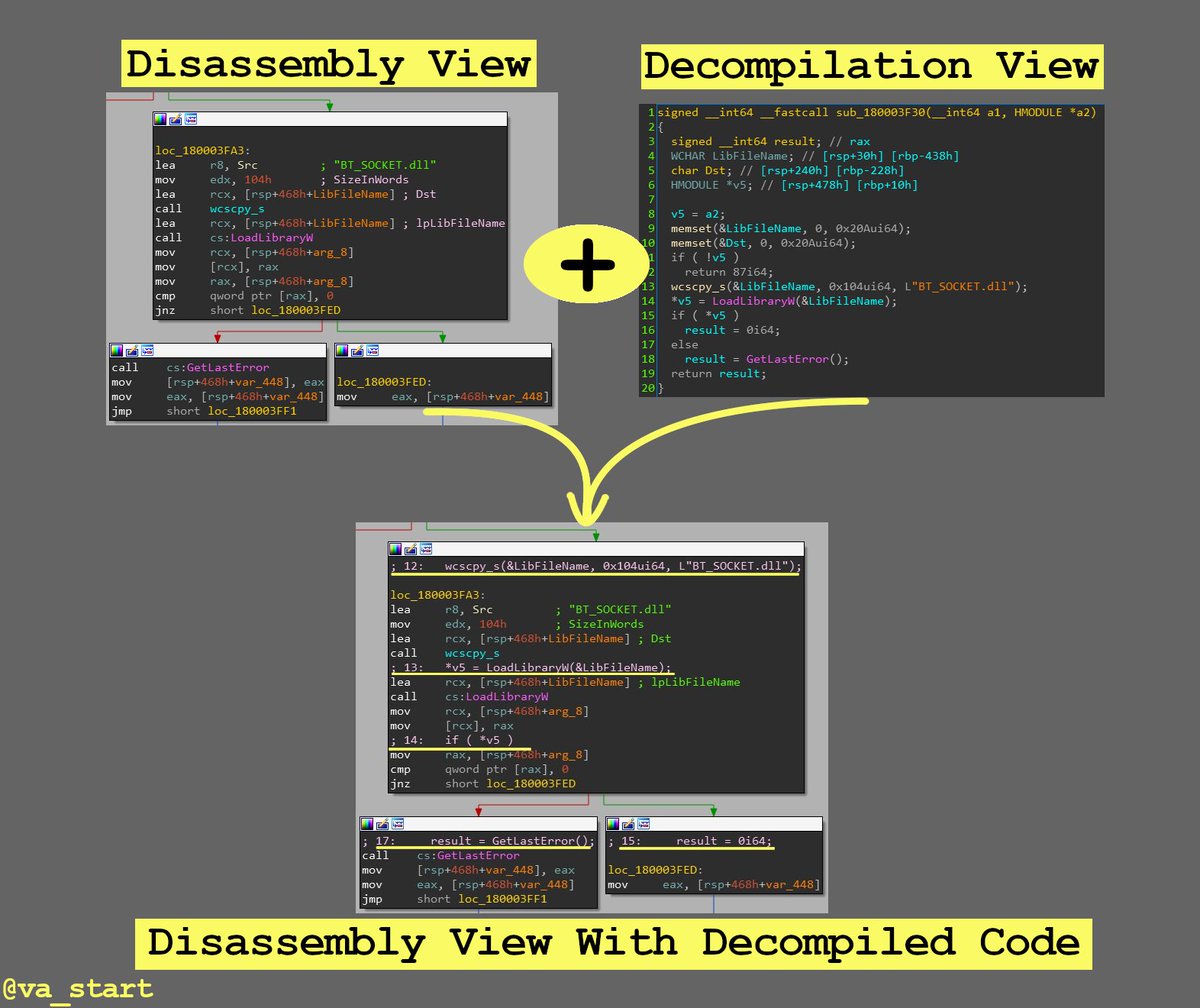
Get the best from both IDA’s decompiler & disassembler by overlaying the C code on the ASM in graph view (by clicking the “/” key)
#BinReversingTips
-Reversing Tip 24/30-
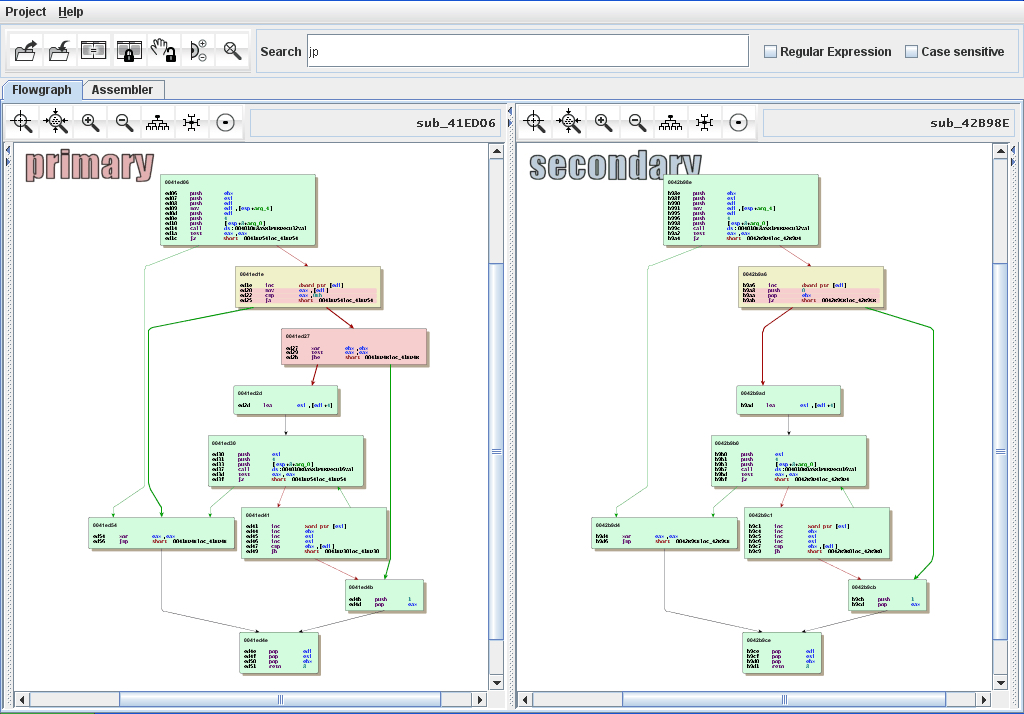
Looking to find code handling certain logic?
Search previous versions’ release notes to find when that logic was last updated. Next, bindiff the version before & of that release, the diff will have your target func https://t.co/2YvMYirXJb / #BinReversingTips
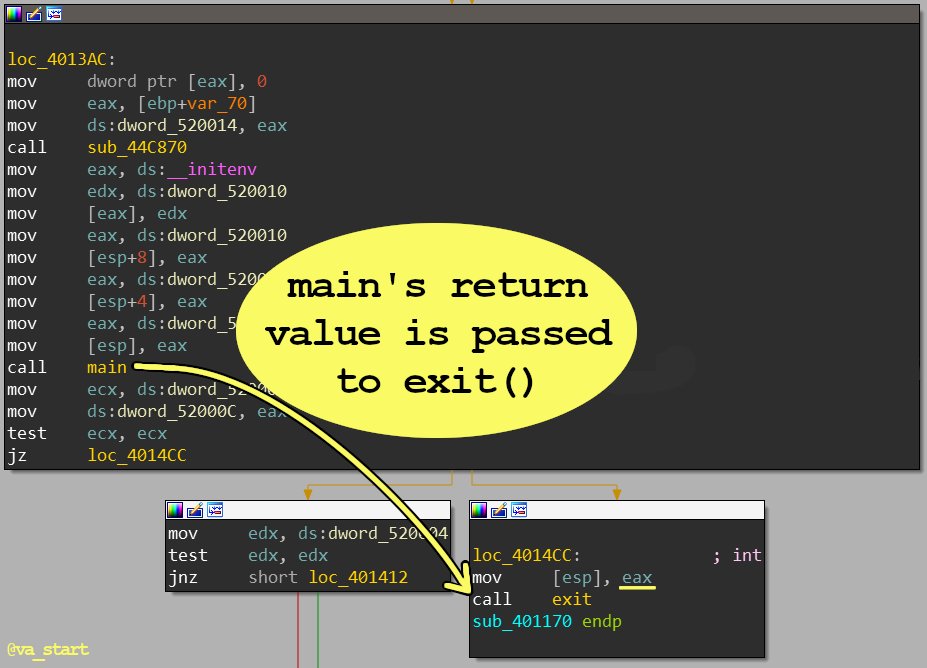
-Reversing Tip 23/30-
The easiest way to find the “main()” function is by working in reverse: find which function’s return value (saved in eax) is passed to exit() - that’s main()
#BinReversingTips
4) Last resort: Time Travel Debugging. 1) Start debugging the program with TTD 2) when the string appears, scan the program’s memory for its addr. 3) go back in time to find when/where the string was put there [5/5] https://t.co/j3MeOkdDX0 // #BinReversingTips
3) Google the str to see if it’s system generated: error strings for example, can be right from lib functions such as perror()/FormatMessageA(), in which case the str won’t be in the exe [4/5] #BinReversingTips
![MavLevin's tweet photo. 3) Google the str to see if it’s system generated: error strings for example, can be right from lib functions such as perror()/FormatMessageA(), in which case the str won’t be in the exe [4/5] #BinReversingTips https://t.co/Qlnx19xRVE](https://pbs.twimg.com/media/EWMczT4UYAIIYUv.jpg)
2) sometimes the string isn’t embedded in the binary, but is imported from an external resource file. find the str by grepping the program's installation folder [3/5] #BinReversingTips
![MavLevin's tweet photo. 2) sometimes the string isn’t embedded in the binary, but is imported from an external resource file. find the str by grepping the program's installation folder [3/5] #BinReversingTips https://t.co/xrYbXnYJqr](https://pbs.twimg.com/media/EWMcqVJVAAApwcS.jpg)
1) the strings window only has auto-identified strings, which misses some.
Use ALT-B to search the whole binary, even places not identified as data regions. [2/5] #BinReversingTips
![MavLevin's tweet photo. 1) the strings window only has auto-identified strings, which misses some.
Use ALT-B to search the whole binary, even places not identified as data regions. [2/5] #BinReversingTips https://t.co/AFPiU552oh](https://pbs.twimg.com/media/EWMb3rGUcAMka2N.png)
-Reversing Tip 22/30-
STRING HUNTING EDITION
strs help identify code functionality; how can we find a str seen in the GUI that isn’t in IDA’s strings window? a thread🧵
#binReversingTips / [1/5] >>>
![MavLevin's tweet photo. -Reversing Tip 22/30-
STRING HUNTING EDITION
strs help identify code functionality; how can we find a str seen in the GUI that isn’t in IDA’s strings window? a thread🧵
#binReversingTips / [1/5] >>> https://t.co/Tb7NFb31ch](https://pbs.twimg.com/media/EWMbsBsVcAU0WFX.png)
Last Seen Hashtags on Sotwe
momson()********+filter:videos
Seen from United States
NOlimit filter:videos
Seen from Ireland
exny or #nolimit() #momson() +filter:native_video
pnpboy
Seen from Norway
dhilo somali
momson filter:videos
Seen from Argentina
sarablonde
Seen from Switzerland
manisabayan
Seen from Turkey
Compran
Seen from United States
somno
Seen from Germany
Trends for you
Most Popular Users

Elon Musk 
@elonmusk
241M followers

Barack Obama
@barackobama
119.2M followers

Cristiano Ronaldo
@cristiano
112.2M followers

Donald J. Trump
@realdonaldtrump
111.8M followers

Narendra Modi
@narendramodi
107.1M followers

Rihanna
@rihanna
98.1M followers

NASA
@nasa
92.2M followers

Justin Bieber
@justinbieber
91.3M followers

KATY PERRY
@katyperry
88.6M followers

Taylor Swift
@taylorswift13
82.5M followers

Lady Gaga
@ladygaga
74M followers

Virat Kohli
@imvkohli
71.3M followers

Kim Kardashian
@kimkardashian
70.2M followers

YouTube
@youtube
68.7M followers

Bill Gates
@billgates
64.4M followers

Neymar Jr
@neymarjr
64.2M followers

The Ellen Show
@theellenshow
62.4M followers

CNN
@cnn
61.8M followers

Selena Gomez
@selenagomez
61.6M followers

X
@x
60.8M followers