

Top Tweets for #DevOpsTips

Cloud-native isn’t “moving to the cloud.” It’s building for scale, failure, and change from day one.
Design stateless. Automate recovery. Monitor everything.
#CloudNative #DevOpsTips #SoftwareArchitecture

Stop guessing. Learn how to configure cloud systems for performance, reliability, and scale. Train hands-on with Cloudix Training.
#CloudPerformance #CloudMistakes #CloudixTraining #DevOpsTips #SystemPerformance #HandsOnLabs #EnterpriseIT #dettycemberrave #TechTraining


In Docker, always use .dockerignore it saves time, bandwidth, and mental sanity 🐳
#DevOpsTips

🚀 Deploy smarter, scale faster.
Check out the 9 Kubernetes book deals every engineer should read in 2025.
List: https://t.co/yssMlFVCQY
What’s your go-to K8s resource?
#Kubernetes #DevOpsTips #CloudEngineering

A running #container 🟰a healthy app. Learn how liveness probes boost #Kubernetes #observability + #uptime. Read #SUSE’s guide
https://t.co/qtaniAwoVI
#Kubernetes #SUSE #CloudNativeOps #LivenessProbes #DevOpsTips #ContainerHealth

Pro tip:
Don’t store large blobs in etcd 🚫🧊
It’s optimized for small, frequent updates — not bulk data.
Keep it lean and clean! 🧽
#DevOpsTips #Devops #SRE #Kubernetes #k8s #IaC


Excited to announce I’m starting a ‘Tip of the Day’ series focused on #DevOps! 🚀
I’d love to make this as valuable as possible, so what are some tips or topics you’re interested in?
Drop your suggestions below and let’s level up together! #DevOpsTips #TechCommunity

🚀Boost your web development game with seamless integration of #DevOps! Automate deployments, test in real time, and collaborate effortlessly for faster, reliable, and efficient web solutions. Level up your skills and stay ahead in the game! 💻🌐 #WebDev #DevOpsTips


11/15: Exclude Specific Directories ❌🎭
🔍 Skip certain directories with find /path -name "*.log" -not -path "/path/exclude/*". Precision matters!
This command excludes specific directories from the search for files with the ".log" extension. #ExcludeDirs #DevOpsTips

#devopstips
#AWSCloud
#100daysofcodechallenge
Some more concepts about Lambda.
Note: Read yesterday's tweet (Quoted below) before reading this one as this is in continuation
1-Layers in Lambda:
->Layers are a way to manage code and resources separately from your Lambda function.
->For instance, you can put common libraries in a layer and share them across multiple functions.
->This helps reduce the size of your deployment package.
Example: You can create a layer for a custom logging library and attach it to multiple functions.
Below attached GIF demonstrates Layers in Lambda : You can see how the common Libraries or other Assets can be put into Layers to reuse them again
2-Permissions:
Who or what can invoke your Lambda function and what resources it can access ?
Permissions define that.
And for this IAM service is there to help us.
->You can create IAM Roles for defining what services your Lambda function can access and what it can do with those services
->You can have Resource based IAM policies which defines which services have the right to trigger (or invoke) your Lambda function
Example : You can grant permissions to your S3 bucket to trigger your Lambda function when a new file is uploaded in the bucket.
(NOTE : In the next tweet I will delve deep into example of IAM Roles and Resource Based IAM Policies)
3-Environment Variables:
->These are key-value pairs you can set for your Lambda function.
->They allow you to configure your function without changing the code.
For example: You can set an environment variable to specify a database connection string for your function.
4-Tags:
->Tags are labels you can attach to your Lambda functions.
->They help you organize and categorize your functions.
For Example: You can tag your functions with "production" or "development" to distinguish between environments.
Tomorrow I will discuss about Synchronous, Asynchronous Invocation, IAM Roles and Policies (in the context of Lambda function) and Monitoring and Operation Tools for the function
#devopstips
#AWSCloud
#100daysofcodechallenge
Today I am starting with very basic insights on AWS Lambda.
In next few tweets I will delve l'll bit deep into the concepts of Lambda & will share how you can create your own Lambda functions
1. What is AWS Lambda?
- AWS Lambda is a service by AWS that lets you run code without managing servers.
- It's like having a computer that only turns on when you need it.
2. How Does it Work?
- You provide AWS Lambda with your code, telling it what task you want to perform.
- You specify when this task should run, based on events or triggers.
3. Event-Driven Execution:
- AWS Lambda is event-driven, meaning it responds to events like file uploads, website visits, or data changes.
- When an event occurs, Lambda automatically wakes up, runs your code, and then goes back to sleep.
4. No Server Management:
- You don't have to worry about provisioning, configuring, or managing servers.
- AWS takes care of all the infrastructure for you.
5. Cost-Efficient:
- You only pay for the compute time used when your code runs.
- This makes it cost-effective for sporadic or low-traffic tasks.
6. Scalable and Flexible:
- Lambda scales automatically to handle varying workloads.
- You can use it for a wide range of tasks, from data processing to building serverless applications.
7. Some simple example use Cases for Lambda:
a-Image Resizing: Automatically resize images when they're uploaded.
b-Serverless APIs: Create APIs for handling HTTP requests.
c-Scheduled Tasks: Automate tasks on a schedule.
d-Event-Driven Services: Respond to events from other AWS services.
e-Microservices: Create small, single-purpose functions for a microservices architecture.
8. Serverless Computing:
AWS Lambda is a fundamental part of the serverless computing system, where you just focus on writing code, and infrastructure will be managed by the cloud provider (AWS)
Below I have shared some screenshots explaining about different functionalities on Lambda console:

#devopstips
#AWSCloud
#100daysofcodechallenge
Today I am starting with very basic insights on AWS Lambda.
In next few tweets I will delve l'll bit deep into the concepts of Lambda & will share how you can create your own Lambda functions
1. What is AWS Lambda?
- AWS Lambda is a service by AWS that lets you run code without managing servers.
- It's like having a computer that only turns on when you need it.
2. How Does it Work?
- You provide AWS Lambda with your code, telling it what task you want to perform.
- You specify when this task should run, based on events or triggers.
3. Event-Driven Execution:
- AWS Lambda is event-driven, meaning it responds to events like file uploads, website visits, or data changes.
- When an event occurs, Lambda automatically wakes up, runs your code, and then goes back to sleep.
4. No Server Management:
- You don't have to worry about provisioning, configuring, or managing servers.
- AWS takes care of all the infrastructure for you.
5. Cost-Efficient:
- You only pay for the compute time used when your code runs.
- This makes it cost-effective for sporadic or low-traffic tasks.
6. Scalable and Flexible:
- Lambda scales automatically to handle varying workloads.
- You can use it for a wide range of tasks, from data processing to building serverless applications.
7. Some simple example use Cases for Lambda:
a-Image Resizing: Automatically resize images when they're uploaded.
b-Serverless APIs: Create APIs for handling HTTP requests.
c-Scheduled Tasks: Automate tasks on a schedule.
d-Event-Driven Services: Respond to events from other AWS services.
e-Microservices: Create small, single-purpose functions for a microservices architecture.
8. Serverless Computing:
AWS Lambda is a fundamental part of the serverless computing system, where you just focus on writing code, and infrastructure will be managed by the cloud provider (AWS)
Below I have shared some screenshots explaining about different functionalities on Lambda console:

Discover the paramount importance of seamlessly integrating #Security into DevOps #methodologies 🔒🛠️
Learn how this synergy fortifies your #Software #development lifecycle.
#devopstips #devsecops

#devopstips
#100DaysOfCode
#AWSCloud
In this twitter thread I've shared some insights about concept of Serverless Architecture:
1-No Server Management:
In a traditional server-based approach, you would need to provision, configure & maintain servers to run your applications...


Why did the DevOps engineer cross the road?
To automate the deployment of chickens on the other side, of course! 🐔🤖
#DevOps #devopstips #engineer #Automation #chickens

I started my career as a sysadmin in 2009 in a services firm.
7 years layer I started my solo DevOps consulting business.
3 weeks ago I launched my 1st product on #Gumroad.
Now I am building the 2nd.
https://t.co/M5egXMvug8
#buildinpublic #infrastructure #devopstips

We're working on new group #monitors, unbelievable flexibility and new level of the #monitoring #web3 #webdevelopment #devops #devopstips

Enhance Your Software Delivery Process with Leading DevOps Service Providers Across the Globe! 🚀🌍
Join Us in Upping Your Development Game.
https://t.co/vgiU6m2k5r
#devopstips #Software #services #development


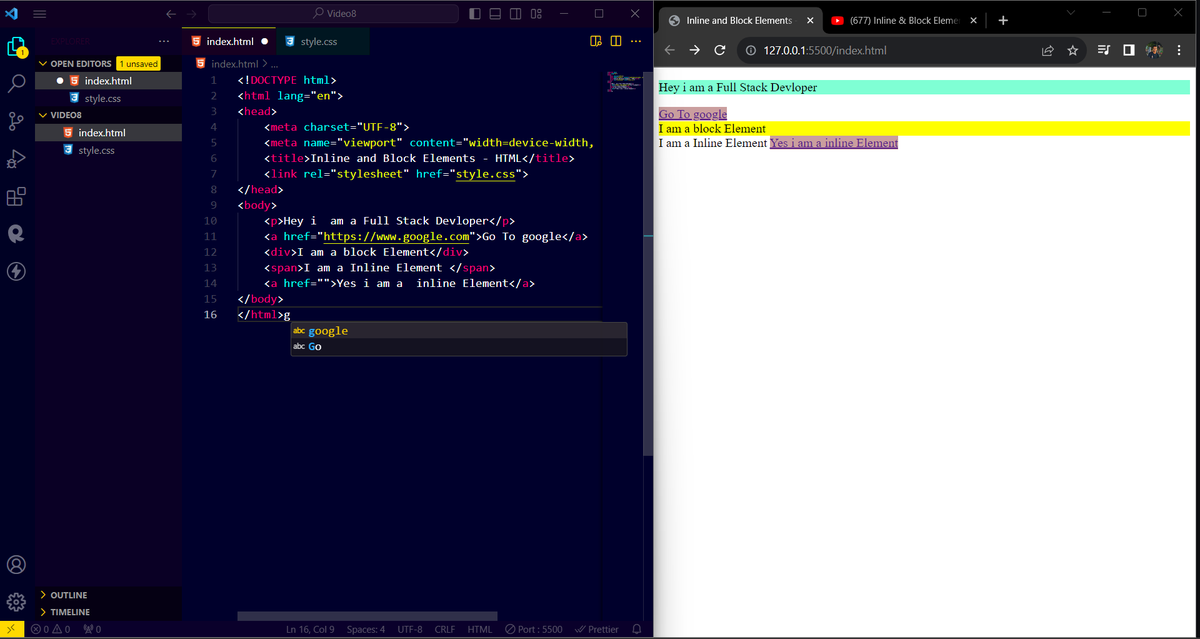
#Day08
Today i learned inline and 🎯block elements💻
.
.
.
.
.
.
.
#javascript #HTML5 #softwaredevloper #FrontEnd #React #programming #codinglife #CodingJourney #codingcommunity #TwitterX #devopstips #node #love #USA #remotework #RemoteDevelopers
Last Seen Hashtags on Sotwe
mlbb #nsfw lesley
Seen from Peru
minichatt
Seen from Japan
肉便器
Seen from United States
auntie
Seen from United Kingdom
mom son ai
Seen from Thailand
minichats
Seen from United States
malluchechi
Seen from India
MGAI()******
Seen from Belgium
henryjimenez
Seen from Peru
outdoor #ช่วยตัวเอง
Seen from Thailand
Trends for you
Most Popular Users

Elon Musk 
@elonmusk
241.3M followers

Barack Obama
@barackobama
118.8M followers

Cristiano Ronaldo
@cristiano
114.5M followers

Donald J. Trump
@realdonaldtrump
111.9M followers

Narendra Modi
@narendramodi
107M followers

Rihanna
@rihanna
98.7M followers

NASA
@nasa
92.3M followers

Justin Bieber
@justinbieber
91.8M followers

KATY PERRY
@katyperry
90M followers

Taylor Swift
@taylorswift13
84M followers

Lady Gaga
@ladygaga
75.5M followers

Virat Kohli
@imvkohli
73.4M followers

Kim Kardashian
@kimkardashian
70.8M followers

YouTube
@youtube
68.7M followers

Neymar Jr
@neymarjr
66.4M followers

Bill Gates
@billgates
65.2M followers

Selena Gomez
@selenagomez
63.1M followers

The Ellen Show
@theellenshow
62.2M followers

CNN
@cnn
61.7M followers

X
@x
60.6M followers