

Top Tweets for #DevOpstips

Cloud-native isn’t “moving to the cloud.” It’s building for scale, failure, and change from day one.
Design stateless. Automate recovery. Monitor everything.
#CloudNative #DevOpsTips #SoftwareArchitecture

Stop guessing. Learn how to configure cloud systems for performance, reliability, and scale. Train hands-on with Cloudix Training.
#CloudPerformance #CloudMistakes #CloudixTraining #DevOpsTips #SystemPerformance #HandsOnLabs #EnterpriseIT #dettycemberrave #TechTraining


In Docker, always use .dockerignore it saves time, bandwidth, and mental sanity 🐳
#DevOpsTips

🚀 Deploy smarter, scale faster.
Check out the 9 Kubernetes book deals every engineer should read in 2025.
List: https://t.co/yssMlFVCQY
What’s your go-to K8s resource?
#Kubernetes #DevOpsTips #CloudEngineering

A running #container 🟰a healthy app. Learn how liveness probes boost #Kubernetes #observability + #uptime. Read #SUSE’s guide
https://t.co/qtaniAwoVI
#Kubernetes #SUSE #CloudNativeOps #LivenessProbes #DevOpsTips #ContainerHealth

Pro tip:
Don’t store large blobs in etcd 🚫🧊
It’s optimized for small, frequent updates — not bulk data.
Keep it lean and clean! 🧽
#DevOpsTips #Devops #SRE #Kubernetes #k8s #IaC


Excited to announce I’m starting a ‘Tip of the Day’ series focused on #DevOps! 🚀
I’d love to make this as valuable as possible, so what are some tips or topics you’re interested in?
Drop your suggestions below and let’s level up together! #DevOpsTips #TechCommunity

🚀Boost your web development game with seamless integration of #DevOps! Automate deployments, test in real time, and collaborate effortlessly for faster, reliable, and efficient web solutions. Level up your skills and stay ahead in the game! 💻🌐 #WebDev #DevOpsTips


11/15: Exclude Specific Directories ❌🎭
🔍 Skip certain directories with find /path -name "*.log" -not -path "/path/exclude/*". Precision matters!
This command excludes specific directories from the search for files with the ".log" extension. #ExcludeDirs #DevOpsTips

#devopstips
#AWSCloud
#100daysofcodechallenge
Some more concepts about Lambda.
Note: Read yesterday's tweet (Quoted below) before reading this one as this is in continuation
1-Layers in Lambda:
->Layers are a way to manage code and resources separately from your Lambda function.
->For instance, you can put common libraries in a layer and share them across multiple functions.
->This helps reduce the size of your deployment package.
Example: You can create a layer for a custom logging library and attach it to multiple functions.
Below attached GIF demonstrates Layers in Lambda : You can see how the common Libraries or other Assets can be put into Layers to reuse them again
2-Permissions:
Who or what can invoke your Lambda function and what resources it can access ?
Permissions define that.
And for this IAM service is there to help us.
->You can create IAM Roles for defining what services your Lambda function can access and what it can do with those services
->You can have Resource based IAM policies which defines which services have the right to trigger (or invoke) your Lambda function
Example : You can grant permissions to your S3 bucket to trigger your Lambda function when a new file is uploaded in the bucket.
(NOTE : In the next tweet I will delve deep into example of IAM Roles and Resource Based IAM Policies)
3-Environment Variables:
->These are key-value pairs you can set for your Lambda function.
->They allow you to configure your function without changing the code.
For example: You can set an environment variable to specify a database connection string for your function.
4-Tags:
->Tags are labels you can attach to your Lambda functions.
->They help you organize and categorize your functions.
For Example: You can tag your functions with "production" or "development" to distinguish between environments.
Tomorrow I will discuss about Synchronous, Asynchronous Invocation, IAM Roles and Policies (in the context of Lambda function) and Monitoring and Operation Tools for the function
#devopstips
#AWSCloud
#100daysofcodechallenge
Today I am starting with very basic insights on AWS Lambda.
In next few tweets I will delve l'll bit deep into the concepts of Lambda & will share how you can create your own Lambda functions
1. What is AWS Lambda?
- AWS Lambda is a service by AWS that lets you run code without managing servers.
- It's like having a computer that only turns on when you need it.
2. How Does it Work?
- You provide AWS Lambda with your code, telling it what task you want to perform.
- You specify when this task should run, based on events or triggers.
3. Event-Driven Execution:
- AWS Lambda is event-driven, meaning it responds to events like file uploads, website visits, or data changes.
- When an event occurs, Lambda automatically wakes up, runs your code, and then goes back to sleep.
4. No Server Management:
- You don't have to worry about provisioning, configuring, or managing servers.
- AWS takes care of all the infrastructure for you.
5. Cost-Efficient:
- You only pay for the compute time used when your code runs.
- This makes it cost-effective for sporadic or low-traffic tasks.
6. Scalable and Flexible:
- Lambda scales automatically to handle varying workloads.
- You can use it for a wide range of tasks, from data processing to building serverless applications.
7. Some simple example use Cases for Lambda:
a-Image Resizing: Automatically resize images when they're uploaded.
b-Serverless APIs: Create APIs for handling HTTP requests.
c-Scheduled Tasks: Automate tasks on a schedule.
d-Event-Driven Services: Respond to events from other AWS services.
e-Microservices: Create small, single-purpose functions for a microservices architecture.
8. Serverless Computing:
AWS Lambda is a fundamental part of the serverless computing system, where you just focus on writing code, and infrastructure will be managed by the cloud provider (AWS)
Below I have shared some screenshots explaining about different functionalities on Lambda console:

#devopstips
#AWSCloud
#100daysofcodechallenge
Today I am starting with very basic insights on AWS Lambda.
In next few tweets I will delve l'll bit deep into the concepts of Lambda & will share how you can create your own Lambda functions
1. What is AWS Lambda?
- AWS Lambda is a service by AWS that lets you run code without managing servers.
- It's like having a computer that only turns on when you need it.
2. How Does it Work?
- You provide AWS Lambda with your code, telling it what task you want to perform.
- You specify when this task should run, based on events or triggers.
3. Event-Driven Execution:
- AWS Lambda is event-driven, meaning it responds to events like file uploads, website visits, or data changes.
- When an event occurs, Lambda automatically wakes up, runs your code, and then goes back to sleep.
4. No Server Management:
- You don't have to worry about provisioning, configuring, or managing servers.
- AWS takes care of all the infrastructure for you.
5. Cost-Efficient:
- You only pay for the compute time used when your code runs.
- This makes it cost-effective for sporadic or low-traffic tasks.
6. Scalable and Flexible:
- Lambda scales automatically to handle varying workloads.
- You can use it for a wide range of tasks, from data processing to building serverless applications.
7. Some simple example use Cases for Lambda:
a-Image Resizing: Automatically resize images when they're uploaded.
b-Serverless APIs: Create APIs for handling HTTP requests.
c-Scheduled Tasks: Automate tasks on a schedule.
d-Event-Driven Services: Respond to events from other AWS services.
e-Microservices: Create small, single-purpose functions for a microservices architecture.
8. Serverless Computing:
AWS Lambda is a fundamental part of the serverless computing system, where you just focus on writing code, and infrastructure will be managed by the cloud provider (AWS)
Below I have shared some screenshots explaining about different functionalities on Lambda console:

Discover the paramount importance of seamlessly integrating #Security into DevOps #methodologies 🔒🛠️
Learn how this synergy fortifies your #Software #development lifecycle.
#devopstips #devsecops

#devopstips
#100DaysOfCode
#AWSCloud
In this twitter thread I've shared some insights about concept of Serverless Architecture:
1-No Server Management:
In a traditional server-based approach, you would need to provision, configure & maintain servers to run your applications...


Why did the DevOps engineer cross the road?
To automate the deployment of chickens on the other side, of course! 🐔🤖
#DevOps #devopstips #engineer #Automation #chickens

I started my career as a sysadmin in 2009 in a services firm.
7 years layer I started my solo DevOps consulting business.
3 weeks ago I launched my 1st product on #Gumroad.
Now I am building the 2nd.
https://t.co/M5egXMvug8
#buildinpublic #infrastructure #devopstips

We're working on new group #monitors, unbelievable flexibility and new level of the #monitoring #web3 #webdevelopment #devops #devopstips

Enhance Your Software Delivery Process with Leading DevOps Service Providers Across the Globe! 🚀🌍
Join Us in Upping Your Development Game.
https://t.co/vgiU6m2k5r
#devopstips #Software #services #development


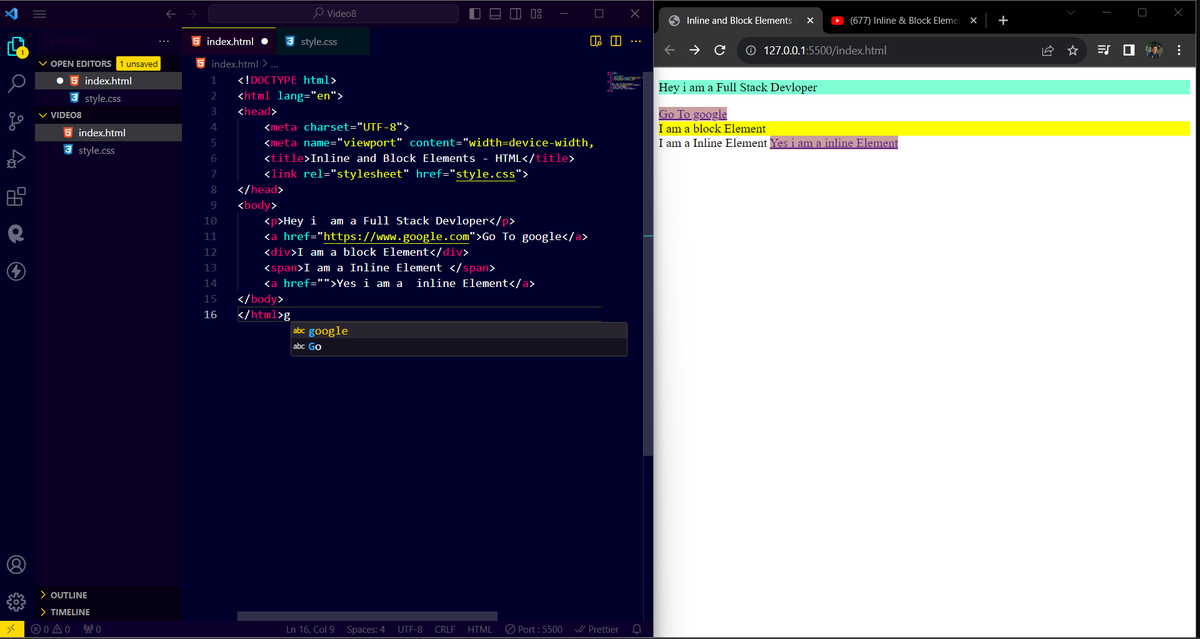
#Day08
Today i learned inline and 🎯block elements💻
.
.
.
.
.
.
.
#javascript #HTML5 #softwaredevloper #FrontEnd #React #programming #codinglife #CodingJourney #codingcommunity #TwitterX #devopstips #node #love #USA #remotework #RemoteDevelopers
Last Seen Hashtags on Sotwe
Jihyo
Seen from Japan
malhado
Seen from Brazil
社死
Seen from United States
MomSon()****** filter:videos
Seen from United States
snotfetish
Seen from Brazil
NoLimit #NoLimit #momson
Seen from India
chuppy
Seen from Vietnam
momson nolimit momson*
Seen from Ukraine
勾引
Seen from Germany
主人
Seen from United States
Trends for you
Most Popular Users

Elon Musk 
@elonmusk
240.4M followers

Barack Obama
@barackobama
119.3M followers

Donald J. Trump
@realdonaldtrump
111.7M followers

Cristiano Ronaldo
@cristiano
110M followers

Narendra Modi
@narendramodi
107M followers

Rihanna
@rihanna
97.5M followers

NASA
@nasa
92.1M followers

Justin Bieber
@justinbieber
90.8M followers

KATY PERRY
@katyperry
87.4M followers

Taylor Swift
@taylorswift13
81.2M followers

Lady Gaga
@ladygaga
72.7M followers

Kim Kardashian
@kimkardashian
69.6M followers

Virat Kohli
@imvkohli
69.4M followers

YouTube
@youtube
68.6M followers

Bill Gates
@billgates
63.7M followers

The Ellen Show
@theellenshow
62.5M followers

Neymar Jr
@neymarjr
62.1M followers

CNN
@cnn
61.9M followers

X
@x
60.9M followers

Selena Gomez
@selenagomez
60.4M followers