

Top Tweets for #EdTechTidbit

TGIF! Next week we’ll look at how to share these wonderful animations. But for now, take it easy and enjoy some downtime. #EdTech #EdTechTidbit
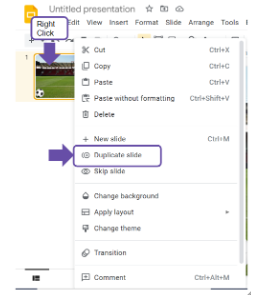
Third Stop: Duplicating Slides, Right Clicking the Slide Preview. Right click on the slide preview in the panel on the left and select “Duplicate slide.”
#EdTech #EdTechTidbit
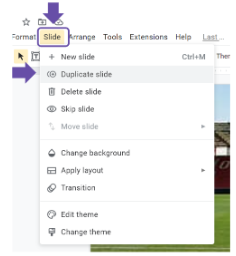
Third Stop: Duplicating Slides, using the “Slide” Menu. Click on the Slide Menu heading and select “Duplicate slide.”
#EdTech #EdTechTidbit
Third Stop: Duplicating Slides, Why and What is it? Stop-frame-esque animation requires only specific elements to move - enter Duplicating Slides! Google gives you two ways to duplicate a slide. (surprised?) Check back later today to find out! #EdTech #EdTechTidbit
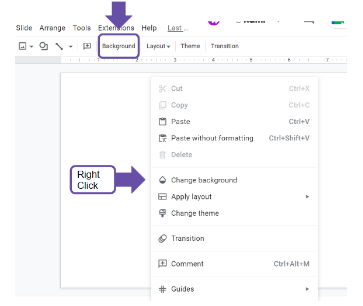
Next Stop: Inserting Backgrounds, Quick Button. Right Click on the canvas and select “Change background.”
#EdTech #EdTechTidbit
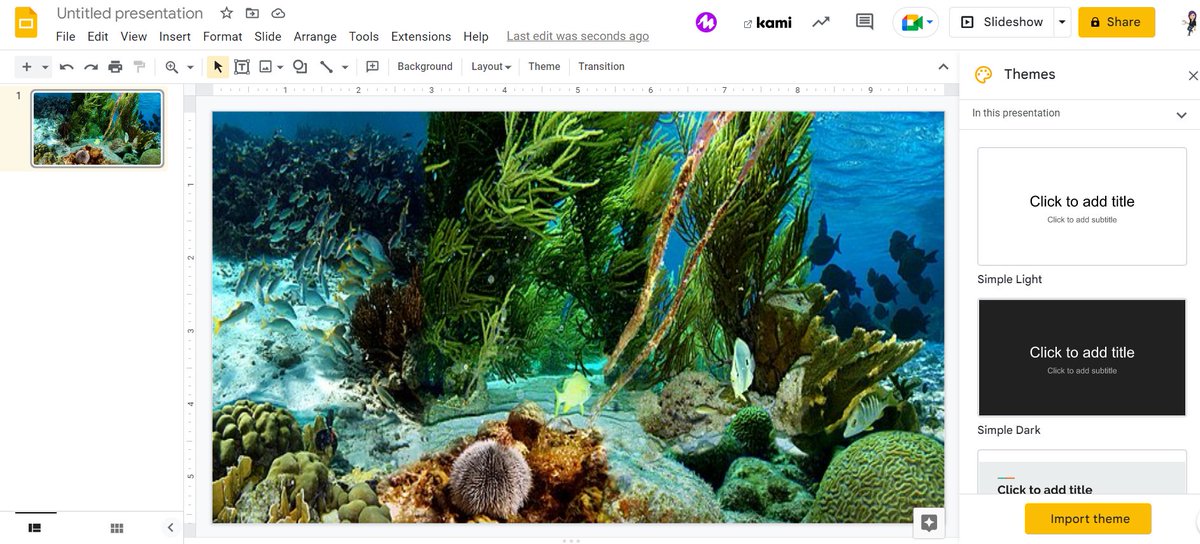
Next Stop: Inserting Backgrounds, Knowing the Difference.
Images you can move, resize, modify, and do a lot of other fun stuff to; a bg is static and fills the entire slide a.k.a. not something likely to accidentally move and mess up your entire project…
#EdTech #EdTechTidbit
Next Stop: Inserting Images, Using the “Insert” Menu: Along the menu bar headings, click on “Insert” and select “Image” #EdTech #EdTechTidbit
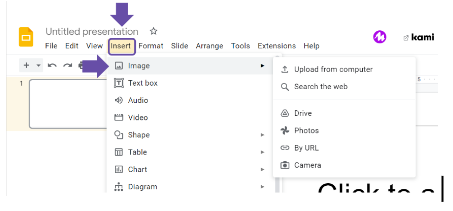
Next Stop: Inserting Images, What Can You Do?
When selecting an image, you can search from the web, upload from your computer, drive, photos, camera, or attach a URL to the photo. #EdTech #EdTechTidbit
Next Stop: Inserting Images, a side note: I teach this prior to setting the background so the students can first practice simple animations such as making a soccer ball bounce along the screen. There are 2 (two) ways to add images. Stay tuned!
#EdTech #EdTechTidbit
The NoCo Collab @ SUNY Pots is designed for teachers, #EdTech Enthusiasts, adminis, AND pre-service teachers. Learn effective/engaging ways to Tech Integrate. Workshops! Poster sessions! Drone soccer! Vendors! Networking w/ Colleagues! We’ve got it all!! #EdTech #EdTechTidbit
Presentation Settings: Show progress bar - if you have multiple sections in your form, toggle this on as a kindness to your respondents. This lets them know how much they have left to complete.
#GettingFORMal #EdTech #EdTechTidbit
One More Week! The NoCo Collab Event is Nov 10 @ SUNY Potsdam! The NoCo Collab @ SUNY Pots is designed for teachers, #EdTech Enthusiasts, adminis, AND pre-service teachers. https://t.co/RCfwu6J1AX #EdTech #EdTechTidbit
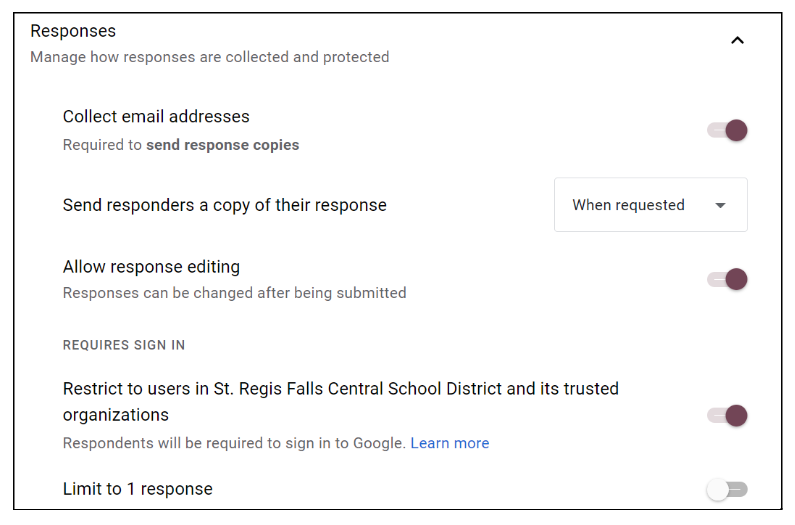
Responses settings: Limit to 1 response - Is it a quiz, or only 1 response/person? Toggle this on.
Collecting multiple points of data over multiple days (SEL check-in, or growth-monitoring)? Toggle this off.#GettingFORMal #EdTech #EdTechTidbit
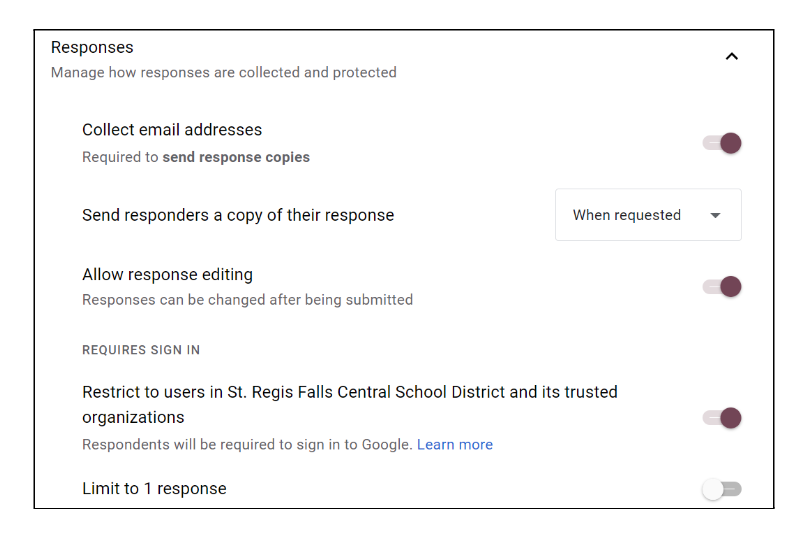
Responses settings: Collect Email Addresses - I suggest you toggle this on by default whenever you need to know WHO responded. If you’re doing a completely anonymous survey, then, by all means, toggle it off. #GettingFORMal #EdTech #EdTechTidbit
The NoCo Collab @ SUNY Pots is designed for teachers, #EdTech Enthusiasts, adminis, AND pre-service teachers. Learn effective/engaging ways to Tech Integrate. Workshops! Poster sessions! Drone soccer! Vendors! Networking w/ Colleagues! We’ve got it all!!
#EdTech #EdTechTidbit
What’s the Diff? A quiz will grade your responses, and requires defined correct answers
A survey gathers various information and data, with no defined correct responses. #GettingFORMal #EdTech #EdTechTidbit
One week and two days away! The NoCo Collab Event is Nov 10 @ SUNY Potsdam! The NoCo Collab @ SUNY Pots is designed for teachers, #EdTech Enthusiasts, adminis, AND pre-service teachers. https://t.co/RCfwu6J1AX #EdTech #EdTechTidbit
Accessorizing - Adjusting your Form Settings
The What:
Quizzes, Response, and Presentation settings.
The How:
Click on the Settings Tab in your Google Form.
The “Extra”:
Limit responses, restrict by domain, & the REAL difference b/w quiz and survey? #EdTech #EdTechTidbit
Happy Halloween! Don’t be afraid! #GettingFORMal can be a scream! Dress-up your next Form with some mysterious hocus pocus! Collect that data with ghastly ease! #EdTech #EdTechTidbit
Happy Halloween! Collecting data driving you batty? Use a Google Form to streamline and digitize the process! #GettingFORMal #EdTech #EdTechTidbit
Last Seen Hashtags on Sotwe
omegle (*******) filter:videos
Seen from Argentina
何気ない一枚
Seen from Colombia
femdom cont
Seen from Austria
monkeyapp(*****)
Seen from Mexico
美唄焼き鳥
Seen from United States
bbcmissionarypounding
Seen from Israel
rimjob
Seen from Germany
btposse
Seen from United States
kinkytwitter
Seen from Spain
ipsalagay
Seen from Turkey
Most Popular Users

Elon Musk 
@elonmusk
241.5M followers

Barack Obama
@barackobama
119.1M followers

Cristiano Ronaldo
@cristiano
113.6M followers

Donald J. Trump
@realdonaldtrump
111.8M followers

Narendra Modi
@narendramodi
107.2M followers

Rihanna
@rihanna
98.5M followers

NASA
@nasa
92.3M followers

Justin Bieber
@justinbieber
91.7M followers

KATY PERRY
@katyperry
89.5M followers

Taylor Swift
@taylorswift13
83.4M followers

Lady Gaga
@ladygaga
74.9M followers

Virat Kohli
@imvkohli
72.6M followers

Kim Kardashian
@kimkardashian
70.7M followers

YouTube
@youtube
68.8M followers

Neymar Jr
@neymarjr
65.5M followers

Bill Gates
@billgates
64.8M followers

Selena Gomez
@selenagomez
62.5M followers

The Ellen Show
@theellenshow
62.3M followers

CNN
@cnn
61.8M followers

X
@x
60.8M followers