

Top Tweets for #LRtip

#Congratulations to all the students who got accepted in the Local Research Training and Internship Program! 🥳🎉🕺💫
#URC #LRTIP


#LRtip When you go to edit a layered TIFF file in Photoshop from Lightroom, choose Edit Original to get access to your layers

Removing Dark Circles using Lightroom Only!! #lightroom #lrtip #portrait #retouching #darkcircles https://t.co/1FAJusDqUn
#LRtip Use the Detail panel window to check for sharpness while working in Fit view.

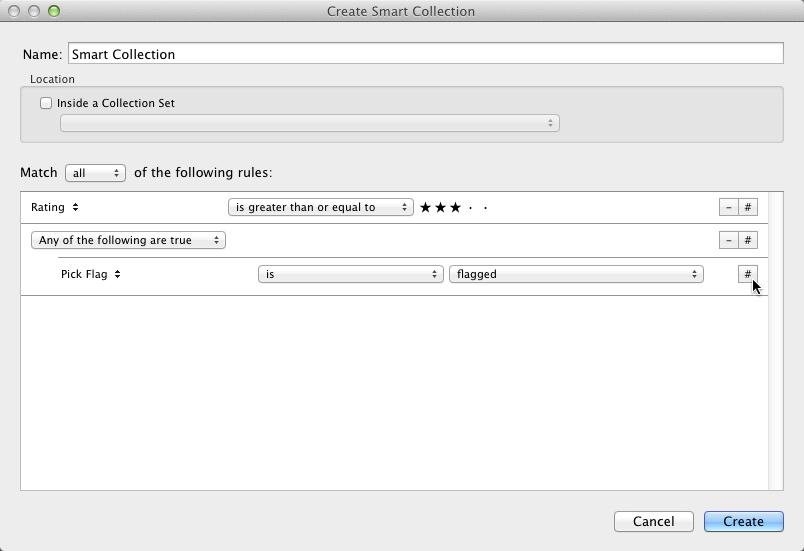
#LRtip Hold down Alt/Option and click + (now #) to add more conditional criteria for Smart Collections #lightroom

#LRTip Use Shift+Ctrl+C to Copy Settings from one image & Shift+Ctrl+V to Paste Settings to another! Very handy for bulk editing! #Lightroom
To reset just the crop for an image in @Lightroom, use Ctrl+Alt+R or Cmd+Opt+R #LRTip #Lightroom <One of the lifesaver shortcuts!>
To quickly narrow down photos in #Lightroom Library module: turn on Caps Lock to auto-advance, p to pick, x to reject images. #LRTip

#LRTip Command + Shift + M (Mac) | Control + Shift + M displays the options to Email Photos in Lightroom
#LRTip For a level horizon, use crop (press 'R'), hold Command (Control on PC) and drag a line to level the image (works vertically too!)
#LRTip Sort your entire Catalog into date order by selecting All Photos in the Catalog Panel then select Capture Time as the sort order
#LRTip Use the Copyright symbol on Exported Images by holding Alt while typing 0169 (Win) or Opt-G (Mac) in the Watermark Menu
#LRTip Find pre-2012 Process Version images in a Catalog by Library - Find Previous Process Photos which puts them in a temporary Collection
#LRTip To see basic camera info in Develop look under the Histogram or select info to display in the Info Overlay (View - Loupe - Show Info)
#LRTip to view or adjust images quickly, always Build Standard Previews first (Select Images then Library - Previews)
#LRTip organize copies or versions of an image, Group into a Stack with the one you like most on top - it will be the one that shows in Grid
#LRTip to see before and after when in develop, hit '/' - or to see before and after side by side, 'Y' (same again to return to Develop)
#LRTip change the adjustment amount on a slider by using the Shift key for greater increments
Last Seen Hashtags on Sotwe
daaskochaat
Seen from France
NoLimit #NoLimit #momson
Seen from United States
blackpyt
Seen from South Africa
memeksmp
Seen from Indonesia
2ควยในรูเดียวกัน
Seen from Thailand
cryptotrading
Seen from United States
frontlinewheels
Seen from United States
นวดปัตตานี
Seen from Thailand
直男撸管
Seen from Germany
ชักว่าวใส่ผ้าถุง
Seen from Thailand
Trends for you
Most Popular Users

Elon Musk 
@elonmusk
240.3M followers

Barack Obama
@barackobama
119.2M followers

Donald J. Trump
@realdonaldtrump
111.6M followers

Cristiano Ronaldo
@cristiano
109.7M followers

Narendra Modi
@narendramodi
106.9M followers

Rihanna
@rihanna
97.4M followers

NASA
@nasa
92.1M followers

Justin Bieber
@justinbieber
90.7M followers

KATY PERRY
@katyperry
87.2M followers

Taylor Swift
@taylorswift13
81M followers

Lady Gaga
@ladygaga
72.6M followers

Kim Kardashian
@kimkardashian
69.6M followers

Virat Kohli
@imvkohli
69.2M followers

YouTube
@youtube
68.6M followers

Bill Gates
@billgates
63.6M followers

The Ellen Show
@theellenshow
62.5M followers

CNN
@cnn
61.9M followers

Neymar Jr
@neymarjr
61.8M followers

X
@x
60.9M followers

Selena Gomez
@selenagomez
60.3M followers