

Top Tweets for #lrtip

#Congratulations to all the students who got accepted in the Local Research Training and Internship Program! 🥳🎉🕺💫
#URC #LRTIP


#LRtip When you go to edit a layered TIFF file in Photoshop from Lightroom, choose Edit Original to get access to your layers

Removing Dark Circles using Lightroom Only!! #lightroom #lrtip #portrait #retouching #darkcircles https://t.co/1FAJusDqUn
#LRtip Use the Detail panel window to check for sharpness while working in Fit view.

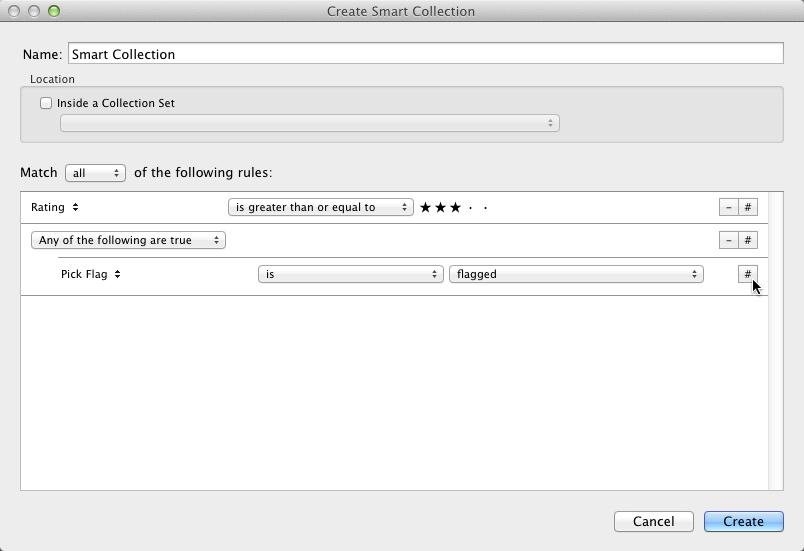
#LRtip Hold down Alt/Option and click + (now #) to add more conditional criteria for Smart Collections #lightroom

#LRTip Use Shift+Ctrl+C to Copy Settings from one image & Shift+Ctrl+V to Paste Settings to another! Very handy for bulk editing! #Lightroom
To reset just the crop for an image in @Lightroom, use Ctrl+Alt+R or Cmd+Opt+R #LRTip #Lightroom <One of the lifesaver shortcuts!>
To quickly narrow down photos in #Lightroom Library module: turn on Caps Lock to auto-advance, p to pick, x to reject images. #LRTip

#LRTip Command + Shift + M (Mac) | Control + Shift + M displays the options to Email Photos in Lightroom
#LRTip For a level horizon, use crop (press 'R'), hold Command (Control on PC) and drag a line to level the image (works vertically too!)
#LRTip Sort your entire Catalog into date order by selecting All Photos in the Catalog Panel then select Capture Time as the sort order
#LRTip Use the Copyright symbol on Exported Images by holding Alt while typing 0169 (Win) or Opt-G (Mac) in the Watermark Menu
#LRTip Find pre-2012 Process Version images in a Catalog by Library - Find Previous Process Photos which puts them in a temporary Collection
#LRTip To see basic camera info in Develop look under the Histogram or select info to display in the Info Overlay (View - Loupe - Show Info)
#LRTip to view or adjust images quickly, always Build Standard Previews first (Select Images then Library - Previews)
#LRTip organize copies or versions of an image, Group into a Stack with the one you like most on top - it will be the one that shows in Grid
#LRTip to see before and after when in develop, hit '/' - or to see before and after side by side, 'Y' (same again to return to Develop)
#LRTip change the adjustment amount on a slider by using the Shift key for greater increments
Trends for you
Most Popular Users

Elon Musk 
@elonmusk
240.3M followers

Barack Obama
@barackobama
119.3M followers

Donald J. Trump
@realdonaldtrump
111.6M followers

Cristiano Ronaldo
@cristiano
109.7M followers

Narendra Modi
@narendramodi
106.9M followers

Rihanna
@rihanna
97.4M followers

NASA
@nasa
92.1M followers

Justin Bieber
@justinbieber
90.7M followers

KATY PERRY
@katyperry
87.2M followers

Taylor Swift
@taylorswift13
81M followers

Lady Gaga
@ladygaga
72.6M followers

Kim Kardashian
@kimkardashian
69.6M followers

Virat Kohli
@imvkohli
69.2M followers

YouTube
@youtube
68.6M followers

Bill Gates
@billgates
63.6M followers

The Ellen Show
@theellenshow
62.5M followers

CNN
@cnn
61.9M followers

Neymar Jr
@neymarjr
61.8M followers

X
@x
60.9M followers

Selena Gomez
@selenagomez
60.3M followers