

Top Tweets for #PyCharmTip

#PyCharmTip
PyCharm regularly checks for remote changes but doesn't automatically fetch them. Thankfully, there's an easy way to fetch the changes without applying them to your code. Let Paul show you how: https://t.co/Jr2JcL1sCE
#Git #branches
#PyCharmTip
Working in a development team often involves resolving conflicts... conflicting Git commits, to be more precise.
Avoid the hassle and let PyCharm warn you about overlapping commits before you push your changes!
Find more tips like this: https://t.co/Nn3Gx2bYA6
#PyCharmTip
🙄 Trying to reconstruct changes you made to your code a day ago? PyCharm can help! 🔮 See and work with the changes right in the editor. Spoiler: no trip through #VCS involved! Here’s how 👉 https://t.co/CMk7uZySXP
#PyCharmTip Partial Commit
Struggling to understand the changes from yet another very large commit? Next time, use a partial commit to split them into several commits. Don’t forget to share this video with your team 😉
Here is a tip from @paulweveritt 👉 https://t.co/VaNcHpVch9
#PyCharmTip: Amend Commit
Want to edit a #commit you just submitted? Just amend it with the changes you need! ✨
Check out the new tip from @paulweveritt to save you time (and a commit)!
🔖 https://t.co/pE0RMjlMQd
#PyCharmTip
Recover from editing disasters with Local History (and @Paulweveritt)
Want to recover the whole file? Follow the link to the PyCharm Guide!
https://t.co/R6ExBaPRkR
#PyCharmTip Reword Commit message
Fix misspelled commit messages before you push them and keep your repo safe.
@Paulweveritt has prepared more details on the topic, including shortcuts, terminal commands, and more – check out the PyCharm Guide!
https://t.co/Vggyr2JDjW
#PyCharmTip: Undo Commit
Ever done a git commit too soon? If you haven't pushed, PyCharm makes it easy to undo the commit and keep the changes.
https://t.co/RinlCdT10y

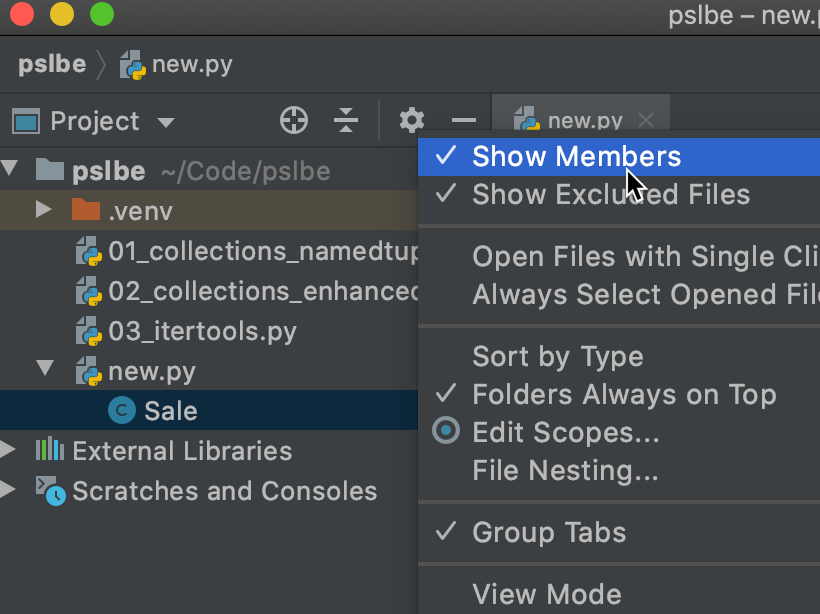
If you enable "Show Members", it will show the classes inside your files. #PyCharmTip

My Pycharm t-shirt is here. It's so awesome 🤩 Thank you @pycharm @gamesbrainiac! #PyCharmTip #refactorAllTheThings


👌 Just received T-Shirt for winning in #PyCharmTip contest.
🔥 Can't wait to wear it.
👍 Thanks @pycharm and @gamesbrainiac


@pycharm Wow :) #PyCharmTip keep use setting virtualenv in New environment before your create project , and type code. this Tip can use easy if you can application deploy to hosting :)
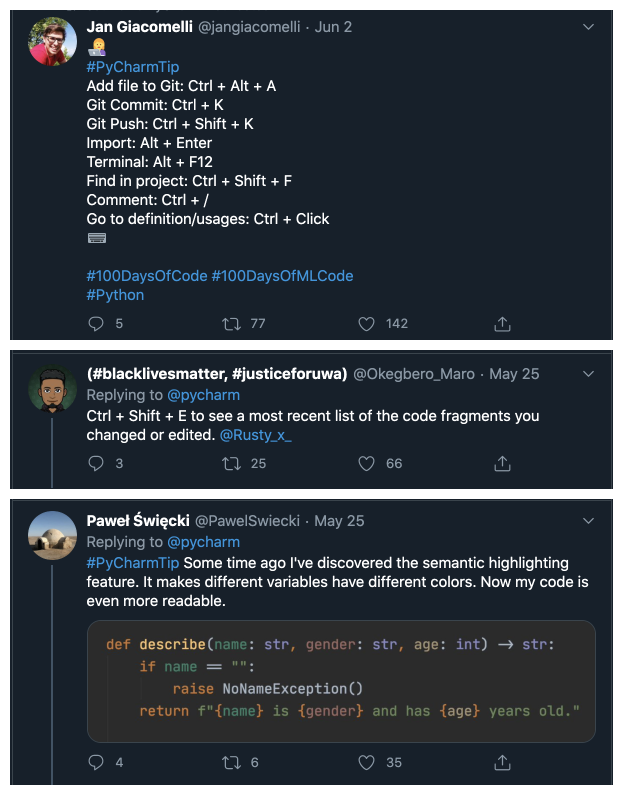
The #PyCharmTip challenge has its winners! Congratulations @jangiacomelli, @Okegbero_Maro, and @PawelSwiecki for your outstanding tips! @gamesbrainiac will be in touch with you guys soon for more details!

@pycharm ask you if you want to create a #python virtual environment when you create a project, but do you know that you can create a new one at any moment ? Just go in Settings (Ctrl+Alt+S) > Project > Python Interpreter !
#PyCharmTip


#PyCharmTip
Use the magic key combo CTRL+ALT+L to reformat all your indentations and empty lines making your code look sexy and organised.
Or use it when you've selected code to only reformat the selected code.
:D
In case you missed it, we are giving away a T-shirt to the most retweeted and most liked #PyCharmTip tweets! Got something to share? Enter, and win! It's until tomorrow!


Next Method ALT+↓
Preivous Method ALT+ ↑
Rename SHIFT + F6
safe delete SHIFT + Delete
#PyCharmTip
🐍You work on a big file and want to check the name of the method or class you are working on? Try this shortcut: Alt+Q. The definition above will be displayed in a little pop-up, and you can press it multiple time to see the higher definition.
#PyCharmTip
#PyCharmTip
In Settings>"File and Code Templates", you can create templates for new files. It will be added at the file creation, depending of the language.
Here is mine :

Last Seen Hashtags on Sotwe
sex kakak
Seen from Malaysia
男男做爱
Seen from Germany
หีสีชมพู
Seen from Thailand
monkeyapp
Seen from Egypt
แม่ลูกเอากัน
Seen from Thailand
myUtmost
Seen from United States
desahancewek #moancewek
Seen from Indonesia
แอบถ่ายสาวอาบน้ำ
Seen from Thailand
soeur
Seen from Belgium
gayamman
Seen from Saudi Arabia
Trends for you
Most Popular Users

Elon Musk 
@elonmusk
241M followers

Barack Obama
@barackobama
119.2M followers

Cristiano Ronaldo
@cristiano
111.8M followers

Donald J. Trump
@realdonaldtrump
111.8M followers

Narendra Modi
@narendramodi
107M followers

Rihanna
@rihanna
98M followers

NASA
@nasa
92.2M followers

Justin Bieber
@justinbieber
91.2M followers

KATY PERRY
@katyperry
88.3M followers

Taylor Swift
@taylorswift13
82.2M followers

Lady Gaga
@ladygaga
73.7M followers

Virat Kohli
@imvkohli
71M followers

Kim Kardashian
@kimkardashian
70.1M followers

YouTube
@youtube
68.7M followers

Bill Gates
@billgates
64.3M followers

Neymar Jr
@neymarjr
63.8M followers

The Ellen Show
@theellenshow
62.4M followers

CNN
@cnn
61.8M followers

Selena Gomez
@selenagomez
61.4M followers

X
@x
60.8M followers