

Top Tweets for #PyQGISChallenge

On Days 29 and 30 of the #PyQGISChallenge, you will take up a mini-project to practice the new #PyQGIS skills gained in the past month. You can automate a workflow, write an action, plugin or a custom function. Learn more at https://t.co/xCx10VFM6z
On Day 25 of the #PyQGISChallenge you will build actions that allow users to select first- and second-degree neighbors from a layer with just a click. You will learn how to use the spatial index to efficiently select candidate features https://t.co/IFdJdGUUja
On Day 19 of the
#PyQGISChallenge, you will learn about the Processing API and learn how to build new algorithms for the Processing Toolbox. https://t.co/uQf0er9ID5
Today is Day 16 of the #PyQGISChallenge and you will learn how to build your first QGIS Plugin. You will start with a minimal plugin template and add features to load your favorite XYZ tiles basemap with just a click. https://t.co/y18hiiPdIv
Week3 of the #PyQGISChallenge focuses on QGIS Plugins. On the Day 15, you will learn about the plugin architecture and how to write, package and share plugins https://t.co/OSgWE7v0yF
We end the Week 2 of the #PyQGISChallenge with a short assignment. For the assignment, you will write code to add a new button that allows you to compute raster statistics of any layer in QGIS and display the results. https://t.co/i9KIFyYmhe

Learn #PyQGIS API to build user interfaces, write custom algorithms, create actions, and build plugins. Spend 30 mins each day for the next 30 days to learn how to customize #QGIS with #Python.
Start at →
https://t.co/aa18GbKEzx
#PyQGISChallenge
By @spatialthoughts
Day 11 videos for the
#PyQGISChallenge are live. Today's topic is Processing Algorithms. All the processing algorithms in the Processing Toolbox are accessible via PyQGIS. https://t.co/rhhlKu2ptL

🚀 Day 8 & 9 of #30DaysChallenge in #QGIS #PythonDevelopment! Learned to add layers with URIs, manage QgsProject API, & create memory layers. Huge thanks to @spatialthoughts ! 🌍💻 #GIS #SpatialAnalysis #PyQGISChallenge


It's Day 9 of the #PyQGISChallenge. Today you will learn about the QgsProject class. A useful class to load projects and manage layers from a QGIS project. https://t.co/xOpURn5abp
On the Day 8 of #PyQGISChallenge you will also learn how to access the layer names and validate layers. Attempt the next exercise to check whether the user has selected a particular layer https://t.co/HamBBHeLNp
We come to the end of Week 1 of the #PyQGISChallenge. Take the time over the weekend to review and catch up on the material so far. We will resume the challenge in a few days https://t.co/xCx10VFeh1
It's Day 4 of the #PyQGISChallenge. Today you learn the concepts of GUI programming and build a dialog box using PyQt. This serves as the foundation for building user interfaces using PyQGIS later on. Check out the content at https://t.co/MovThuECpr

First exercise of the #PyQGISChallenge by @spatialthoughts. Screenshot shows script to find distance between three points in QGIS using PyQGIS.
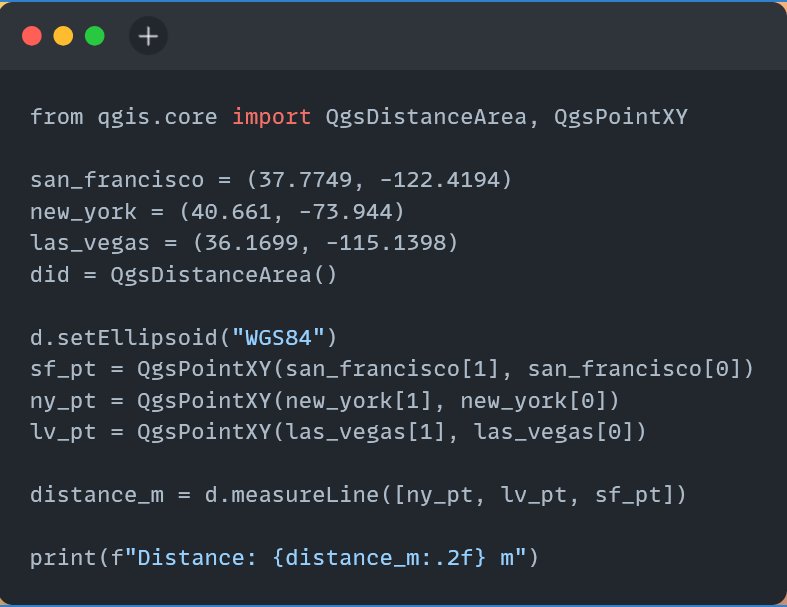
Today, you will also attempt the first exercise for the #PyQGISChallenge to improve the script to compute distance between multiple cities https://t.co/XMvbkB9VJ5 and then learn how to convert the distance to different units using #PyQGIS API. https://t.co/IdigYnE4tv
It's Day3 of the #PyQGISChallenge. Today you will start using PyQGIS classes and learn how to construct objects and use them. The first problem we will solve to write a script to compute distances between 2 cities on an ellipsoid https://t.co/3DQDO3K9t1
Before diving further into the #PyQGIS API - you need to learn about "Classes and Objects". Understanding this is critical is understanding the documentation and using PyQGIS classes. We introduce classes in the next video of the #PyQGISChallenge https://t.co/cYJGsmcrbk
On the Day2 of #PyQGISChallenge you will start learning PyQGIS by running code in the built-in Python console https://t.co/slY7fofHhg and the Code Editor to automate a task. https://t.co/ap3MR012Qj

QGIS-Tipp: #PyQGISChallenge! https://t.co/7vkI9WU7Fo via @spatialthoughts #qgis #switch2qgis #python #PyQGIS #gistribe #gischat #fossgis #foss4g #OSGeo #spatial #geospatial #opensource #gis #geo #geoObserver pls RT
Day 1 videos for the #PyQGISChallenge are live. Today you will get an overview of the content, get the course materials and complete the installation of the software. Come back tomorrow for the next set of videos https://t.co/ySe09kNGMc
Last Seen Hashtags on Sotwe
Most Popular Users

Elon Musk 
@elonmusk
241.2M followers

Barack Obama
@barackobama
119.1M followers

Cristiano Ronaldo
@cristiano
112.8M followers

Donald J. Trump
@realdonaldtrump
111.8M followers

Narendra Modi
@narendramodi
107.1M followers

Rihanna
@rihanna
98.3M followers

NASA
@nasa
92.3M followers

Justin Bieber
@justinbieber
91.4M followers

KATY PERRY
@katyperry
89M followers

Taylor Swift
@taylorswift13
82.9M followers

Lady Gaga
@ladygaga
74.4M followers

Virat Kohli
@imvkohli
71.8M followers

Kim Kardashian
@kimkardashian
70.4M followers

YouTube
@youtube
68.8M followers

Neymar Jr
@neymarjr
64.8M followers

Bill Gates
@billgates
64.6M followers

The Ellen Show
@theellenshow
62.4M followers

Selena Gomez
@selenagomez
62M followers

CNN
@cnn
61.8M followers

X
@x
60.8M followers