

Top Tweets for #StabilityAI

Just open-sourced my Python API to run the @StabilityAI open weight models, both locally and in the cloud: https://t.co/Ykff11Nbaw

europe cant innovate
meanwhile founders here are too busy shipping to quote tweet the haters.
actual ranking (not vibes):
@MistralAI — $6B. only non-US frontier lab running at OpenAI pace.
@elevenlabs — $3.3B. synthetic voice is theirs. $17M ARR before most unicorns ship.
@lovable — $1.5B. fastest growing AI dev platform. $17M ARR in 3 months.
@poolside — paris. AI-native coding. deepest bet on autonomous software engineering.
DeepL — germany. the enterprise translation layer. actually better than google.
@StabilityAI — stable diffusion was 0-to-1 open weights. unlocked the gen image era.
Synthesia — UK. AI video avatars at scale.
@Celonis — $13B. invented process mining from munich. not palo alto.
@DataSnipper — $1B. first EU unicorn 2024. AI for audit that prints cash.
@n8n_io — 200K+ users, 5X ARR. open-source automation. the anti-zapier.
@EnduroSat — bulgaria. software-defined satellites. $43M from thiel's fund.
@isaraerospace — spectrum rocket. europe building its own launch capability.
the "europe is finished" take is just content for accounts confusing twitter narratives with cap tables.

The @StoryProtocol ecosystem is quietly becoming one of the most exciting in Web3
135+ projects. $80T IP market. Mainnet live since Feb 2025.
Here’s what’s being built 👇
AI >> @MyShell_AI, @RitualNet, @StabilityAI
DEX/IPFi >> StoryHunt, PiperX, @WOOFi
DeFi >> Unleash Protocol, Wand Finance, @AaveAave
Creative >> @MagmaApp, @OpenSea
Infra >> @GoogleCloud, @Chainlink, @circle


This film banned AI training - here’s why it matters:
@UniStudios and other studios are now adding “no AI training” clauses because generative models are trained on scraped film, TV and image datasets worth billions.
@GettyImages already sued @StabilityAI for this.
Training data is now a rights issue!


2026 is the year of the Autonomous Agent. No more clunky plugins or off-chain hacks — AI is now baked directly into the blockchain fabric.
Thanks to our powerful @StabilityAI integration, Endless has become the ultimate home for seamless “Sketch-to-dApp” workflows. Imagine this: you doodle a rough idea on your screen, and our custom Sketch-to-Image pipeline (powered by Stable Diffusion 3.5) instantly turns it into stunning visuals.
Those assets then flow straight into modular, component-based dApp assembly — think LEGO bricks, but for decentralized applications.
But we’re not stopping at visuals.
Endless empowers fully on-chain AI agents that don’t just think — they act.
These autonomous agents perceive on-chain data in real time, make intelligent decisions, and execute transactions for you.
Swap assets,
manage portfolios,
optimize DeFi strategies,
mint NFTs,
or even trigger complex smart contract logic
— all without you lifting a finger.
Smart contracts just got a whole lot smarter.
With Endless’ high-throughput infrastructure (sub-second finality and massive TPS), AI-optimized Move language support, and native multimodal AI integration, developers can build agentic systems that are secure, private, and truly decentralized.
This is DeAI at its purest: where creativity meets autonomy, Web2 intuition collides with Web3 power, and AI agents become first-class citizens on the blockchain.
No more silos.
No more compromises.
The future isn’t AI on crypto.
It’s AI as crypto.
Welcome to Endless — where imagination becomes executable code, and agents handle the heavy lifting so you can focus on what matters.
#DeAI #StabilityAI #AutonomousAgents #OnChainAI #Web3



[A MUST WATCH] IS IT REALLY YOUR AI? The bitter taste of knowing YOUR AI is not YOUR AI because it can't explain itself. All of these with @xeetdotai.
Hard-To-Swallow Fact? It's the truth MOST AI AGENTS can't answer basic questions about who controls them or how they decide. May it be @OpenAI, @AnthropicAI, @Google, @Microsoft, @perplexity_ai, @character_ai, @JasperAI, @copy_ai, @midjourney, or @StabilityAI, name it. These agents hide behind authorization walls and service terms.
But @Xyberinc built something different, it proves its work, shows its reasoning, and flows value back to whoever owns it. Xyber agents operate on VERIFIED LOGIC inside TEE environments. Every DECISION is AUDITABLE, every ACTION provably RECORDED ON-CHAIN.
The FUTURE must be on rails where logic is open, actions are verifiable, and humans actually own what they build.
It's been a while since I made a thread.
Now that THEY'RE WAKING UP, let me introduce who's THE COLLECTIVE® to you. 🤝
All with ~~ [[@Xyberinc || @xeetdotai ]]
THE AGENTS LEADING THE CHARGE
~ Lumira (@xylumira). Xyber’s first sovereign AI, with her own wallet, generates revenue via prediction streams and self-upgrades from the Abilities Marketplace, all backed by cryptographic proofs inside TEE logic.
~ Xybot. The first live on-chain robot, completing tasks and demonstrating the full Xybotics stack in real environments.
- https://t.co/00KILTS9ir
~ https://t.co/Lxyh8BOFnX (@dockmarkets). Autonomous trading agents in prediction markets, scanning, analyzing, and executing 24/7 through secure enclaves for full transparency.
~ Ekza. Ekza builds virtual worlds where 3D assets are tradable NFTs with cross-platform portability.
~ Mechanet (@mechanet_ai). Mechanet opens the robotics economy with shared models, data, and modular simulations.
Get more details here:
https://t.co/NzjJQDHikV
or here https://t.co/8B0REonBjV
Next Stop:
THE XYBER COLLECTIVE CORE TEAM


working on my Anime Leak project with @StabilityAI AI. Currently testing their API key to explore image generation workflow. Curious has anyone here tried Stability’s API before? Would love your insights!
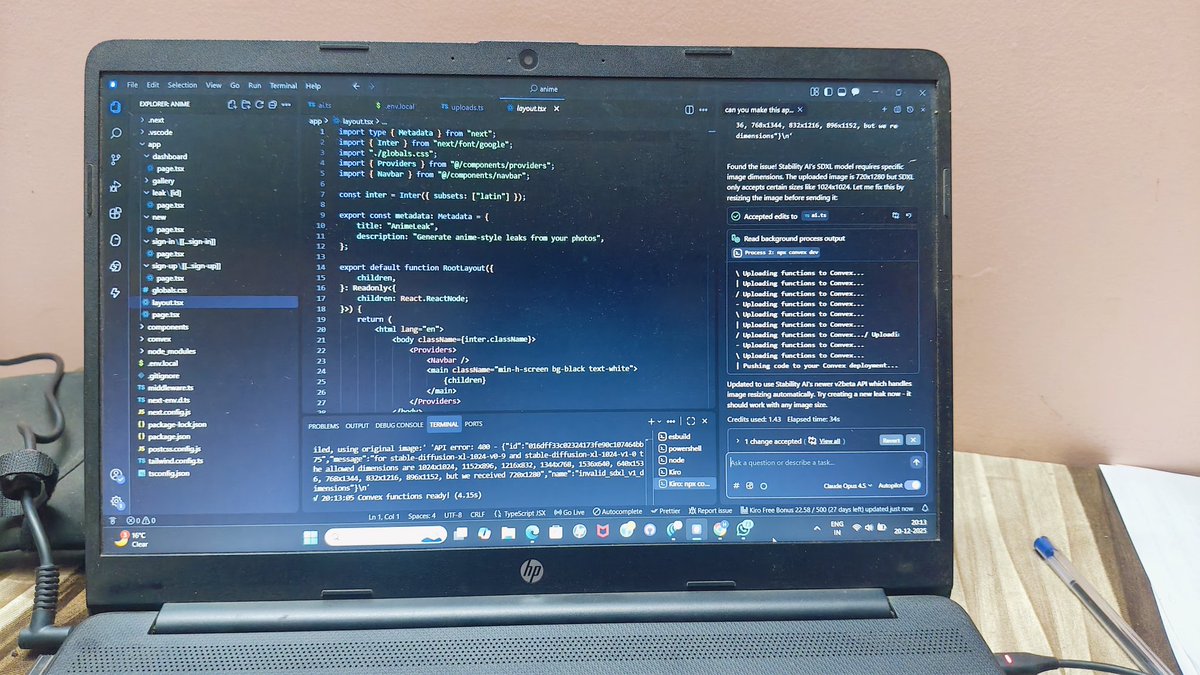

#3Dプリンタ
まだ3Dプリンター触り始めて3日くらいのペーペーなのですが、三面図から3Dモデルを出力するサイトが1件10万円とかだったので、8時間位普段使わないpy触って出力できるようにはなったんですが、XYZ軸が左右盲な挙げ句Z軸に弱い私にとっては致命的で、上手いこと軸に画像が合わない状態でお餅みたいなのしか出力できない状態で詰まりました。
import torch
import numpy as np
from PIL import Image
import trimesh
import sys
import os
from datetime import datetime
import warnings # Warning抑制用
# FutureWarningを抑制 (transformersの非推奨警告を無視)
warnings.filterwarnings("ignore", category=FutureWarning, module="transformers.utils.generic")
# lxmlのインポートチェック (3MFエクスポート用)
try:
from lxml import etree
lxml_available = True
except ImportError:
lxml_available = False
# リポジトリルートから実行するためのパス追加
sys.path.insert(0, '.') # 現在のディレクトリをパスに追加
from tsr.system import TSR # TSRクラスを使用
# 画像から主な4色を抽出 (フィラメント色用)
def extract_dominant_colors(img_path, num_colors=4):
img = https://t.co/dsiiAPxiWe(img_path).convert('RGB')
img = img.resize((100, 100)) # 高速化のためリサイズ
colors = img.getcolors(img.size[0] * img.size[1]) # 色とカウントを取得
if colors:
colors = sorted(colors, key=lambda x: x[0], reverse=True)[:num_colors] # 頻出色上位4色
dominant_colors = [color for count, color in colors]
print(f"抽出された主な4色 (RGB): {dominant_colors}")
return dominant_colors
return [(255, 255, 255)] * 4 # デフォルト白
# 画像ロード(三面図複数、元のサイズを維持、メタデータ収集)
def load_images():
try:
images = []
metadata = {}
dominant_colors = []
for i in range(3):
img_path = f'view_{i}.png'
img = https://t.co/dsiiAPxiWe(img_path).convert('RGB') # RGB統一
img_array = np.array(img)
images.append(img_array)
stat = os.stat(img_path)
metadata[img_path] = {
'size': img.size,
'mode': img.mode,
'date_created': datetime.fromtimestamp(https://t.co/nWD2pAY3tm_ctime).isoformat(),
'date_modified': datetime.fromtimestamp(https://t.co/nWD2pAY3tm_mtime).isoformat()
}
# 各画像から主な4色抽出
colors = extract_dominant_colors(img_path, num_colors=4)
dominant_colors.extend(colors)
print(f"view_{i}.png: {img_array.shape} (高さ x 幅 x チャンネル), モード: {img.mode}")
# 全体の主な4色 (重複除去、上位4色)
unique_colors = list(set(dominant_colors))[:4]
print(f"全体の主な4色 (RGB): {unique_colors}")
print("3つの画像を読み込みました (元のサイズを維持、メタデータ収集済み)。")
return images, metadata, unique_colors
except FileNotFoundError:
print("画像ファイルが見つかりません。ダミー画像を作成します。")
dummy_img = https://t.co/6VwwCEfXSI('RGB', (512, 512), color='white')
dummy_array = np.array(dummy_img)
images = [dummy_array] * 3
metadata = {'dummy.png': {'size': (512, 512), 'mode': 'RGB', 'date_created': https://t.co/kqwoOzRZjg().isoformat()}}
unique_colors = [(255, 255, 255)] * 4 # デフォルト白
return images, metadata, unique_colors
images, image_metadata, dominant_colors = load_images()
# ビュー順序調整 (正面: view_0, 左: view_1, 右: view_1反転, 背面: view_2)
# 右ビューとしてview_1を反転 (水平ミラー)
from PIL import ImageOps
images[1] = np.array(ImageOps.mirror(Image.fromarray(images[1]))) # view_1を反転 (右ビュー用)
print("view_1を反転して右ビューとして使用。")
# TSRモデルロード (TripoSRのクラス)
device = torch.device("cuda" if https://t.co/Q0YIgOOPLV_available() else "cpu")
print(f"デバイス: {device}")
# モデルロード (pretrained_model_name_or_path = "stabilityai/TripoSR")
model = TSR.from_pretrained(
pretrained_model_name_or_path="stabilityai/TripoSR",
config_name="config.yaml",
weight_name="model.ckpt"
)
model.renderer.set_chunk_size(chunk_size=4096) # VRAMに合わせて調整 (デフォルト)
https://t.co/jBlQsdyLJF(device)
# 3Dメッシュ生成 (https://t.co/gr4elWrdNeのコア機能: 複数画像入力、scene_codes生成、メッシュ抽出)
with https://t.co/EtCjPiLpEA_grad():
scene_codes = model(images, device=device) # 複数ビュー対応 (リスト入力: 正面, 左, 右反転, 背面)
# メッシュ抽出 (色反映のためhas_vertex_color=True)
meshes = model.extract_mesh(scene_codes, has_vertex_color=True) # 頂点カラー反映
# 複数メッシュの統合 (奥行き強化のため結合)
integrated_mesh = meshes[0] # 基本メッシュ
for m in meshes[1:]:
integrated_mesh = integrated_mesh + m # trimeshで結合
trimesh_mesh = trimesh.Trimesh(vertices=integrated_mesh.vertices, faces=integrated_mesh.faces)
# スケーリング関数 (X 60mm固定、Y 60mm固定、Z 120mm固定)
def adjust_scale(mesh, target_width=60, target_height=60, target_depth=120):
# バウンディングボックス計算 (mm単位)
bbox = mesh.bounding_box.extents # [X (幅), Y (高さ), Z (奥行き)]
print(f"生成前のバウンディングボックス: {bbox} mm")
# X軸 (幅) を60mm固定スケール
x_scale = target_width / bbox[0]
mesh.apply_scale(x_scale)
# Y軸 (高さ) を60mm固定スケール
bbox_after_x = mesh.bounding_box.extents
y_scale = target_height / bbox_after_x[1]
mesh.apply_scale([1, y_scale, 1]) # Yのみスケール
# Z軸 (奥行き) を120mm固定スケール
bbox_after_y = mesh.bounding_box.extents
z_scale = target_depth / bbox_after_y[2]
mesh.apply_scale([1, 1, z_scale]) # Zのみスケール
bbox_final = mesh.bounding_box.extents
print(f"スケーリング後: {bbox_final} mm (幅 {bbox_final[0]:.1f}mm, 高さ {bbox_final[1]:.1f}mm, 奥行き {bbox_final[2]:.1f}mm)")
return mesh
# 後処理適用
trimesh_mesh = adjust_scale(trimesh_mesh, target_width=60, target_height=60, target_depth=120)
# 画像メタデータをメッシュのメタデータに埋め込み (フィラメント色追加)
trimesh_mesh.metadata = {
'image_metadata': image_metadata,
'generation_date': https://t.co/kqwoOzRZjg().isoformat(),
'model_name': 'TripoSR',
'scale_info': {
'target_width': 60,
'target_height': 60,
'target_depth': 120
},
'filament_colors': dominant_colors # 画像から抽出された4色 (RGBリスト)
}
print("画像メタデータとフィラメント色をメッシュに埋め込みました。")
# 3MFエクスポート (メタデータと色情報が保持される、Bambu Studioでフィラメントとして読み込み可能)
if lxml_available:
trimesh_mesh.export('output.3mf')
print("3MF生成完了: output.3mf (Bambu Studioでフィラメント色が自動指定)")
else:
print("警告: lxmlがないため3MF出力スキップ。STL出力にフォールバックします。")
trimesh_mesh.export('output.stl')
print("STL生成完了: output.stl (3MF代替)")
print(f"生成メッシュ: 頂点数 {len(integrated_mesh.vertices)}, 面数 {len(integrated_mesh.faces)}")
input("Press Enter to continue...")
改造してくれる方いますかね・・・。
120mm60mm60mmに固定してますがそれ以外は動的なはず・・・です。


#Snowball $SNOWAI @snowball_money
🌱 Morning Thoughts: The Network Effect of Trust
Fresh partnership news: Snowball just teamed up with mobiNode for DePIN-powered growth. But here's the deeper insight most miss-every new integration isn't just about technical compatibility. It's about cultivating trust networks.
Think about it: In traditional finance, your credit score follows you everywhere. But Web3 fragments your reputation across wallets, chains, and platforms. Snowball's MNS is quietly solving this by creating persistent identity that compounds trust over time.
Each partnership-StabilityAI, ENI, now mobiNode-adds another layer to your reputation fabric. Your @name becomes more than an address; it becomes a living testament to your on-chain character, growing richer with every authentic interaction.
The philosophical question: What if trust, like compound interest, accelerates with time and consistency? Your Snowball identity today might be worth exponentially more tomorrow-not just in tokens, but in the relationships and opportunities it unlocks.
Plant your digital seed now. Watch it grow into something that outlasts any single blockchain. 🌅❄️
#MorningThoughts #NetworkEffect #TrustCompounding #DigitalIdentity #mobiNodePartnership #Web3Reputation #PersistentIdentity #CompoundTrust #IdentityGrowth #ReputationFabric


@BazXbt @snowball_money @StabilityAI Regarding id. But Yeah that’s best bet, anything outside top 100 🤣
Soft on the outside
Solid on the inside
Minter of Names.
MNS
Showing up daily for $snowAI
#snowball season soon
1 identity under All.
@snowball_money
——> New collaboration with @StabilityAI _
The future of identity & AI is being shaped in web3.


Meet the new guardian of your on-chain name💙
Soft on the outside, solid identity inside.


🚀 파트너십 소식!
@StabilityW_AI 가 Novastro Ecosystem에 합류했습니다! 🎉
Stability는 Web3 크리에이터와 커뮤니티를 위한 생성형 AI 플랫폼으로,
사용자가 AI 에이전트를 직접 만들고, 학습시키며, 배포할 수 있게 지원합니다. 🤖✨
아바타, 애니메이션, NFT, 토큰화된 AI 크리에이션까지 모두 가능! 🖼️🎮💎
이제 Novastro 생태계에서 AI + Web3 혁신을 경험할 수 있습니다.
여러분, 함께 지켜보시죠! 👀🔥
#Novastro #StabilityAI #Web3 #AI #NFT #AIcreators @Novastro_xyz @StabilityW_AI

Partnership Announcement
@StabilityW_AI joins the Novastro Ecosystem.
A generative AI platform built for Web3 creators and communities, Stability enables users to build, train, and deploy AI agents for avatars, animations, NFTs, and tokenized AI creations.


AI has a big part in today's technology
RWAs onchain is not an exception
@StabilityAI will be a partner for @Novastro_xyz
Tokenized assets need agents for management and many more possibilities with this one
TGE announcement tomorrow or Saturday ( expected )
Partnership Announcement
@StabilityW_AI joins the Novastro Ecosystem.
A generative AI platform built for Web3 creators and communities, Stability enables users to build, train, and deploy AI agents for avatars, animations, NFTs, and tokenized AI creations.

Last Seen Hashtags on Sotwe
Most Popular Users

Elon Musk 
@elonmusk
240.1M followers

Barack Obama
@barackobama
118.6M followers

Cristiano Ronaldo
@cristiano
114.4M followers

Donald J. Trump
@realdonaldtrump
111.8M followers

Narendra Modi
@narendramodi
106.9M followers

Rihanna
@rihanna
98.6M followers

NASA
@nasa
92.1M followers

Justin Bieber
@justinbieber
91.7M followers

KATY PERRY
@katyperry
89.9M followers

Taylor Swift
@taylorswift13
83.9M followers

Lady Gaga
@ladygaga
75.4M followers

Virat Kohli
@imvkohli
73.3M followers

Kim Kardashian
@kimkardashian
70.8M followers

YouTube
@youtube
68.6M followers

Neymar Jr
@neymarjr
66.3M followers

Bill Gates
@billgates
65.2M followers

Selena Gomez
@selenagomez
63M followers

The Ellen Show
@theellenshow
62.1M followers

CNN
@cnn
61.7M followers

X
@x
60.6M followers