

Top Tweets for #dlcProTip

#DLCProTip: Did you know you can use unsupervised learning to adapt a trained model on the fly to your video in DeepLabCut!?
When you run video analysis, check out “video adaptation” - it reduces jitter and provides better poses! ⬇️
https://t.co/Xdllvom4Yp

#DLCProTip: it is also easy to integrate this labeling tool into your existing @ProjectJupyter notebook!
Beta-test it here: https://t.co/mJGsGqwQfd

#DLCProTip: all the code to make the pretty figures from our recent @naturemethods paper is all open source!
📖:https://t.co/7NrlGuuFXF
💻:https://t.co/WGBy9m8kIC
🎉Main and suppl. figures have a
@ProjectJupyter notebook! Tools include @matplotlib
@numpy_team @pandas_dev 💜

@btPURPLEs SO Cute! 🐭 small #DLCProTip: label more points along the tail for better performance! You can add bodyparts by editing config.yaml and relaunch GUI, it will ask you how you want to add them :D
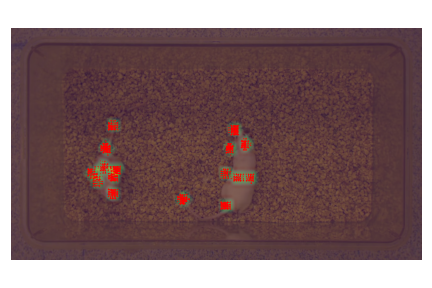
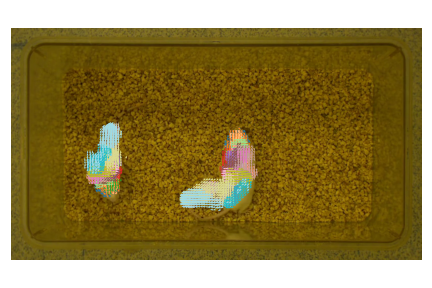
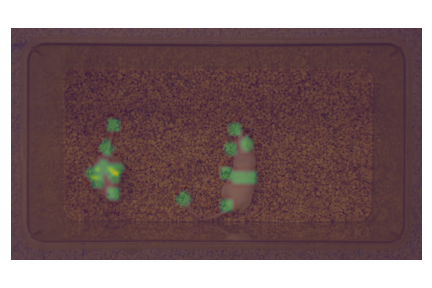
Want to play around and see the performance of #maDLC yourself? #DLCProTip
Checkout the new #COLAB notebook with a pretrained multi-mouse model here (no installation required!)
Just click and go!
https://t.co/KkN1uARmte
#DLCProTip: the latest 2.2.0.2+ maDLC is much faster 🔥 due to a fully data-driven optimal graph algorithm!
You can even run this faster than real-time, i.e., here the data was collected at 30 FPS, but this 800 x 400 images frame runs at 50+ on @GoogleColab:


#DLCProTip: When you evaluate networks, numbers are useful, but don't tell the whole story (for one, what is human level accuracy in your dataset?) We recommend using:
dlc.𝚎𝚡𝚝𝚛𝚊𝚌𝚝_𝚜𝚊𝚟𝚎_𝚊𝚕𝚕_𝚖𝚊𝚙𝚜()
to plot results too!
👀 is 🔑
Data courtesy @GoldenNeuron 💙
#DLCProTip: did you know we have an interactive interface to help you learn more and get the most out of DLC?
https://t.co/l4nCyyFLPM
Doing some hashtag housekeeping ⬆️#DLCProTip
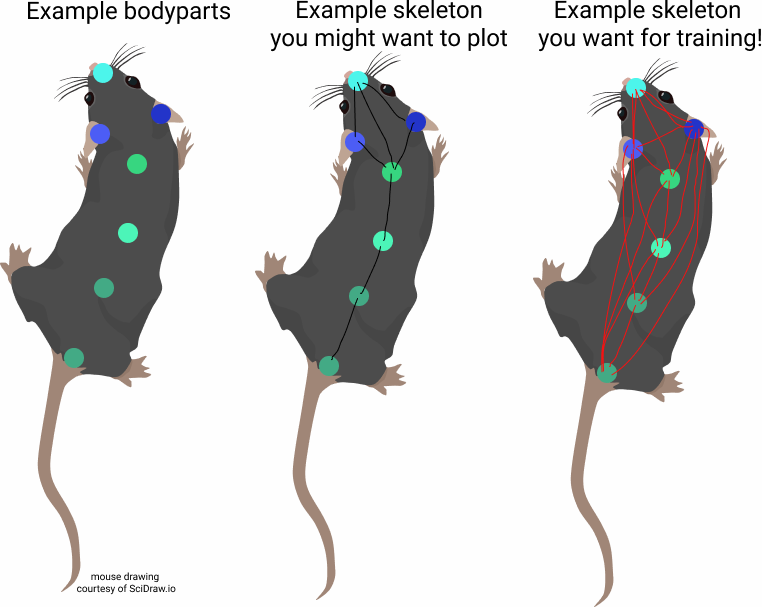
#DLCProTip: this ⬇️ is no longer required in 2.2 code - we built a smart graph algorithm to automate finding the optimal skeleton of your data! 🔥😱 but you can still use this GUI to make beautiful skeletons for plotting your data! ❤️
#maDeepLabCut #protip: the 'skeleton' is used for training, & this means connecting it is key! We built a new @matplotlib based GUI (& a @scidrawio 🐭 to demo) how to (1) use more points, and (2) how to connect the skeleton!
📹 https://t.co/GAkS1P4eUx
📖 https://t.co/77aNGOp37R


A very important thread on how diverse data, not more data, leads to robust networks! #DLCProTip from lead developer @TrackingActions ⤵️
I've been noticing more and more that people are using DeepLabCut sub-optimally: don't train a network per animal. 20 individuals w/10 images per individual is MUCH better than 200 frames from 1 video! You will not get robust networks this way. [Just my advice to the void.]
#DLCProTip: ready to upgrade to ubuntu 20.04 LTS?!
Check out our new wiki on how to get up and going with DLC w/CUDA, Docker, anaconda rapidly: https://t.co/5HpwFEsDb9
You will be all set for the TF2 release that is on deck for the *next release*! 🔥
#dlcProTip: building great models comes from great data. 10 highly different videos with 20 (diff) frames each is a MUCH better than 200 frames from 1 video.
Want to learn more? Read our primer on the principles of DNNs for MoCap: https://t.co/wxI08x6007
https://t.co/2AfuL2jEqU


It’s true, I think labeling really gives one a sense of data quality!
“If you can see it, you can track it”
is our informal slogan, as it boils down to your data and labeling precision (pretty fish!!) #dlcProTip

If only all the frames were as crisp and easy to define as this shot. @DeepLabCut #polypterus #finlets @FishSciBot

@ivancedric_a actually no videos are used in training, only the frames you extract and label. Check out this new primer piece, has some important tips for this!: #DLCProTip
https://t.co/rpMR7pJdYy
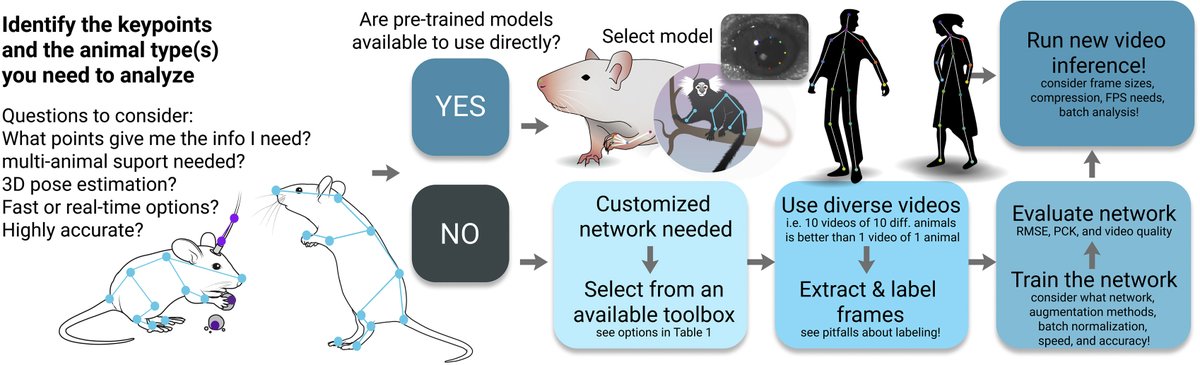
@ivancedric_a We recommend training to 200K; then you should look at the loss (..stats.csv in the train folder) to be sure it's flat, and then evaluate multiple snapshots of your model; then pick the best performing snapshot and use this for videos! Hope that helps! #dlcProTip
#DLCProTip: Did you know that this year we launched a free online course for learning to use #DeepLabCut?!
🥳 Click here to get started via the graphic:
https://t.co/74ypqORwhv
or simply: https://t.co/TAWsacAypn
It's been a while! SO, #DLCProTip!
Did you know the latest DeepLabCut (pip install deeplabcut==2.2b8) also has the ability to rapidly place new labels?! Amazing hack from a user request by @jessy_lauer ! 🎉
⬇️ I simply cntrl+C and get prior labels - AWESOME for static objects
#dlcProTip: if you're new to DLC, or a pro, many new features or improvements are released ~monthly, and docs/tutorials, etc.
Really new to DLC/python, etc? Check out: https://t.co/TAWsacAypn
Check out https://t.co/7RXzRMJtfV as a launch point for all the resources:
Most Popular Users

Elon Musk 
@elonmusk
241.1M followers

Barack Obama
@barackobama
119.1M followers

Cristiano Ronaldo
@cristiano
112.6M followers

Donald J. Trump
@realdonaldtrump
111.8M followers

Narendra Modi
@narendramodi
107.1M followers

Rihanna
@rihanna
98.2M followers

NASA
@nasa
92.2M followers

Justin Bieber
@justinbieber
91.4M followers

KATY PERRY
@katyperry
88.8M followers

Taylor Swift
@taylorswift13
82.7M followers

Lady Gaga
@ladygaga
74.2M followers

Virat Kohli
@imvkohli
71.7M followers

Kim Kardashian
@kimkardashian
70.3M followers

YouTube
@youtube
68.7M followers

Neymar Jr
@neymarjr
64.6M followers

Bill Gates
@billgates
64.5M followers

The Ellen Show
@theellenshow
62.4M followers

Selena Gomez
@selenagomez
61.9M followers

CNN
@cnn
61.8M followers

X
@x
60.8M followers