

Top Tweets for #edtechtidbit

TGIF! Next week we’ll look at how to share these wonderful animations. But for now, take it easy and enjoy some downtime. #EdTech #EdTechTidbit
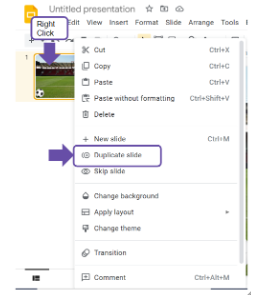
Third Stop: Duplicating Slides, Right Clicking the Slide Preview. Right click on the slide preview in the panel on the left and select “Duplicate slide.”
#EdTech #EdTechTidbit
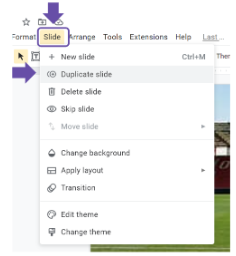
Third Stop: Duplicating Slides, using the “Slide” Menu. Click on the Slide Menu heading and select “Duplicate slide.”
#EdTech #EdTechTidbit
Third Stop: Duplicating Slides, Why and What is it? Stop-frame-esque animation requires only specific elements to move - enter Duplicating Slides! Google gives you two ways to duplicate a slide. (surprised?) Check back later today to find out! #EdTech #EdTechTidbit
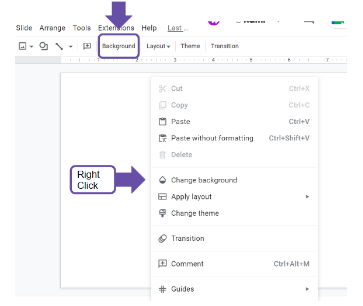
Next Stop: Inserting Backgrounds, Quick Button. Right Click on the canvas and select “Change background.”
#EdTech #EdTechTidbit
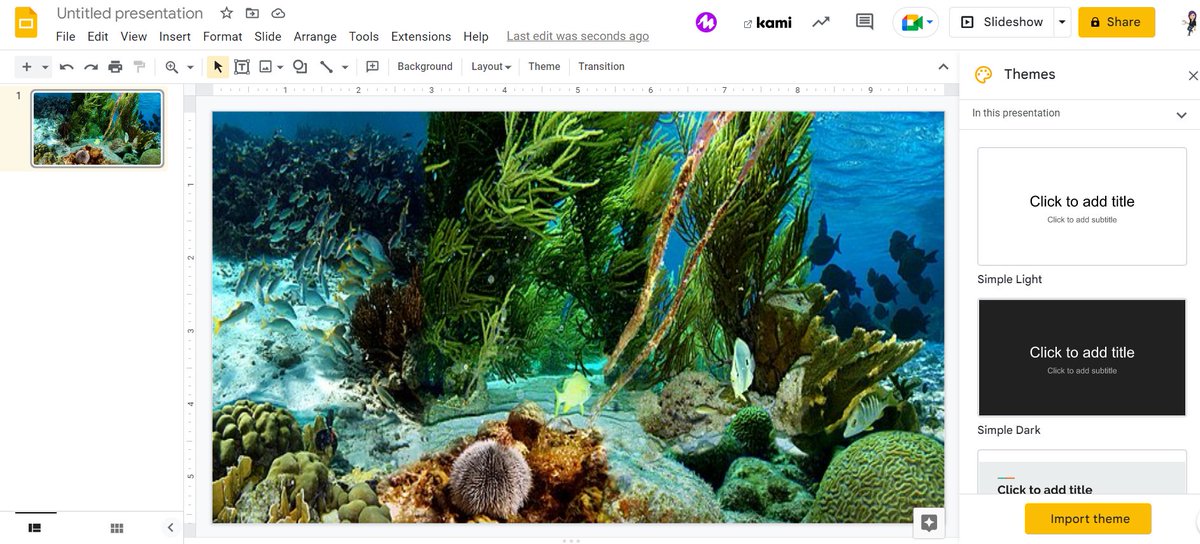
Next Stop: Inserting Backgrounds, Knowing the Difference.
Images you can move, resize, modify, and do a lot of other fun stuff to; a bg is static and fills the entire slide a.k.a. not something likely to accidentally move and mess up your entire project…
#EdTech #EdTechTidbit
Next Stop: Inserting Images, Using the “Insert” Menu: Along the menu bar headings, click on “Insert” and select “Image” #EdTech #EdTechTidbit
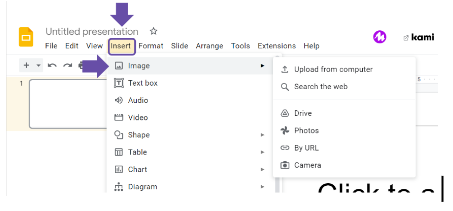
Next Stop: Inserting Images, What Can You Do?
When selecting an image, you can search from the web, upload from your computer, drive, photos, camera, or attach a URL to the photo. #EdTech #EdTechTidbit
Next Stop: Inserting Images, a side note: I teach this prior to setting the background so the students can first practice simple animations such as making a soccer ball bounce along the screen. There are 2 (two) ways to add images. Stay tuned!
#EdTech #EdTechTidbit
The NoCo Collab @ SUNY Pots is designed for teachers, #EdTech Enthusiasts, adminis, AND pre-service teachers. Learn effective/engaging ways to Tech Integrate. Workshops! Poster sessions! Drone soccer! Vendors! Networking w/ Colleagues! We’ve got it all!! #EdTech #EdTechTidbit
Presentation Settings: Show progress bar - if you have multiple sections in your form, toggle this on as a kindness to your respondents. This lets them know how much they have left to complete.
#GettingFORMal #EdTech #EdTechTidbit
One More Week! The NoCo Collab Event is Nov 10 @ SUNY Potsdam! The NoCo Collab @ SUNY Pots is designed for teachers, #EdTech Enthusiasts, adminis, AND pre-service teachers. https://t.co/RCfwu6J1AX #EdTech #EdTechTidbit
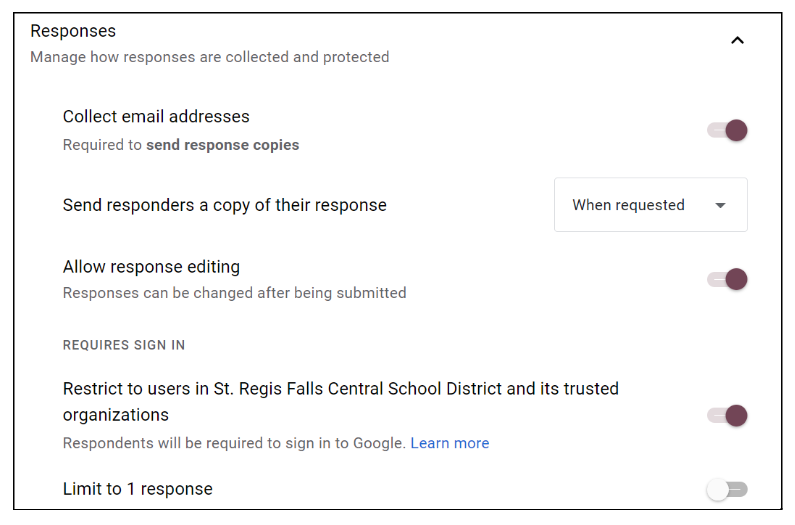
Responses settings: Limit to 1 response - Is it a quiz, or only 1 response/person? Toggle this on.
Collecting multiple points of data over multiple days (SEL check-in, or growth-monitoring)? Toggle this off.#GettingFORMal #EdTech #EdTechTidbit
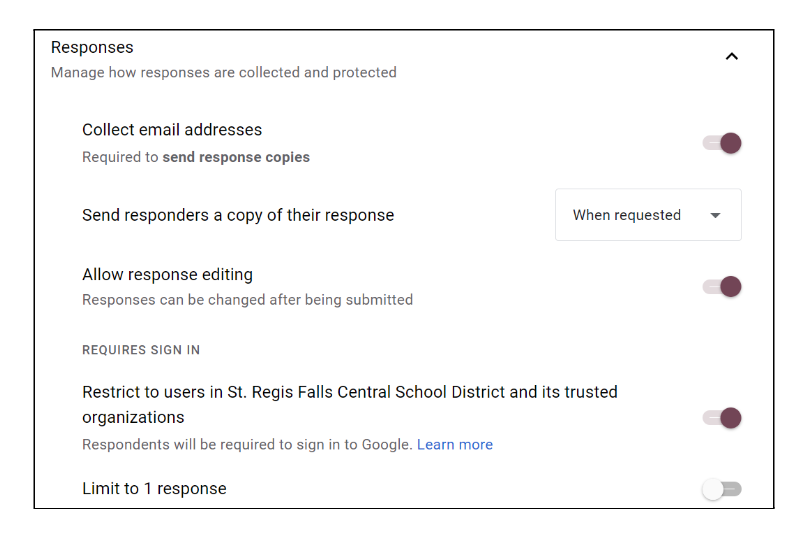
Responses settings: Collect Email Addresses - I suggest you toggle this on by default whenever you need to know WHO responded. If you’re doing a completely anonymous survey, then, by all means, toggle it off. #GettingFORMal #EdTech #EdTechTidbit
The NoCo Collab @ SUNY Pots is designed for teachers, #EdTech Enthusiasts, adminis, AND pre-service teachers. Learn effective/engaging ways to Tech Integrate. Workshops! Poster sessions! Drone soccer! Vendors! Networking w/ Colleagues! We’ve got it all!!
#EdTech #EdTechTidbit
What’s the Diff? A quiz will grade your responses, and requires defined correct answers
A survey gathers various information and data, with no defined correct responses. #GettingFORMal #EdTech #EdTechTidbit
One week and two days away! The NoCo Collab Event is Nov 10 @ SUNY Potsdam! The NoCo Collab @ SUNY Pots is designed for teachers, #EdTech Enthusiasts, adminis, AND pre-service teachers. https://t.co/RCfwu6J1AX #EdTech #EdTechTidbit
Accessorizing - Adjusting your Form Settings
The What:
Quizzes, Response, and Presentation settings.
The How:
Click on the Settings Tab in your Google Form.
The “Extra”:
Limit responses, restrict by domain, & the REAL difference b/w quiz and survey? #EdTech #EdTechTidbit
Happy Halloween! Don’t be afraid! #GettingFORMal can be a scream! Dress-up your next Form with some mysterious hocus pocus! Collect that data with ghastly ease! #EdTech #EdTechTidbit
Happy Halloween! Collecting data driving you batty? Use a Google Form to streamline and digitize the process! #GettingFORMal #EdTech #EdTechTidbit
Last Seen Hashtags on Sotwe
Most Popular Users

Elon Musk 
@elonmusk
241.5M followers

Barack Obama
@barackobama
119.1M followers

Cristiano Ronaldo
@cristiano
113.6M followers

Donald J. Trump
@realdonaldtrump
111.8M followers

Narendra Modi
@narendramodi
107.2M followers

Rihanna
@rihanna
98.5M followers

NASA
@nasa
92.4M followers

Justin Bieber
@justinbieber
91.7M followers

KATY PERRY
@katyperry
89.5M followers

Taylor Swift
@taylorswift13
83.4M followers

Lady Gaga
@ladygaga
74.9M followers

Virat Kohli
@imvkohli
72.6M followers

Kim Kardashian
@kimkardashian
70.7M followers

YouTube
@youtube
68.8M followers

Neymar Jr
@neymarjr
65.6M followers

Bill Gates
@billgates
64.9M followers

Selena Gomez
@selenagomez
62.6M followers

The Ellen Show
@theellenshow
62.3M followers

CNN
@cnn
61.8M followers

X
@x
60.8M followers