

Top Tweets for #learnvimdaily

@michaeldyrynda I'll hop on this #DispelTheMyth train with ya. Maybe I should get my #learnvimdaily going again?
Motions can include an amount of lines, such as d9j to delete this line and 9 below.
Doing math on line numbers or counting is slow and annoying though. The solution?
:set relativenumber
For some people it takes some getting used to, but it's SO worth it!
#learnvimdaily #vim
One of my favorite ways to use macros in vim: recursive macros!
qa^ifoo[esc]j@aq
qa - record into register a
^ifoo[esc]j - start of line, insert foo, exit insert mode, go down a line
@a - perform macro a
q - stop recording
Now @a and watch the magic!
#learnvimdaily #vim
Another common macro trick: start your macro with 0 or ^ and end it with j.
Then you can 10@a to perform the macro 10 times, which is effectively 10 lines!
#learnvimdaily #vim
Editing macros! We technically already covered this with registers, but it's worth pointing out again!
Record a macro into register a. Paste it ("ap (normal) or ctrl-r a (insert)). Edit it. Copy it back to the register ^"ay$
No more re-recording macros!
#learnvimdaily #vim
Time to dive into macros!
qaifoo[esc]q
This will insert foo wherever the cursor is - a useless macro but easy enough to talk about.
If you want to do this on the next 10 times: 10@a
If you want this to happen on 10 LINES, make sure to hit j in the macro!
#learnvimdaily #vim
Going to wrap up our :g tips today with something that should seem obvious: :g can take a regex just like / and :s can!
#learnvimdaily #vim
So, my favorite use of :g is for this really cool refactoring idea!
:g/foo/s/doSomething/doSomethingWithFoo/g
:g/bar/s/doSomething/doSomethingWithBar/g
Turns 1 function with 2 types for an argument into 2 functions with 1 argument type!
#learnvimdaily #vim
My most common use of :g is in combination with :s!
:g/foo/s/bar/baz/g
On lines containing foo, replace bar with baz.
This is VERY powerful and tomorrow I'll show you one of my favorite uses of this with a really cool refactoring idea!
#learnvimdaily #vim
Similar to :s, we've got :g[lobal]. This is one of my favorite commands, although I don't use it every day.
:g will let you perform actions on lines that match the pattern:
:g/foo/norm dd
On any line containing foo, perform normal mode dd on that line.
#learnvimdaily #vim
Search (/) and substitute (:s) both work with regex as well!
However, not like you'd always expect.
/foo|bar will search for foo|bar
/foo\|bar will search for foo OR bar
/\vfoo|bar will search for foo OR bar.
:s example:
:%s/\vfoo|bar/baz
See :h magic
#learnvimdaily #vim
Do you ever search something, use n. and decide that's too annoying? You can instead do:
:%s//barg
That will replace whatever your last searched item was with bar!
#learnvimdaily #vim
Of course we can also substitute text in a visual selection! When you type :s/foo/bar/g inside a visual selection, you should see this:
:'<,'>s/foo/bar/g
'< and '> are special marks, if you can remember when we discussed those!
#learnvimdaily #vim
What if you wanted to replace all instances of foo on a line?
:s/foo/bar/g
And for all lines:
:%s/foo/bar/g
What if we wanted confirmation before we blindly substitute everything?
:%s/foo/bar/gc
This will ask before each substitution!
#learnvimdaily #vim
We've covered both searching and the dot command, but what if you don't want to spam n.?
:substitute/foo/bar will replace the first foo on the given line after the cursor with bar.
:%s/foo/bar/ for the first foo on all lines
#learnvimdaily #vim

What are your most used #vim editor windows management keyboard shortcuts?
For me (with 2 windows) these are:
CTRL-W K
move window up
CTRL-W L
move window right
CTRW-W X
swap windows position
https://t.co/J6ZrP4lzpB
#learnvimdaily #developers #editors


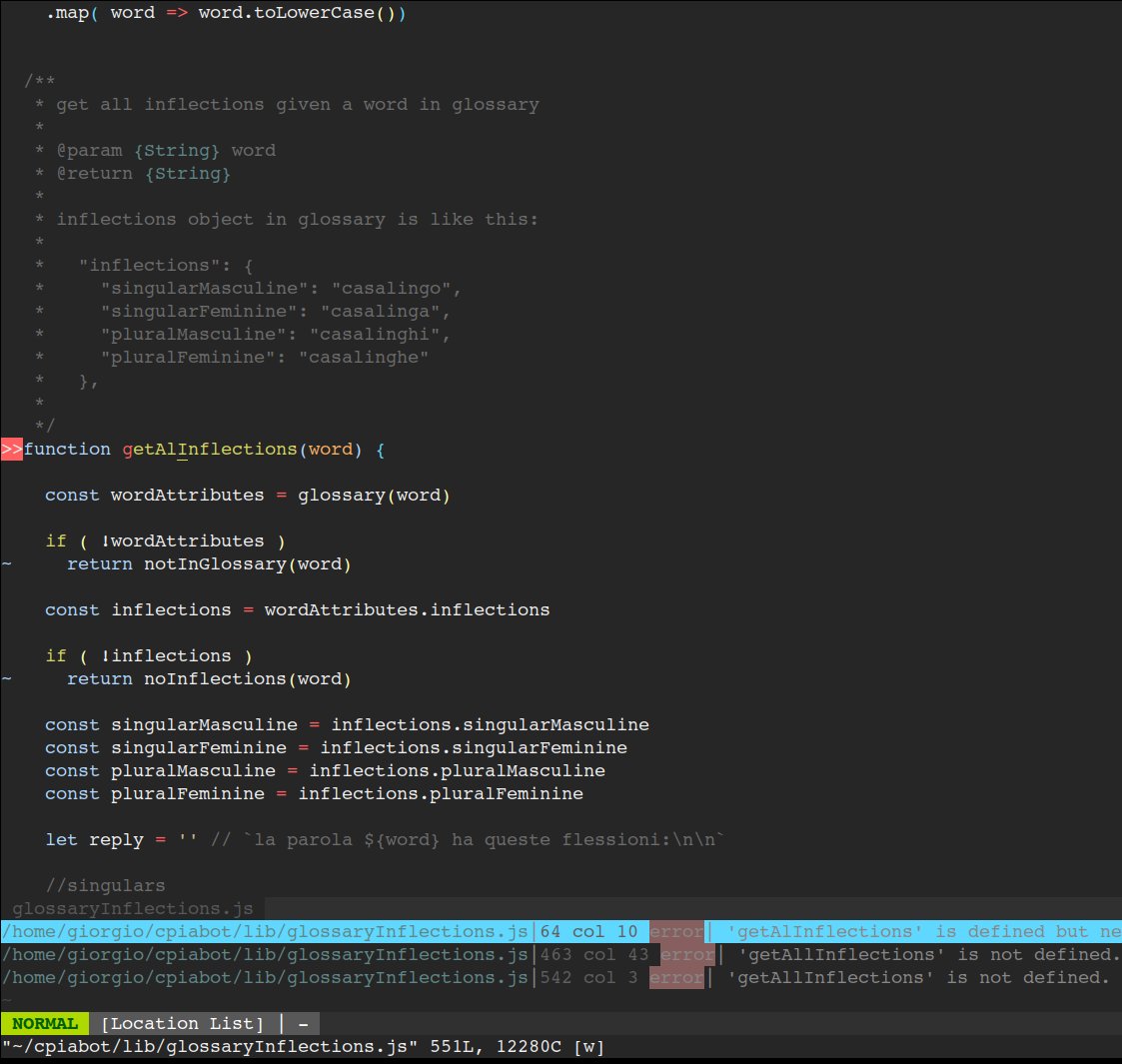
What is your preferred/always on vim #editor plugin? Why?
For me, this is syntastic (https://t.co/nGUEpu4wek) (as vim wrapper to @geteslint)
#vim #learnvimdaily #vimplugin
#javascript #nodejs
cc @masteringvim @VimLinks @FatBoyXPC @learnvim
Vim can also do case insensitive searches!
:set ignorecase
However, it gets better with:
:set smartcase
This will be case insensitive unless you include capital letters in your search!
#learnvimdaily #vim
Sometimes you want to search a whole word with *, but sometimes you want to see the letters "in" in the words "in" and "insert".
Sure you could /in[enter]
You could also g* (with cursor on the word 'in')
Of course you can go backward with g# as well!
#learnvimdaily #vim
Another search tidbit!
Press n to go to the next match, or press N to go to the previous match.
Note that n/N change direction based on * or / and # or ?.
To clarify: if you /foo [enter] n, n goes forward. But if you ?foo [enter] n, n goes backward.
#learnvimdaily #vim
More on searching!
* and # will search the word under cursor, forward and backward respectively.
Think of * like / and # like ?
#learnvimdaily #vim
Last Seen Hashtags on Sotwe
EffieAwardsMéxico
Seen from United States
omegle
Seen from Brazil
extremebnwo
Seen from United States
تفله
Seen from Spain
momson((()))*+filter:native_video
Seen from Peru
barelylegal
Seen from United States
bagets
Seen from United States
bagets viral sex
Seen from Philippines
momson() +filter:native_video
Seen from Pakistan
NPNHJBTourMexico
Seen from United States
Most Popular Users

Elon Musk 
@elonmusk
240.8M followers

Barack Obama
@barackobama
119.2M followers

Donald J. Trump
@realdonaldtrump
111.7M followers

Cristiano Ronaldo
@cristiano
111.1M followers

Narendra Modi
@narendramodi
107M followers

Rihanna
@rihanna
97.8M followers

NASA
@nasa
92.2M followers

Justin Bieber
@justinbieber
91M followers

KATY PERRY
@katyperry
87.9M followers

Taylor Swift
@taylorswift13
81.8M followers

Lady Gaga
@ladygaga
73.3M followers

Virat Kohli
@imvkohli
70.3M followers

Kim Kardashian
@kimkardashian
69.9M followers

YouTube
@youtube
68.7M followers

Bill Gates
@billgates
64M followers

Neymar Jr
@neymarjr
63.1M followers

The Ellen Show
@theellenshow
62.4M followers

CNN
@cnn
61.9M followers

Selena Gomez
@selenagomez
61M followers

X
@x
60.8M followers