

Top Tweets for #visualstudiotips

Another delicious #visualstudio tip for your consumption! If you ever need to track certain variables in across multiple debugging sessions, you can use the Watch window.
https://t.co/csIsTAXlGj
#visualstudiotips #gamedev #csharp #dotnet #programming
Another juicy #visualstudio tip for your consumption!
If you ever needs to find what variables you can read and update during debugging, you can utilize autos and locals window.
https://t.co/6aZEQAv0HP
#visualstudiotips #gamedev #csharp #dotnet #programming
Another delicious #visualstudio tip for your consumption!
If you ever accidentally remove all your breakpoints, no need to worry. You can restore them using breakpoint window. There's an undo option.
https://t.co/ijnFypc7FC
#visualstudiotips #gamedev #csharp #dotnet #programming
Another delicious #visualstudio tip for your consumption!
If you ever have too many breakpoints, try using breakpoint window. It lists all of them for you, allows you to group them, label them etc.
🔥https://t.co/LxcsY7bidL
#visualstudiotips #gamedev #csharp #dotnet #programming
Another useful #visualstudio tip for your consumption!
If you only want to trigger a breakpoint when a certain line of code is executed beforehand, you can make it into a dependent breakpoint.
🔥https://t.co/em4YV3g3zT
#visualstudiotips #gamedev #csharp #dotnet #programming
Another juicy #visualstudio tip for your consumption!
If you want a breakpoint to trigger only once, you don't need to remove it. Just turn it into a temporary breakpoint.
🔥https://t.co/xfbZvBYXnH
#visualstudiotips #gamedev #csharp #dotnet #programming
Another delicious #visualstudio tip for your consumption!
If you need to quickly log something, without stopping your app, you can use a special kind of a breakpoint called tracepoint.
🔥https://t.co/4d5DkxogAX
#visualstudiotips #gamedev #csharp #dotnet #programming
Another useful #visualstudio tip for your consumption!
You can attach a condition to a breakpoint, if you only want to trigger it in a certain scenario.
🔥https://t.co/TIoCjvBOnP
#visualstudiotips #gamedev #csharp #dotnet #programming
Another juicy #visualstudio tip for your consumption!
If you want to pause your app when a certain code gets hit, you can use a feature called breakpoints. Here's a quick video on that:
🔥https://t.co/o8aCAxQPGI
#visualstudiotips #gamedev #csharp #dotnet #programming

CTRL + R'yi tarihe gömüyoruz. Visual Studio'da Alt+ Shift + . (nokta) ile seçtiğiniz metni bulup istediğiniz değişikliği yapabilirsiniz. Bu kısayol sadece aynı dosyada bulunan seçili metin değerini değiştirir. Alt+Shift+, ile de geriye doğru gidebiliriz. #visualstudiotips

Another delicious #visualstudio tip for your consumption!
You can use solution filters to load in specific projects in your solution, instead of all of them.
🔥https://t.co/LfJoUfa2Qt
#visualstudiotips #gamedev #csharp #dotnet #programming
Another delicious #visualstudio tip for your consumption!
Turns out that you can run multiple projects in debug mode simultaneously.
Here's how:
🔥https://t.co/w6dgrqv3t1
#visualstudiotips #gamedev #csharp #dotnet #programming
Another delicious tip for your consumption!
If you ever need to compare the difference between two files, #visualstudio has such a feature available out of the box in the latest version.
🔥https://t.co/yxqrGLLinY
#visualstudiotips #gamedev #csharp #dotnet #programming

Top Tips for Managing Package and .NET Version in Visual Studio #visualstudio #visualstudiotips #net
https://t.co/gYZkhvvhHZ #Dotnet #vs
Visual Studio Reference Version Conflicts | Quick Tips #visualstudio #visualstudiotips #net
https://t.co/jn98Huo6N5 @VisualStudio

"Hey @VisualStudio, is there a way to provide feedback on the code completion feature? Sometimes it suggests some really unexpected options 🤔 #VisualStudioTips #CodeCompletion"
Another delicious #visualstudio tip for your consumption!
If you ever want to share your settings with someone, you can export whichever one's you need in a form of a file.
🔥https://t.co/5IBm2m2W6G
#visualstudiotips #gamedev #csharp #dotnet #programming

#VisualStudioTips
Visual Studio で C#の変数をデバッグ中
ウォッチウインドウの
変数の前に & をつけると、アドレスが確認できます
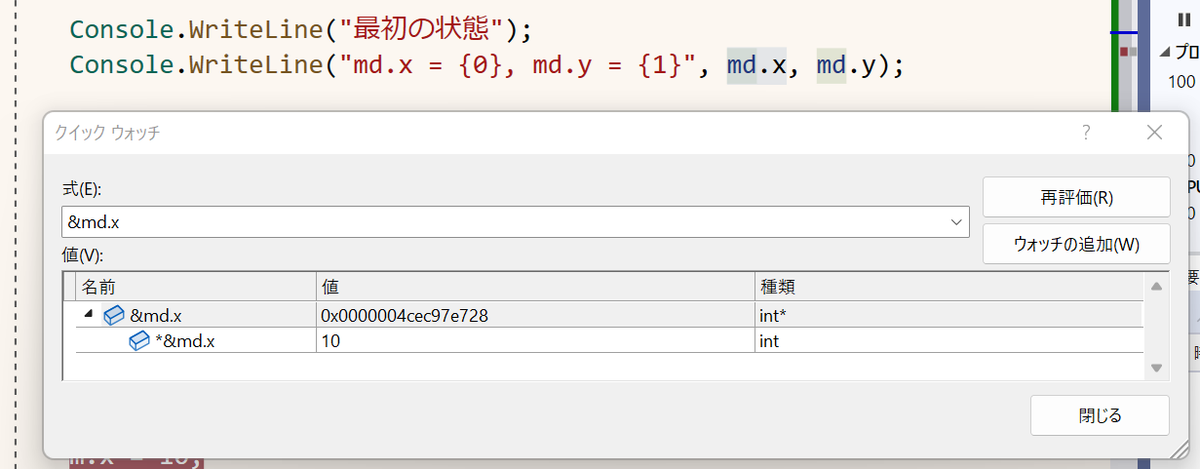
Another delicious #visualstudio tip for your consumption!
On today's menu - how to run C# code without starting a new project.
🔥https://t.co/UKdEP6IiED
#visualstudiotips #gamedev #csharp #dotnet #programming

Debugging multiple projects at the same time in Visual Studio
https://t.co/fKIApCrm48
#VisualStudioTips #dotnet #debugging
Last Seen Hashtags on Sotwe
chudai
Seen from United States
konyapasif
Seen from Turkey
MonkeyApp
Seen from Netherlands
Teenage nolimit _
Seen from Belgium
shailenzo Lorenzo
Seen from Italy
ChacalPasivo
Seen from Peru
Missionary
Seen from Mexico
สาวอวบรับงานบางสะพาน
Seen from Thailand
moaning
FREETROUBLE
Seen from United Kingdom
Trends for you
Most Popular Users

Elon Musk 
@elonmusk
240.1M followers

Barack Obama
@barackobama
119.3M followers

Donald J. Trump
@realdonaldtrump
111.6M followers

Cristiano Ronaldo
@cristiano
108.8M followers

Narendra Modi
@narendramodi
107M followers

Rihanna
@rihanna
97.2M followers

NASA
@nasa
92.1M followers

Justin Bieber
@justinbieber
90.5M followers

KATY PERRY
@katyperry
86.7M followers

Taylor Swift
@taylorswift13
80.5M followers

Lady Gaga
@ladygaga
72.1M followers

Kim Kardashian
@kimkardashian
69.4M followers

YouTube
@youtube
68.6M followers

Virat Kohli
@imvkohli
68.5M followers

Bill Gates
@billgates
63.4M followers

The Ellen Show
@theellenshow
62.5M followers

CNN
@cnn
61.9M followers

Neymar Jr
@neymarjr
61M followers

X
@x
60.9M followers

CNN Breaking News
@cnnbrk
59.9M followers