Find my HDR analysis and setup guides on my website https://t.co/2Q9qM8Tr9l
In the websites article section you can read about setting up peak brightness, paper white, HDR settings in Windows / Consoles, installation of RenoDX HDR mods etc.
On this X account I answer questions about HDR.
GTA6 HDR setup.
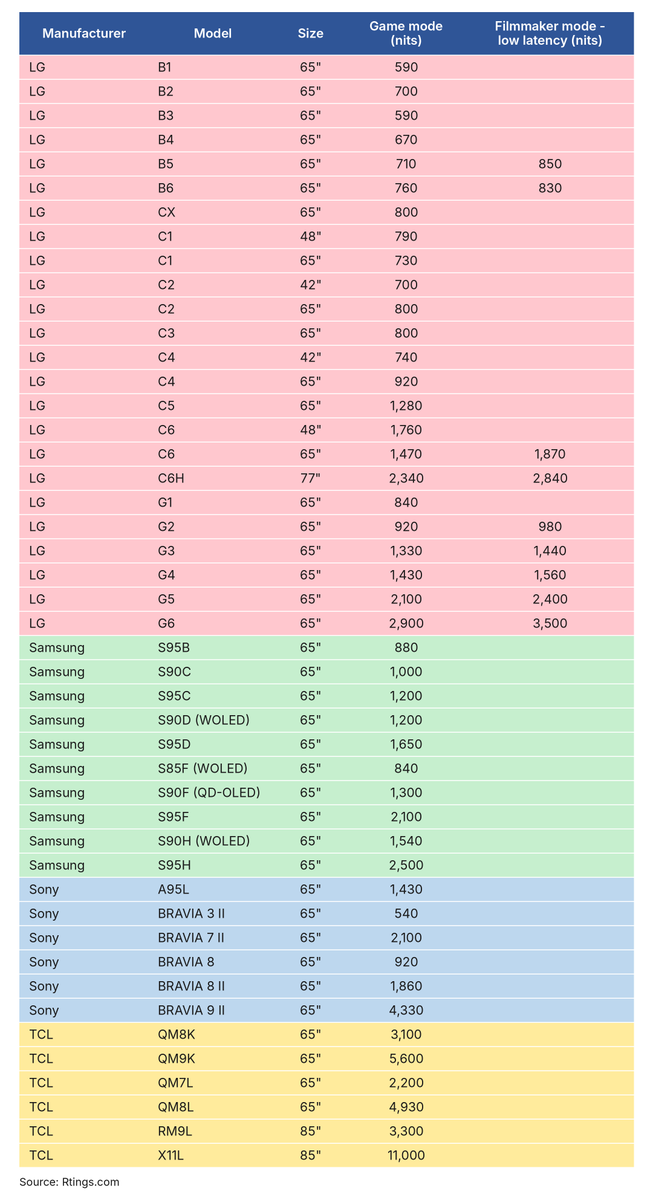
I added more TVs to the list in picture 1. It shows what TVs can max output of HDR brightness.
Picture 2 is to be used together with my HDR analysis and setup guide for GTA6 (see link in next post).
You need my HDR analysis to get guidance on how to setup paper white especially.
When you have chosen the setting on the paper white slider that gives you the best overall brightness in the picture (daytime and nighttime), then go into picture 2 to see what to setup on the max brightness slider, to get the game to output what your TV is capable off (value in picture 1).
There is no perfect HDR setttings for a TV. It will depend on personal preference, how bright your room is, how you have setup your TV settings etc. So please read my HDR analysis and setup guide for general guidance.
Try and use 55 paper white, 10 black levels and 2500 max brightness.
I use 55 and 10 black levels myself on my 2000 nits OLED.
You seam to like a brigher image overall, sincy you use DTM, so 55 paper white might also be for you. And it also brightens the dark nights a bit, if you like that.
I can't do a similar chart for monitors.
Their peak brightness is very dependend on what settings you chose on your monitor (TB400, TB500 or anything above). And you can chose another peak than you monitor can actually output.
You can read my article about settting up peak brightness on OLED monitors. Then use the chart for paper white and max brightness sliders.
https://t.co/jWBx68ujug
My HDR analysis and setup guides can be used for both monitors and TVs.
I made this separate HDR guide for GTA6.
Then you don't need to read my HDR analysis. Hopefully it will make it a bit easier to understand.
https://t.co/dIvb0VZTsP
@Mac6Tyson It does not apply to DTM.
I dont know how DTM works exactly on a TCL TV. I would setup the games HDR first the best you can using HGiG. Then simply turn on DTM afterwords.
First you need to find the paper white you want to use.
Lower settings on the paper white slider, will lower the peak brightness the game outputs. Thats unfortunately how Rockstar build their HDR.
So you need to increase the value on the max brightness slider to something higher than 1300 nits to get the game to output 1300 nits peak brightness.
If you use 40 on the paper white slider, then you need to set the max brightness slider to 2100 nits to get the game to output 1300 nits in highlights.