claude code turned my dead old android into an iPhone running iOS 16…
it sat in a drawer for 3 years. 2 GB of RAM, 16 GB of storage that was always full, a battery that died by lunch, and whatsapp took 9 seconds to open
claude code went through it piece by piece:
> memory · turned unused storage into virtual RAM. 2 GB became 8 GB, and apps stopped reloading every time i switched between them
> storage · took an old memory card from the same drawer and merged it into the phone's own storage, so android sees it as one drive. 16 GB became 128 GB, and apps install straight onto it like it's built in
> speed · disabled 38 bloat apps and stopped 21 of them from secretly starting in the background
> battery · switched everything to true black dark mode and killed the trackers waking the phone up all night. a full day on one charge
> ads · set up a private DNS that blocks ads across every app and browser on the phone, no extra app needed
then it rebuilt the whole look: iOS home screen, control center, the settings app, the dock. even the "about" page says iPhone now
boots in 14 seconds instead of 52. whatsapp opens instantly
my friend asked which iPhone it was. i told him it was the android from my drawer
took me one evening and i didn't write a single line of code
the whole thing was 1 prompt. it's in the comments, and that phone in your drawer gets a second life ↓
If you want to become top-tier with AI coding agents, then learn these 10 testing techniques (save now):
1. Test oracle: The rule that says pass or fail. If one agent writes the code and the rule, it can make the same mistake in both. Then the test passes on wrong code. Write the rule yourself, or get a second check.
2. End-to-end test: An agent opens your app in a real browser. It clicks & types like a person. Then it checks the screen. These tests are slow, so keep very few for the key flows.
3. Mocks vs integration: A mock is a fake stand-in for a real service. It shows your code asked the right thing. It can't show what the real service will answer. An integration test talks to the real service, or a close copy. Use both.
4. Preview environment: Each pull request gets its own live copy of the app. You click around & run tests there before the code joins the main app.
5. Unhappy paths: The happy path is when all goes well. Unhappy paths are the rest: bad input, a page with no data, a user trying to see someone else's stuff. Test these on purpose. Bugs hide where no one looks.
6. Regression: Something that worked, then broke after a change. Keep your old tests & run them again. When you fix a bug, add a test for it so it can't sneak back.
7. Flaky test: Same code. Sometimes it passes. Sometimes it fails. Timing, shared data, and the network are common causes. Fix it. If you can't yet, set it aside and track it.
8. Test isolation: Each test makes its own data & cleans up after. One test should never need another to run first. If tests share data, a change in run order can break them.
9. Test evidence: Save screenshots, videos, or traces of each run. Good tools record a trace or replay you can step through. When a test fails, you see what it saw.
10. Spec-driven testing: Write down what the feature should do. Then write tests from that list. Tests written by reading the code copy the code's bugs.
If you learn AI Security Engineering, you will never be unemployed again.
Stage 1: Threat Modeling & Foundations
- Learn: OWASP Top 10 for LLMs, MITRE ATLAS, STRIDE, trust boundaries.
- Practice: Threat model a RAG chatbot and map every place untrusted text enters the system.
Stage 2: Prompt Injection & Jailbreaks
- Learn: Direct vs indirect injection, instruction hierarchy, multi-turn attacks.
- Practice: Hijack a sandboxed agent with a poisoned webpage, then patch it.
Stage 3: Insecure Output Handling
- Learn: LLM-driven XSS, SQLi, SSRF, command injection, excessive agency.
- Practice: Exploit an app that pipes model output into a shell, then fix it with strict validation.
Stage 4: RAG & Vector DB Security
- Learn: Embedding poisoning, tenant isolation, ACL-aware retrieval.
- Practice: Plant a malicious document in a knowledge base and make the bot leak another user's data.
Stage 5: Agent & Tool Security
- Learn: Least privilege, confused deputy attacks, sandboxing, scoped credentials.
- Practice: Give an agent shell and email tools, then build a permission layer that blocks dangerous chains.
Stage 6: MCP Security
- Learn: Tool poisoning, rug pulls, tool shadowing, OAuth scopes, server authentication.
- Practice: Build a malicious MCP server that exfiltrates data, then write a scanner that catches it.
Stage 7: Data Leakage & Privacy
- Learn: PII exposure, training data extraction, membership inference, DLP.
- Practice: Extract memorized strings from a fine-tuned model and measure the leakage rate.
Stage 8: Model Supply Chain
- Learn: Pickle deserialization, safetensors, model signing, AI-BOM, typosquatting.
- Practice: Craft a malicious model file that executes code on load, then build a pipeline that refuses it.
Stage 9: Adversarial ML
- Learn: Evasion, data poisoning, backdoors, model extraction.
- Practice: Backdoor a small classifier with 1% poisoned data and detect it afterward.
Stage 10: Guardrails & Runtime Enforcement
- Learn: Input/output classifiers, policy engines, deterministic checks, human-in-the-loop.
- Practice: Put a policy gateway in front of an agent that blocks risky actions before they execute.
Stage 11: Red Teaming & Evals
- Learn: garak, PyRIT, promptfoo, attack success rate, regression suites.
- Practice: Automate a red-team pipeline in CI that fails the build when a new jailbreak lands.
Stage 12: Detection, IR & Governance
- Learn: Audit logging, anomaly detection, NIST AI RMF, ISO 42001, EU AI Act.
- Practice: Write an incident response playbook for a compromised agent, then run a tabletop exercise.
Chatbots are a commodity. AI Security is the physics of trust.
The modern AI Security Engineer builds the immune system for autonomous intelligence.
Bookmark and Repost!
LeetCode, but for ML and AI.
We have LeetCode for DSA.
But where's the LeetCode for AI engineers?
This is not a 10-hour YouTube tutorial.
Your ordinary "Build an AI agent in 5 minutes" course.
I mean actual engineering challenges:
→ Implement backpropagation without PyTorch.
→ Build a tokenizer from scratch.
→ Write your own attention mechanism.
→ Build RAG without relying on frameworks.
→ Create an AI agent loop from scratch.
→ Learn how to evaluate and debug AI systems.
So I built something I wish existed when I started learning AI.
🔗 https://t.co/Q2FHIjaPI5
The idea is simple:
1. Understand the problem.
2. Learn the math behind it.
3. Implement it yourself.
4. Run the tests.
5. Actually understand what you built.
From ML fundamentals to transformers, LLMs, RAG, and AI agents.
✅ 100% open source
✅ Completely free
✅ No paywalls or signups
✅ Learn by building, not just watching
LeetCode taught a generation of engineers how to solve algorithms.
Maybe it's time we had something similar for building AI.
If you're serious about becoming an AI engineer, stop just calling APIs.
Start understanding what's behind them.
♻️ Repost this for someone learning AI.
💯 Completely Opensource and FREE with 71K stars
P.S. Would you use a daily LeetCode-style challenge for AI engineering?
If you learn Forward Deployed Engineering, you will never be unemployed again.
I’d do this.
Stage 1: Enterprise Identity & Access (The Gatekeeper)
- Learn: OAuth2, SAML, OIDC, SCIM provisioning, Row-Level Security (RLS) and multi-tenant data isolation.
- Practice: Build an auth bridge connecting your AI app to a simulated customer's Okta/Azure AD, ensuring User A can only query data their specific RBAC role permits.
- Why: No SSO and strict data isolation means no enterprise contract. Security review is the first gate.
Stage 2: Air-Gapped & VPC Deployments (The Environment)
- Learn: Kubernetes (K8s), Helm, Terraform, private container registries, air-gapped networking and egress filtering.
- Practice: Script a one-click Terraform/Helm deployment of your entire AI stack into a simulated customer VPC with zero egress to the public internet.
- Why: Banks, hospitals and governments don't let your AI talk to the public cloud. You must deploy in their basement.
Stage 3: Legacy Data Extraction & ETL (The Fuel)
- Learn: OCR, unstructured PDF parsing, mainframe DB connectors, Apache Airflow, dbt and data reconciliation.
- Practice: Build a pipeline that ingests 10 years of messy, scanned customer invoices and turns them into a clean, queryable hybrid (vector + relational) store.
- Why: Enterprise AI starves without clean data. The customer's data will always be a mess.
Stage 4: Secure RAG & Permission-Filtered Retrieval (The Brain)
- Learn: Hybrid search, document-level access control, citation grounding, metadata tagging and abstention logic.
- Practice: Build a RAG pipeline where the LLM dynamically filters out retrieved chunks that the specific user asking the question doesn't have clearance to see.
- Why: An AI that leaks HR salaries or M&A docs to a junior employee is an immediate breach of contract.
Stage 5: MCP & Legacy System Integration (The Hands)
- Learn: Model Context Protocol (MCP), SOAP/REST translation, web scraping, headless browsers and API rate-limit handling.
- Practice: Build an MCP server that lets an LLM safely query and write to the customer's 15-year-old on-prem SAP or Oracle instance without exposing raw credentials.
- Why: Agents are useless if they can't touch the customer's actual systems of record.
Stage 6: AI Guardrails & PII Redaction (The Shield)
- Learn: NER (Named Entity Recognition), deterministic regex filtering, LLM output validation, UUID masking, and audit logging.
- Practice: Build a middleware proxy that intercepts LLM inputs/outputs, masks SSNs and credit cards with UUIDs before they hit the model, and restores them post-generation.
- Why: Compliance teams will kill the deal if a single PII token hits an external frontier API.
Stage 7: Human-in-the-Loop (HITL) Workflows (The Trust)
- Learn: Temporal {dot} io, webhook routing, state machines, durable execution and UI approval gates.
- Practice: Build a workflow where the AI drafts a $50k purchase order, but physically pauses execution until a human manager clicks "Approve" in Slack or Teams.
- Why: Enterprises adopt AI only when humans remain legally accountable for the final action.
Stage 8: Edge & On-Prem Inference (The Silicon)
- Learn: vLLM, TensorRT-LLM, Ollama, GPU partitioning (MIG), and local quantized models (AWQ/GGUF).
- Practice: Deploy a quantized 8B model on a single customer-owned GPU node to handle highly sensitive triage locally without network latency.
- Why: Sometimes the data is too hot to move. You must bring the model to the data.
Stage 9: Observability & Customer Health (The Pulse)
- Learn: OpenTelemetry, Langfuse, custom Grafana dashboards, usage telemetry and cost-attribution.
- Practice: Build a "Customer Health" dashboard showing the exact cost-savings, time-saved and token-spend the AI has generated for their specific team this month.
- Why: If the customer doesn't see the ROI quantified, they will churn at renewal.
Stage 10: Evals on Customer Data (The Proof)
- Learn: Golden dataset creation, trajectory grading, shadow testing, and LLM-as-a-judge calibration.
- Practice: Take 100 real past customer support tickets, run them through your agent in shadow mode, and prove to the VP of Support that it resolved 80% accurately.
- Why: Generic benchmarks mean nothing to a buyer. You must prove the AI works on *their* messy data.
Stage 11: Technical Discovery & Scoping (The Translation)
- Learn: Stakeholder interviewing, architecture diagramming, SOW (Statement of Work) writing and expectation management.
- Practice: Translate a vague "we want AI for supply chain" executive request into a scoped, 4-week technical deployment plan with defined, measurable success metrics.
- Why: FDEs are the translators between revenue (Sales) and reality (Engineering).
Stage 12: The Handoff & Self-Serve Admin (The Scale)
- Learn: Technical writing, runbooks, admin portals, automated onboarding and chaos testing.
- Practice: Write a deployment runbook and build an admin UI so the customer's internal IT team can manage the AI stack, update prompts and view logs without calling you.
- Why: Your leverage is measured by how little the customer needs you for day-to-day operations.
AI labs build the engine. FDEs build the roads.
The modern Forward Deployed Engineer builds the secure, durable nervous system that connects frontier intelligence to legacy reality.
Bookmark and Repost!
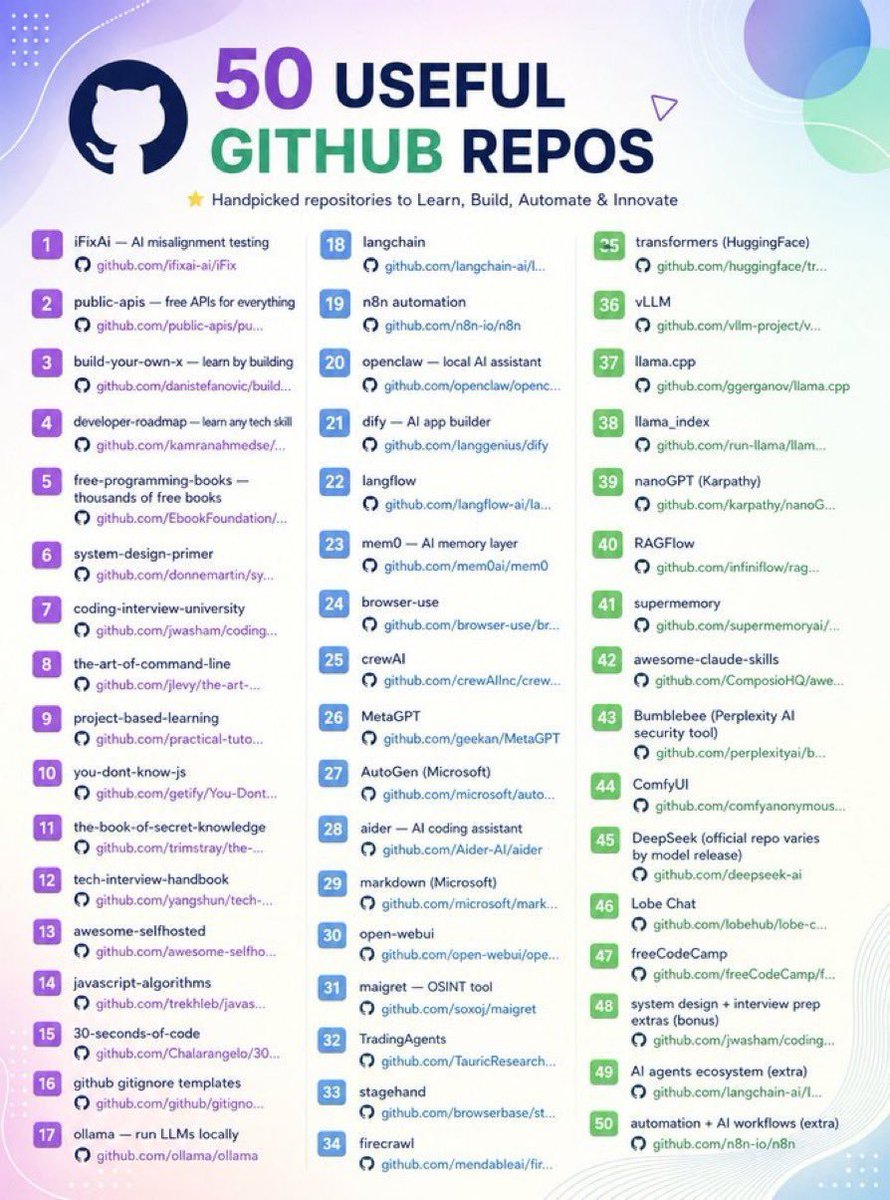
GitHub has officially gone insane.
You can now build an entire AI content factory without hiring a single person.
10 ridiculously powerful repos:
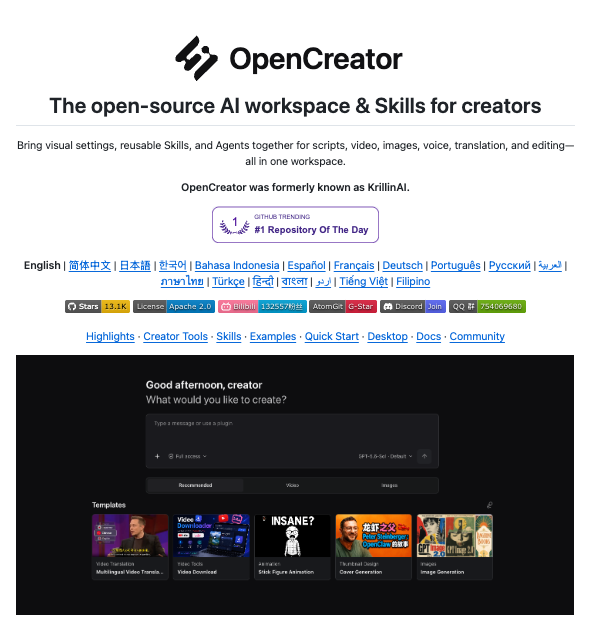
1. OpenCreator
Give Codex a creator workspace to write scripts, generate images, create voiceovers, translate videos, and edit content.
https://t.co/YFG5tZRhTf
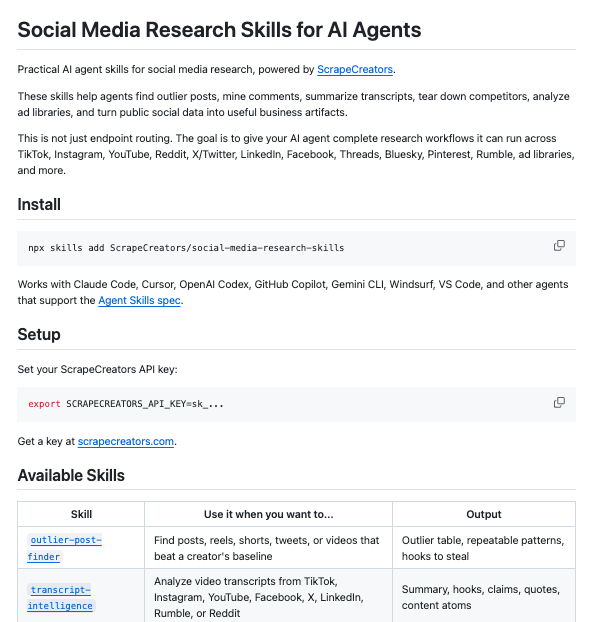
2. Social Media Research Skills
Give Claude Code and Codex skills to find standout posts, study competitors, mine comments, and pull hooks from video transcripts. Powered by ScrapeCreators.
https://t.co/XOW8tV0URo
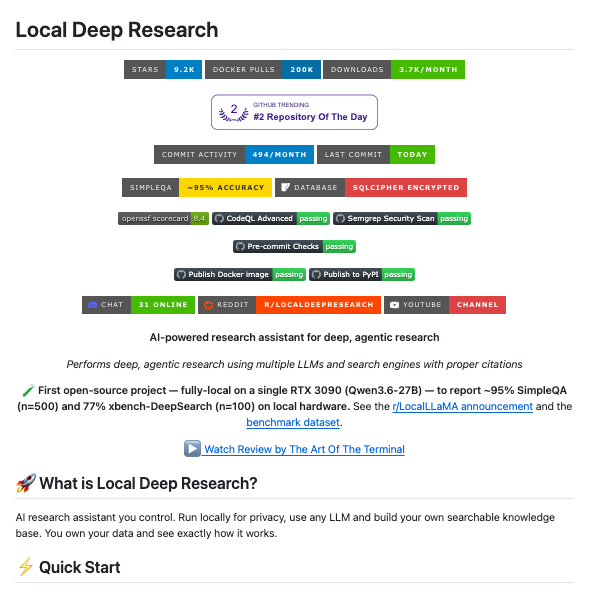
3. Local Deep Research
Turn a topic into a research report by searching the web and your documents. Works with local and cloud AI models.
https://t.co/XVSzkcfXzu
4. FLUX.2
Generate and edit images for thumbnails, social posts, and campaigns. The Klein 4B models come with Apache-licensed weights.
https://t.co/WiqsJCwkns
5. Kokoro
Turn your scripts into AI voiceovers using a compact, open-weight speech model. Build narration directly into your content pipeline.
https://t.co/8Ffw7c5mOs
6. ACE-Step 1.5
Generate music from text descriptions, create instrumental tracks, and regenerate sections of audio. Runs locally on supported hardware.
https://t.co/Rl76BjNO0H
7. Short Video Factory
Turn prompts and your footage into batches of short videos, with AI-written copy, voiceovers, automatic editing, and subtitles.
https://t.co/6YbGCSwZl2
8. AI YouTube Shorts Generator
Turn long YouTube videos into vertical Shorts with AI-picked highlights, transcription, and automatic cropping.
https://t.co/kpYkdsZcd9
9. Podcastfy
Turn source material into AI podcast conversations. Customize the dialogue and generate audio in multiple languages.
https://t.co/RBY68LBify
10. Social Media Agent
Turn a URL into X and LinkedIn posts. Review the drafts, make changes, and schedule them through an AI agent workflow.
https://t.co/ZFweXXrFzF
Which part of your content workflow are you automating first?
Goldmine for AI Engineers! 📌
If you're learning AI, ML, LLMs, or AI agents, don't waste hours jumping between random tutorials.
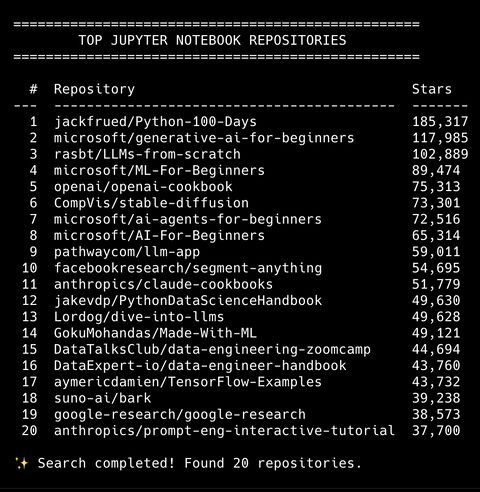
These are 10 repositories I'd actually keep bookmarked - from Python fundamentals to ML, LLMs, agents, and production AI.
1. Python - 100 Days
jackfrued/Python-100-Days
A 100-day Python learning path covering fundamentals, data analysis, web development, and more.
GitHub:
https://t.co/ED5Fm7Ei3Q
2. Generative AI for Beginners
microsoft/generative-ai-for-beginners
A practical introduction to building Generative AI applications.
Covers:
• LLM fundamentals
• Prompt engineering
• RAG
• AI agents
• Fine-tuning
• AI application development
GitHub:
https://t.co/kdQ2b6jBYB
3. LLMs From Scratch
rasbt/LLMs-from-scratch
Want to understand what's actually happening inside an LLM?
Build one step by step.
Covers:
• Tokenization
• Embeddings
• Attention
• Transformers
• Training
• Fine-tuning
GitHub:
https://t.co/lzCKdk7kl1
4. Machine Learning for Beginners
microsoft/ML-For-Beginners
A structured 12-week, 26-lesson curriculum covering classical machine learning.
A good starting point if you want ML fundamentals before jumping into LLMs.
GitHub:
https://t.co/AlXqh5KO9b
5. OpenAI Cookbook
openai/openai-cookbook
A collection of practical examples and guides for building applications with OpenAI models.
Useful when you want to move from:
Learning → Building
GitHub:
https://t.co/FrBiKTbIS6
6. Stable Diffusion
CompVis/stable-diffusion
Interested in generative image models?
This repository contains the original Stable Diffusion implementation and research code.
GitHub:
https://t.co/25e7FVkHIf
7. AI Agents for Beginners
microsoft/ai-agents-for-beginners
A practical course for understanding and building AI agents.
Covers:
• Agentic AI
• RAG
• Agent frameworks
• Tool use
• Multi-agent systems
GitHub:
https://t.co/oAn2ptn2T5
8. AI for Beginners
microsoft/AI-For-Beginners
A structured 12-week, 24-lesson introduction to AI.
Covers:
• Neural networks
• Computer vision
• NLP
• Deep learning
• Classical AI
GitHub:
https://t.co/p4PdLnL89o
9. LLM App
pathwaycom/llm-app
Focused on building practical LLM applications.
Explore:
• RAG
• AI pipelines
• Enterprise search
• Real-time data
• Vector search
GitHub:
https://t.co/LYMOE4PgWj
10. Segment Anything
facebookresearch/segment-anything
A foundation model for promptable image segmentation.
Worth exploring if you're interested in computer vision and multimodal AI.
GitHub:
https://t.co/j0mPn2or2V
Don't bookmark all 10 and forget about them.
Pick based on where you are:
Python → Python-100-Days
ML → ML-For-Beginners
AI Fundamentals → AI-For-Beginners
LLMs → LLMs-from-scratch
Generative AI → Generative-AI-for-Beginners
Agents → AI-Agents-for-Beginners
Building → OpenAI Cookbook / LLM App
Computer Vision → Segment Anything
Pick one.
Build something.
Then move to the next.
This is an actual goldmine for every AI builder
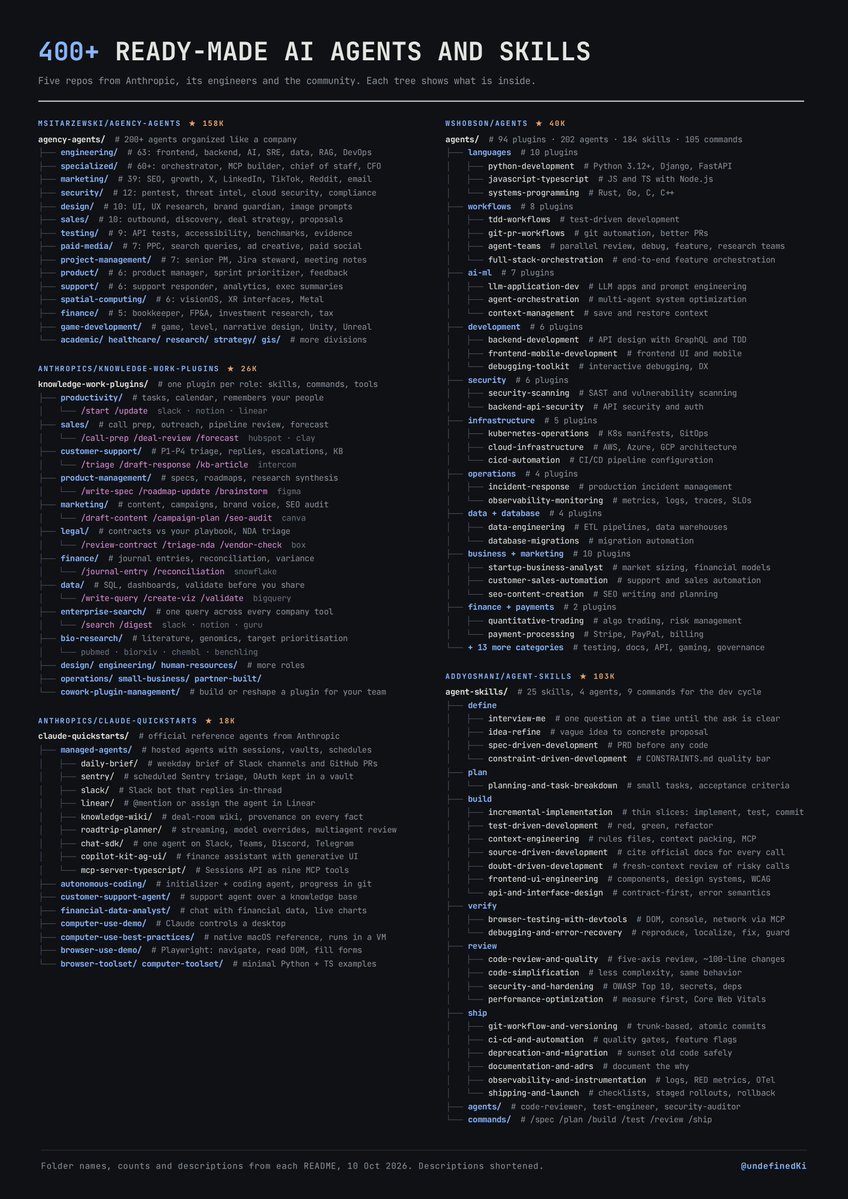
400+ ready-made agents and skills for almost any job. From Anthropic, its engineers and the community.
https://t.co/5a4ZEG1lR2 (158k stars)
~170 agents organized like a company: engineering, design, marketing, sales, product, testing, security, support. Extra packs for finance, healthcare and game dev. Works with 15+ tools.
https://t.co/5oQQqoYR0H (40k stars)
202 agents, 184 skills and 105 commands packed into 94 Claude Code plugins. Language experts, code review, debugging, infra, security, testing. Install only the plugins you need.
https://t.co/HA64e77RFt (26k stars)
Anthropic’s own plugins built around jobs: sales, customer support, product management, marketing, legal, finance, data.
https://t.co/ue1eJ5QCQX (18k stars)
Official agents you can deploy: a daily brief from Slack and GitHub, scheduled Sentry triage, Slack and Linear bots, a customer support agent, a financial data analyst.
https://t.co/x93uIDHS6C (103k stars)
From Anthropic engineer. 25 skills covering the whole dev cycle: interview-me, spec writing, TDD, browser testing, security review, CI/CD.
I’d start with claude-quickstarts. Every agent there is a full working example you can run and take apart.
Resources every software engineer should know about 📌
Not courses.
Not certifications.
Just stuff worth bookmarking.
1. Cloudflare Learning
DNS, CDN, networking, security, HTTP
https://t.co/W1kvXNWksg
2. Google Engineering Practices
How engineers actually write and review code
https://t.co/J4QZ2J9CDT
3. Uber Engineering
Real systems, scaling, infra + AI
https://t.co/m8h7yzXowO
4. AWS Architecture Center
Real architecture patterns + diagrams
https://t.co/xH8fOwXtFW
5. Stripe Engineering
Payments, APIs, distributed systems
https://t.co/Day9yKkYqD
6. Netflix TechBlog
Distributed systems, data + infrastructure
https://t.co/OPBEA11MjP
7. GitHub Engineering
How GitHub builds and scales its platform
https://t.co/iWzZUnm727
8. Meta Engineering
Production ML + infra at massive scale
https://t.co/RCkGd5p1ee
Bookmark these. 📌
Reading how companies solve real engineering problems is a completely different kind of learning.