The command fastapi (the FastAPI CLI) now looks so much nicer 😎
It now uses @patrick91's rich-toolkit 🎨
To get it, upgrade your dependencies with fastapi[standard] 🤓
Or manually upgrade the package fastapi-cli to the latest version: 0.0.6 🚀
Bun v1.1
- Windows
- Cross-runtime IPC between Node <> Bun
- if else [[cond]] statements in Bun Shell
- Improved Next.js support
- Fixed crash in Bun.Transpiler
Thanks to 364 contributors since Bun 1.0!
https://t.co/mjFHWbznbO
New release! ❄️ Freeze: a CLI tool to generate terminal screenshots of code and ANSI output. Run a single command to generate PNGs and SVGs of terminals with program output or syntax-highlighted code. Use it in READMEs to show off code and CLI output.
https://t.co/0jwMhX8F6u
Have you seen the official announcement of Traefik v3? 👀 It's a huge leap forward with new features including:
- WebAssembly (Wasm)
- OpenTelemetry (OTel)
- Kubernetes Gateway API Support
- HTTP/3
- SPIFFE
- Much more
Details here 👉 https://t.co/hD7uYZBSsz
🎉 Traefik v3 is officially a Release Candidate! 🎉 Thank you to everyone who made v3 possible with awesome new features including:
- WebAssembly (Wasm)
- OpenTelemetry (OTel)
- Kubernetes Gateway API Support
- HTTP/3
- SPIFFE
- Much more
Details here 👉 https://t.co/99QHt2xhLy
Angular v17.2 is now available and brings Feb 14 presents for everyone ❤️
‣ Experimental Material 3 support
‣ Signal queries and model inputs in developer preview
‣ Image directive @Netlify loader
‣ @bunjavascript package manager support
🎁 https://t.co/Wh5KGfr3U4
Any of you guys running their own email servers, or manage mails though your own domains?
Hope you got SPF, DKIM, DMARC, and BIMI in place…
if not? Next video is gonna cover you ���
TypeScript 5.3 beta just went out! Now slimmer and faster, with lots of new narrowing improvements, correctness checks, import attributes, and more - so try it out now!
https://t.co/HH0wN9jug6
Two things developers hate the most:
1. Meetings that could've been an email
2. CORS
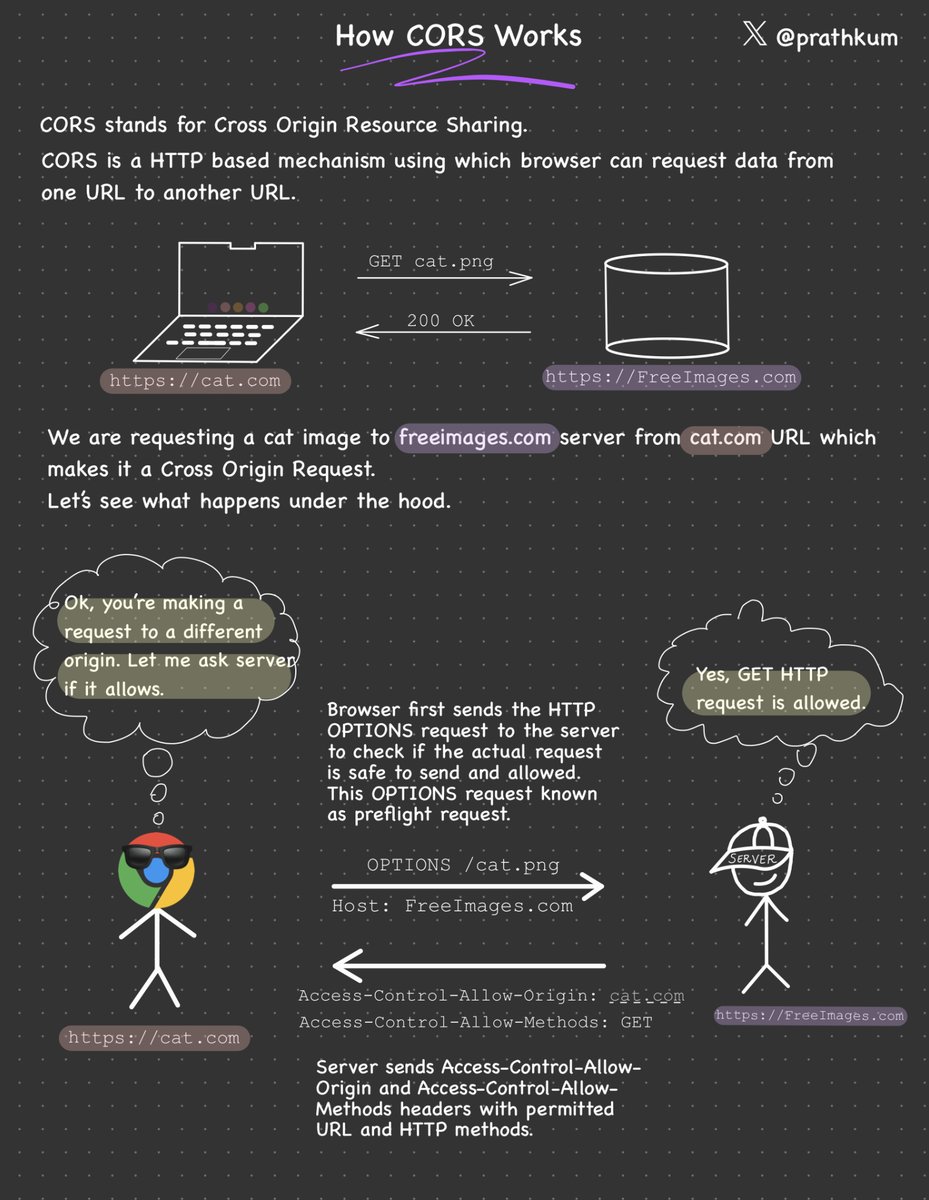
We'll talk about the first one later but let's see what CORS (not even a word) is.
Stands for Cross-Origin Resource Sharing.
It is a security feature implemented by web browsers that controls how web pages from one domain can request resources hosted on another domain.
Browsers generally have a Same-Origin Policy, which means requesting data from the same origin is allowed but requesting data from another URL will throw an error.
But why so? Due to security reasons.
This policy restricts the web page's ability to access data or resources from other origins to prevent potential security vulnerabilities, like cross-site scripting (XSS) attacks.
How to make a Cross-Origin request?
When the browser makes a cross-origin request, it will add an ‘Origin’ header that states the scheme(protocol), domain, and port number.
In return, the server responds with Access-Control-Allow-Origin — specifying the allowed origin(s). It can be set to a specific origin, "*", or omitted.
However, HTTP requests other than GET, POST, and HEAD require a preflight request before making an actual Cross-Origin request.
A preflight request is nothing but an OPTIONS HTTP request to check if the actual request is allowed.
The server responds with an ‘Access-Control-Allow-Methods’ header which states the HTTP Methods allowed to be used by the origin.
CORS is confusing but necessary for security.
It's nothing but a combination of HTTP headers, preflight requests, and browser checks to control and allow safe cross-origin requests while maintaining the security of web applications.








![FastAPI's tweet photo. The command fastapi (the FastAPI CLI) now looks so much nicer 😎
It now uses @patrick91's rich-toolkit 🎨
To get it, upgrade your dependencies with fastapi[standard] 🤓
Or manually upgrade the package fastapi-cli to the latest version: 0.0.6 🚀 https://t.co/ajvIiAVCpS](https://pbs.twimg.com/media/Gd9j5_dWsAACxIH.jpg)