@SharadRPathak bato banexa ni k aadhar ma vanu, jabo 5,6 km ko bato 2 karyekal lagi sakyo, tehi mathi aru sahar jada ni teha bharatpur ko jastai bato dekhxu, smart batti dekhxu, bharatpur ko marketing ramro vako chha tehi ho.. jaha tehi mawobadi middleman dekhinxa..
REACT can be difficult to learn, but this PDF book will make it easy!
I've created a comprehensive REACT PDF book that will make learning React a breeze!
Get a FREE copy of my #React PDF book.
𝐖𝐨𝐫𝐭𝐡 $39, 𝐛𝐮𝐭 𝐟𝐫𝐞𝐞 𝐭𝐨𝐝𝐚𝐲!
To get it, just:
1. Like & Repost
2. Comment “R”
3. Follow me @arnill_dev (so i can DM you)
🚨🇧🇪 Eden Hazard announces his retirement from professional football.
"You must listen to yourself and say stop at the right time."
"After 16 years and more than 700 matches played, I have decided to end my career as a professional footballer."
"I was able to realise my dream, I have played and had fun on many pitches around the world."
"During my career I was lucky to meet great managers, coaches and teammates — thank you to everyone for these great times, I will miss you all."
"I also want to thank the clubs I have played for: LOSC, Chelsea and Real Madrid; and thanks to the RBFA for my Belgian Selection."
"A special thank you to my family, my friends, my advisors and the people who have been close to me in good times and bad."
"Finally, a huge thank you to you, my fans, who have followed me for all these years and for your encouragement everywhere I have played."
"Now is the time to enjoy my loved ones and have new experiences."
"See you off the field soon my friends." ❤️
Learn these 13 Git commands because you'll be using them 99% of the time:
1. `git init`
Initialize a new Git repository.
This creates a new subdirectory named ".git" in the current directory, where Git stores all the metadata for the repository.
2. `git clone`
Clone an existing repository.
This creates a local copy of the repository, including all of its history and branches.
`git clone <repo-link>`
3. `git add`
Stage changes for the next commit.
This adds the specified file(s) to the staging area, where they will be included in the next commit.
`git add file1.txt file2.txt`
4. `git commit`
Create a new commit.
This records the staged changes and any additional changes made since the last commit, along with a commit message describing the changes.
`git commit -m "Add new feature"`
5. `git push`
Push commits to a remote repository.
This sends the local commits to the specified remote repository, updating the branch on the remote with the new commits.
`git push origin main`
6. `git pull`
Fetch and merge changes from a remote repository.
This retrieves the latest commits from the specified remote repository and merges them into the current branch.
`git pull origin main`
7. `git branch`
List, create, or delete branches.
This command can be used to list the available branches in a repository, create a new branch, or delete an existing branch.
`git branch new-branch`
8. `git checkout`
Switch to a different branch.
This command allows you to switch to a different branch in the repository and make it the current working branch.
`git checkout main`
9. `git merge`
Merge one branch into another.
This command combines the changes from one branch into another branch, creating a new commit that reflects the merged changes.
`git merge new-branch`
10. `git status`
Show the status of the repository.
This command displays the current branch, any staged or unstaged changes, and any untracked files.
`git status`
11. `git rebase`
Incorporate changes from one branch into another branch.
Let's say you have made some changes on an "XYZ" branch that you want to incorporate into the "main" branch. You can use git rebase to reapply your changes on top of the main branch.
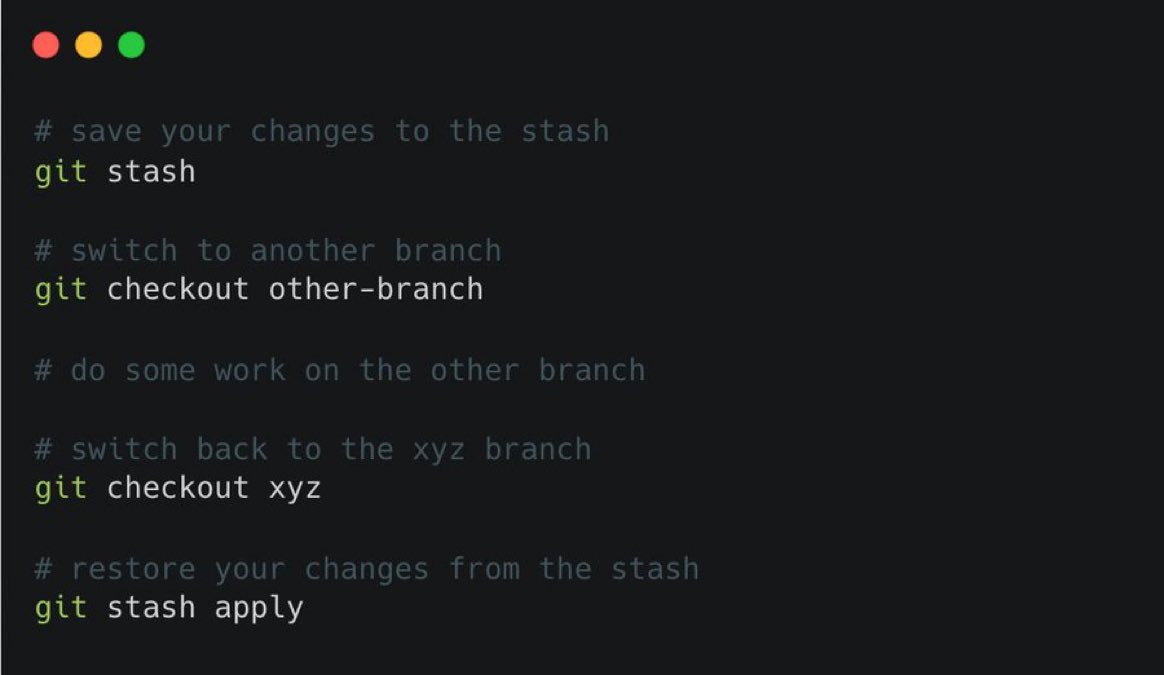
12. `git stash`
Temporarily save changes that you are not yet ready to commit.
If your changes are not ready to commit but you want to work on a different branch, you can temporarily save your changes for later use and switch branches without losing your progress.
13. `git revert`
Let's say you have made a mistake in a previous commit and you need to undo it. You can use git revert to create a new commit that undoes the changes introduced by the previous commit.
`git revert <commit1>..<commit2>`
HOW TO STRUCTURE YOUR BACKEND CODE IN NODE.JS(express.js).
[with explanation]
📁
├── 📄 app.js
├── 📁 bin
├── 📁 config
├── 📁 controllers
│ ├── 📄 customer.js
│ ├── 📄 product.js
│ └── ...
├── 📁 middleware
│ ├── 📄 auth.js
│ ├── 📄 logger.js
│ └── ...
├── 📁 models
│ ├── 📄 customer.js
│ ├── 📄 Product.js
│ └── ...
├── 📁 routes
│ ├── 📄 api.js
│ ├── 📄 auth.js
│ └── ...
├── 📁 public
│ ├── 📁 css
│ ├── 📁 js
│ ├── 📁 images
│ └── ...
├── 📁 views
│ ├── 📄 index.ejs
│ ├── 📄 product.ejs
│ └── ...
├── 📁 tests
│ ├── 📁 unit
│ ├── 📁 integration
│ ├── 📁 e2e
│ └── ...
├── 📁 utils
│ ├── 📄 validation.js
│ ├── 📄 helpers.js
│ └── ...
└── 📁 node_modules
Here's a brief explanation:
app.js
It's like the control centre of your web application. It's where you set up and manage everything.
bin
Think of this as a place for starting your web server. It's where you have scripts that make your website work.
config
These are like settings for your website, such as where your database is or how your website should behave.
controllers
This is where you put the brains of your website explains the name controllers. Each file here handles a different part of your site, like customer stuff or product stuff.
middleware
Imagine these as helpers that help your website do things like checking if you're logged in or keeping a record of what people do on your site.
models
This is where you describe what your data looks like. If your website is a store, this is where you say what a product is or what a customer is.
routes
These are like the paths to different parts of the website. If the website is a city, these are the streets and highways.
public
Think of this as your storage room for things everyone can see, like images, styles, and scripts.
views
If your website is like a book, these are the pages. This is where you put together what people see on the screen.
tests
These are like exams for your website to make sure it works correctly. You create different kinds of tests to check different parts of your site.
utils
These are like handy tools you use to make your website better, like checking if someone's email is valid or formatting dates nicely.
node_modules
This is like your toolbox filled with tools (libraries and code) that you use to build your website. It's automatically filled with things your project needs.
This organized structure helps you build and manage your website in a neat and organised way, making it easier to understand and work on, especially when your project gets bigger and more complex and you have to make changes very often.
I am not saying that this is the only or the best way, this is what I usually follow and thought about sharing it.
@Cricketracker Winner: England
Runners-up: Pakistan
Most runs: KL Rahul
Most Wickets: R Jadeja
Player of tournament: Ben Stokes
Surprise package: R ashwin
@rupesh9803@sigdel562 Some good games in home ground gave big hopes to fan but on real, team is same as like 10 years ago. Can beat usa, png and uae on the day we play well if not, we lose.