En lugar de ver Netflix este domingo, dedica 1 hora a esto.
Un CURSO COMPLETO SUBTITULADO AL ESPAÑOL de Claude, te enseña a automatizar lo que te roba 3 horas al día.
El lunes lo agradecerás.
Dos ingenieros de Anthropic pasaron 24 minutos exponiendo cada función de Claude Code que no sabías que existía y gratis.
La mayoría de las personas pasarán de largo este contenido
Instead of watching Netflix tonight.
Spend a day mastering Claude here: https://t.co/Vn60ElPZ2i
→ Level 1 - 24 min: The basics.
Claude For Dummies: https://t.co/jw2qdIcjnh
Claude Certified: https://t.co/9jKsXWOt66
Stupid simple Claude: https://t.co/SVGd967eMQ
→ Level 2 - 1 hour: Real workflows.
Claude Cowork: https://t.co/uWTpOI3Woc
Claude for teams: https://t.co/qxlcqhf8bM
Claude Design: https://t.co/ZY8Fg5D2ea
Cowork + Projects: https://t.co/Q7AN9CZAbO
Claude for slides: https://t.co/L0bPMgXci6
Claude Skills: https://t.co/6cHYYfjXEA
→ Level 3 - 3.5 hours: The pro moves.
Claude to sound like you: https://t.co/kDGBpSF7Wh
Stop hitting Claude limits: https://t.co/j5fEzSH5br
Stop Prompting: https://t.co/j1LATSJiat
Claude replaced me: https://t.co/pNs1hPNDy5
Stop sounding like AI: https://t.co/JWKUGNKgOS
Excel with Claude: https://t.co/7g3CFNcKrs
→ Level 4 - 8 hours: Expert mode.
Claude Code: https://t.co/UgE9xBXVbE
Claude Connectors: https://t.co/TSAQqOpDeV
Stop using Claude at work: https://t.co/c6X55Thy6t
Pro tip: Don't binge it. Do one level per sitting.
Actually apply each guide before moving to the next.
Claude Code es un lío. Hasta que instalas esto.
Hay un plugin oficial de Anthropic llamado claude-code-setup.
Te dice qué automatizaciones puedes montar (hooks, skills, MCP servers, subagentes…) y cómo configurarlas paso a paso.
Básicamente analiza tu proyecto y te recomienda qué activar.
Para instalarlo:
/plugin install claude-code-setup@claude-plugins-official
Guarda este post para no perderlo 🔖
𝗦𝘁𝗼𝗽 𝘂𝘀𝗶𝗻𝗴 𝗖𝗹𝗮𝘂𝗱𝗲 𝗹𝗶𝗸𝗲 𝗶𝘁’𝘀 𝟮𝟬𝟮𝟰.
“Write in short sentences.
My audience is founders.
No bullet points.
Match my voice.”
You should not be typing this every single time.
Claude now lets you store your preferences, context, workflows, and recurring instructions so it works more like a trained collaborator, not a blank chatbot.
Here are the 𝟭𝟵 𝗿𝘂𝗹𝗲𝘀 𝘁𝗼 𝗴𝗲𝘁 𝗳𝗮𝗿 𝗺𝗼𝗿𝗲 𝗼𝘂𝘁 𝗼𝗳 𝗖𝗹𝗮𝘂𝗱𝗲:
━━━━━━━━━━━━━━
𝟭. 𝗦𝗲𝘁𝘂𝗽 ⚙️
➤ 𝗧𝘂𝗿𝗻 𝗼𝗻 𝗠𝗲𝗺𝗼𝗿𝘆
So Claude does not start from zero every time.
➤ 𝗨𝘀𝗲 𝗢𝗽𝘂𝘀 𝗳𝗼𝗿 𝗺𝗼𝘀𝘁 𝘀𝗲𝗿𝗶𝗼𝘂𝘀 𝘄𝗼𝗿𝗸
Unless you are truly optimizing for speed.
➤ 𝗘𝗻𝗮𝗯𝗹𝗲 𝗘𝘅𝘁𝗲𝗻𝗱𝗲𝗱 𝗧𝗵𝗶𝗻𝗸𝗶𝗻𝗴
Especially for complex, multistep reasoning.
➤ 𝗖𝗵𝗼𝗼𝘀𝗲 𝘁𝗵𝗲 𝗿𝗶𝗴𝗵𝘁 𝗺𝗼𝗱𝗲
Chat to think.
Code to build.
Cowork to automate.
━━━━━━━━━━━━━━
𝟮. 𝗖𝗼𝗻𝘁𝗲𝘅𝘁 🧠
➤ 𝗨𝗽𝗹𝗼𝗮𝗱 .𝗠𝗗 𝗳𝗶𝗹𝗲𝘀
Style guides, customer profiles, brand rules, positioning notes.
➤ 𝗖𝗼𝗻𝗻𝗲𝗰𝘁 𝘆𝗼𝘂𝗿 𝘁𝗼𝗼𝗹𝘀
Let Claude work directly with Notion, Gmail, and more.
➤ 𝗖𝗿𝗲𝗮𝘁𝗲 𝗣𝗿𝗼𝗷𝗲𝗰𝘁𝘀 𝗳𝗼𝗿 𝗿𝗲𝗰𝘂𝗿𝗿𝗶𝗻𝗴 𝘄𝗼𝗿𝗸
Add your rules, examples, and context once.
➤ 𝗢𝗻𝗲 𝗣𝗿𝗼𝗷𝗲𝗰𝘁 = 𝗼𝗻𝗲 𝗰𝗹𝗲𝗮𝗿 𝗷𝗼𝗯
“Client proposals” works.
“Marketing” is too broad.
━━━━━━━━━━━━━━
𝟯. 𝗣𝗿𝗼𝗺𝗽𝘁𝗶𝗻𝗴 ✍️
➤ 𝗦𝗵𝗼𝘄 𝗖𝗹𝗮𝘂𝗱𝗲 𝘄𝗵𝗮𝘁 𝗴𝗼𝗼𝗱 𝗹𝗼𝗼𝗸𝘀 𝗹𝗶𝗸𝗲
Give examples of successful outputs and outcomes.
➤ 𝗔𝘀𝘀𝗶𝗴𝗻 𝗮 𝗿𝗼𝗹𝗲
“You are a senior recruiter.”
“You are a sharp product marketer.”
➤ 𝗨𝘀𝗲 𝗽𝗿𝗲𝗰𝗶𝘀𝗲 𝗰𝗼𝗻𝘀𝘁𝗿𝗮𝗶𝗻𝘁𝘀
“Ask no more than 5 questions” beats “don’t ask too many questions.”
➤ 𝗔𝘀𝗸 𝗳𝗼𝗿 𝟱 𝗼𝗽𝘁𝗶𝗼𝗻𝘀
Do not force one “perfect” answer too early.
━━━━━━━━━━━━━━
𝟰. 𝗜𝘁𝗲𝗿𝗮𝘁𝗶𝗼𝗻 🔁
➤ 𝗜𝗳 𝗖𝗹𝗮𝘂𝗱𝗲 𝗰𝗮𝗻’𝘁 𝗲𝘅𝗽𝗹𝗮𝗶𝗻 𝗶𝘁 𝗹𝗶𝗸𝗲 𝘆𝗼𝘂’𝗿𝗲 𝟭𝟬, 𝗶𝘁’𝘀 𝗻𝗼𝘁 𝗿𝗲𝗮𝗱𝘆
Clarity is the real quality check.
➤ 𝗖𝗿𝗲𝗮𝘁𝗲 𝗲𝗱𝗶𝘁𝗮𝗯𝗹𝗲 𝗱𝗼𝗰𝘀 𝗼𝗿 𝘁𝗿𝗮𝗰𝗸𝗲𝗿𝘀 𝗶𝗻𝘀𝗶𝗱𝗲 𝘁𝗵𝗲 𝗰𝗵𝗮𝘁
Use Artifacts instead of scattered back-and-forth.
➤ 𝗡𝗲𝘃𝗲𝗿 𝗮𝗰𝗰𝗲𝗽𝘁 𝘁𝗵𝗲 𝗳𝗶𝗿𝘀𝘁 𝗱𝗿𝗮𝗳𝘁
The second or third pass is usually where the value appears.
➤ 𝗧𝗲𝗮𝗰𝗵 𝗶𝘁 𝘁𝗼 𝗰𝗵𝗮𝗹𝗹𝗲𝗻𝗴𝗲 𝘆𝗼𝘂
Claude agrees too easily by default.
Tell it to push back, question assumptions, and flag weak thinking.
━━━━━━━━━━━━━━
𝟱. 𝗦𝘆𝘀𝘁𝗲𝗺𝘀 🧩
➤ 𝗦𝗮𝘃𝗲 𝘆𝗼𝘂𝗿 𝗯𝗲𝘀𝘁 𝗽𝗿𝗼𝗺𝗽𝘁𝘀
Good prompts are reusable assets.
➤ 𝗜𝗻𝘀𝘁𝗮𝗹𝗹 𝗖𝗹𝗮𝘂𝗱𝗲 𝗦𝗸𝗶𝗹𝗹𝘀
Use them for research, writing, analysis, and repeatable workflows.
➤ 𝗕𝘂𝗶𝗹𝗱 𝘆𝗼𝘂𝗿 𝗼𝘄𝗻 𝗰𝘂𝘀𝘁𝗼𝗺 𝗦𝗸𝗶𝗹𝗹𝘀
For recurring tasks like:
“Anti-AI content checklist”
“Founder post sharpener”
“Investor update reviewer”
➤ 𝗦𝗲𝘁 𝗖𝗹𝗮𝘂𝗱𝗲 𝘂𝗽 𝗽𝗿𝗼𝗽𝗲𝗿𝗹𝘆 𝗼𝗻𝗰𝗲
So you stop wasting time repeating yourself forever.
━━━━━━━━━━━━━━
Most people are still using Claude as a chatbot.
The real leverage begins when you use it as a 𝗽𝗲𝗿𝘀𝗼𝗻𝗮𝗹𝗶𝘀𝗲𝗱 𝘄𝗼𝗿𝗸 𝘀𝘆𝘀𝘁𝗲𝗺.
❤️ Like
🔁 Retweet
🔖 Bookmark
Follow @MeenakshiYACS for more such posts
#AI #ArtificialIntelligence #GenerativeAI #CareerGrowth #Upskilling
Si tienes una cuenta de Gmail, necesitas leer esto
La IA de Google ahora analiza tus correos electrónicos y archivos adjuntos: extractos bancarios, declaraciones de impuestos, informes médicos, todo. Se activó de forma predeterminada, y existe una demanda colectiva relacionada con la manera en que se hizo.
Aquí tienes 5 pasos para desactivarla. El interruptor está oculto en dos lugares.
USO CLAUDE TODO EL DIA SIN ALCANZAR EL LÍMITE DE USO.
Claude no cuenta mensajes — cuenta tokens. Eso significa que algunos chats consumen tu límite 10× más rápido que otros.
Si quieres usar Claude todo el día sin quedarte sin acceso, utiliza estos 9 trucos inteligentes:
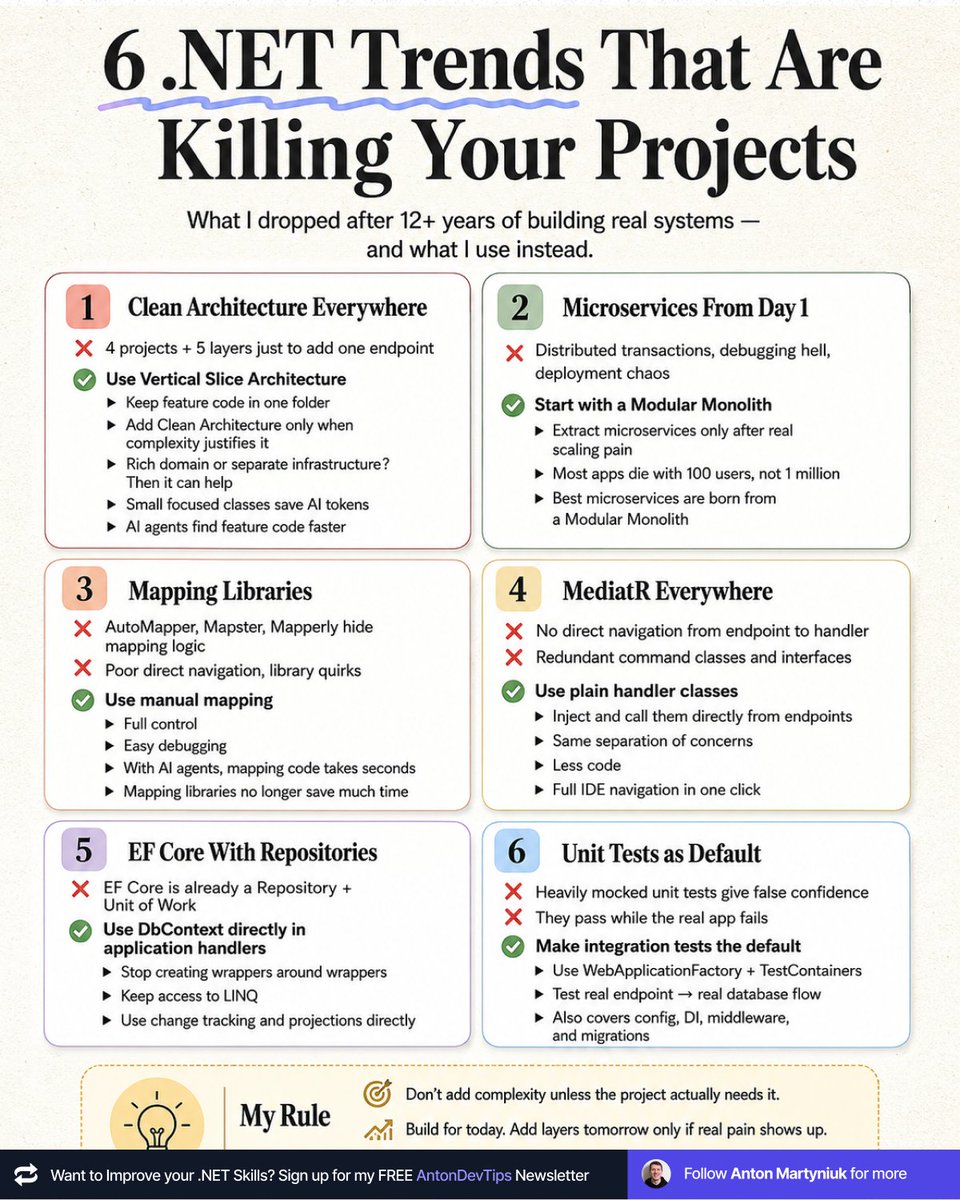
𝟲 .𝗡𝗘𝗧 𝗧𝗿𝗲𝗻𝗱𝘀 𝗧𝗵𝗮𝘁 𝗔𝗿𝗲 𝗞𝗶𝗹𝗹𝗶𝗻𝗴 𝗬𝗼𝘂𝗿 𝗣𝗿𝗼𝗷𝗲𝗰𝘁𝘀
Every .NET tutorial sells these as "best practice."
After 12+ years of building real systems, I dropped all 6.
Here's what I use instead 👉
𝟭. 𝗖𝗹𝗲𝗮𝗻 𝗔𝗿𝗰𝗵𝗶𝘁𝗲𝗰𝘁𝘂𝗿𝗲 𝗘𝘃𝗲𝗿𝘆𝘄𝗵𝗲𝗿𝗲
❌ 4 projects and 5 layers to navigate just to add one endpoint.
✅ Use Vertical Slice Architecture. All feature code lives in one folder.
Add Clean Architecture principles only when complexity justifies it, like rich domain models or separate infrastructure concerns.
↳ Small focused classes save tokens with AI.
↳ AI agents find your feature code much faster when it's all in one place.
𝟮. 𝗠𝗶𝗰𝗿𝗼𝘀𝗲𝗿𝘃𝗶𝗰𝗲𝘀 𝗙𝗿𝗼𝗺 𝗗𝗮𝘆 𝟭
❌ Distributed transactions, debugging hell, deployment chaos.
✅ Start with a Modular Monolith. Extract microservices only when you feel real scaling pain.
Most apps die with 100 users, not at 1 million.
The best microservices are born from a Modular Monolith.
𝟯. 𝗠𝗮𝗽𝗽𝗶𝗻𝗴 𝗟𝗶𝗯𝗿𝗮𝗿𝗶𝗲𝘀
❌ AutoMapper, Mapster and Mapperly hide your mapping logic.
❌ You lose direct navigation and fight library quirks for hours.
✅ Use manual mapping. Full control, direct navigation, easy debugging.
With AI coding agents, mapping code takes seconds to write.
Mapping libraries don't save you any time anymore.
𝟰. 𝗠𝗲𝗱𝗶𝗮𝘁𝗥 𝗘𝘃𝗲𝗿𝘆𝘄𝗵𝗲𝗿𝗲
❌ No direct navigation from endpoint to handler.
❌ Redundant command classes and interfaces just to satisfy the pattern.
✅ Use plain handler classes without interfaces. Inject and call them directly from your endpoints.
Same separation of concerns. Less code. Full IDE navigation in one click.
𝟱. 𝗘𝗙 𝗖𝗼𝗿𝗲 𝗪𝗶𝘁𝗵 𝗥𝗲𝗽𝗼𝘀𝗶𝘁𝗼𝗿𝗶𝗲𝘀
❌ EF Core is already a Repository and a Unit of Work.
✅ Use DbContext directly in your application handlers.
Stop creating wrappers around wrappers.
You only hide the real power of EF Core: LINQ, change tracking, and projections.
𝟲. 𝗨𝗻𝗶𝘁 𝗧𝗲𝘀𝘁𝘀 𝗮𝘀 𝗗𝗲𝗳𝗮𝘂𝗹𝘁
❌ Heavily mocked unit tests give false confidence.
❌ They pass while your real app crashes in production.
✅ Make integration tests your default.
Use WebApplicationFactory + TestContainers to verify the real endpoint → real database flow.
Your config, DI, middleware, and migrations get tested too.
📌 My rule:
Don't add complexity unless the project actually needs it.
Most "best practices" are someone else's solution to someone else's problem.
Build for today.
Add layers tomorrow only if real pain shows up.
Start simple, leaving room for extension in the future.
The last trend I dropped was MediatR.
Which of these trends will you drop first?
——
♻️ Repost to help other .NET devs ditch trends that introduce unnecessary complexity
➕ Follow me ( @AntonMartyniuk ) to improve your .NET and Architecture Skills
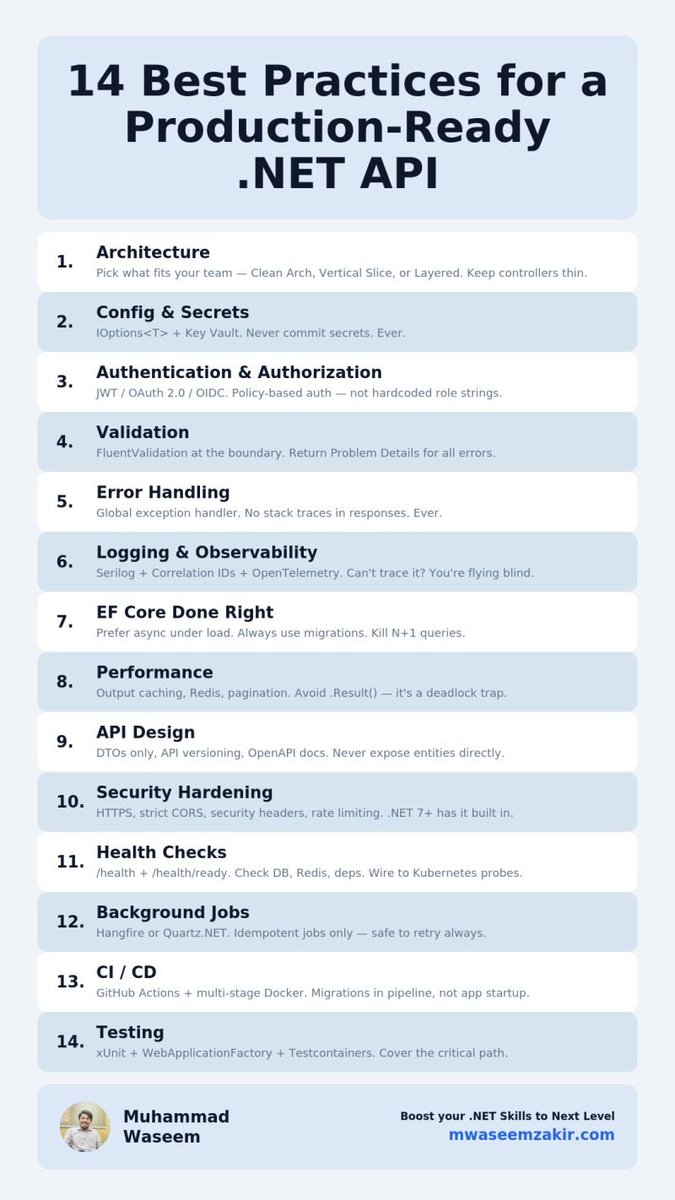
🚀 14 Best Practices for a Production-Ready .NET API
Most .NET APIs work in dev. Few survive production.
Here's what separates them:
𝟭. 𝗔𝗿𝗰𝗵𝗶𝘁𝗲𝗰𝘁𝘂𝗿𝗲 - Pick what fits your team. Clean Architecture, Vertical Slice, or even simple layered. The pattern matters less than the discipline. Just keep controllers thin.
𝟮. 𝗖𝗼𝗻𝗳𝗶𝗴 & 𝗦𝗲𝗰𝗿𝗲𝘁𝘀 - Options pattern + Key Vault. Never commit secrets. Ever.
𝟯. 𝗔𝘂𝘁𝗵 - JWT / OAuth 2.0 / OIDC. Policy-based authorization. Not hardcoded role strings scattered across 30 controllers.
𝟰. 𝗩𝗮𝗹𝗶𝗱𝗮𝘁𝗶𝗼𝗻 - FluentValidation at the boundary. Return Problem Details for all errors.
𝟱. 𝗘𝗿𝗿𝗼𝗿 𝗛𝗮𝗻𝗱𝗹𝗶𝗻𝗴 - Global exception handler. No stack traces in responses. Ever.
𝟲. 𝗟𝗼𝗴𝗴𝗶𝗻𝗴 - Serilog + structured logs + correlation IDs + OpenTelemetry. If you can't trace a request, you're flying blind.
𝟳. 𝗘𝗙 𝗖𝗼𝗿𝗲 - Prefer async methods, especially under load. But don't obsess over it for simple scripts or CLI tools - context matters. Always use migrations. Kill N+1 queries before they kill you.
𝟴. 𝗣𝗲𝗿𝗳𝗼𝗿𝗺𝗮𝗻𝗰𝗲 - Output caching. Pagination on every list endpoint. Redis for hot data. Avoid .Result() and .Wait() - those are deadlock traps waiting to happen.
𝟵. 𝗔𝗣𝗜 𝗗𝗲𝘀𝗶𝗴𝗻 - REST conventions. API versioning. DTOs only (never expose entities). OpenAPI docs.
𝟭𝟬. 𝗦𝗲𝗰𝘂𝗿𝗶𝘁𝘆 - HTTPS only. Security headers. Strict CORS. Rate limiting. .NET 7+ has it built in - no excuse to skip it.
𝟭𝟭. 𝗛𝗲𝗮𝗹𝘁𝗵 𝗖𝗵𝗲𝗰𝗸𝘀 - /health + /health/ready. Check DB, Redis, dependencies. Wire to Kubernetes probes.
𝟭𝟮. 𝗕𝗮𝗰𝗸𝗴𝗿𝗼𝘂𝗻𝗱 𝗝𝗼𝗯𝘀 - Hangfire or Quartz .NET. Idempotent jobs only. Monitor your failed queue.
𝟭𝟯. 𝗖𝗜/𝗖𝗗 - GitHub Actions for automated build, test, and deploy. Multi-stage Docker builds. Migrations in pipeline, not app startup. Release builds only.
𝟭𝟰. 𝗧𝗲𝘀𝘁𝗶𝗻𝗴 - xUnit + WebApplicationFactory + Testcontainers. Cover the critical path. Don't chase 100% coverage.
---
Production readiness isn't a feature you add at the end.
It's a habit you build from day one.
Want more .NET content? I write about it in my newsletter 👉 https://t.co/wsGNeqIUuu
Which ones do you disagree with? 👇
#dotnet #csharp #softwaredevelopment #webapi #backend #softwarearchitecture #programming
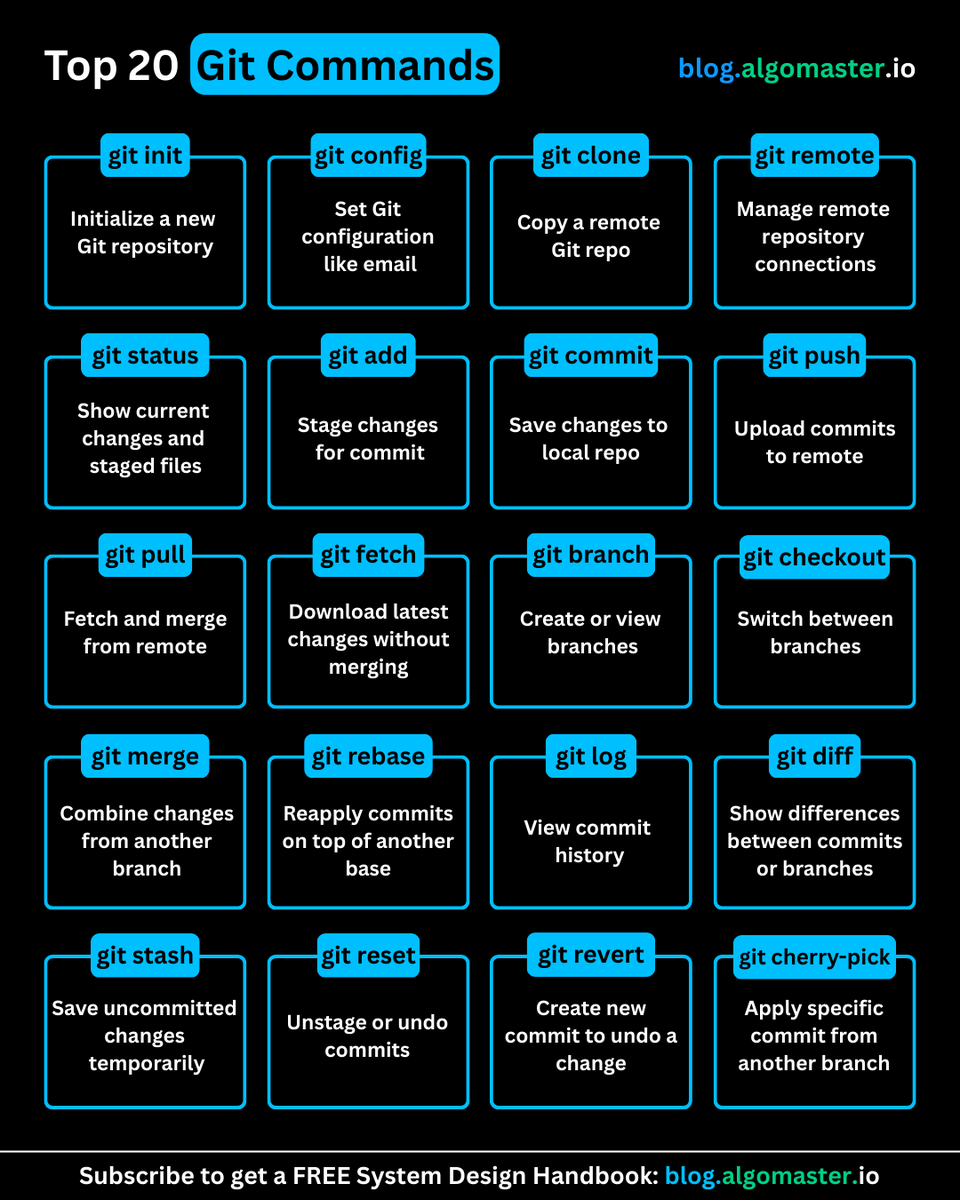
Git is easy (actually) once you learn these 20 commands:
1. 𝐠𝐢𝐭 𝐢𝐧𝐢𝐭: Initializes a new Git repository
- Example: git init my-new-project
2. 𝐠𝐢𝐭 𝐜𝐨𝐧𝐟𝐢𝐠: Set git configuration values like username/email
- Example: git config --global user .name "user123"
3. 𝐠𝐢𝐭 𝐜𝐥𝐨𝐧𝐞: Creates a copy of a remote repository
- Example: git clone remote_url
4. 𝐠𝐢𝐭 𝐫𝐞𝐦𝐨𝐭𝐞: Manages connections to remote repositories
- Example: git remote add origin remote_url
5. 𝐠𝐢𝐭 𝐬𝐭𝐚𝐭𝐮𝐬: Shows the current state of your working directory
- Example: git status
6. 𝐠𝐢𝐭 𝐚𝐝𝐝: Adds files to the staging area
- Example: git add file.js
7. 𝐠𝐢𝐭 𝐜𝐨𝐦𝐦𝐢𝐭: Record changes to local repository
- Example: git commit -m "Fix navigation bug"
8. 𝐠𝐢𝐭 𝐩𝐮𝐬𝐡: Uploads local commits to a remote repository
- Example: git push origin main
9. 𝐠𝐢𝐭 𝐩𝐮𝐥𝐥: Fetches and integrates changes from a remote repository
- Example: git pull origin main
10. 𝐠𝐢𝐭 𝐟𝐞𝐭𝐜𝐡: Downloads latest changes from a remote repository without merging
- Example: git fetch origin
11. 𝐠𝐢𝐭 𝐛𝐫𝐚𝐧𝐜𝐡: Lists, creates, or deletes branches
- Example: git branch feature/login
12. 𝐠𝐢𝐭 𝐜𝐡𝐞𝐜𝐤𝐨𝐮𝐭: Switches branches or restores files
- Example: git checkout feature/login
13. 𝐠𝐢𝐭 𝐦𝐞𝐫𝐠𝐞: Combines changes from different branches
- Example: git merge feature/login
14. 𝐠𝐢𝐭 𝐫𝐞𝐛𝐚𝐬𝐞: Reapplies commits on top of another base
- Example: git rebase main
15. 𝐠𝐢𝐭 𝐥𝐨𝐠: Shows commit history
- Example: git log --oneline --graph
16. 𝐠𝐢𝐭 𝐝𝐢𝐟𝐟: Shows differences between commits, branches, etc.
- Example: git diff HEAD~1 HEAD
17. 𝐠𝐢𝐭 𝐬𝐭𝐚𝐬𝐡: Temporarily stores uncommitted changes
- Example: git stash save "WIP: feature implementation"
18. 𝐠𝐢𝐭 𝐫𝐞𝐬𝐞𝐭: Undoes changes by moving HEAD
- Example: git reset --soft HEAD~1
19. 𝐠𝐢𝐭 𝐫𝐞𝐯𝐞𝐫𝐭: Creates a new commit that undoes a change
- Example: git revert abc123f
20. 𝐠𝐢𝐭 𝐜𝐡𝐞𝐫𝐫𝐲-𝐩𝐢𝐜𝐤: Applies specific commit from another branch
- Example: git cherry-pick abc123f
What other git commands would you add to this list?
♻️ Repost to help others in your network
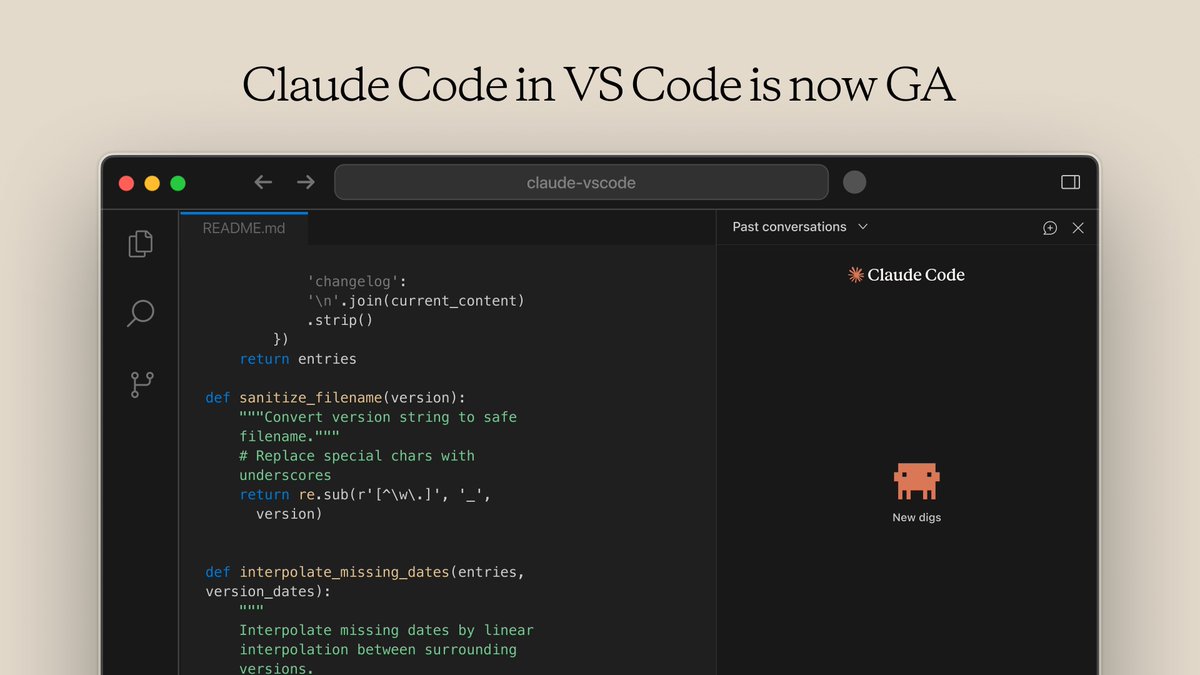
The VS Code extension for Claude Code is now generally available.
It’s now much closer to the CLI experience: @-mention files for context, use familiar slash commands (/model, /mcp, /context), and more.
Download it here: https://t.co/q95Cw4soMk
Scaling databases gets a lot easier once you learn these 10 techniques:
1. 𝐈𝐧𝐝𝐞𝐱𝐢𝐧𝐠
2. 𝐕𝐞𝐫𝐭𝐢𝐜𝐚𝐥 𝐒𝐜𝐚𝐥𝐢𝐧𝐠
3. 𝐂𝐚𝐜𝐡𝐢𝐧𝐠
4. 𝐒𝐡𝐚𝐫𝐝𝐢𝐧𝐠
5. 𝐑𝐞𝐩𝐥𝐢𝐜𝐚𝐭𝐢𝐨𝐧
6. 𝐐𝐮𝐞𝐫𝐲 𝐎𝐩𝐭𝐢𝐦𝐢𝐳𝐚𝐭𝐢𝐨𝐧
7. 𝐂𝐨𝐧𝐧𝐞𝐜𝐭𝐢𝐨𝐧 𝐏𝐨𝐨𝐥𝐢𝐧𝐠
8. 𝐕𝐞𝐫𝐭𝐢𝐜𝐚𝐥 𝐏𝐚𝐫𝐭𝐢𝐭𝐢𝐨𝐧𝐢𝐧𝐠
9. 𝐃𝐞𝐧𝐨𝐫𝐦𝐚𝐥𝐢𝐳𝐚𝐭𝐢𝐨𝐧
10. 𝐌𝐚𝐭𝐞𝐫𝐢𝐚𝐥𝐢𝐳𝐞𝐝 𝐕𝐢𝐞𝐰𝐬
What other database scaling technique are you familiar with?
♻️ Repost to help other engineers learn this.
¡Trucazo con GitHub! Añade un 0 a la URL de una Pull Request para que una IA te ayuda a revisar y entender los cambios que quieren fusionar. Sin coste. Te lo explico ↓
La mítica base de datos MySQL se está apagando…
Lleva más de 4 meses sin recibir ni un solo commit en su repositorio público de GitHub. Mala señal.
La pausa coincide con los despidos de septiembre en Oracle dentro del equipo.
No significa que vaya a desaparecer. Está en millones de servidores y seguirá funcionando durante años.
Pero sí es una señal clara de algo más profundo:
MySQL ya no compite como comunidad open source, sino como producto puramente comercial.
Menos transparente, con otras prioridades.
El sorpasso de PostgreSQL ya es inevitable.
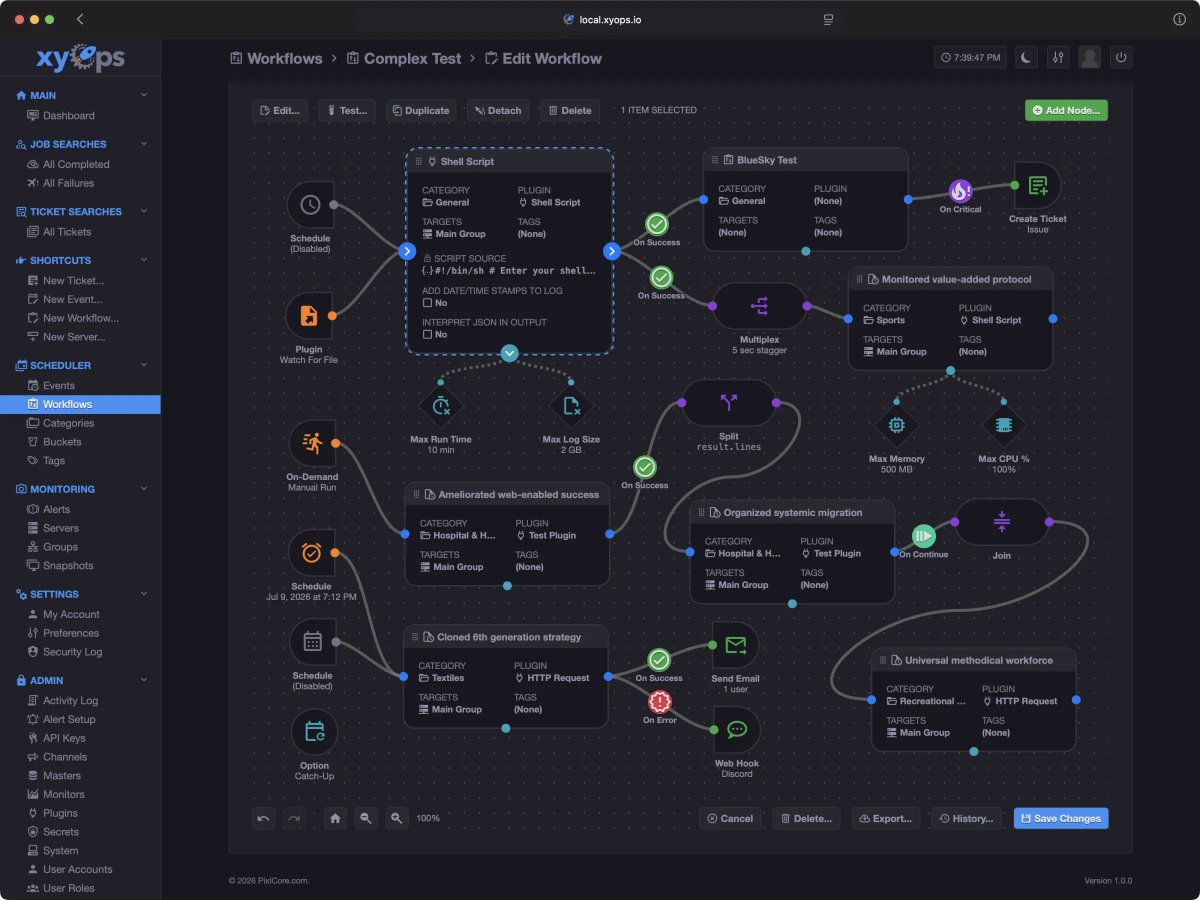
🛠️xyOps™ es un sistema de última generación para la programación de tareas, la automatización de flujos de trabajo, la supervisión de servidores, las alertas y la respuesta a incidentes
Diseñado para desarrolladores y equipos de operaciones que desean controlar su pila de automatización sin renunciar a los datos
https://t.co/DuOmPRI2we
#dotNETConf session replay... What's New in ASP .NET Core
In this session, we explore the latest enhancements coming to #ASPNET Core in .NET 10--covering new features for building modern web applications and APIs. Drop in to see how it continues to be the best framework for building cloud-native web applications with .NET. 🎥 https://t.co/bRtRVKJC9w