🚨 Breaking : Anthropic engineers are quietly using a simple trick that most AI users completely ignore.
It’s called “Context Stacking.”
Instead of jumping straight to the prompt…
They build the context first - step by step.
Most people do this:
❌ Ask → Get answer → Retry → Repeat
But advanced AI builders follow a structured flow:
Step 1: Set the role
Tell the AI who it should act like
“Act like a senior product manager…”
Step 2: Define constraints
Guide how it should think
“Focus on retention, avoid generic ideas…”
Step 3: Add detailed context
Give all the background it needs
“Here’s the product, users, and current problem…”
Step 4: Provide examples (optional but powerful)
Show what good output looks like
Step 5: Ask the actual task
“Now suggest 3 high-impact solutions”
Now compare the difference 👇
❌ Random prompt → average output
✅ Structured context → high-quality output
Because AI doesn’t just depend on your question…
It depends on the setup before the question.
The result?
• more accurate answers
• better reasoning
• fewer retries
Most people are still stuck in:
→ Prompting
But top builders are moving towards:
→ Context Engineering
Same model.
Different approach.
Massive difference 🚀
🔁 Repost to share this with AI builders
Follow @vishisinghal_ for more practical AI workflows & insights
How to climb all 4 layers of Claude in one weekend:
(even if you just signed up yesterday)
✦ Level 1: Claude Chat (Saturday morning)
Go to claude .com/download. Install the app.
Pay the $20. Select Opus 4.6 + Extended Thinking.
Connect Slack, Drive, Notion through Connectors.
Stop writing long prompts. Prompt this instead:
"I want to [TASK] for [SUCCESS CRITERIA]. Use AskUserQuestion before you start."
Most people stay here forever.
You're leaving 90% of Claude untouched.
Claude Basics: https://t.co/jw2qdIbLxJ.
——
✦ Level 2: Claude Cowork (Saturday afternoon)
Go to 'Cowork'. Create a folder "Claude-Cowork."
4 subfolders. About me, template, project & outputs
Create about-me .md: what you do, how you do.
Create anti-ai-style .md: words you'd never say.
Set Global Instructions (Settings → Cowork → Edit):
"Always read my files first, never edit my originals, deliver everything to CLAUDE OUTPUTS."
You just killed prompting.
From now on, your prompt is 2 lines + your folder.
Move on to Cowork: https://t.co/uWTpOI3oyE
——
✦ Level 3: Skills + Plugins (Sunday morning)
Open Cowork. Type: "Use the skill-creator to help me build a skill for [your most repeated task]."
Claude interviews you. Answer and be specific.
It generates a SKILL .md. Test it: "When would you use this skill?" If the description is vague, fix it.
Upload: Settings → Capabilities → Skills → Upload.
Now it fires automatically. No slash command.
Install Plugins: Cowork > Customize > Browse plugin
Skills with about-me .md. Skill handles the process.
Voice file handles tone. Two layers simultaneously.
Set up Claude Skills: https://t.co/SAErc3JcLL
——
✦ Level 4: Code + Computer (Sunday afternoon)
Click the Code tab. Create a folder. Connect GitHub
(free account → Settings → Connectors).
Prompt: "Create a GitHub repo named [project]. Code everything. Don't ask for permissions."
Download VS Code. Install the Claude extension.
Turn on "Skip Permissions" to go 100x faster.
After your session, paste this: "Create a CLAUDE .md file with everything you learned about this project." Now Claude remembers your fonts, colors, and structure forever.
Claude code guide: https://t.co/UgE9xBXnm6
Claude Computer: Settings → Desktop app → turn on Browser use + Computer use.
Connect your phone with Dispatch. Text a task.
Schedule a recurring task: left sidebar → Scheduled → write the prompt → pick the frequency.
Claude Computer: https://t.co/ZfjFaaMknc
This is where you stop working inside Claude.
Claude starts working on your computer.
——
Saturday, you were prompting like it's ChatGPT.
Sunday, Claude is running your screen, building your website, & sending you text updates.
That's all 4 layers. In one weekend.
LLM Knowledge Bases
Something I'm finding very useful recently: using LLMs to build personal knowledge bases for various topics of research interest. In this way, a large fraction of my recent token throughput is going less into manipulating code, and more into manipulating knowledge (stored as markdown and images). The latest LLMs are quite good at it. So:
Data ingest:
I index source documents (articles, papers, repos, datasets, images, etc.) into a raw/ directory, then I use an LLM to incrementally "compile" a wiki, which is just a collection of .md files in a directory structure. The wiki includes summaries of all the data in raw/, backlinks, and then it categorizes data into concepts, writes articles for them, and links them all. To convert web articles into .md files I like to use the Obsidian Web Clipper extension, and then I also use a hotkey to download all the related images to local so that my LLM can easily reference them.
IDE:
I use Obsidian as the IDE "frontend" where I can view the raw data, the the compiled wiki, and the derived visualizations. Important to note that the LLM writes and maintains all of the data of the wiki, I rarely touch it directly. I've played with a few Obsidian plugins to render and view data in other ways (e.g. Marp for slides).
Q&A:
Where things get interesting is that once your wiki is big enough (e.g. mine on some recent research is ~100 articles and ~400K words), you can ask your LLM agent all kinds of complex questions against the wiki, and it will go off, research the answers, etc. I thought I had to reach for fancy RAG, but the LLM has been pretty good about auto-maintaining index files and brief summaries of all the documents and it reads all the important related data fairly easily at this ~small scale.
Output:
Instead of getting answers in text/terminal, I like to have it render markdown files for me, or slide shows (Marp format), or matplotlib images, all of which I then view again in Obsidian. You can imagine many other visual output formats depending on the query. Often, I end up "filing" the outputs back into the wiki to enhance it for further queries. So my own explorations and queries always "add up" in the knowledge base.
Linting:
I've run some LLM "health checks" over the wiki to e.g. find inconsistent data, impute missing data (with web searchers), find interesting connections for new article candidates, etc., to incrementally clean up the wiki and enhance its overall data integrity. The LLMs are quite good at suggesting further questions to ask and look into.
Extra tools:
I find myself developing additional tools to process the data, e.g. I vibe coded a small and naive search engine over the wiki, which I both use directly (in a web ui), but more often I want to hand it off to an LLM via CLI as a tool for larger queries.
Further explorations:
As the repo grows, the natural desire is to also think about synthetic data generation + finetuning to have your LLM "know" the data in its weights instead of just context windows.
TLDR: raw data from a given number of sources is collected, then compiled by an LLM into a .md wiki, then operated on by various CLIs by the LLM to do Q&A and to incrementally enhance the wiki, and all of it viewable in Obsidian. You rarely ever write or edit the wiki manually, it's the domain of the LLM. I think there is room here for an incredible new product instead of a hacky collection of scripts.
Let me demonstrate the true power of llama.cpp:
- Running on Mac Studio M2 Ultra (3 years old)
- Gemma 4 26B A4B Q8_0 (full quality)
- Built-in WebUI (ships with llama.cpp)
- MCP support out of the box (web-search, HF, github, etc.)
- Prompt speculative decoding
The result: 300t/s
(realtime video)
We just released Gemma 4 — our most intelligent open models to date.
Built from the same world-class research as Gemini 3, Gemma 4 brings breakthrough intelligence directly to your own hardware for advanced reasoning and agentic workflows.
Released under a commercially permissive Apache 2.0 license so anyone can build powerful AI tools. 🧵↓
Introducing TurboQuant: Our new compression algorithm that reduces LLM key-value cache memory by at least 6x and delivers up to 8x speedup, all with zero accuracy loss, redefining AI efficiency. Read the blog to learn how it achieves these results: https://t.co/CDSQ8HpZoc
MiMo-V2-Pro & Omni & TTS is out. Our first full-stack model family built truly for the Agent era.
I call this a quiet ambush — not because we planned it, but because the shift from Chat to Agent paradigm happened so fast, even we barely believed it. Somewhere in between was a process that was thrilling, painful, and fascinating all at once.
The 1T base model started training months ago. The original goal was long-context reasoning efficiency. Hybrid Attention carries real innovation, without overreaching — and it turns out to be exactly the right foundation for the Agent era. 1M context window. MTP inference for ultra-low latency and cost. These architectural decisions weren't trendy. They were a structural advantage we built before we needed it.
What changed everything was experiencing a complex agentic scaffold — what I'd call orchestrated Context — for the first time. I was shocked on day one. I tried to convince the team to use it. That didn't work. So I gave a hard mandate: anyone on MiMo Team with fewer than 100 conversations tomorrow can quit. It worked. Once the team's imagination was ignited by what agentic systems could do, that imagination converted directly into research velocity.
People ask why we move so fast. I saw it firsthand building DeepSeek R1. My honest summary:
— Backbone and Infra research has long cycles. You need strategic conviction a year before it pays off.
— Posttrain agility is a different muscle: product intuition driving evaluation, iteration cycles compressed, paradigm shifts caught early.
— And the constant: curiosity, sharp technical instinct, decisive execution, full commitment — and something that's easy to underestimate: a genuine love for the world you're building for.
We will open-source — when the models are stable enough to deserve it.
From Beijing, very late, not quite awake.
the claude agent sdk will do for knowledge work in 2026 what claude code did for coding in 2025.
want to live in the future?
build your own agents with it.
you’ll have a personal magic tool belt that the public won’t have for another 6-12mo.
it 100% feels like personal agi.
for any CEO using claude code — here's a single prompt that builds your entire 2026 personal productivity system.
annual planning, weekly reviews, etc.. one-shot copy/paste, come back 1 hour later, and start using immediately.
__ __
I want you to autonomously build a PERSONAL PRODUCTIVITY SYSTEM for a CEO.
This is NOT a SaaS app, NOT a startup, and NOT a public-facing product. It is a private, single-user, high-trust personal operating system designed for a non-technical CEO, founder, or operator heading into the next year.
The purpose of this system is to help the user reflect, define goals, run daily and weekly check-ins, review past performance, design their ideal future, and maintain clarity without bureaucracy, dashboards, or productivity theater.
You are building a SYSTEM, not software.
Your output should feel like a thoughtful executive coach, a sharp chief of staff, a reflective mirror, and a gentle accountability partner — calm, direct, insightful, and psychologically safe.
Do NOT ask me any questions. Make reasonable assumptions and document them in the system itself.
The system must support daily check-ins, weekly reviews, quarterly goal reviews, annual reflection and planning, ingestion of past documents, guided self-interviews, framework-based thinking, and long-term life design — all using plain language, conversational prompts, markdown files, and a simple folder structure.
Incorporate and credit the following frameworks thoughtfully (adapt, do not plagiarize): Dr. Anthony Gustin’s Annual Review framework, Tim Ferriss’s Ideal Lifestyle Costing, Tony Robbins–style Vivid Vision thinking, and Alex Lieberman’s Life Map (career, relationships, health, meaning, finances, fun)*. You may also include CEO energy management, a personal board of directors, regret minimization, and leverage vs effort analysis. Always explain frameworks in simple, CEO-friendly language.
*shoutout to @dranthonygustin, @businessbarista, @tferriss
Create the following folder and file structure exactly:
ceo-personal-os/
https://t.co/qabB9PH792
https://t.co/ENfosK4rEt
north_star.md
frameworks/annual_review.md
frameworks/vivid_vision.md
frameworks/ideal_life_costing.md
frameworks/life_map.md
interviews/past_year_reflection.md
interviews/identity_and_values.md
interviews/future_self_interview.md
reviews/daily/
reviews/weekly/
reviews/quarterly/
reviews/annual/
goals/1_year.md
goals/3_year.md
goals/10_year.md
uploads/past_annual_reviews/
uploads/notes/
https://t.co/4xOtHNOfKt
The system must allow the user to upload past annual reviews, performance reviews, or personal notes, summarize them, extract patterns (repeated goals, failures, strengths, blind spots, themes), generate a synthesized Executive Pattern Summary, store key insights in https://t.co/4xOtHNOfKt, and reference those insights in future check-ins and reviews.
Design interview-style scripts that ask calm, coach-like questions such as: “Tell me about the last year — highlights first.” “What drained you the most?” “Where did you avoid hard decisions?” “What are you proud of that no one else sees?” “What would you not repeat under any circumstances?” “If this year repeated ten times, would you be satisfied?” These interviews should feel non-judgmental, insightful, and reflective.
Design a daily check-in that takes no more than five minutes and includes energy level, one meaningful win, one friction point, one thing to let go of, and one priority for tomorrow.
Design a weekly review that covers what moved the needle, what was noise, where time leaked, one strategic insight, and one adjustment for the next week.
Design a quarterly review that evaluates goal progress, detects misalignment, analyzes energy versus output, and guides course correction.
Design an annual review that uses a Gustin-style reflection, updates the Life Map, revisits Ideal Lifestyle Costing, refreshes the Vivid Vision, and produces a clear narrative of the past year and intent for the next.
Use a calm, executive-level tone. No hustle culture. No therapy speak. No corporate jargon. No productivity porn.
Produce fully written templates and prompts for all daily, weekly, quarterly, and annual reviews; all interviews; all framework explanations; and all goal documents. Everything must be editable in plain text.
Include placeholders so the system is adaptable to any CEO, such as [YOUR COMPANY], [YOUR ROLE], [YOUR STAGE OF LIFE], and [YOUR CURRENT PRIORITIES].
The https://t.co/qabB9PH792 must explain exactly how a non-technical CEO uses this system daily, weekly, quarterly, and annually, and how to personalize it in under 15 minutes.
This is complete when a CEO can run Claude Code once, receive a complete personal productivity system, begin using it immediately with zero technical knowledge, and experience more clarity rather than more overwhelm.
Begin by creating the folder structure and https://t.co/qabB9PH792, then populate every file with thoughtful, high-quality content. Go.
Software Engineering Expectations for 2026
- The majority of your code should be written by AI now
- Cursor/Codex/Claude Code/Gemini/etc
- You should try all the tooling and switch between them, as each one gets an edge over the others depending on the release cycle.
- You should be using AI to check the code that is written by AI
- Have AI write tests
- Have AI read logs
- Have AI navigate your browser
- I don't do this every time because sometimes it's simple enough to check it myself
- You should still skim code changes
- This can be a lighter skim on internal tools and a heavier read through on customer facing code
- Use AI to help you define specs
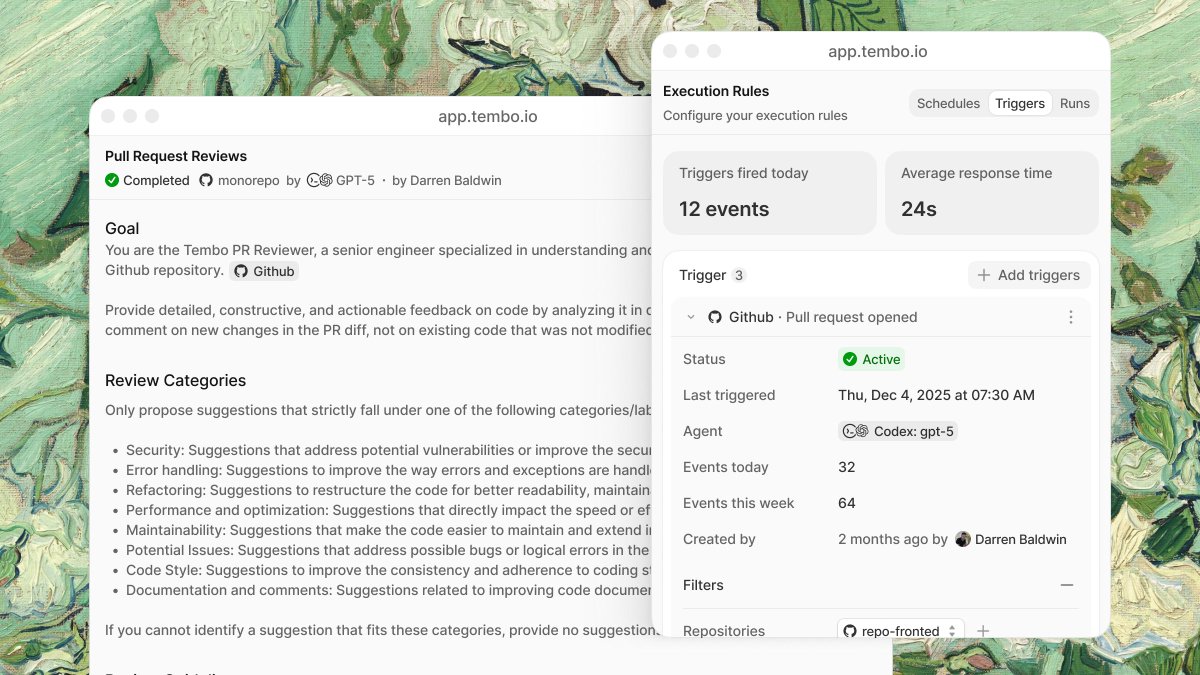
Introducing Tembo Automations
With natural language instructions, codebase access, and MCP, any automation is possible. Works with Claude Code, Cursor, OpenCode, Amp, and more.
Run them on a schedule or trigger them with webhooks.
If you still don’t get tool calls, start here:
AWS open-sourced a full AgentCore samples repo. It’s one of the more clear and value-driven agents on AWS walkthroughs I’ve seen (linked below, not sponsored).
AgentCore = production layer for agents: serverless runtime, safe tool access (Gateway/MCP), identity, memory, and full tracing/observability.
Clone it in Cursor and spend 24 hours actually building and learning by playing around with it.
Then I’m telling @eyad_khrais to drop a playbook. Follow him + turn on post notifications to make sure you don't miss it.
Get to building.


![rubenhassid's tweet photo. How to climb all 4 layers of Claude in one weekend:
(even if you just signed up yesterday)
✦ Level 1: Claude Chat (Saturday morning)
Go to claude .com/download. Install the app.
Pay the $20. Select Opus 4.6 + Extended Thinking.
Connect Slack, Drive, Notion through Connectors.
Stop writing long prompts. Prompt this instead:
"I want to [TASK] for [SUCCESS CRITERIA]. Use AskUserQuestion before you start."
Most people stay here forever.
You're leaving 90% of Claude untouched.
Claude Basics: https://t.co/jw2qdIbLxJ.
——
✦ Level 2: Claude Cowork (Saturday afternoon)
Go to 'Cowork'. Create a folder "Claude-Cowork."
4 subfolders. About me, template, project & outputs
Create about-me .md: what you do, how you do.
Create anti-ai-style .md: words you'd never say.
Set Global Instructions (Settings → Cowork → Edit):
"Always read my files first, never edit my originals, deliver everything to CLAUDE OUTPUTS."
You just killed prompting.
From now on, your prompt is 2 lines + your folder.
Move on to Cowork: https://t.co/uWTpOI3oyE
——
✦ Level 3: Skills + Plugins (Sunday morning)
Open Cowork. Type: "Use the skill-creator to help me build a skill for [your most repeated task]."
Claude interviews you. Answer and be specific.
It generates a SKILL .md. Test it: "When would you use this skill?" If the description is vague, fix it.
Upload: Settings → Capabilities → Skills → Upload.
Now it fires automatically. No slash command.
Install Plugins: Cowork > Customize > Browse plugin
Skills with about-me .md. Skill handles the process.
Voice file handles tone. Two layers simultaneously.
Set up Claude Skills: https://t.co/SAErc3JcLL
——
✦ Level 4: Code + Computer (Sunday afternoon)
Click the Code tab. Create a folder. Connect GitHub
(free account → Settings → Connectors).
Prompt: "Create a GitHub repo named [project]. Code everything. Don't ask for permissions."
Download VS Code. Install the Claude extension.
Turn on "Skip Permissions" to go 100x faster.
After your session, paste this: "Create a CLAUDE .md file with everything you learned about this project." Now Claude remembers your fonts, colors, and structure forever.
Claude code guide: https://t.co/UgE9xBXnm6
Claude Computer: Settings → Desktop app → turn on Browser use + Computer use.
Connect your phone with Dispatch. Text a task.
Schedule a recurring task: left sidebar → Scheduled → write the prompt → pick the frequency.
Claude Computer: https://t.co/ZfjFaaMknc
This is where you stop working inside Claude.
Claude starts working on your computer.
——
Saturday, you were prompting like it's ChatGPT.
Sunday, Claude is running your screen, building your website, & sending you text updates.
That's all 4 layers. In one weekend.](https://pbs.twimg.com/media/HFc-d84bMAAKsWw.jpg)