An epic weekend & a proud moment for my #cybersecurity advance research #CAP Cybersecurity Assurance & Policy Center at @MorganStateU. Under the advisement of our Professor Kevin T. Kornegay, Ph.D. four young researchers graduated with Ph.D. in #engineering with #CyberSecurity.
The last 32 for the 2026 World Cup...
🇿🇦🇨🇦 South Africa vs. Canada
🇧🇷🇯🇵 Brazil vs. Japan
🇩🇪🇵🇾 Germany vs. Paraguay
🇳🇱🇲🇦 Netherlands vs. Morocco
🇨🇮🇳🇴 Ivory Coast vs. Norway
🇫🇷🇸🇪 France vs. Sweden
🇲🇽🇪🇨 Mexico vs. Ecuador
🏴🇨🇩 England vs. DR Congo
🇧🇪🇸🇳 Belgium vs. Senegal
🇺🇸🇧🇦 USA vs. Bosnia and Herzegovina
🇪🇸🇦🇹 Spain vs. Austria
🇵🇹🇭🇷 Portugal vs. Croatia
🇨🇭🇩🇿 Switzerland vs. Algeria
🇦🇺🇪🇬 Australia vs. Egypt
🇦🇷🇨🇻 Argentina vs. Cape Verde
🇨🇴🇬🇭 Colombia vs. Ghana
Reply with your picks for the last 16... ⤵️
Become a Claude Certified Architect
Here are all the required resource in one place: (save it)
Training courses: https://t.co/kBXCuOrprM (13 free courses)
Cookbook: https://t.co/SLnSUT703t
Exam Guide: https://t.co/A2pbDcy8GC
Practice questions: https://t.co/90eXwUwL8i (free)
MCP documentation: https://t.co/SbwZI0eM61 (free)
API documentation: https://t.co/9rmnLWxRHE (free)
Partner Network: https://t.co/diT5OE5H0b (free to join)
Link to join: https://t.co/OXQyTmf4wD
Personal Playbook someone created after the exam: https://t.co/qhXan3XnBK
Sunday Afternoon 10 Mile. Peachtree 10K race train day 9/
You want out to drop 10K. Late Spring Texas Weather is so breezy and beautiful you end up clocking 10 Miles instead…
💪🏾💪🏾💪🏾 #peachtreeroadrace#atlantatrackclub
A Chinese engineering student spent $4,000 on two Mac Studios and a Mac Mini. Put them on his desk. Labeled each one with a sticky note: UI/UX. DEV. ADMIN. Connected two monitors. Satellite maps on both screens.
His parents thought he was building a startup. His professors thought it was a thesis project. His roommate thought it was overkill for homework. He let all of them keep thinking that.
Then someone noticed what the three boxes were actually connected to.
A wallet. Making $104K. Betting on the temperature.
ColdMath. $104,642 profit. 5,470 predictions. Joined November 2025. Bio: Edge Compounds.
→ https://t.co/iJLnXKdlnh
Two Mac Studios and a Mac Mini doing one thing. Claude pulls live pilot weather data. METAR. TAF. Real sensors from real stations. Updated every 1-3 hours worldwide. Temperature accurate to a tenth of a degree. The DEV box compares it to prediction market prices. When they don't match the UI/UX screen flashes. The ADMIN box logs the trade.
Flash. Trade. Green.
$25 on Tokyo hitting 16C on March 20. Payout: $12,452. $24 on Chicago reaching 54F on March 11. Payout: $12,398.
Eleven dollar bets returning five thousand. On the temperature in a city most people can't find on a map.
A friend who flies commercial told him pilots get atmospheric data hours before any public forecast. This data is free. Aviation safety requires it. Nobody outside of aviation even looks at it.
He looked. Pointed Claude at the feeds. Said: find me every city where the real temperature doesn't match the price.
Claude found dozens. Every single day. Tokyo. Chicago. Wellington. Atlanta. Ankara. Lucknow. Cities on six continents. All with weather stations publishing data that nobody in the markets is reading.
The three boxes run 24/7. Even when he's in class. Even when he's asleep. The satellite maps keep updating. The DEV box keeps comparing. The screen keeps flashing.
His roommate finally asked what the setup actually does. The student showed him the balance. The roommate didn't say anything. Just asked for a third monitor.
34K people watching. $94K still loaded in active positions. Two Mac Studios. One Mac Mini. Two screens. One quiet kid who realized the most predictable thing on Earth is the thing everyone ignores.
The weather.
You can now enable Claude to use your computer to complete tasks.
It opens your apps, navigates your browser, fills in spreadsheets—anything you'd do sitting at your desk.
Research preview in Claude Cowork and Claude Code, macOS only.
Most developers are using Claude Code wrong.
They install it…
run a few prompts…
and treat it like a terminal chatbot.
That’s why the results feel average.
Claude Code is actually a 4-layer system 👇
1️⃣ CLAUDE.md
Your project’s persistent memory.
It defines:
• what the system does
• how the repo is structured
• rules Claude should follow
Think of it as the brain of the project.
2️⃣ Skills
Reusable knowledge packs Claude automatically invokes.
Examples:
• code review rules
• refactor playbooks
• debugging workflows
• release procedures
Skills make Claude behave like a specialized engineer, not a generic model.
3️⃣ Hooks
Deterministic safety gates.
Important detail:
Rules in CLAUDE.md → followed ~70% of the time
Hooks → enforced 100% of the time
Use hooks for:
• running tests
• formatting code
• blocking risky directories
4️⃣ Agents
Sub-agents with their own context windows.
This lets Claude handle complex multi-step work without losing context.
Most engineers miss the setup that makes all of this work.
The difference between average and exceptional results is the initial configuration:
• run /init on day one to generate CLAUDE.md
• structure the .claude/ folder (skills, hooks, permissions)
• write skill descriptions that actually trigger correctly
• use memory hierarchy (global → project → subfolder)
• enforce rules with hooks instead of relying on prompts
When this is configured properly, the workflow becomes:
Plan Mode → Auto-Accept → Iterate → Commit.
If you're using Claude Code without CLAUDE.md + Skills + Hooks, you're probably using 20% of what it can actually do.
#ClaudeCode #AIAgents #AIEngineering #GenAI #DeveloperTools
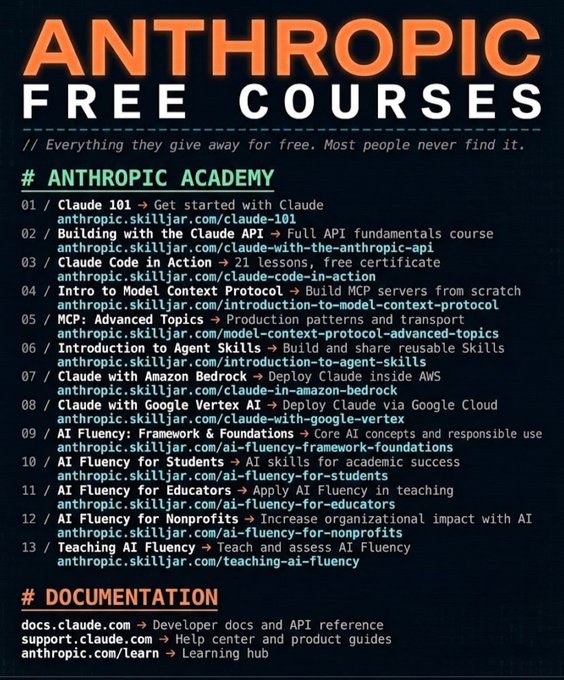
I spent 101+ hours digging through official Anthropic resources, documentation, hidden course pages, and deployment guides...
And organized everything into one structured document.
Inside:
• 13 Free Claude courses (with certificates)
• Full API fundamentals
• MCP (Model Context Protocol) deep dives
• Agent skills breakdown
• AWS + Vertex deployment guides
• Complete AI Fluency track
• Direct documentation links
No random bookmarks.
No messy threads.
No “Google and figure it out.”
Just a clean, step-by-step learning stack.
Most people will never put this together.
I’m giving it away for free.
How to get it:
1️⃣ Follow me (so I can DM you)
2️⃣ Like + Repost
3️⃣ Comment “DOC”
I’ll send the full curated file directly.
🚨 BREAKING: A developer on GitHub just built a tool that turns any GitHub repo into an interactive knowledge graph and open sourced it for free.
It's called GitNexus. Think of it as a visual X-ray of your codebase but with an AI agent you can actually talk to.
No server. No subscription. No enterprise sales call.
Here's what it does inside your browser:
→ Parses your entire GitHub repo or ZIP file in seconds
→ Builds a live interactive knowledge graph with D3.js
→ Maps every function, class, import, and call relationship
→ Runs a 4-pass AST pipeline: structure → parsing → imports → call graph
→ Stores everything in an embedded KuzuDB graph database
→ Lets you query your codebase in plain English with an AI agent
Here's the wildest part:
It uses Web Workers to parallelize parsing across threads so a massive monorepo doesn't freeze your tab.
The Graph RAG agent traverses real graph relationships using Cypher queries not embeddings, not vector search. Actual graph logic.
Ask it things like "What functions call this module?" or "Find all classes that inherit from X" and it traces the answer through the graph.
This is the kind of code intelligence tool enterprise teams pay thousands per month for.
It runs entirely in your browser.
Works with TypeScript, JavaScript, and Python.
100% Open Source. MIT License.
Repo: https://t.co/RzIoLR2vAe