After my time with 100 Thieves came to an end, I took a couple of months off to reset and figure out what I want for the next chapter of my career.
I learned a lot during my time there, both in and out of the server, and I’m very thankful to everyone behind the team who gave me the opportunity and supported me along the way.
I’ve been a free agent for a while now, and I’m looking forward to finding a new project from here on out and getting back to competing.
For business inquiries, please contact my agent: [email protected]
RTs appreciated. ❤️
AM5 users: set Core Tuning Config to Level 2.
❌ Legacy = outdated launch behavior
❌ Level 1 = only looks good in fake benchmarks
✅ Level 2 = real-world gaming sweet spot
Kills micro stutters, boosts 1% lows, AMD's stable default.
Set it and forget it.
discord down below⬇️
The 3 things I changed:
• Unplugged my 60Hz second monitor (my main is 240Hz).
• Changed m_pitch to 0.0165 because CS2 always felt different from CS:GO.
• Switched NVIDIA scaling from GPU to Display after seeing donk tell NertZ to do it.
Could all of this be placebo? Maybe.
Windows 11'de gizlenen yeni özellik keşfedildi: İşlemci performansını artırıyor!
Varsayılan olarak gizlenen "Processor Performance Boost Mode" ayarı, kayıt defterinde yapılacak küçük bir değişiklikle aktif hale getirilebiliyor.
👉 Özelliği etkinleştirmek için Windows Kayıt Defteri Düzenleyicisi'nde aşağıdaki konuma gidilmesi gerekiyor:
HKEY_LOCAL_MACHINE\SYSTEM\CurrentControlSet\Control\Power\PowerSettings\
54533251-82be-4824-96c1-47b60b740d00\
be337238-0d82-4146-a960-4f3749d470c7
👉 Buradaki Attributes değerinin 1 yerine 2 olarak değiştirilmesiyle birlikte, Güç Seçenekleri içerisindeki İşlemci Güç Yönetimi bölümünde yeni seçenekler görünmeye başlıyor.
👉 Normalde yalnızca "Minimum İşlemci Durumu" ve "Maksimum İşlemci Durumu" ayarlarını sunan Windows, bu değişiklik sonrasında farklı işlemci hızlandırma profillerini de kullanıcıya açıyor.
CS2 Workshop Showcase #1 (aim_treeni_fps)
In my opinion one of the most underrated warmup/prac maps in all of Counter-Strike 2
- Linear and round area targets, up to 20 at once
- Bots with various settings
- KPM and accuracy stats
- Target tracking
- Dark/light mode, with customizable target and wall colors
- Adjustable target size, duration, spawn time, and health
- Custom target hit sounds
- Moving target settings
- Training modes: intense, cross, and tracking
- All custom knives
It’s the fps version of aim_treeni, so it runs lighter while keeping all the actually useful features (up to 30% better fps)
An absolutely great map for quick warmups or extensive practice.
How to Apply Custom CS2 Game Settings + Nvidia Optimization Profile for Better Performance on Windows 10/11
(Increased FPS + Lower Mouse/System Latency)
Download Link Below📷
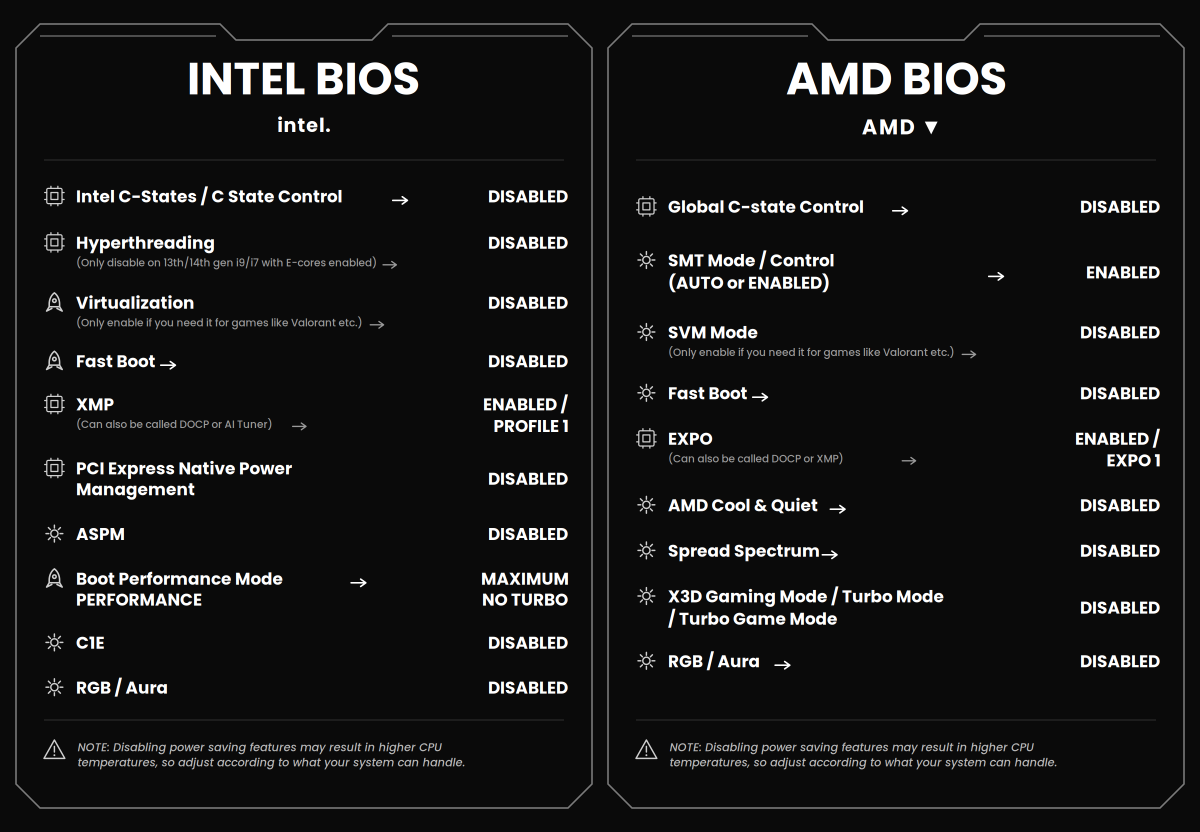
BIOS cheat sheet for max performance 🔥
Intel + AMD every setting you actually need.
Save this before you forget.
📩DM me or Join my Discord for the best PC optimization
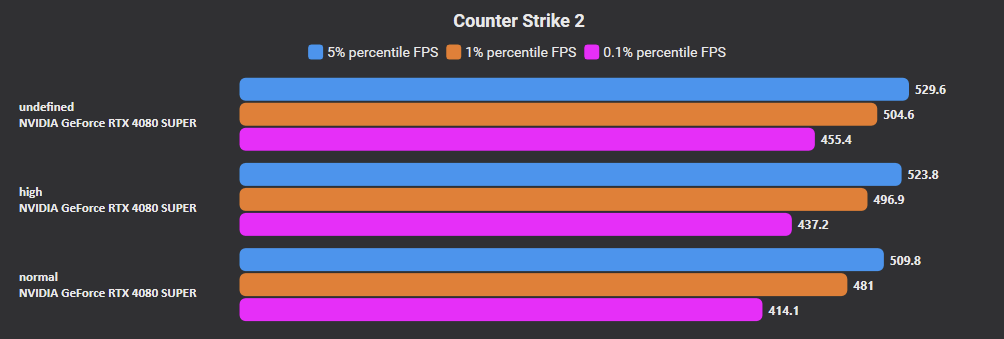
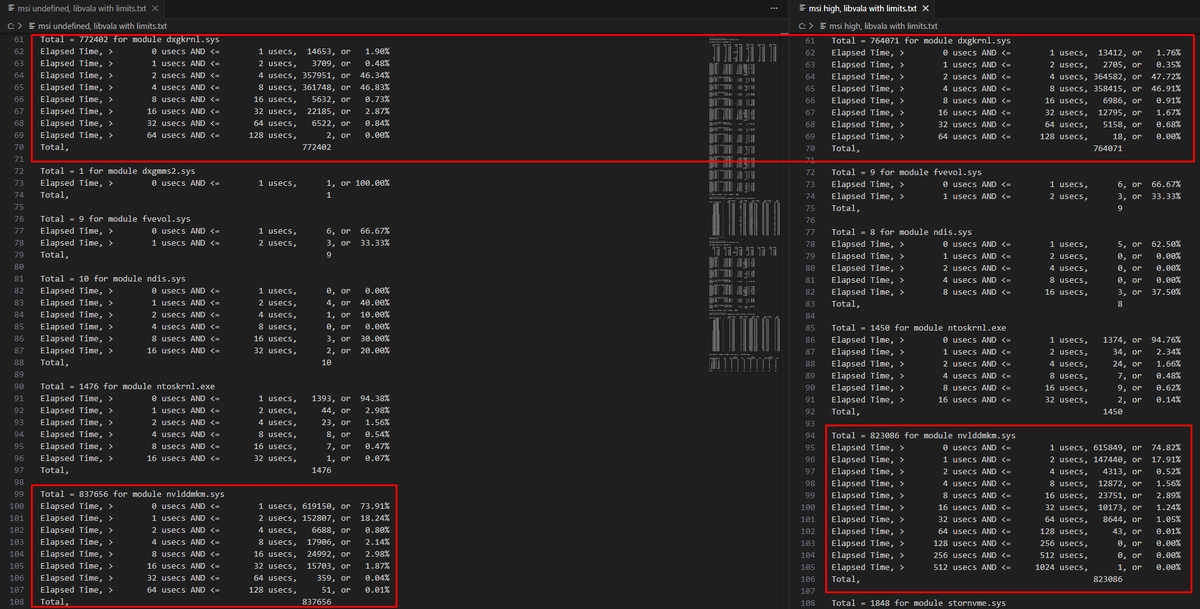
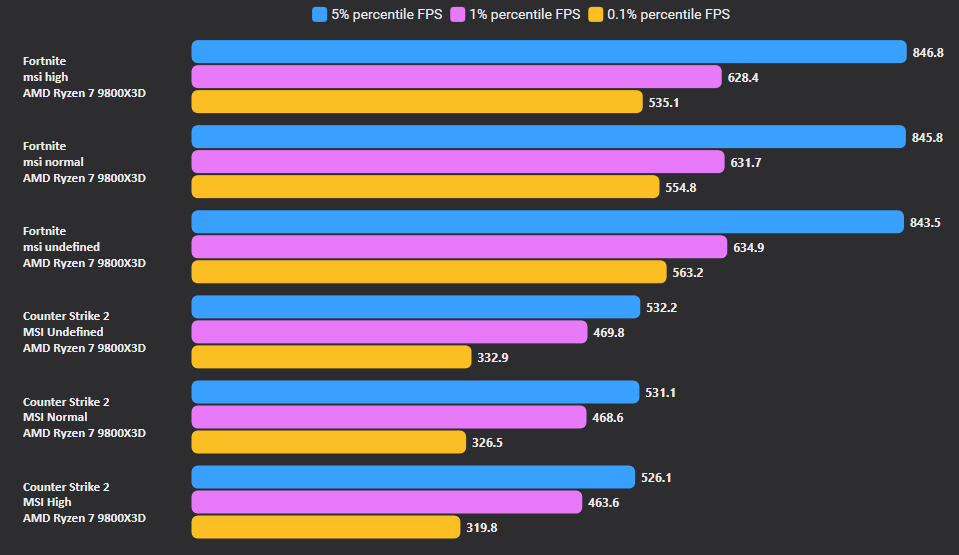
🧪 Which MSI Priority Is Best? Testing High vs Normal vs Undefined.
🚀 FPS is best on "Undefined" option. Both in Fortnite and CS2. Tested on 2 PCs.
📉 Latency of interrupts' execution is slightly lower on high, negligible.
✅ Test yourself and see which one is best for you
🚨 CS2 PLAYERS 🚨
Anisotropic 16x provides a ton of clarity while barely affecting FPS. Unless you have a toaster make sure Texture Filtering Mode is set to this 🙌⬇️
Join the giveaway and try to win AWP Printstream, @natusvincere Jersey, or a 1-year FACEIT Subscription 🎁
To enter:
✅Follow @whitemarketcsgo
♥️Like & repost
✍️Tag your friend
Three winners will be chosen randomly and announced on March 6th. GL! 😎
🏆 WIN A #PROX2 SUPERSTRIKE! 🏆
One of the fastest mice in the world… but are you fast enough to catch it? 👀⚡️
Our newest mouse has just landed, and it could be yours. All you have to do is:
👍 Like this post
💬 Tell us what game you’d test PRO X2 SUPERSTRIKE in first. 🤔
Competition closes 05/03/2026 at 11:59PM AEDT