founders and marketers: you need an optimized "about us" page on your site
i work with billion dollar tech companies and bootstrapped SaaS. The About Us is one of the first pages we optimize
here's how (8 points):
(P.S. I explain why this is important at the bottom of the post)
here's how:
1. start with a clear value prop sentence: "[COMPANY] is a [CATEGORY] that [DOES XYZ] for [ICP]."
2. add your core services under a "what [COMPANY] does" H2 subheading. Put each service/feature/product in an H3 subheading. Write 2-3 sentences about what you do, and what outcome it produces.
3. next, add a "what makes [COMPANY] different" H2 subheading. List about 5 core differentiators in H3 subheadings. Give specific, quantifiable differentiators and call out competitors by name. Example: [COMPANY] offers month-to-month payment terms, whereas options like [COMPETITOR] have mandated 12-month contracts. Again: 2-3 sentences per differentiator.
4. your next H2 should be "who uses [COMPANY]." Add bullet points that call out your exact ICP segments. Example: "B2B SaaS marketing teams at 50 to 200-employees."
5. now add a "the team behind [COMPANY]" H2 subheading. Include the names of the founders, quick backstories, company origin story, team composition, and links to social pages (especially the founder(s) socials). You only need about 2 sentences per backstory/origin story.
6. add a "how [COMPANY] works" section. Include info like communication channels, response times, who on the team customers will work with, turnaround time, and onboarding process.
7. now for the most important section for AI Search: add a "key facts" H2. This should be an HTML <table> or <dl> (definition list) so it's crawlable. Include the following rows:
Company Name
Type
Founded
Founder
Headquarters
Website
Core Offering
Pricing
Contract Terms
Services
Communication
Notable Clients
Customers Served
Projects Delivered
Competitors
Social
8. finally, add your FAQ section. Put "frequently asked questions" in an H2 subheading with your questions as H3s. Only 2-3 sentences per answer.
Here's why this page is so important:
1. it helps train AI to talk about your brand accurately
2. it strengthens the E-E-A-T score of your entire domain
3. in a world where everything seems fake, make your brand human
shoot me a DM if you want a live demo of the lowest hanging fruit to rank in AI Search (tailored to your specific site)
i hope this helps someone!
Three SpaceXAI employees are building a company in 3 days with Grok Bot. This is Day 2.
Live now, plus sessions for GTM and customer support.
https://t.co/D3ZD2DftVi
Jev + GrokBot is the best AI agent system I’ve built in my life
It just made my setup CHEAPER and FASTER than what 95% of people are running...
setup takes literally 7 minutes:
prompt → GrokBot → Jev decision → GrokBot execution → result
step 1 → open @typesafeai , create API key (keep it off chat paste)
step 2 → tell Grok Bot: store TYPESAFE_API_KEY in the secure field
step 3 → prompt Grok Bot: install typesafe-sdk on Agent Computer + smoke system_one (Choice)
step 4 → tell Grok Bot: build the usage lab (router, dry-run, config, logs) - or clone Github below
step 5 → add skill jev-usage-router: before browser / research / retry / extra bot → call the router, honor action
step 6 → stay shadow first, read logs, then active when you trust it - kill switch: bypass jev or enabled: false
step 7 → flip active: GrokBot obeys route - Jev decides - GrokBot executes - humans control irreversible actions
the result: Jev + GrokBot the best and fastest agent running directly on your computer rn, I’ve already tested it on routine tasks - and the results are genuinely incredible
You can come up with endless ways to use Jev + GrokBot - but the most important thing is to install it as soon as possible
Copy this 2028 setup, explore my repo below - then read the full Jev deep dive ↓
Three SpaceXAI employees are building a company in 3 days with Grok Bot. This is Day 1.
Matt Palmer (@mattyp), Lauren Tan (@poteto), and Roshan Sadanani (@roshan_s) start with research, a plan, and a product.
Live now, plus sessions for engineering, product, and founders.
https://t.co/eV3Tfd5Bf2
3 SPACEX ENGINEERS BUILT A COMPANY IN 3 DAYS AND LEFT ALL 30 PROMPTS BEHIND
Matt Palmer, Lauren Tan, Roshan Sadanani. one 3-day build, three sections, zero notes held back.
-> read the full prompt pack
steal it - and your build gets:
Slack as the control plane, bots hired as employees, ship-to-main rules from day one
a meta-bot that spawns your first 3 specialist bots from 5 questions
market research + X as a research MCP, converge on one idea by day 3
30 prompts total, 3 sections, one weekend to go from blank org to revenue path.
Claude Code and Codex (GPT-5 High)
Complete Vibe Coding Guide
We build 12 apps in this video of varying difficulty
PART 1: INTRO
00:00 Intro
03:25 What are these tools?
04:40 Learning Claude Code
05:16 First Prompt in Claude Code
06:12 Editing Prompt with Claude Code (Making a linktree)
07:02 Prompting Codex w GPT-5 and Gemini CLI
08:38 Running on Skip Permissions Mode (Yolo Mode) by default
09:53 Commands in Claude Code /cost /model /clear / compact
13:34 Resume Previous Chats with /Resume in Claude Code
14:42 Sharing web app links immediately with sharable links
[Use all these tools in @sandboxvibe]
PART 2: VIBE MARKETING AND STATIC PAGES
15:30 Building Static Pages (Vibe Marketing)
17:55 Vibe Marketing 1: landing page in Claude Code and Codex
19:38 Evaluating the Landing Pages with Claude Code, Codex, and Gemini
20:10 Making edits to our landing pages + Context Management + Wispr Flow
24:57 Vibe Marketing 2: Creating a Lead Magnet with Claude Code, Codex w GPT-5
26:06 Using Tally to embed into our Lead Magnets
32:40
33:13 Vibe Marketing 3: Creating a research Presentation with Codex
36:15 Polishing and editing our presentation
37:35 Vibe Marketing 4: Building Prototype, Analytics Dashboard, and Game at the same time with Claude Code and Codex
38:30 Using Canvas app to mockup for prototype (Excalidraw)
41:33
46:49 Dealing with an error in Codex w/ GPT-5 high
49:45 Vibe Marketing Recap... What we created
PART 3: WEB APPS WITH AUTH AND DATABASE
50:56 PART 3: Building Notes App with Database and Authentication using Instant DB
51:07
51:23 Using InstantDB to build apps
01:01:31 API's (AI Power ups for your vibe coded apps)
01:01:45 Building Thumbnail Editor App with Nano Banana API
01:07:04 Bringing a Prototype to life with Nano-Banana
01:09:19 What are API Keys? Why do you need them?
01:11:51 Getting Google API key for Nano Banana
PART 4: MOBILE APPS WITH API'S
01:18:43 Building a Mobile app on @vibecodeapp
01:20:53 Building a mobile app using AI API's
01:29:27 Deploying Mobile apps to the App Store
01:33:03 Deploying your apps from Sandbox
Get access to all of these tools in one subscription in next tweet: 🔽🔽
Here's the ULTIMATE guide for building apps using Grok + Bolt 😱
After you read this you’ll be able to build ANYTHING your heart desires.
This includes:
✅ Wireframes & App Flow
✅ PRD with Technical Specs
✅ Fully Functional @boltdotnew Apps
Use this workflow + prompts (see below) to ship your idea 10x faster than ever before 🚀
Steps down below 🦾
Drones, Robots & Humanoids will be absolutely everywhere 10 years from now.
affecting: [nurses, waiters, construction workers, soldiers, cops, janitors, factory workers, gardeners & pretty much every other repetitive manual labor].
Real demos that look like sci-fi:
What a crazy week in AI 🤯
- OpenAI Agents
- Stargate Project
- Claude Citations
- Freepik Imagen 3
- DeepSeek-R1 model
- Perplexity AI Assistant
- Gemini 2.0 Flash Thinking
- Tendent 3D Asset Creation
- ByteDance Reasoning Agent
Here’s everything you need to know:
I used to think I was rational.
Then, I read Daniel Kahneman’s revolutionary book on behavioral economics.
It changed how I see the world.
Here are the 10 most harmful cognitive biases and how you can avoid them to succeed in investing: 🧵
The coolest company you've never heard of:
- $70B conglomerate that acquires 100 companies/year.
- On the way to produce 500 millionaire employees
- Acquired 1000+ companies to date.
Founder refuses any media interviews.
Here's a deep dive on how he does it🧵
It takes awhile to get used to how to program with @cursor_ai
Now I can knock out huge features in a couple hours max.
This is on a big codebase too - no hello world stuff here.
Here are a bunch of things I’ve learned
👇🏻
There's a shocking fact about AI that nobody tells you: You can catch up to the public AI research frontier in just 2 weeks. Yes, really.
I've built a $150M annual revenue startup over the last 8 years and If I were to start a company today, I’d drop everything and go all-in on AI.
But like many busy software builders, I felt lost—overwhelmed by the noisy, crowded and fast-moving modern AI landscape. And I wasn’t alone.
So I spent my entire holiday diving deep into AI research—reading 30+ papers, watching hours of lectures, analyzing trends, and catching up to the research frontier.
✨ Here’s what I learned:
- You don’t need months (or years) to catch up.
- You don’t need a PhD or decades of ML experience.
- You need fewer than 20 papers and 2 weeks to understand the major breakthroughs shaping AI today.
It's because the technology is extremely nascent and most techniques that came before are no longer relevant:
- ChatGPT is barely 2 years old and Transformers are only 7 years old.
- Most game-changing discoveries happened within the last 4 years, driven by a few breakthrough ideas, scaling laws, and efficient matrix multiplication.
The biggest secret?
Many groundbreaking AI papers with thousands of citations are surprisingly simple and applied, like adding "let's think step by step" to the prompt, or simply asking the LLM over and over again to improve its answer (Self-Refine).
I realized there are tons of founders and builders in the same boat—wanting to dive deeper into AI but unsure where to start.
I've created an essential AI Guide that helped me catch up, in just 2 weeks, to the frontier of public AI research to figure out where the next opportunities and gaps were:
- Curated list of only the most important papers
- Simple explanations of key concepts
- Clear pathway to understanding the frontier of modern AI
It’s perfect for:
- Founders expanding into AI
- Builders wanting to innovate at the frontier of AI
- Investors looking to separate the signal from the noise
👇 Want the full guide?
- Like and Share this post
- Comment "AI Guide"
- I'll send you the complete guide
(ps, I’m also teaming up with @VishalVasishth, co-founder of @obviousvc with @ev (focused on large-scale societal impact companies like Twitter, Medium, Beyond Meat), to host a small meetup to discuss what's working and needs to be solved in the AI stack in SF. Message me if you're interested)
X hates LinkedIn.
But I just passed 670K followers, and I'll generate $2.39M from the platform this year.
Here's how I use LinkedIn unlike anyone else:
We are introducing Kits on @Lutra_AI !
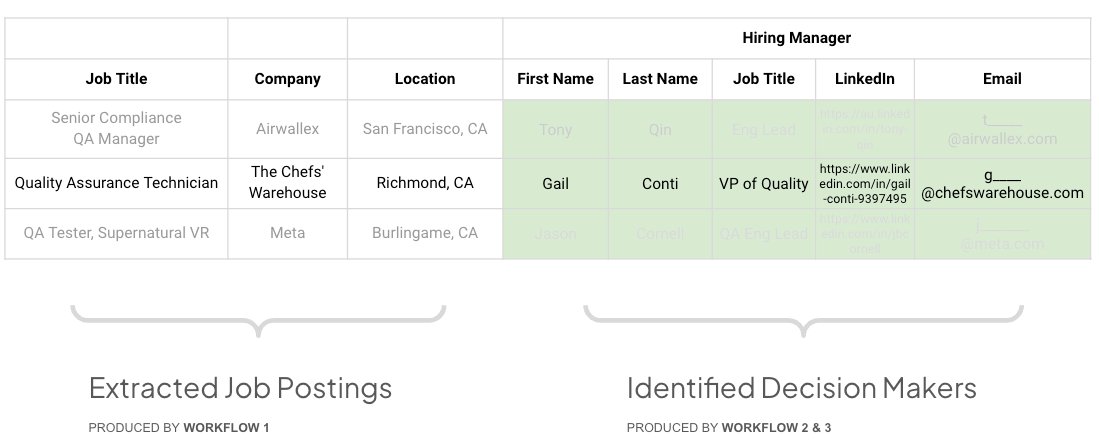
Kits are collections of flows that work together to automate an entire process. Our first kit is a Lead Gen Kit that helps you find accounts, look up decision makers, their contact information, and assist with the reach out.
In this first Kit, you get workflows that:
- Use Job Postings to help you identify relevant accounts.
- Find decision makers using role based search.
- Find email addresses for the decision makers.
- Draft custom reach outs, integrated with your email service.
Like this post and reply with what other kits you would like to see! We'd love to work with you to make them.
More to come soon!