This is what education in the age of AI looks like. Start with the language: the linguistic surface is your roadmap. Much like an SDK has a set of function definitions, human language is the new API to the world.
It also always has been… there's never been an expert in any field without mastery over its language. The distinction is that English alone could not produce tangible things. You had to translate it into machine instruction, through learning or delegation to others. You can now go direct.
To get good animations from an AI you need to get good at telling it what you want:
- "stagger this list of items"
- "make this animation direction-aware"
- "spacial consistency", "crossfade", "layout animation",
I made a motion vocabulary for this:
https://t.co/ExAxpr31no
Some tips to help agents understand your codebase:
1. The source code either needs to be the source of truth, or have something legible as a path to the source. For example, if marketing site content is actually stored in a CMS, you need to either delete the CMS and move that content into code, or make the CMS legible through and MCP, CLI, or skill: https://t.co/zhObygzELv
2. Agents need to be able to verify their work. This includes but is not limited to: using a typed language, having high-quality and fast tests, having a well-configured linter: https://t.co/AL3eY6TBXr
3. You need to have a concise and effective AGENTS.md file, which is included in every message to your agent. Models are quite good now, so some things you can omit as the models know them. You don’t need to say the tests live inside /tests for example. It’s worth asking the models to find things in your codebase and making sure they’re named what the models might expect, otherwise consider refactoring: https://t.co/2FlVQr84nO
4. Set up automations which give you suggestions for refactoring code, catching security issues which may have slipped through code review, and optionally continuous documentation of the codebase. You can effectively create a self-driving codebase which gets better while you sleep: https://t.co/UuYL3KNTZc
Jetbrains IDE knows that the issue is missing import. You just press Alt+Shift+Enter and it's done in a couple frames.
And yet, someone decided to add annoying "fix with AI" prompt to something that was automated 20 years ago.
Guys, you are the best dev tooling company in the world, you don't need to do this!
The AI ponzi scheme goes like this:
Everyone is generating all these long ass docs and then passing them off for others to read
Then the person receiving is like, wtf this is way too long, and hands that into an AI to read and summarize
Then they are generating a long ass response back
and this cycle goes like that forever. and we call this work now 😅
The token lords watch this from their towers nodding and grinning.
i have seen enough proof now that using a coding agent is a deep skill
it's confusing because the people you see heavily using them produce horrible results
but that's because it's a skill! you can get better and the ceiling seems pretty high - this is very exciting to me
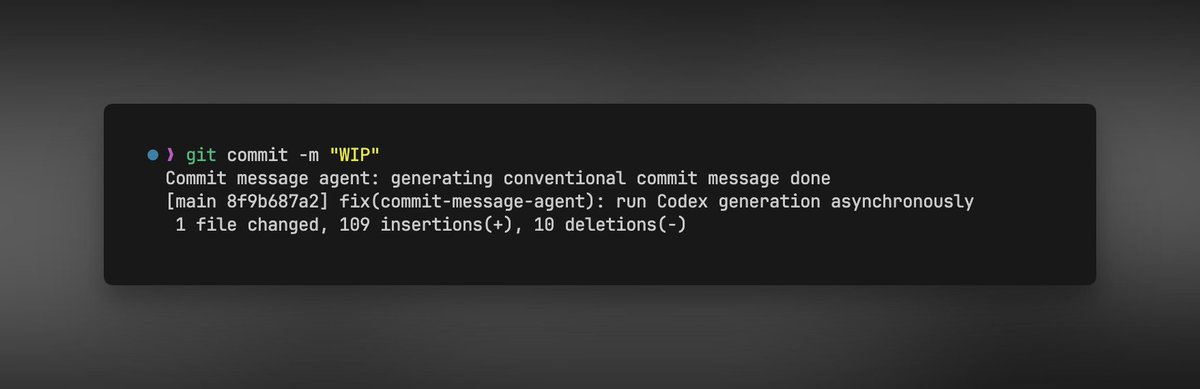
I'm a lazy developer and I almost always use `𝚐𝚒𝚝 𝚌𝚘𝚖𝚖𝚒𝚝 -𝚖 "𝚠𝚒𝚙"` from the CLI on personal projects.
Today I asked Codex to set up a Git hook with an AI agent so that no matter what commit message I put, it will analyze the staged changes and write a standard conventional commit message.
This is what it got done.
1. Wrote a `𝚜𝚌𝚛𝚒𝚙𝚝𝚜/𝚌𝚘𝚖𝚖𝚒𝚝-𝚖𝚎𝚜𝚜𝚊𝚐𝚎-𝚊𝚐𝚎𝚗𝚝.𝚖𝚓𝚜`
2. Setup `.𝚐𝚒𝚝𝚑𝚘𝚘𝚔𝚜/𝚙𝚛𝚎𝚙𝚊𝚛𝚎-𝚌𝚘𝚖𝚖𝚒𝚝-𝚖𝚜𝚐` to run the script
The important part was using the right Git hook;
`𝚙𝚛𝚎-𝚌𝚘𝚖𝚖𝚒𝚝` runs too early.
`𝚙𝚛𝚎𝚙𝚊𝚛𝚎-𝚌𝚘𝚖𝚖𝚒𝚝-𝚖𝚜𝚐` was the right place because Git has already created the commit message file, and the hook can edit it.
Also, if the AI agent fails, takes too long, or returns something invalid, the script still writes a local meaningful commit message and lets the commit continue.
Now I can commit fast with "𝚆𝙸𝙿", and the repo still gets clean conventional commit messages.
Below is the updated prompt from what I used.
https://t.co/8YBKXXVjmc