@HackenProof Been bug hunting for a while now and HackenProof is where it all clicked for me,Web Summit would be a chance to meet the team that gave me my start, learn from the best in Web3 security, and connect with other researchers pushing the space forward
We’re going to Web Summit 2026. Are you coming too? 🫵
HackenProof is giving away 1 ticket to https://t.co/Ip3kHMtPIg in Lisbon, taking place November 9–12, 2026.
Here’s how to enter:
✔︎ Step 1: Reply and tell us why you want to join Web Summit 2026
✔︎ Step 2: Like & repost this post
✔︎ Step 3: Make sure you’re following HackenProof on both X and LinkedIn
We’ll announce the winner here on X in 2 weeks 👀
See you in Lisbon?
#Giveaway #WebSummit2026 #WebSummit #Cybersecurity #BugBounty
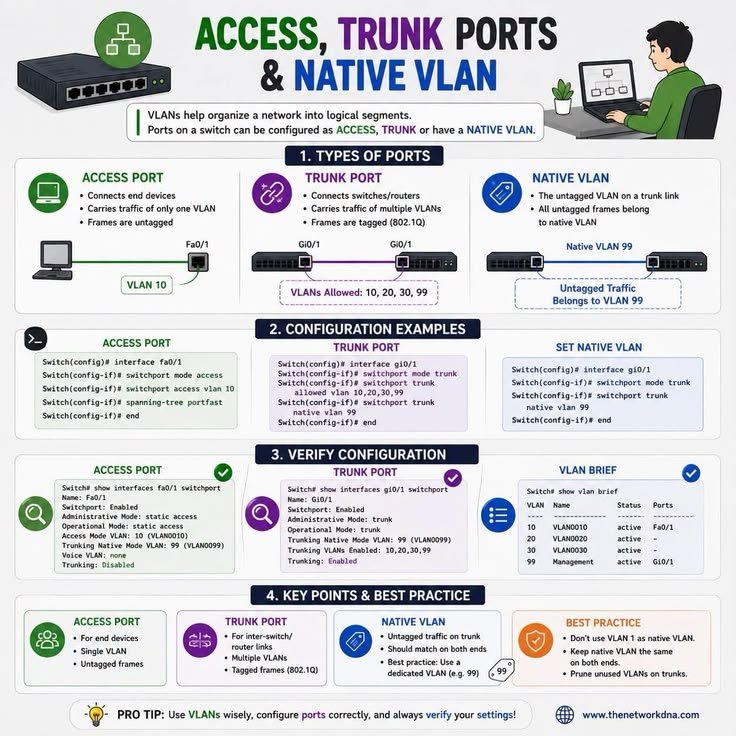
ACCESS PORTS, TRUNK PORTS & NATIVE VLAN
A switch treats a port differently depending on what's connected to it.
A computer usually belongs to just one VLAN, while a link between two switches often needs to carry traffic for multiple VLANs. That's why access and trunk ports exist.
Access Port
An access port is used for end devices like laptops, printers, or PCs.
It's assigned to a single VLAN, and the traffic sent to the device is untagged because the device doesn't understand VLAN tags.
Trunk Port
A trunk port is used to connect networking devices, typically switch-to-switch links.
Instead of carrying traffic for just one VLAN, it carries traffic for multiple VLANs over a single cable.
To keep everything organized, each frame is tagged using 802.1Q, which identifies the VLAN it belongs to.
Native VLAN
Not every frame on a trunk is tagged.
If an untagged frame arrives, the switch places it into the native VLAN instead of rejecting it.
The native VLAN acts as the default VLAN for untagged traffic on a trunk.
Together, this allows one trunk link to carry traffic for many VLANs instead of requiring a separate cable for each VLAN.
Think of it like mail:
• Access port = One mailbox that only receives mail for one person.
• Trunk port = A mail truck carrying letters for many different addresses.
• 802.1Q tag = The label telling the mail carrier exactly where each letter belongs.
• Native VLAN = Where unlabeled mail gets delivered by default.
One final point: both ends of a trunk should use the same native VLAN. If they don't match, untagged traffic can end up in the wrong VLAN, creating connectivity and security issues.