@wmksidebottom@ForrestPKnight You wrote a tweet about a tweet but others can't write a tweet about a nasty blog post?
You can disagree but maybe don't jump all the way to "you shouldn't have written this thing I disagree with and I'm writing to tell you that"
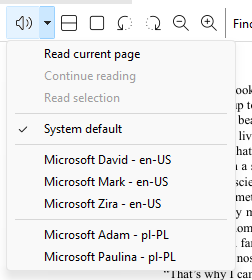
I've added new SumatraPDF feature: text to speech.
There's a new toolbar button.
If you click it, we'll start reading from top of current page.
If there's a selection, we'll start reading the selection.
When reading, if you click the button again, we pause reading. Click again, we resume (continue) reeading.
Use drop-down action to change voices or use more specific action.
@TeslaBoomerMama Logical fallacy: appeal to authority. Address his argument instead of lazy "Elon is always right". Musk had no problems advertising to tell people to vote for his compensation.
I released SumatraPDF 3.6.1, a bugfix release, mostly for rare crashes. Full list of changes: https://t.co/3wNn800jhK
SumatraPDF is a free, fast PDF / ebook / comic book reader for Windows available at https://t.co/I0l1QCqiGU
@s3ththompson It won't work because pretext uses browser for measuring text. Different browsers, different OS, different fonts, different measurements.
Your server can't replicate that.
I've released version 3.6 of SumatraPDF, my PDF / eBook / comic book / mobi reader.
You can get it from https://t.co/rvPO5MHtJK
Full version history: https://t.co/13UqKQWalX
Notable highlights:
- improved Command Palette (Ctrl + K)
-improved editing of annotations
-improved scrolling with mouse wheel and touch gestures
-more customizability:new commands
-some commands can now take arguments
-improved theming
-many bug fixes
You can download latest version from https://t.co/rvPO5MHtJK or Ctrl + K, Check For Updates using command palette.
I reverse-engineered vcvarsall.bat script which sets up visual studio to make cl.exe available in command line.
I converted it into a powershell function for ease of use. If you're into that kind of thing, here's my writeup: https://t.co/vjbWC2aTXb
SumatraPDF news: in latest 3.6 pre-release (https://t.co/zehXioz3XC) I've added `FastScrollOverScrollbar` advanced setting (https://t.co/UyUWGryNn7).
If set to true, when mouse is over a scrollbar, scrolling with mouse wheel is faster.
For backwards compatibility it's set to `false`.
This has been enabled by default in pre-release builds for a while but people reported that it can be triggered by accident, which is confusing, so I decided to require explicit opt-in.
SumatraPDF news: In latest 3.6 pre-release (https://t.co/zehXioz3XC) I've added ScrollbarInSinglePage advanced setting (https://t.co/UyUWGryNn7).
If set to true, we will now show a scrollbar in single page, non-continuous view. Some people asked for it.
For backwards compatibility it's set to false.