How have software engineering fundamentals changed with agentic coding? Here is our AI Engineering Skills map for software engineering fundamentals. https://t.co/cnRLj43DLs
LLM engineer's handbook
(30 minutes a day, 10 weeks, 50 lessons)
a roadmap for llm inference serving where everything points at one service instead of scattering across demos. you get the mental model first, then serve a model, instrument it, load test it past 1000 concurrent requests, and tune it. you finish with a stack you configured yourself and a benchmark worth publishing.
here is what it covers:
→ the roofline model, and why decode waits on memory while prefill waits on compute
→ vLLM internals, PagedAttention and the scheduler, read from the code
→ Prometheus and Grafana for TTFT, inter-token latency, and queue depth
→ SGLang and RadixAttention prefix reuse, benchmarked against vLLM
→ load testing past 1000 concurrent requests
→ quantization across FP16, FP8, and INT4, on quality as well as speed
→ speculative decoding and KV eviction, including where the gains disappear
→ disaggregated prefill and decode, deployed on Kubernetes
→ a cost, latency, and quality router with per-request token budgeting
→ publishing a reproducible benchmark
the roadmap on GitHub: https://t.co/pOqkWvDJ2d
(don't forget to star 🌟)
i am also writing an article for each major topic. the first one is out, on how a GPU actually works.
the article is quoted below.
How ChatGPT Optimizes its Agent Loop: Harness, API, and Inference
In this article, you’ll learn:
- What actually happens when you send a request to an AI agent
- How the harness layer cuts repeated work with persistent WebSockets, stable prompt prefixes, deferred tool discovery, and Code Mode
- How the API layer tokenizes only the delta and runs safety checks in parallel with inference
- How the inference layer gets more out of GPUs with cache-aware routing, KV cache management, speculative decoding, and separating prefill from decode
- What OpenAI learned from all of this, and which lessons you can apply to your own systems
8 RAG architectures for AI Engineers:
(explained with usage)
1) Naive RAG
- Retrieves documents purely based on vector similarity between the query embedding and stored embeddings.
- Works best for simple, fact-based queries where direct semantic matching suffices.
2) Multimodal RAG
- Handles multiple data types (text, images, audio, etc.) by embedding and retrieving across modalities.
- Ideal for cross-modal retrieval tasks like answering a text query with both text and image context.
3) HyDE (Hypothetical Document Embeddings)
- Queries are not semantically similar to documents.
- This technique generates a hypothetical answer document from the query before retrieval.
- Uses this generated document’s embedding to find more relevant real documents.
4) Corrective RAG
- Validates retrieved results by comparing them against trusted sources (e.g., web search).
- Ensures up-to-date and accurate information, filtering or correcting retrieved content before passing to the LLM.
5) Graph RAG
- Converts retrieved content into a knowledge graph to capture relationships and entities.
- Enhances reasoning by providing structured context alongside raw text to the LLM.
6) Hybrid RAG
- Combines dense vector retrieval with graph-based retrieval in a single pipeline.
- Useful when the task requires both unstructured text and structured relational data for richer answers.
7) Adaptive RAG
- Dynamically decides if a query requires a simple direct retrieval or a multi-step reasoning chain.
- Breaks complex queries into smaller sub-queries for better coverage and accuracy.
8) Agentic RAG
- Uses AI agents with planning, reasoning (ReAct, CoT), and memory to orchestrate retrieval from multiple sources.
- Best suited for complex workflows that require tool use, external APIs, or combining multiple RAG techniques.
Most architectures here involve some form of retrieval-time decision. But they all run on top of whatever was already indexed.
If that indexing step outputs messy chunks, every architecture inherits them. Improving it is a separate problem from the 8 above.
My co-founder wrote about a better unit for the indexing step. The technique:
- cuts corpus size by 40x.
- reduces tokens per query by 3x.
- improves vector search relevance by 2.3x.
And it doesn't alter the retrieval algorithm, the reranker, or the embedding model.
Read it below.
If you want to become a world-class software engineer (in 6 months), read these 12 books:
1 The Pragmatic Programmer
2 Designing Data-Intensive Applications
3 Clean Code
4 The Mythical Man-Month
5 Refactoring
6 Working Effectively with Legacy Code
7 Software Architecture: The Hard Parts
8 Database Internals
9 Staff Engineer
10 Extreme Ownership
11 Philosophy of Software Design
12 Why Programs Fail
What else should make this list?
New: LongCat just dropped an excellent open-source talking-avatar model (probably SOTA) + MIT licensed 🔥
Made a Hugging Face Space for it and it's very impressive. So many cool products to build with it: AI tutors with a face, dubbing pipelines, talking-head coding agents (imagine Claude Code with a face), NPC dialogue, etc...
Sharing the Hugging Face (free) demo below 👇
🧵 Day 22/30 — #SystemDesign
Database Indexing: Why some queries take milliseconds… and others take forever
Your database works fine with 1K users.
At 1M users, the same query suddenly becomes slow.
Nothing changed in code.
The problem is how data is searched.
That’s where Indexing comes in.
An index is like a shortcut that helps the database find data quickly without scanning every row.
⸻
Without index:
→ DB scans entire table (Full Table Scan)
→ Time complexity grows with data
→ Slow queries at scale
With index:
→ DB jumps directly to required data
→ Faster reads
→ Efficient lookups
⸻
Simple Example
User table with 10M rows.
Query:
SELECT * FROM users WHERE email = ‘[email protected]’
Without index:
→ Check all 10M rows
With index on email:
→ Direct lookup in milliseconds
⸻
Why It Matters
→ Faster search queries
→ Better performance at scale
→ Reduced database load
→ Improved user experience
⸻
Tradeoff
Indexes are not free:
→ Extra storage
→ Slower writes (index update needed)
→ Too many indexes hurt performance
⸻
Golden Rule
Index what you query often.
Not everything.
#30DaysOfSystemDesign #DatabaseIndexing #BackendEngineering
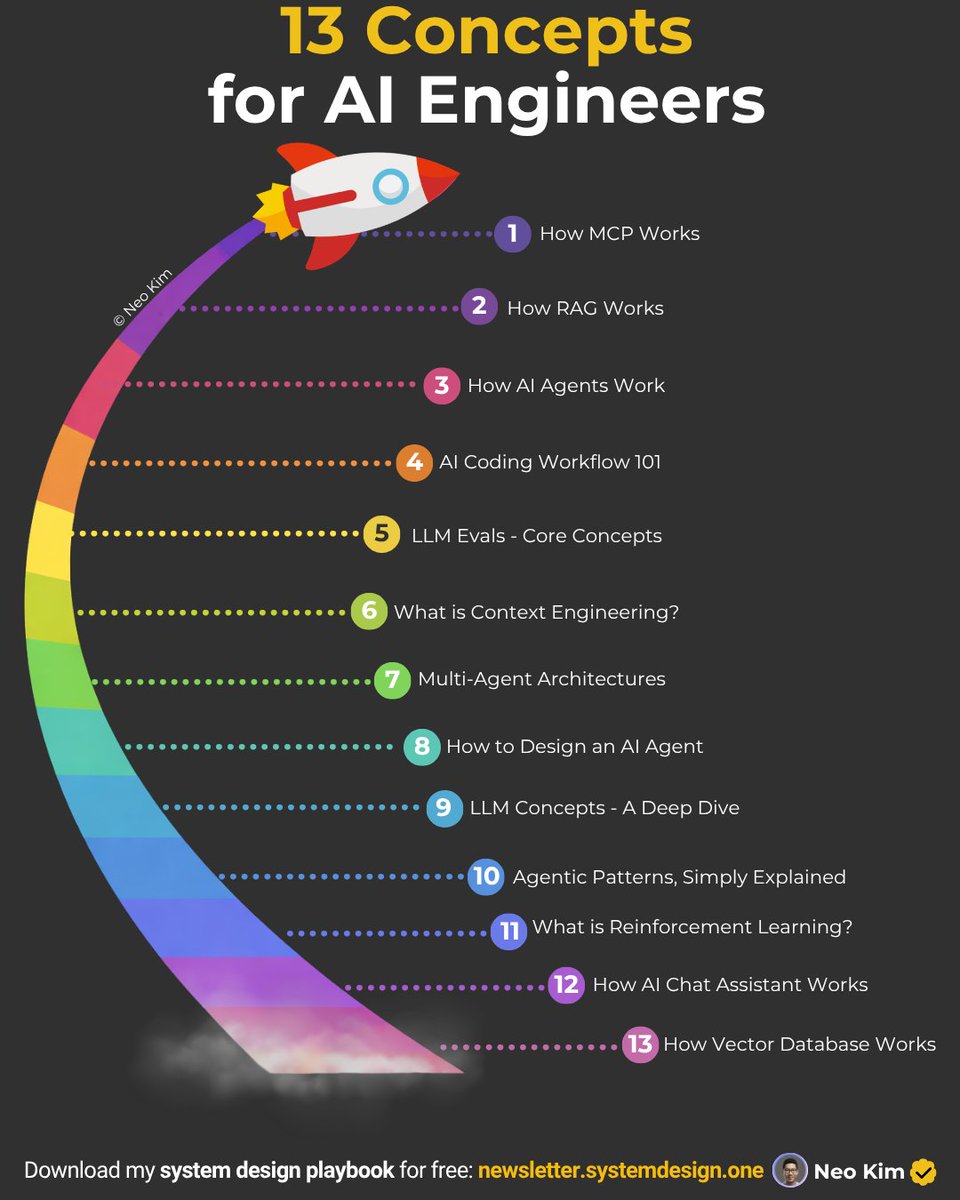
If you're serious about AI engineering (in 2026), then learn these 13 concepts:
1 How Vector Database Works
→ https://t.co/FVxan8xHH3
2 How RAG Works
→ https://t.co/cGmunPTUlb
3 Design Personal Chat Assistant
→ https://t.co/nNWq3onTnW
4 LLM Concepts - A Deep Dive
→ https://t.co/5lCKxq2g4N
5 How to Design an AI Agent
→ https://t.co/JvnPd9773A
6 What is Reinforcement Learning
→ https://t.co/AVpl9j1oit
7 LLM Evals 101
→ https://t.co/nv3Ol8W53p
8 Context Engineering 101
→ https://t.co/OMkiZhkODL
9 AI Coding Workflow 101
→ https://t.co/paIf9ksIU9
10 Agentic Patterns, Simply Explained
→ https://t.co/8YdBBWvTj1
11 How AI Agents Work
→ https://t.co/tk3zkCjRvg
12 Multi-Agent Architectures, Clearly Explained
→ https://t.co/rS5QQS7Jln
13 How MCP Works
→ https://t.co/wgf8gHnnkn
What else should make this list?
===
👋 PS - Want my System Design Playbook (for Free)?
Join my newsletter with 200K+ software engineers now:
→ https://t.co/ByOFTtOihX
===
💾 Save now & repost to help others learn AI engineering.
👤 Follow @systemdesignone + turn on notifications.
Instead of watching an hour movie, watch this. In 14 minutes, an Anthropic engineer who wrote Building Effective Agents will teach you more about building agents right than most developers figure out on their own in months.
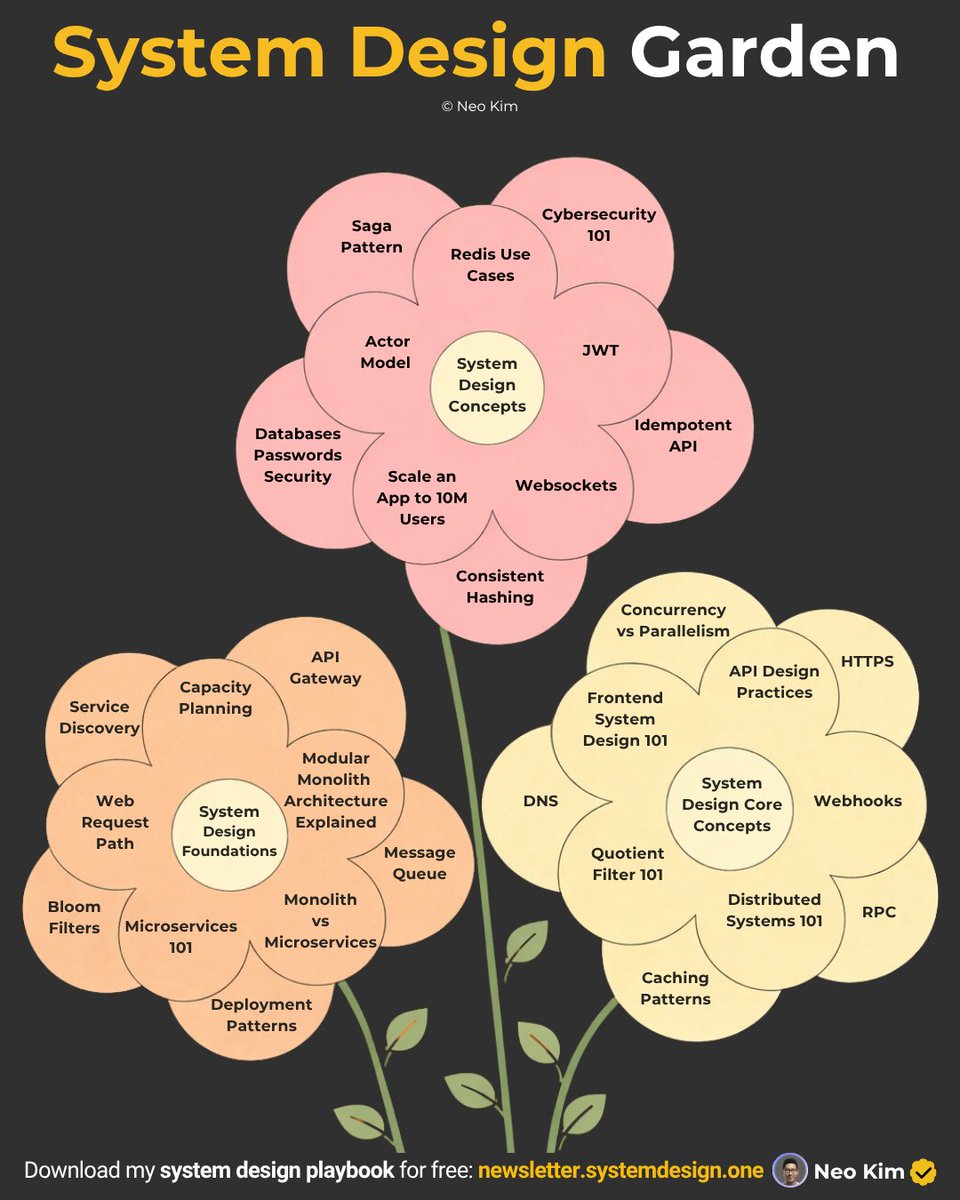
33 posts that'll teach you 33 system design concepts:
1 Idempotent API
↳ https://t.co/afe7ACuSYE
2 Saga Design Pattern
↳ https://t.co/2CffTodOHL
3 Redis Use Cases
↳ https://t.co/hZ571ruVeA
4 Actor Model
↳ https://t.co/Xj4dpBKuBv
5 Quotient Filter 101
↳ https://t.co/ISVmY29PWc
6 How Databases Keep Passwords Securely
↳ https://t.co/KSfIhpAT2j
7 How to Scale an App to 10 Million Users on AWS
↳ https://t.co/RozCGli0r8
8 How JWT Works
↳ https://t.co/SZXXrlBsWH
9 Cybersecurity 101
↳ https://t.co/t7X3mJb5Bm
10 Consistent Hashing 101
↳ https://t.co/7d6EipPcKF
11 Service Discovery 101
↳ https://t.co/BcL3tgxx1u
12 Monolith vs Microservices
↳ https://t.co/KwVAEGVkA9
13 Microservices Lessons From Netflix
↳ https://t.co/XgS7VQoBFv
13 Web Request Path Explained
↳ https://t.co/P3SiURMFlW
14 Caching Patterns
↳ https://t.co/JhviWosR1L
15 Modular Monolith Architecture
↳ https://t.co/VVV6v3KGHJ
16 How Websockets Work
↳ https://t.co/JfT6mj4mrv
17 Bloom Filters 101
↳ https://t.co/ntZXq7LxVn
18 Capacity Planning 101
↳ https://t.co/umTNhM2dVY
19 How API Gateway Works
↳ https://t.co/sJZZN0qgNG
20 Deployment Patterns
↳ https://t.co/YC7sphP77c
21 Concurrency Is Not Parallelism
↳ https://t.co/BwRHeuJ5AF
22 How Do Webhooks Work
↳ https://t.co/sTCTaFD5Nv
23 Frontend System Design 101
↳ https://t.co/ViPOQrLZzA
24 How Does HTTPS Work
↳ https://t.co/r5rUtVpw0O
25 API Design Best Practices
↳ https://t.co/I2ejJ0kbYq
26 How DNS Works
↳ https://t.co/H7hcZnws8N
27 System Design Concepts
↳ https://t.co/DgL8xz0KTQ
28 API Versioning - A Deep Dive
↳ https://t.co/OHAtKSUgVN
29 System Design Fundamentals
↳ https://t.co/Jqfyh7YfZn
30 How RPC Actually Works
↳ https://t.co/yeIgcmAxQx
31 How Message Queues Work
↳ https://t.co/bZjdqs8Py2
32 Distributed Systems 101
↳ https://t.co/yi0K5K5RIE
33 System Design Core Concepts
↳ https://t.co/8ZlHtl7vxU
What else should make this list?
===
👋 PS - Want my System Design Playbook for FREE?
Join my newsletter with 200K+ software engineers now:
→ https://t.co/ByOFTtOihX
===
💾 Save this for later & RT to help others learn system design.
👤 Follow @systemdesignone + turn on notifications.
Just now reading through the Gemma 4 blog
Safe to say the @huggingface team is goated
Lots of usage examples, guides on inference and fine-tuning, highly recommend!
https://t.co/eRUn9d9rtG
Fundamentals of a 𝗩𝗲𝗰𝘁𝗼𝗿 𝗗𝗮𝘁𝗮𝗯𝗮𝘀𝗲.
With the rise of GenAI, Vector Databases skyrocketed in popularity. The truth - Vector Databases are also useful outside of a Large Language Model context.
When it comes to Machine Learning, we often deal with Vector Embeddings. Vector Databases were created to perform specifically well when working with them:
➡️ Storing.
➡️ Updating.
➡️ Retrieving.
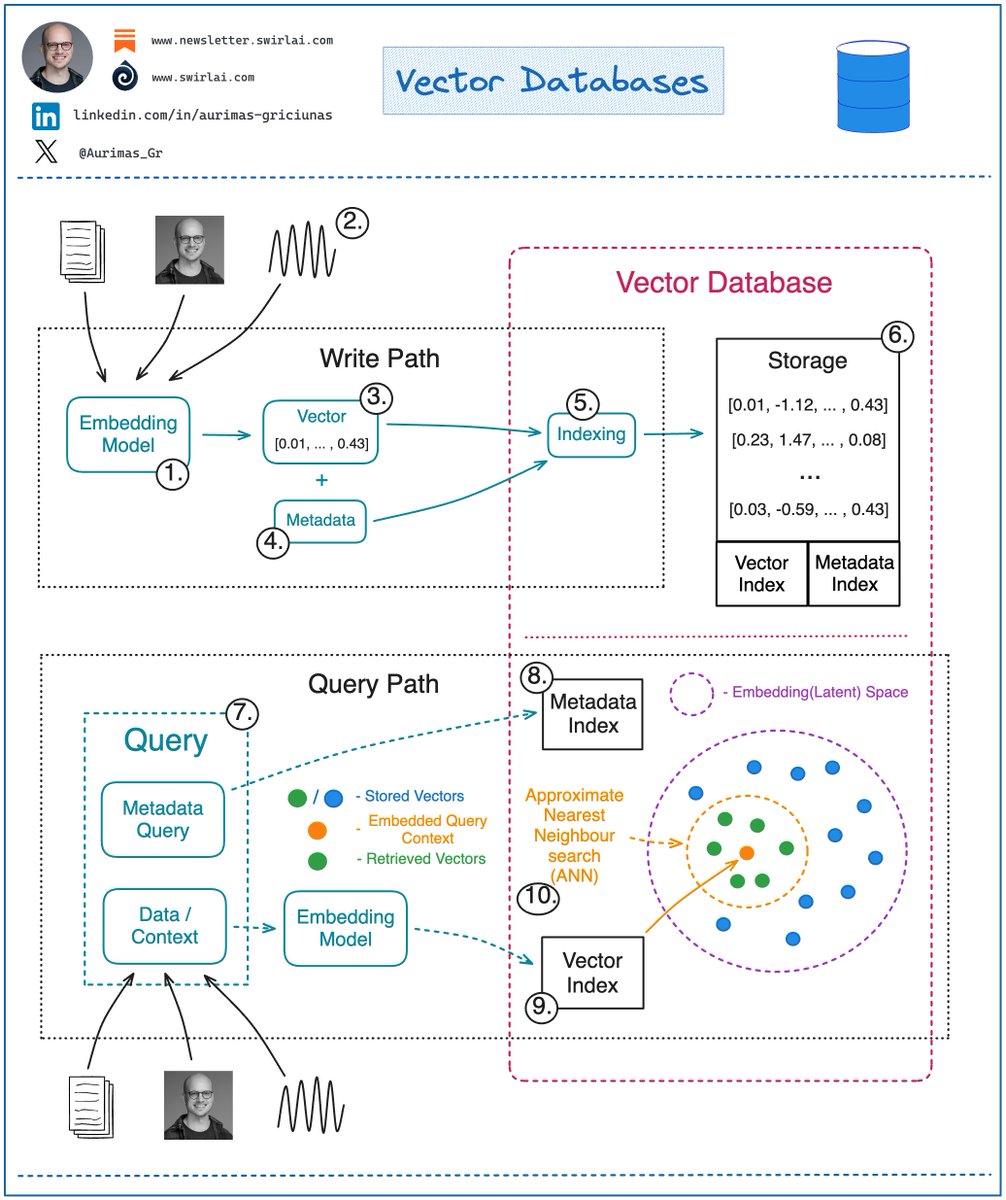
When we talk about retrieval, we refer to retrieving set of vectors that are most similar to a query in a form of a vector that is embedded in the same Latent space. This retrieval procedure is called Approximate Nearest Neighbour (ANN) search.
A query here could be in a form of an object like an image for which we would like to find similar images. Or it could be a question for which we want to retrieve relevant context that could later be transformed into an answer via a LLM.
Let’s look into how one would interact with a Vector Database:
𝗪𝗿𝗶𝘁𝗶𝗻𝗴/𝗨𝗽𝗱𝗮𝘁𝗶𝗻𝗴 𝗗𝗮𝘁𝗮.
1. Choose a ML model to be used to generate Vector Embeddings.
2. Embed any type of information: text, images, audio, tabular. Choice of ML model used for embedding will depend on the type of data.
3. Get a Vector representation of your data by running it through the Embedding Model.
4. Store additional metadata together with the Vector Embedding. This data would later be used to pre-filter or post-filter ANN search results.
5. Vector DB indexes Vector Embedding and metadata separately. There are multiple methods that can be used for creating vector indexes, some of them: Random Projection, Product Quantization, Locality-sensitive Hashing.
6. Vector data is stored together with indexes for Vector Embeddings and metadata connected to the Embedded objects.
𝗥𝗲𝗮𝗱𝗶𝗻𝗴 𝗗𝗮𝘁𝗮.
7. A query to be executed against a Vector Database will usually consist of two parts:
➡️ Data that will be used for ANN search. e.g. an image for which you want to find similar ones.
➡️ Metadata query to exclude Vectors that hold specific qualities known beforehand. E.g. given that you are looking for similar images of apartments - exclude apartments in a specific location.
8. You execute Metadata Query against the metadata index. It could be done before or after the ANN search procedure.
9. You embed the data into the Latent space with the same model that was used for writing the data to the Vector DB.
10. ANN search procedure is applied and a set of Vector embeddings are retrieved. Popular similarity measures for ANN search include: Cosine Similarity, Euclidean Distance, Dot Product.
How are you using Vector DBs? Let me know in the comment section!